
1. Úvod
The AlphaTheta DDJ-FLX2 Compact 2-Channel DJ Controller offers a blend of portability, flexibility, and useful features, making it ideal for both new and experienced DJs. It works with popular DJ applications like rekordbox, djay, and Serato DJ Lite, connecting easily to smartphones, tablets, or PC/Mac for quick use. Users can stream music from services such as Beatport, Beatsource, SoundCloud, TIDAL, and even more through djay. The controller includes simple tutorials and helpful pop-up hints in the app to make setup and learning straightforward. Smart CFX and Smart Fader features enable smooth and professional transitions with little effort.
Klíčové vlastnosti:
- Kompaktní a přenosné: Lightweight and USB-powered for easy transport and use with PC, Mac, or mobile devices.
- Music Streaming Access: Stream from services like Beatport, SoundCloud Go+, TIDAL, and Apple Music (with djay).
- Easy Mixing with Smart Features: Smart CFX and Smart Fader assist in creating smooth transitions.
- Široká kompatibilita softwaru: Works with rekordbox, djay, and Serato DJ Lite.
2. Průvodce nastavením
2.1 Obsah balení
- DDJ-FLX2 Compact 2-Channel DJ Controller
- USB cable (C to C)
- Záruka (pro některé regiony)
- Rychlý průvodce
- Opatření pro použití
- Ochranné pouzdro
- Kabel nástroje
- Austin Bazaar Polishing Cloth

Figure 1: The DDJ-FLX2 controller and included accessories: a protective case, an instrument cable, and a polishing cloth.
2.2 Připojení ovladače
The DDJ-FLX2 offers flexible connectivity options for various setups:
- Připojení k PC/Mac: Use the provided USB Type-C cable to connect the controller to your computer. This connection also provides power.
- Připojení mobilního zařízení: Connect to smartphones or tablets via USB Type-C. For devices without USB Type-C, Bluetooth Low Energy can be used.
- Zvukový výstup: Connect your speakers to the MASTER output (3.5 mm stereo mini jack).
- Sluchátka: Plug your headphones into the PHONES output (3.5 mm stereo mini jack) for monitoring.
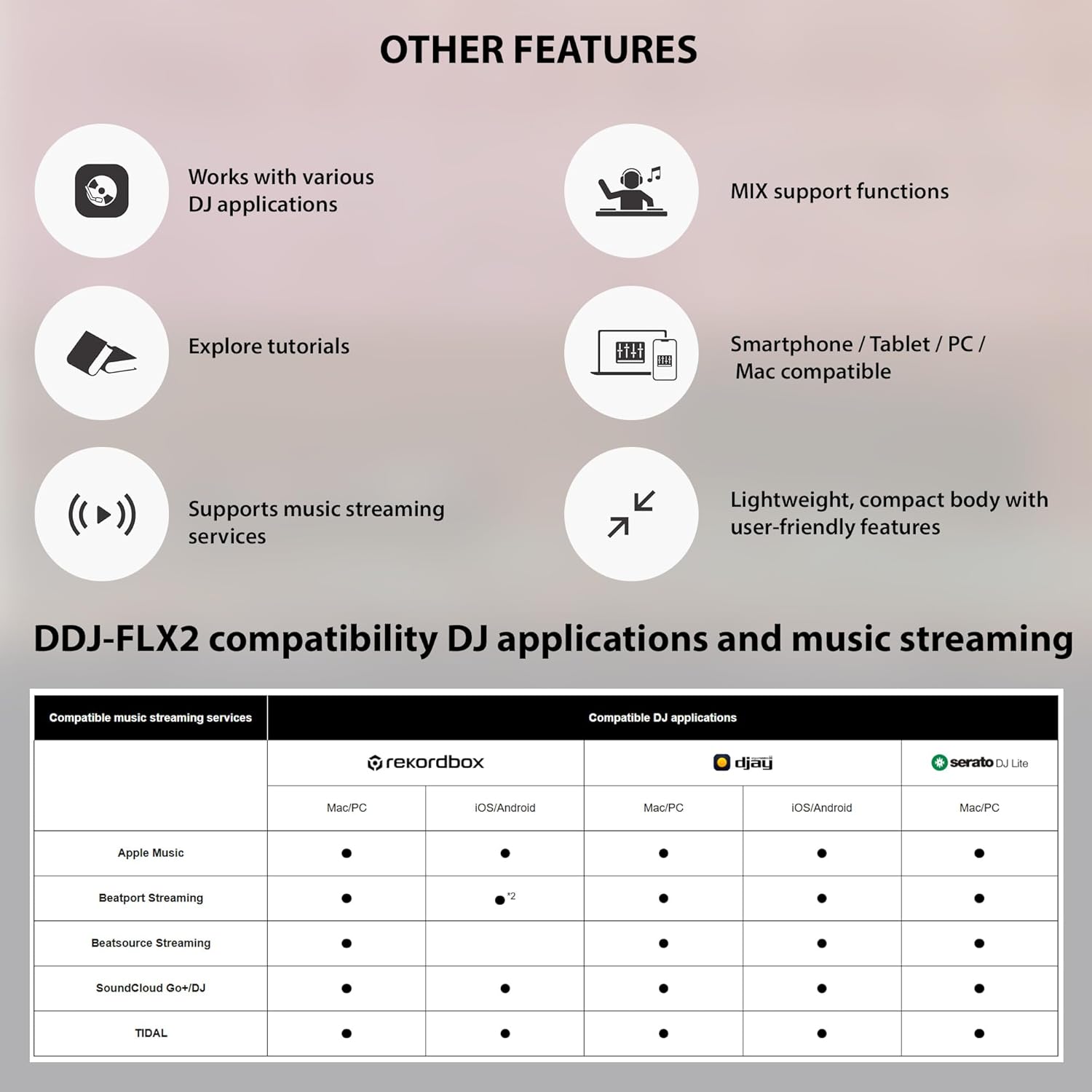
Figure 2: Setup options for the DDJ-FLX2, showing connections for smartphones, PC/Mac, speakers, and headphones.
3. Návod k obsluze
3.1 Základní ovládací prvkyview
The DDJ-FLX2 features an intuitive layout designed for ease of use. Familiarize yourself with the main components:
- Jogová kola: Used for scratching, nudging, and searching through tracks.
- Tempo Sliders: Adjust the playback speed (BPM) of tracks.
- Výkonové podložky: Trigger Hot Cues, Pad FX, Loops, and Samples.
- EQ Knobs (HI, MID, LOW): Adjust the high, mid, and low frequencies of each channel.
- Fadery kanálu: Control the volume of individual tracks.
- Cross Fader: Blend between the two channels.
- CFX Knobs: Apply color effects to tracks.

Figure 3: Labeled diagram of the DDJ-FLX2 controller's user-friendly layout.
3.2 Smart Features (Smart CFX & Smart Fader)
The DDJ-FLX2 incorporates 'Smart' features to simplify mixing and enhance performance:
- Smart CFX: Apply complex effects with a single knob turn, automatically adjusting multiple parameters for a professional sound.
- Smart Fader: Seamlessly transition between tracks, even if their BPMs or genres differ significantly, by automatically adjusting volume, bass, and BPM.
Video 1: Overview of the Pioneer DDJ-FLX4 DJ Controller, demonstrating features like Smart CFX and Smart Fader. Note: While this video features the DDJ-FLX4, the Smart CFX and Smart Fader functionalities are similar on the DDJ-FLX2.
3.3 Software Compatibility & Music Streaming
The DDJ-FLX2 is designed to work with a variety of popular DJ software and music streaming services:
- Kompatibilní software: rekordbox (Mac/Windows, iOS/Android), djay Pro (Mac/Windows), djay (iOS/Android), Serato DJ Lite, Serato DJ Pro (license needed).
- Služby streamování hudby: Stream directly from Beatport, Beatsource, SoundCloud, TIDAL, and Apple Music (via djay).

Figure 4: Compatibility chart for DDJ-FLX2 with popular DJ software and streaming platforms.
4. Údržba
To ensure the longevity and optimal performance of your DDJ-FLX2 controller, follow these simple maintenance guidelines:
- Čištění: Use the provided Austin Bazaar polishing cloth to keep your controller free from dust and smudges. Avoid abrasive cleaners or solvents.
- Skladování: When not in use, store the controller in its protective case to prevent dust accumulation and physical damage.
- Zacházení: Handle the controller with care, avoiding drops or impacts that could damage internal components.
5. Řešení problémů
If you encounter any issues with your DDJ-FLX2 controller, please refer to the following general troubleshooting steps:
- Problémy s připojením: Ensure all cables (USB, audio) are securely connected. If using Bluetooth, verify the device is paired correctly and within range.
- Software nerozpoznává řadič: Check that your DJ software is up-to-date and that the necessary drivers (if any) are installed. Restart both the software and the controller.
- Žádný zvukový výstup: Verify volume levels on the controller, software, and connected speakers/headphones. Ensure the correct audio output device is selected in your computer or mobile device settings.
- Problémy s výkonem: Close other applications running on your computer or mobile device to free up system resources.
For more detailed troubleshooting, consult the Quick Start Guide included with your product or visit the AlphaTheta support webmísto.
6. Technické specifikace

Figure 5: Physical dimensions and weight of the DDJ-FLX2 controller.
| Funkce | Detail |
|---|---|
| Kompatibilní software | rekordbox for Mac/Windows, rekordbox for iOS/Android, djay Pro for Mac/Windows, djay for iOS/Android, Serato DJ Lite, Serato DJ Pro (license needed) |
| Frekvenční odezva | 20 Hz - 20 kHz (USB) |
| Poměr S/N | 102 dB (USB) |
| Celkové harmonické zkreslení | 0.006% (USB) |
| Výstupy | MASTER × 1 (3.5 mm stereo mini jack), PHONES × 1 (3.5 mm stereo mini jack) |
| USB | USB Type-C × 1 |
| Bezdrátový systém | Bluetooth Low Energy |
| Bluetooth Max Transmission Distance | Přibližně 10 m za podmínek bez překážek |
| Frekvenční pásmo Bluetooth | 2.4 GHz |
| Bluetooth Modulation Method | FH-SS (rozprostřené spektrum s přeskakováním frekvence) |
| Napájení | USB bus power (when using the unit with mobile devices with ports other than USB Type-C, connect it via Bluetooth) |
| Spotřeba energie | DC 5 V, 500 mA |
| Rozměry (ŠxHxV) | 15.09 x 8.19 x 1.9 palce |
| Hmotnost | 2.6 libry |
7. Záruka a podpora
Your AlphaTheta DDJ-FLX2 controller comes with a manufacturer's warranty, which may vary by region. Please refer to the 'Warranty' document included in your package for specific terms and conditions.
For technical support, product registration, or further inquiries, please visit the official AlphaTheta webnebo se obraťte na jejich zákaznický servis. Uschovejte si účtenku jako doklad o koupi pro případ reklamace.