
1. Úvod
The MUDDY Mitigator Cellular 24MP Imaging Trail Camera is designed to provide high-quality surveillance for wildlife monitoring and security. This manual will guide you through the setup, operation, and maintenance of your new trail camera system.
Klíčové vlastnosti:
- 24MP Imaging Resolution: Captures clear and detailed photos.
- 80 Feet Detection and Flash Range: Ensures broad area coverage.
- Cellular Connectivity: Stay connected via the Stealth Cam Command Pro app.
- Automatic Network Coverage: Selects the strongest Verizon or AT&T signal.
- On Demand Function: Capture real-time photos remotely.
- RUB Decoration: Blends seamlessly with natural environments.
- Bundle Includes: Camera, SD Card Reader and Viewer, 32GB SDHC UHS-I Memory Card, and USB 2.0 Card Reader.

Figure 1: MUDDY Mitigator Cellular Trail Camera and included accessories.
2. Obsah balení
Než budete pokračovat v instalaci, ověřte si prosím, zda jsou v balení přítomny všechny níže uvedené položky:
- MUDDY Mitigator Cellular 24MP Imaging Trail Camera
- Muddy SD Card Reader and Viewer with 4.3 Inch LCD Screen
- 32GB SDHC UHS-I Memory Card
- Focus All In One High Speed USB 2.0 Card Reader

Figure 2: All components included in the MUDDY Mitigator Cellular Trail Camera bundle.
3. Průvodce nastavením
3.1. Instalace baterie
- Otevřete západku krytu kamery.
- Insert the required number of AA batteries (not included) into the battery compartment, ensuring correct polarity (+/-).
- Bezpečně uzavřete přihrádku na baterie.
3.2. Vložení SD karty
- Vyhledejte slot pro SD kartu na boku fotoaparátu.
- Insert the provided 32GB SDHC UHS-I Memory Card into the slot until it clicks into place. Ensure the card is inserted in the correct orientation.
- Chcete-li kartu vyjmout, jemně ji zatlačte, dokud nevyskočí.
3.3. Počáteční zapnutí a nastavení sítě
- Turn the camera's power switch to the ON position.
- The camera will automatically begin searching for the strongest cellular signal (Verizon or AT&T) using its Automatic Network Coverage feature.
- Once a signal is acquired, the camera will display network status.
- For optimal performance, ensure the camera is placed in an area with good cellular reception.
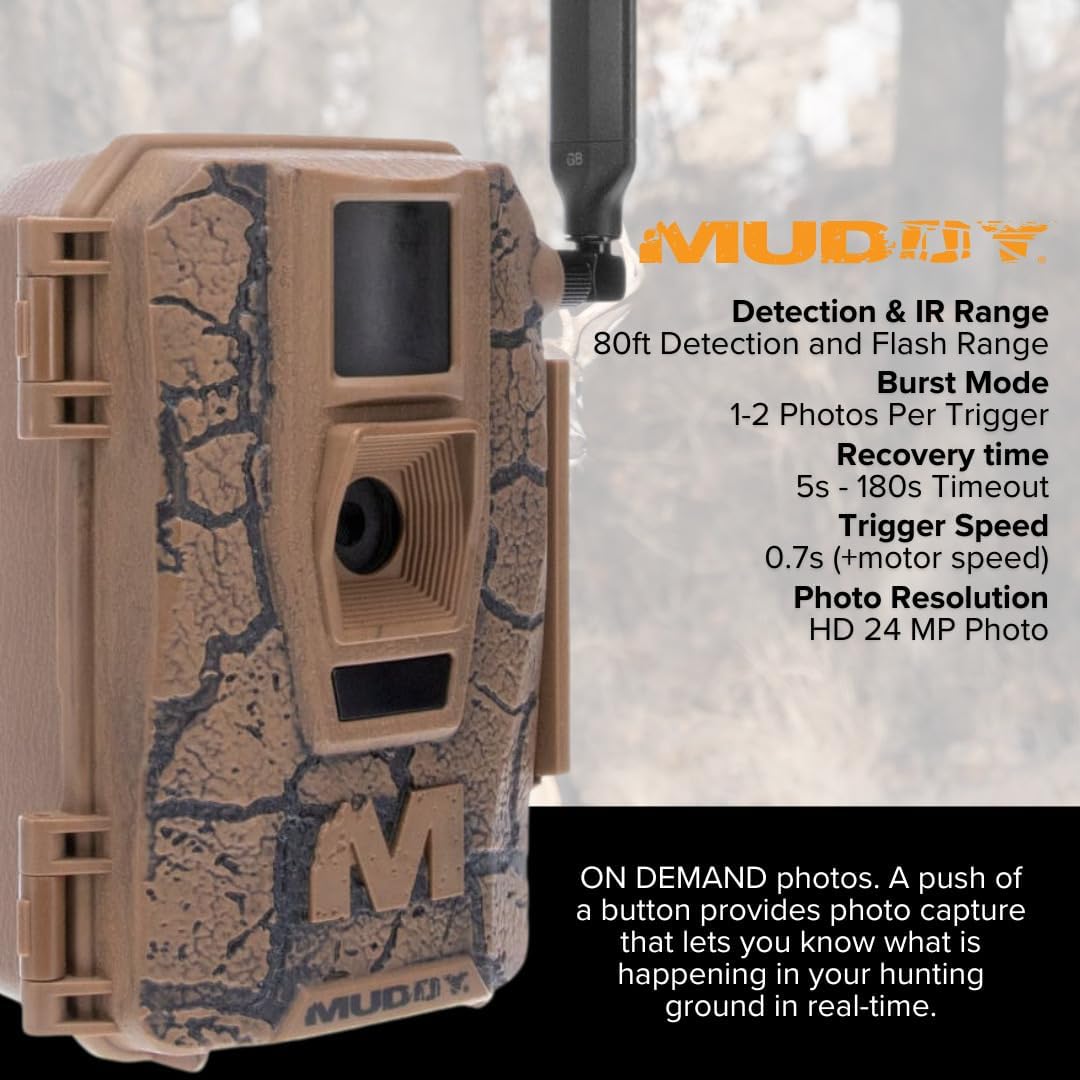
Figure 3: MUDDY Mitigator Cellular Trail Camera showing key specifications like detection range and trigger speed.

Figure 4: Proper placement and setup of the camera for optimal network coverage.
4. Návod k obsluze
4.1. Stealth Cam Command Pro App
The MUDDY Mitigator camera is fully compatible with the new Stealth Cam Command Pro app. This app allows you to remotely monitor your cameras, download images and videos, and operate the camera from your mobile device.
- Download the "Stealth Cam Command Pro" app from your mobile device's app store.
- Vytvořte si účet nebo se přihlaste.
- Follow the in-app instructions to add your Mitigator camera using its unique ID.
- Once connected, you can access camera settings, view captured media, and receive notifications.
4.2. On Demand Function
The On Demand function allows you to send a command to the camera to immediately capture photos of the hunting area in real-time. This feature is accessible through the Stealth Cam Command Pro app.
- Open the Stealth Cam Command Pro app and select your Mitigator camera.
- Navigate to the "On Demand" or "Capture Now" section.
- Initiate the command to capture a photo. The camera will take a picture and send it to your app.
4.3. Image Sharing
The Stealth Cam Command Pro app allows you to share your Mitigator camera with other app users (lease buddies, family, friends) or easily share individual images via text messages, emails, or social media platforms.

Obrázek 5: Přample of an image captured by a MUDDY trail camera.

Obrázek 6: Přesview of key features including HuntStand app integration.
5. Údržba
5.1. Čištění
Regular cleaning ensures optimal performance and longevity of your camera.
- Otřete vnější povrch fotoaparátu měkkým hadříkemamp tkanina. Vyhněte se abrazivním čisticím prostředkům.
- Gently clean the lens and sensor window with a lens cleaning cloth to prevent scratches and ensure clear images.
- Ensure no debris obstructs the PIR sensor or flash.
5.2. Výměna baterie
Replace batteries when the low battery indicator appears on the camera or in the app. Always use fresh, high-quality batteries.
5.3. Správa SD karty
Periodically format your SD card using the camera's menu or a computer to maintain performance and prevent data corruption. Back up important images before formatting.
6. Řešení problémů
6.1. Kamera se nezapíná
- Zkontrolujte polaritu baterií a ujistěte se, že jsou baterie plně nabité.
- Ověřte, zda je vypínač v poloze ZAPNUTO.
- Try a different set of fresh batteries.
6.2. No Cellular Signal / Connectivity Issues
- Relocate the camera to an area with better cellular reception.
- Ensure the camera's antenna is securely attached and oriented correctly.
- Check your data plan status with your cellular provider.
- Verify the camera is properly registered and activated in the Stealth Cam Command Pro app.
6.3. Poor Image Quality / No Images Captured
- Vyčistěte objektiv fotoaparátu a okénko senzoru.
- Ensure the SD card is properly inserted and not full. Format the SD card if necessary (after backing up data).
- Check camera settings for resolution and trigger delay.
- Verify the PIR sensor is not obstructed and the detection range is appropriate for the placement.
7. Specifikace
| Funkce | Detail |
|---|---|
| Rozměry produktu | 9.1 x 9.1 x 9.1 palce |
| Hmotnost položky | 10.43 libry |
| ASIN | B0DNF21NY2 |
| Datum první dostupnosti | 18. října 2024 |
| Výrobce | Zablácený |
| Značka | ZABLÁCENÝ |
| Jsou vyžadovány baterie? | Ano |
| UPC | 196271630906 |
| Rozlišení obrazu | 24MP (24MP, 8MP, and 4MP options) |
| Rozsah detekce | 80 stop |
| Rozsah blesku | 80 stop |
| Mobilní síť | Verizon or AT&T (Automatic Network Coverage) |
| Kompatibilita aplikací | Stealth Cam Command Pro |
8. Záruka a podpora
8.1. Informace o záruce
MUDDY products are manufactured to high-quality standards. For specific warranty details, including coverage period and terms, please refer to the warranty card included with your product or visit the official MUDDY webUschovejte si doklad o koupi pro případ reklamace.
8.2. Zákaznická podpora
If you encounter any issues or have questions not covered in this manual, please contact MUDDY customer support. You can typically find contact information on the official MUDDY website or through the Stealth Cam Command Pro app.
For app-related inquiries, please refer to the Stealth Cam Command Pro app's help section or support resources.