
1. Úvod
This manual provides essential instructions for the proper setup, operation, and maintenance of your Irfora Remote Control. This remote control is designed for wireless navigation and control of compatible GPS fishing bait boats, specifically models D18B, D16B, D18E, and D16E.
The remote control features a strong signal for extended range and an LCD screen to display critical information about your bait boat's status and location.

Image: The Irfora Remote Control shown alongside a compatible GPS fishing bait boat, demonstrating its intended use for wireless operation.
2. Konec produktuview
Familiarize yourself with the components and controls of your Irfora Remote Control.
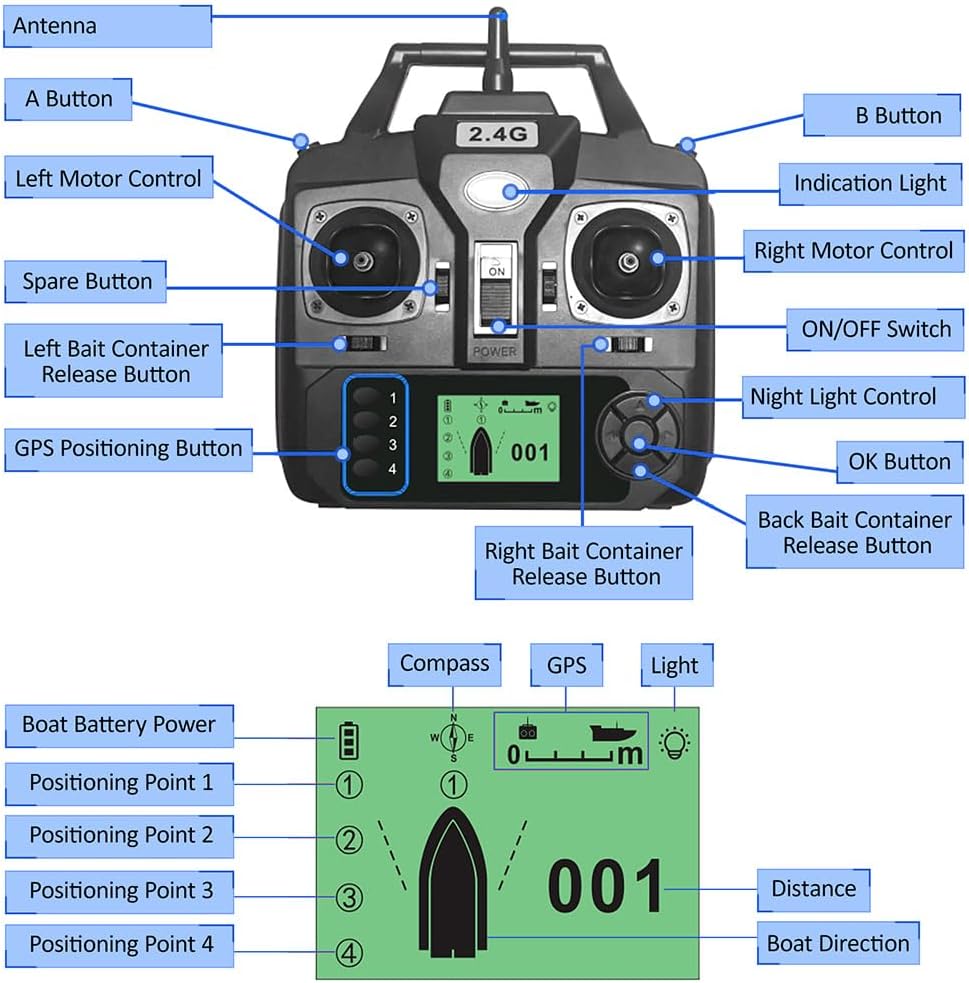
Image: A detailed diagram labeling each part of the remote control, including the antenna, joysticks, ON/OFF switch, bait release buttons, GPS positioning buttons, and LCD screen.
Klíčové komponenty:
- Anténa: Pro bezdrátový přenos signálu.
- Left Motor Control: Joystick for controlling the left motor of the bait boat.
- Right Motor Control: Joystick for controlling the right motor of the bait boat.
- Přepínač ON/OFF: Zapíná nebo vypíná dálkové ovládání.
- Indikační světlo: Poskytuje zpětnou vazbu o stavu.
- A Button / B Button: Auxiliary control buttons.
- Left Bait Container Release Button: Activates the release mechanism for the left bait container.
- Right Bait Container Release Button: Activates the release mechanism for the right bait container.
- Back Bait Container Release Button: Activates the release mechanism for the rear bait container (if applicable to boat model).
- GPS Positioning Button (1-4): Used to set and recall GPS positioning points.
- Ovládání nočního světla: Activates or deactivates the boat's night lights.
- Tlačítko OK: Confirms selections on the LCD screen.
- LCD obrazovka: Displays boat distance, direction, positioning points, battery life, and light status.

Obrázek: Přední strana view of the remote control, illustrating its physical dimensions for reference.
3. Nastavení
3.1 Instalace baterie
- Najděte přihrádku na baterie na zadní straně dálkového ovladače.
- Otevřete kryt bateriového prostoru.
- Vložte 4 baterie typu AA (nejsou součástí balení) do přihrádky a dbejte na správnou polaritu (+/-).
- Bezpečně zavřete kryt bateriového prostoru.

Obrázek: Zadní view of the remote control, highlighting the battery compartment for battery installation.
3.2 Zapnutí/vypnutí
- To power on, slide the ON/OFF switch to the "ON" position. The LCD screen will illuminate.
- To power off, slide the ON/OFF switch to the "OFF" position. The LCD screen will turn off.
3.3 Pairing with Bait Boat
The remote control is typically pre-paired with compatible Irfora GPS fishing bait boats. If pairing is required or connection is lost:
- Ensure both the remote control and the bait boat are powered off.
- Power on the bait boat first.
- Within 5 seconds, power on the remote control.
- The remote control should automatically connect to the bait boat. The LCD screen will display connection status. Refer to your bait boat's specific manual for detailed pairing instructions if issues persist.
4. Návod k obsluze
This section details the functions of the remote control for navigating and operating your GPS fishing bait boat.

Image: The remote control in use, demonstrating its function in guiding a bait boat across the water.
4.1 Boat Navigation
- Použijte Left Motor Control joystick to adjust the speed and direction of the left motor.
- Použijte Right Motor Control joystick to adjust the speed and direction of the right motor.
- Combine both joysticks for forward, backward, turning, and precise maneuvering.
4.2 Vypuštění návnady
- Stiskněte tlačítko Left Bait Container Release Button to open the left bait compartment and release bait.
- Stiskněte tlačítko Right Bait Container Release Button to open the right bait compartment and release bait.
- Stiskněte tlačítko Back Bait Container Release Button to open the rear bait compartment (if available on your boat model).
4.3 Určení polohy pomocí GPS
The remote control allows you to set and recall up to 4 GPS positioning points.
- Setting a Point: Navigate the boat to the desired location. Press and hold one of the GPS Positioning Buttons (1-4) until the remote confirms the point is saved.
- Recalling a Point: Stiskněte požadované GPS Positioning Button (1-4) briefly. The boat will automatically navigate to the saved location.
4.4 Informace o LCD obrazovce
The LCD screen provides real-time data:
- Boat Battery Power: Indicates the remaining battery life of the bait boat.
- Kompas: Shows the boat's current heading.
- Stav GPS: Indicates GPS signal strength and lock.
- Stav světla: Shows if the boat's lights are on or off.
- Vzdálenost: Displays the distance of the boat from the remote control or a set point.
- Boat Direction: Visual representation of the boat's orientation.
- Positioning Points (1-4): Indicates which GPS points are set or active.
4.5 Night Light Control
- Stiskněte tlačítko Ovládání nočního světla button to toggle the bait boat's night lights on or off for visibility in low-light conditions.
5. Údržba
- Čištění: Dálkový ovladač otírejte měkkým, suchým hadříkem. Nepoužívejte agresivní chemikálie ani abrazivní čisticí prostředky.
- Skladování: Store the remote control in a cool, dry place away from direct sunlight and extreme temperatures. Remove batteries if storing for extended periods to prevent leakage.
- Vystavení vodě: The remote control is not waterproof. Avoid exposing it to water or high humidity.
6. Řešení problémů
| Problém | Možná příčina | Řešení |
|---|---|---|
| Dálkové ovládání se nezapíná. | Baterie jsou vybité nebo nesprávně nainstalované. | Vyměňte za nové baterie typu AA a dbejte na správnou polaritu. |
| No connection to bait boat. | Boat is not powered on; remote is out of range; pairing issue. | Ensure boat is on. Move closer to the boat. Re-attempt pairing procedure (Section 3.3). |
| Boat does not respond to controls. | Weak signal; boat battery low; remote battery low. | Check remote and boat battery levels. Move closer to the boat. |
| LCD obrazovka je tmavá nebo prázdná. | Slabá baterie v dálkovém ovladači. | Vyměňte baterie v dálkovém ovladači. |
7. Specifikace
- Značka: Irfora
- Materiál: Plast
- Barva: Černý
- Rozměry produktu: Approximately 15.5 cm (W) x 16.5 cm (H) / 6.1 in (W) x 6.5 in (H)
- Rozměry balení: Approximately 17 cm x 17 cm x 7 cm / 6.7 in x 6.7 in x 2.8 in
- Hmotnost balení: Přibližně 250 g / 8.8 oz
- Zdroj napájení: 4 x AA baterie (nejsou součástí balení)
- Bezdrátová frekvence: 2.4G
- Vzdálený dosah: 400-500 metry
- Kompatibilita: Irfora GPS Fishing Bait Boats D18B, D16B, D18E, D16E