
FIREBAT AK2 PLUS
User Manual: FIREBAT Mini PC AK2 PLUS
Model: AK2 PLUS | Brand: FIREBAT
1. Úvod
Thank you for choosing the FIREBAT Mini PC AK2 PLUS. This manual provides essential information for setting up, operating, maintaining, and troubleshooting your new mini PC. Please read this manual thoroughly before use to ensure optimal performance and longevity of your device.
2. Obsah balení
Carefully unpack your FIREBAT Mini PC and verify that all items listed below are included:
- 1 x FIREBAT AK2 N150 Mini PC
- 1 x 12V/2.5A US Adapter
- 1 x držák VESA
- 1 x HDMI kabel
- 1 x Uživatelská příručka (tento dokument)

Image: Contents of the FIREBAT Mini PC AK2 PLUS package, including the mini PC, power adapter, VESA mount, HDMI cable, and user manual.
3. Konec produktuview
The FIREBAT Mini PC AK2 PLUS is a compact and powerful desktop computer designed for various applications, from office work to home entertainment. It features an Intel 13th Gen N150 processor, ample storage, and versatile connectivity options.
3.1 Klíčové vlastnosti
- Procesor: Intel 13th Gen Twin Lake N150 (4 cores/4 threads, up to 3.6GHz)
- Paměť: 16GB DDR4 RAM
- Skladování: 512GB M.2 2280 SSD (expandable up to 4TB with 2.5" SSD/HDD)
- Grafika: Intel UHD Graphics (1000MHz, 4K support)
- Zobrazit: Supports dual HDMI output for simultaneous 4K display
- Konektivita: Dual-band Wi-Fi, Bluetooth 4.2, Gigabit Ethernet
- Porty: Multiple USB 2.0 and USB 3.0 ports, HDMI, LAN
- Chlazení: Ultra-quiet fans with intelligent cooling technology

Obrázek: Přední a zadní view of the FIREBAT Mini PC AK2 PLUS, highlighting its compact design and various ports.
3.2 Porty a rozhraní
Seznamte se s dostupnými porty na vašem Mini PC:
- Přední panel: Power Button, USB 3.2 Type-A ports
- Zadní panel: DC Power Input, 2 x HDMI 2.0 Type-A ports, LAN RJ45 port, USB 2.0 Type-A ports

Image: Detailed diagram of the FIREBAT Mini PC AK2 PLUS interfaces, showing the location of USB, HDMI, LAN, and power ports.
3.3 Vnitřní komponenty a rozšíření
The Mini PC comes with pre-installed RAM and SSD. You can expand the storage capacity:
- BERAN: DDR4 SODIMM
- SSD: M.2 2280 SATA SSD
- Rozšíření: Supports adding a 2.5" SSD/HDD (not included) for additional storage up to 2TB.

Image: Illustration of the M.2 2280 SSD and SO-DIMM DDR4 memory modules used in the Mini PC.
4. Průvodce nastavením
Follow these steps to set up your FIREBAT Mini PC:
4.1 Připojení periferních zařízení
- Připojení displeje: Use the provided HDMI cable to connect the Mini PC to your monitor or TV. The Mini PC supports dual display output via its two HDMI ports.
- Připojení klávesnice a myši: Plug your USB keyboard and mouse into the available USB ports on the Mini PC.
- Připojení k síti (volitelné): For a wired connection, connect an Ethernet cable from your router/modem to the LAN RJ45 port on the Mini PC. For wireless, ensure your Wi-Fi network is available.
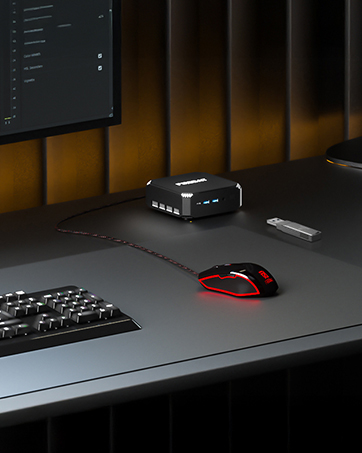
Image: The Mini PC connected to a monitor, keyboard, and mouse on a desk, illustrating a typical setup.
4.2 Zapnutí
- Připojte napájecí adaptér: Plug the 12V/2.5A US Adapter into the DC power input port on the Mini PC, then plug the adapter into a power outlet.
- Zapnutí: Stiskněte tlačítko napájení na přední straně Mini PC. Rozsvítí se kontrolka napájení.

Image: The Mini PC connected to its power adapter, demonstrating the correct power connection.

Image: Close-up of the Mini PC's power button, indicating its location for powering on the device.
4.3 Instalace držáku VESA (volitelné)
The included VESA mount allows you to attach the Mini PC to the back of a compatible monitor or to a wall, saving desk space.
- Attach the VESA bracket to the back of your monitor or desired surface using appropriate screws.
- Slide the Mini PC onto the VESA bracket until it clicks securely into place.

Image: The Mini PC shown with its VESA mount, demonstrating how it can be attached to the back of a monitor for a space-saving setup.
5. Návod k obsluze
5.1 Počáteční spuštění a nastavení operačního systému
Upon first power-on, the Mini PC may guide you through the initial setup of its default operating system. Follow the on-screen prompts to configure language, region, network, and user accounts.
5.2 Nastavení duálního zobrazení
Použití funkce duálního zobrazení:
- Connect two monitors to the two HDMI ports on the rear of the Mini PC.
- Once both monitors are connected and powered on, the operating system should automatically detect them.
- Adjust display settings (e.g., extend, duplicate, resolution) through your operating system's display configuration panel.

Image: The Mini PC connected to two monitors via HDMI, demonstrating its dual display capability for enhanced productivity.
5.3 Síťové připojení
The Mini PC supports both wired and wireless network connections:
- Kabelové (Ethernet): Connect an Ethernet cable to the RJ45 port. The connection will be established automatically.
- Bezdrátové připojení (Wi-Fi): Access your operating system's network settings, select your Wi-Fi network, and enter the password to connect.
- Bluetooth: Enable Bluetooth in your operating system settings to pair with compatible devices like headphones, keyboards, or mice.
6. Údržba
Správná údržba zajistí dlouhou životnost a optimální výkon vašeho Mini PC.
6.1 Čištění
- Pravidelně čistěte vnější povrch Mini PC měkkým, suchým hadříkem.
- Use compressed air to gently clear dust from the ventilation openings to maintain proper airflow and cooling.
- Do not use liquid cleaners or sprays directly on the device.

Image: An illustration showing the internal cooling fan of the Mini PC, emphasizing the importance of keeping ventilation clear for efficient heat dissipation.
6.2 Skladování a životní prostředí
- Mini PC skladujte na chladném a suchém místě mimo dosah přímého slunečního záření a extrémních teplot.
- Avoid placing the device in dusty environments or near sources of moisture.
- Ensure adequate ventilation around the Mini PC during operation.
7. Řešení problémů
If you encounter issues with your FIREBAT Mini PC, refer to the following common problems and solutions:
| Problém | Možná příčina | Řešení |
|---|---|---|
| Žádné napájení/Nezapíná se | Napájecí adaptér není připojen nebo je vadný; Problém se zásuvkou. | Ujistěte se, že je napájecí adaptér bezpečně připojen k Mini PC i k funkční zásuvce. Zkuste jinou zásuvku. |
| Žádné zobrazení na monitoru | HDMI cable loose or faulty; Monitor input not selected correctly; Monitor not powered on. | Check HDMI cable connections. Ensure monitor is powered on and set to the correct input source (HDMI). Try a different HDMI cable or monitor. |
| Žádné připojení k internetu (Wi-Fi) | Nesprávné heslo k Wi-Fi; Problém s routerem; Wi-Fi adaptér je deaktivován. | Verify Wi-Fi password. Restart your router. Check operating system settings to ensure Wi-Fi is enabled. |
| No internet connection (Wired) | Ethernet cable loose or faulty; Router issue; Network adapter disabled. | Check Ethernet cable connections. Restart your router. Check operating system settings to ensure the wired network adapter is enabled. |
| Systém je pomalý nebo nereaguje | Too many applications running; Low disk space; Overheating. | Close unnecessary applications. Free up disk space. Ensure proper ventilation and clean dust from vents. Restart the Mini PC. |
If the problem persists after trying these solutions, please contact FIREBAT customer support.
8. Specifikace
Detailed technical specifications for the FIREBAT Mini PC AK2 PLUS:
| Funkce | Specifikace |
|---|---|
| Číslo modelu | AK2 PLUS |
| Procesor | Intel 13th Gen Twin Lake N150 (4 Cores, 4 Threads, up to 3.6 GHz) |
| BERAN | 16GB DDR4 SDRAM |
| Skladování | 512GB M.2 2280 SSD (eSATA interface) |
| Grafický koprocesor | Intel UHD Graphics (Integrated, 1000MHz) |
| Maximální rozlišení obrazovky | 4096 x 2160 pixelů (4K) |
| Bezdrátové připojení | 802.11a/b/g/n/ac (Dual-band Wi-Fi), Bluetooth 4.2 |
| USB porty | 2 2.0 x USB, 2 x USB 3.0 |
| Video výstup | 2 x HDMI |
| LAN port | RJ45 Gigabit Ethernet |
| Operační systém | Default (Pre-installed) |
| Hmotnost položky | 12.8 uncí (cca 0.36 kg) |
| Rozměry produktu | 5.5 x 5.5 x 1.9 palců (přibližně 14 x 14 x 4.8 cm) |
| Barva | Šedá |
9. Záruka a podpora
FIREBAT is committed to providing quality products and excellent customer service. Your Mini PC comes with a standard warranty. For specific warranty terms and conditions, please refer to the documentation included with your purchase or visit the official FIREBAT webmísto.
9.1 Zákaznická podpora
If you require technical assistance, have questions about your product, or need to claim warranty service, please contact FIREBAT customer support:
- E-mail: support@firebatpc.com
- Webmísto: www.firebatpc.com
Please provide your product model (AK2 PLUS) and a detailed description of the issue when contacting support to facilitate a quicker resolution.
Související dokumenty - AK2 PLUS
 |
Uživatelská příručka k počítači Firebat Mini PC – Nastavení, funkce a řešení problémů Komplexní uživatelská příručka pro modely Firebat Mini PC (např. AK2, MN56, AM02, T8). Zahrnuje obsah balení, nastavení, připojení hardwaru, montáž VESA, nastavení systému BIOS, často kladené otázky a řešení problémů pro optimální výkon. |
 |
Uživatelská příručka k notebooku FIREBAT Ryzen7 – Nastavení, funkce a řešení problémů Komplexní uživatelská příručka pro notebook FIREBAT Ryzen7, která zahrnuje informace o nastavení, správě napájení, připojení, řešení problémů, údržbě a záruce. |
 |
FIREBAT AK2 Mini Desktop PC Uživatelská příručka Komplexní uživatelská příručka pro stolní počítač FIREBAT AK2 Mini, která zahrnuje specifikace, instalaci, nastavení, řešení problémů a údržbu. |
 |
FIREBAT AK2 Mini Desktop PC Uživatelská příručka Komplexní uživatelská příručka pro stolní počítač FIREBAT AK2 Mini, která zahrnuje specifikace, rychlou instalaci, nastavení, řešení problémů a údržbu. Naučte se, jak nastavit kompaktní počítač pro optimální výkon. |
 |
FIREBAT Mini Desktop PC User Guide Comprehensive user guide for the FIREBAT Mini Desktop PC, covering setup, installation, BIOS configuration, troubleshooting, and maintenance. |
 |
Uživatelská příručka k minipočítači Firebat-A8 Uživatelská příručka k mini počítači Firebat-A8 s informacemi o záruce, specifikacích produktu, instalaci a tipy. |
Ask a question about this manual
Ask about setup, troubleshooting, compatibility, parts, safety, or missing instructions. Manuals+ will review the question and use this page’s manual context to help answer it.