
Zavedení
This manual provides essential information for setting up, operating, maintaining, and troubleshooting your Samsung Galaxy S24+ Plus 5G smartphone. Please read this guide thoroughly to ensure proper use and to maximize the device's capabilities.
The Samsung Galaxy S24+ Plus 5G features a 6.7-inch Dynamic AMOLED 2X QHD+ display, 12GB RAM, and a powerful Snapdragon 8 Gen 3 or Exynos 2400 processor. It includes a versatile triple-rear camera system (50MP main, 12MP ultrawide, 10MP telephoto) and a 12MP front camera. The device is built with an Enhanced Armor Aluminum frame, IP68 dust/water resistance, and supports 5G connectivity.

Obrázek: Přední a zadní strana view of the Samsung Galaxy S24+ Plus 5G in Amber Yellow.
Nastavení
1. Rozbalení a počáteční kontrola
Carefully remove the phone and included accessories from the packaging. Inspect the device for any visible damage. The package typically includes the Samsung Galaxy S24+ Plus 5G and a charging cable. Other accessories, such as a power adapter, may be sold separately.

Obrázek: Přední a zadní strana view of the Samsung Galaxy S24+ Plus 5G.
2. Vložení SIM karty
- Vyhledejte držák SIM karty na boku zařízení.
- K otevření zásuvky použijte nástroj pro vysunutí SIM karty (pokud je součástí dodávky, nebo malou kancelářskou sponku).
- Place your Nano SIM card into the tray with the gold contacts facing down.
- Opatrně vložte zásobník zpět do telefonu.
3. Zapnutí a počáteční konfigurace
- Stiskněte a podržte tlačítko Napájení/Boční tlačítko, dokud se nezobrazí logo Samsung.
- Follow the on-screen prompts to complete the initial setup, including language selection, Wi-Fi connection, Google account sign-in, and security settings (fingerprint recognition, PIN, pattern, or password).
Návod k obsluze
Displej a navigace
The device features a 6.7-inch Dynamic AMOLED 2X display with a 1-120Hz adaptive refresh rate for smooth scrolling and responsive touch. Navigate using gestures or traditional navigation buttons, configurable in settings.
Vlastnosti fotoaparátu
The Galaxy S24+ Plus 5G is equipped with a triple-rear camera system and a front camera:
- Hlavní fotoaparát: 50 MP
- Ultraširokoúhlý fotoaparát: 12 MP
- Teleobjektiv: 10 MP with 3x optical zoom
- Přední kamera: 12 MP
The camera supports various modes including photo, video (up to 8K/4K), portrait, and night mode. Advanced features like Circle to Search allow for quick object identification and search directly from the screen.
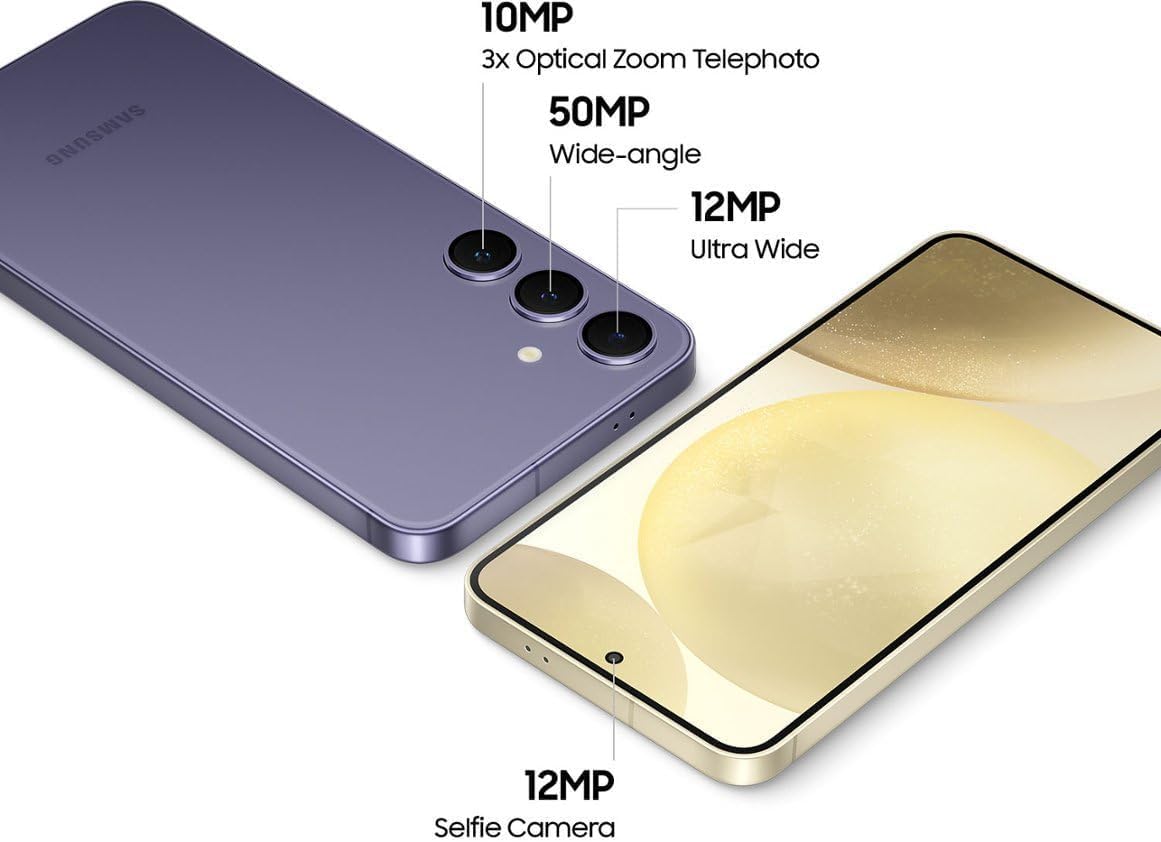
Image: Diagram illustrating the camera specifications of the Samsung Galaxy S24+ Plus 5G.

Image: Demonstration of the Circle to Search feature on the Samsung Galaxy S24+ Plus 5G.

Image: A user editing a photo on the Samsung Galaxy S24+ Plus 5G, showcasing editing capabilities.
Baterie a nabíjení
The device is powered by a 4900 mAh Lithium-Ion battery. It supports 45W wired fast charging and 15W wireless charging. Use only Samsung-approved chargers and cables to prevent damage and ensure optimal charging performance. The charging cable is included; the power adapter is sold separately.
Konektivita
The Galaxy S24+ Plus 5G supports 5G cellular technology, Bluetooth, NFC, and UWB. Ensure your SIM card is properly inserted and your mobile data plan is active for 5G connectivity. For Wi-Fi, connect to a network via the Settings menu.
Údržba
Čištění zařízení
K čištění telefonu používejte měkký hadřík, který nepouští vlákna. Nepoužívejte abrazivní materiály ani agresivní chemikálie. V případě odolných šmouh lehceamphadřík vodou. Nestříkejte čisticí prostředky přímo na zařízení.
Aktualizace softwaru
Pravidelně kontrolujte a instalujte aktualizace softwaru, abyste zajistili, že vaše zařízení má nejnovější funkce, bezpečnostní záplaty a vylepšení výkonu. Aktualizace můžete zkontrolovat v Nastavení > Aktualizace softwaru.
Stav baterie
To prolong battery life, avoid extreme temperatures. Do not leave the phone fully charged or fully discharged for extended periods. Optimize battery usage through the device settings.
Odstraňování problémů
Zařízení se nezapíná
If your device does not turn on, ensure it is charged. Connect it to a charger for at least 10-15 minutes, then try pressing and holding the Power/Side key again. If the issue persists, perform a forced restart by holding the Power/Side key and Volume Down key simultaneously for about 7-10 seconds.
Problémy s připojením k síti
If you experience problems with cellular network connectivity (no signal, unable to make calls), check if your SIM card is correctly inserted. Try restarting the device. Verify that Airplane Mode is not enabled. If issues continue, contact your service provider.
Aplikace pády nebo zamrzání
If an application is not responding, force close it through the recent apps menu. If the problem recurs, clear the app's cache and data in Nastavení > Aplikace > [Název aplikace] > Úložiště. As a last resort, uninstall and reinstall the application.
Specifikace
| Funkce | Detail |
|---|---|
| Značka | Samsung |
| Název modelu | Galaxy S24 Plus |
| Operační systém | Android |
| Velikost nainstalované paměti RAM | 12 GB |
| Kapacita paměti | 256 GB |
| Model CPU | Hledík |
| Rychlost CPU | 2.9 GHz |
| Velikost obrazovky | 6.7 palce |
| Typ zobrazení | AMOLED |
| Maximální rozlišení displeje | 3120x1440 pixelů |
| Obnovovací frekvence | 120 Hz |
| Rear Facing Camera Photo Sensor Resolution | 50 MP (Main) |
| Front Photo Sensor Resolution | 12 MP |
| Rozlišení záznamu videa | 4K |
| Kapacita baterie | 4900 miliamp Hours (Lithium-Ion) |
| Úroveň odolnosti proti vodě | Voděodolný (IP68) |
| Biometrická bezpečnostní funkce | Rozpoznávání otisků prstů |
| Rozměry položky | 6.24 x 2.99 x 0.3 palce |
| Hmotnost položky | 6.88 unce |
| Technologie připojení | 5G, Bluetooth, NFC, UWB |
| Vestavěná média | Nabíjecí kabel |
Informace o záruce
Tento produkt je dodáván s a 90denní omezená záruka. For specific terms and conditions, please refer to the warranty card included with your purchase or visit the manufacturer's official webmísto.
Podpora
Pro další pomoc, technickou podporu nebo view detailed product documentation, please visit the official Samsung support website. You can also find FAQs and community forums for common queries.
Online podpora: Podpora Samsung