
1. Úvod
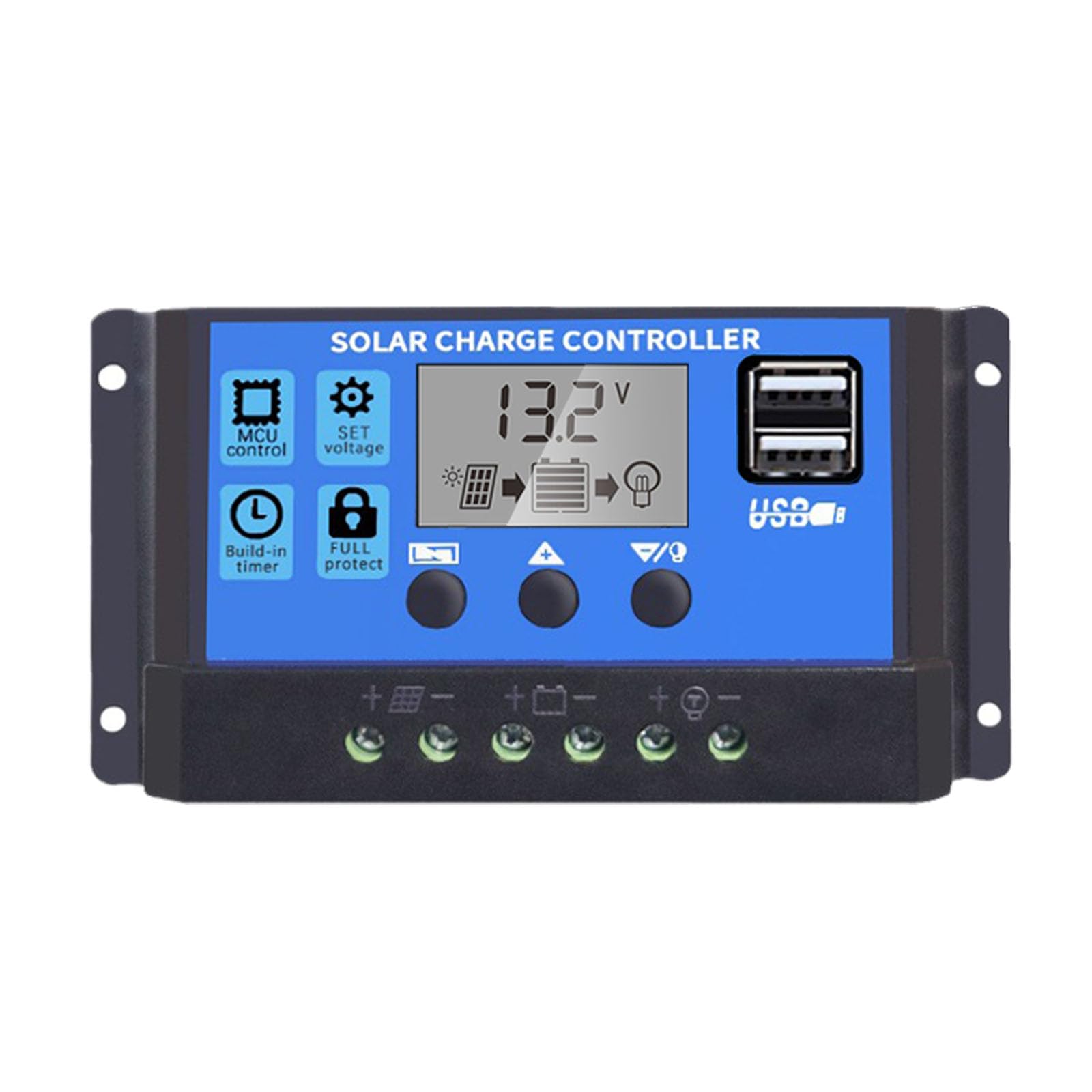
This manual provides essential instructions for the safe and efficient operation of your Saooer Solar Charge Controller. This device is designed to manage the power flow from your solar panel to your battery, ensuring optimal charging and protecting your battery from overcharge and over-discharge. It is compatible with both 12V and 24V solar systems and features a 30A discharge current capacity.
2. Bezpečnostní pokyny
Please read all safety instructions carefully before installation and operation. Failure to follow these instructions may result in damage to the controller, battery, or other components, and may cause personal injury.
- Ujistěte se, že objem baterietage is sufficient for the controller to recognize the battery type before the first installation.
- The charge controller is suitable for lead-acid batteries (OPEN, AGM, GEL) and lithium-ion batteries. Do not use it for other battery types.
- Install the charge controller indoors, away from direct sunlight, high temperatures, and humid environments.
- The controller will heat up during operation; ensure good ventilation.
- The controller's positive and negative terminals should be connected correctly. Reverse connection may damage the device.
- Vždy nejdříve připojte baterii, poté solární panel a nakonec zátěž. Odpojujte v opačném pořadí: zátěž, poté solární panel a nakonec baterii.
3. Vlastnosti produktu
- System Voltage Kompatibilita: Automatically detects 12V or 24V systems.
- Vybíjecí proud: Kapacita 30A.
- Integrated Micro Controller: Manages solar panel and battery operation efficiently.
- Duální USB porty: Supports mobile phone charging (5V/2A output).
- Komplexní ochrana: Includes short-circuit protection, open-circuit protection, reverse polarity protection, and over-load protection to enhance system efficiency and battery lifespan.
- LCD displej: Provides clear indication of status and data, allowing for convenient mode switching and parameter configuration.
- Nastavitelné parametry: User-configurable settings for various battery types and operational needs.
- Vestavěný časovač: For load control.
4. Obsah balení
- 1x Saooer Solar Charge Controller (30A)
5. Nastavení a instalace
Follow these steps for proper installation of the solar charge controller. Incorrect connection order can damage the controller.
- Připojte baterii: Connect the battery to the charge regulator first. Ensure correct polarity (positive to positive, negative to negative). This allows the controller to recognize the battery voltage.
- Připojte solární panel: Connect the solar panel to the solar charge controller. Ensure correct polarity.
- Připojení zátěže: Connect the consumer or load to the charge controller regulator. Ensure correct polarity.
Important Disconnection Note:
When disconnecting the system, always remove the solar panel connection first, then the load connection, and finally the battery connection. This prevents potential damage to the controller.

6. Návod k obsluze
The controller features an LCD display and three buttons for operation: MENU, UPa DOLŮ.
6.1. LCD displej
The LCD display shows real-time system status and data, including battery voltage, charging current, discharging current, and various parameter settings.
6.2. Funkce tlačítek
- Tlačítko MENU: Press to cycle through different display modes and enter parameter setting mode. Long press to exit setting mode.
- Tlačítko NAHORU: In setting mode, press to increase the parameter value.
- Tlačítko DOLŮ: In setting mode, press to decrease the parameter value.
6.3. Nastavení parametrů
To adjust parameters (e.g., battery type, charge/discharge voltage limits, load timer settings):
- Stiskněte tlačítko MENU button until the desired parameter display appears.
- Dlouze stiskněte MENU button until the displayed value starts flashing.
- Použijte UP a DOLŮ tlačítka pro úpravu hodnoty.
- Once the desired value is set, long press the MENU button again to save the setting and exit the flashing state.
Refer to the specific icons on the LCD for detailed parameter identification.

7. Údržba
Pravidelná údržba zajišťuje dlouhou životnost a optimální výkon vašeho solárního regulátoru nabíjení.
- Čistota: Udržujte ovladač čistý a bez prachu a nečistot. K čištění používejte suchý hadřík.
- Spojení: Periodically check all wiring connections to ensure they are tight and free from corrosion. Loose connections can cause power loss and overheating.
- Větrání: Ensure the installation area has adequate ventilation to prevent overheating of the controller.
- Inspekce: Inspect the controller for any signs of physical damage or unusual operation.
8. Řešení problémů
Pokud narazíte na problémy se solárním regulátorem nabíjení, zvažte následující běžné kroky pro řešení problémů:
- Žádný displej/Žádné napájení: Zkontrolujte připojení baterie a ujistěte se, že má dostatečné napětítage. Verify all wiring is correct and secure.
- Baterie se nenabíjí: Check solar panel connections and ensure the panel is receiving adequate sunlight. Verify solar panel voltage and current. Ensure the controller's charging parameters are correctly set for your battery type.
- Načtení nefunguje: Check load connections. Ensure the load is not exceeding the controller's rated current. Check the load timer settings if applicable. The controller may have entered protection mode due to over-discharge or over-load; check the display for error codes or indicators.
- Over-Voltage/Under-Voltage Alarms: Zkontrolujte objem baterietage. Ensure solar panel open-circuit voltagnepřekračuje maximální vstupní hlasitost regulátorutage.
Pokud problém přetrvává i po provedení těchto kontrol, kontaktujte zákaznickou podporu.
9. Specifikace
| Funkce | Specifikace |
|---|---|
| Značka | Saooer |
| Model | 30A solární regulátor nabíjení |
| System Voltage | 12V / 24V Auto-sensing |
| Vybíjecí proud | 30A |
| Materiál | Kov, Plast |
| Typ zobrazení | LCD |
| USB výstup | Dual USB, 5V/2A |
| Zahrnuté komponenty | 1x Solar Charge Controller |

10. Záruka a podpora
For warranty information, please refer to the documentation provided with your purchase or contact your retailer. For technical support or inquiries, please contact Saooer customer service through their official channels.