
1. Úvod
Děkuji za nákupasing the LONPOO LP-816 Compact Micro HiFi System. This manual provides essential information for the safe and efficient operation of your new audio system. Please read this manual thoroughly before use and retain it for future reference.
2. Bezpečnostní pokyny
- Zdroj napájení: Zajistěte napájení objtage odpovídá jmenovité hodnotě uvedené na jednotce.
- Větrání: Neblokujte žádné větrací otvory. Ponechte kolem jednotky dostatečný prostor pro správné proudění vzduchu.
- Voda a vlhkost: Nevystavujte jednotku dešti, vlhkosti ani kapajícím/stříkajícím tekutinám. Na jednotku nestavte předměty naplněné tekutinami, například vázy.
- Teplo: Udržujte jednotku mimo dosah zdrojů tepla, jako jsou radiátory, topná tělesa, sporáky nebo jiná zařízení (včetně amplifikátory), které produkují teplo.
- Čištění: Před čištěním odpojte přístroj ze zásuvky. Používejte pouze měkký, suchý hadřík. Nepoužívejte tekuté ani aerosolové čisticí prostředky.
- Servis: Nepokoušejte se tento výrobek opravit sami. Veškerý servis svěřte kvalifikovanému servisnímu personálu.
- Umístění: Umístěte jednotku na stabilní, rovný povrch, aby nedošlo k jejímu pádu.
3. Obsah balení
Ověřte, zda jsou v balení obsaženy všechny níže uvedené položky:
- LONPOO LP-816 Micro HiFi System Unit
- Dálkové ovládání
- Napájecí adaptér
- FM anténa
- Uživatelská příručka (tento dokument)
4. Konec produktuview
4.1 Front and Rear Panel Controls
Familiarize yourself with the various buttons, ports, and indicators on your LP-816 system.
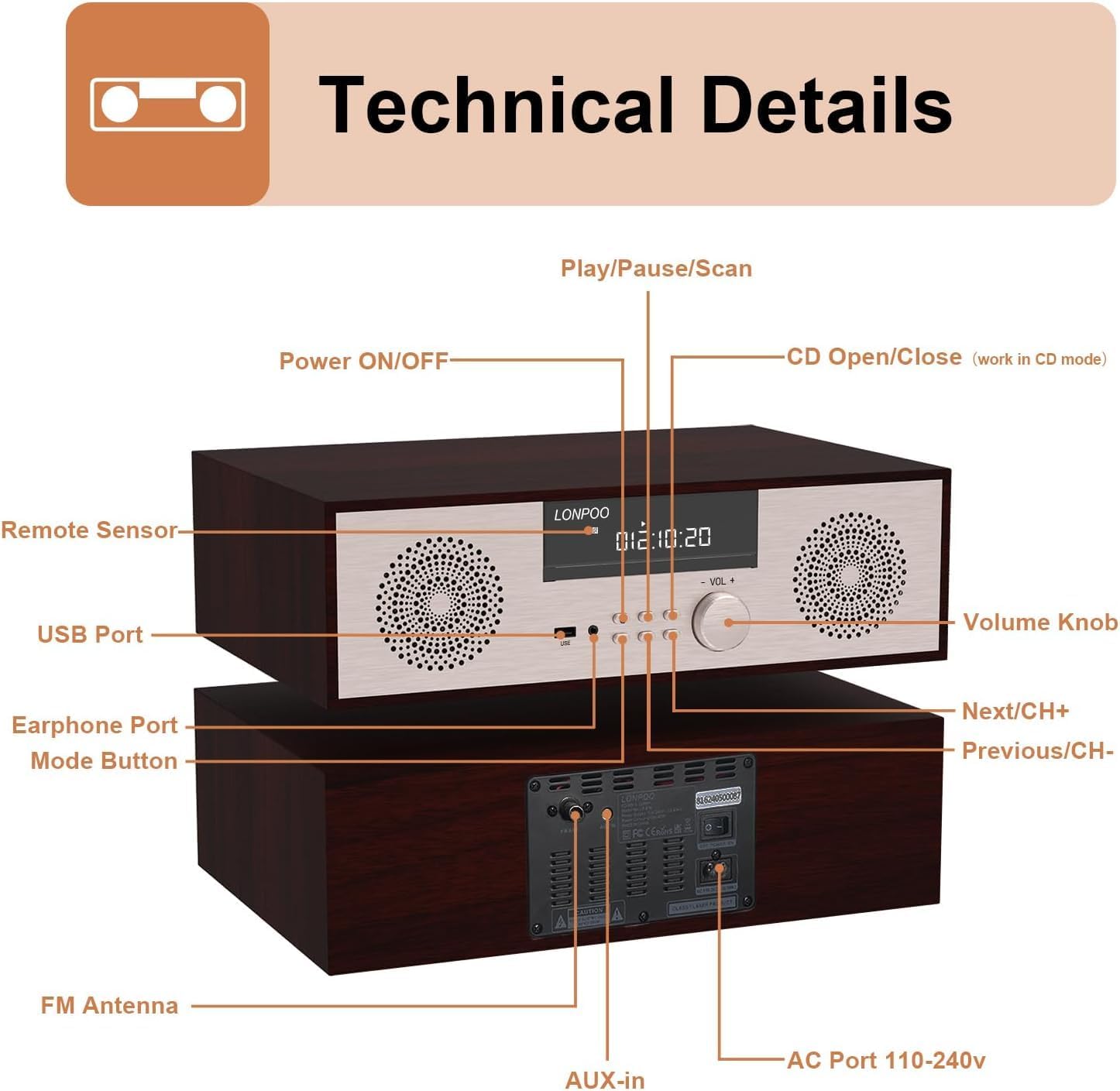
Obrázek: Přední a zadní view of the LONPOO LP-816 system, highlighting the LCD display, control buttons, volume knob, USB port, earphone port, mode button, remote sensor, CD compartment, AUX-in, FM antenna port, and AC power port.
- Zapnutí/vypnutí: Zapíná nebo vypíná jednotku.
- LCD displej: Shows current mode, track information, frequency, and time.
- Přihrádka na CD: Pro vkládání audio CD.
- USB port: Připojte USB flash disky pro přehrávání zvuku.
- Port pro sluchátka: 3.5mm jack pro připojení sluchátek.
- Tlačítko režimu: Switches between CD, FM, Bluetooth, AUX, and USB modes.
- Play/Pause/Scan Button: Controls playback and initiates FM scan.
- Next/CH+ Button: Skips to the next track or FM preset.
- Previous/CH- Button: Skips to the previous track or FM preset.
- Knoflík hlasitosti: Nastavuje hlasitost zvuku.
- Dálkový senzor: Přijímá signály z dálkového ovladače.
- Vstup AUX: 3.5mm jack pro připojení externích audio zařízení.
- Anténa FM: Connects the included FM antenna for radio reception.
- AC Port 110-240V: Připojuje napájecí adaptér.
4.2 Dálkové ovládání
The remote control provides convenient access to all functions of the LP-816 system.

Image: Close-up of the LONPOO LP-816 remote control, showing various buttons for power, mode selection, volume, track control, EQ, and numeric input.
Insert two AAA batteries (not included) into the remote control, observing the correct polarity.
5. Nastavení
5.1 Umístění
Place the LP-816 system on a flat, stable surface. Ensure there is adequate space around the unit for proper ventilation. Avoid placing it near strong magnetic fields or direct sunlight.
5.2 Připojení FM antény
Connect the supplied FM antenna to the 'FM Antenna' port on the rear of the unit. Extend the antenna fully for optimal FM reception.
5.3 Připojení napájení
Connect the power adapter to the 'AC Port 110-240V' on the rear of the unit, then plug the adapter into a wall outlet.
6. Návod k obsluze
6.1 Zapnutí/vypnutí
Press the 'Power ON/OFF' button on the front panel or the remote control to turn the unit on or off.
6.2 Přehrávání CD
To play an audio CD:
- Press the 'Mode' button until 'CD' mode is selected on the display.
- Press the 'CD Open/Close' button (if available on the unit or remote) or gently insert the CD into the slot. The unit will automatically load the CD.
- The CD will begin playing automatically. If not, press the 'Play/Pause' button.
- Use the 'Next/CH+' and 'Previous/CH-' buttons to skip tracks.
- Press 'Play/Pause' to pause or resume playback.

Image: The LONPOO LP-816 system with its CD player compartment open, ready to accept a disc.
6.3 FM rádio
Chcete-li poslouchat rádio FM:
- Press the 'Mode' button until 'FM' mode is selected.
- Automatické skenování: Press and hold the 'Play/Pause/Scan' button to automatically scan and save available FM stations.
- Ruční ladění: Use the 'Next/CH+' and 'Previous/CH-' buttons to manually tune to a specific frequency.
- Výběr předvoleb: Use the 'Next/CH+' and 'Previous/CH-' buttons (short press) to cycle through saved preset stations.

Image: The LONPOO LP-816 system displaying an FM radio frequency (87.50 MHz) on its screen, with a visual representation of the FM band.
6.4 Připojení Bluetooth
Chcete-li připojit zařízení Bluetooth:
- Press the 'Mode' button until 'BT' (Bluetooth) mode is selected. The display will show 'BT' and the unit will enter pairing mode.
- Na zařízení s podporou Bluetooth (např. smartphonu) povolte Bluetooth a vyhledejte dostupná zařízení.
- Select 'LP-816' from the list of devices.
- Once paired, the unit will indicate a successful connection, and you can play audio from your device through the LP-816.

Image: The LONPOO LP-816 system displaying 'BT' on its screen, with a smartphone nearby showing a successful Bluetooth connection to 'LP-816'.
6.5 Připojení AUX-in
To play audio from an external device via AUX-in:
- Connect a 3.5mm audio cable (not included) from the headphone jack or line-out of your external device to the 'AUX-in' port on the rear of the LP-816.
- Press the 'Mode' button until 'AUX' mode is selected.
- Play audio from your external device. The sound will be output through the LP-816 speakers.
6.6 Přehrávání z USB
Pro přehrávání zvuku filez USB flash disku:
- Insert a USB flash drive into the 'USB Port' on the front panel.
- Press the 'Mode' button until 'USB' mode is selected.
- Jednotka automaticky detekuje a začne přehrávat kompatibilní audio files z USB disku.
- Use the 'Next/CH+' and 'Previous/CH-' buttons to skip tracks.

Image: A close-up of the LONPOO LP-816 system's front panel, showing a USB flash drive inserted into the USB port.
6.7 Sluchátkový výstup
Connect standard 3.5mm headphones to the 'Earphone Port' on the front panel for private listening. When headphones are connected, sound will no longer be output from the main speakers.
7. Údržba
7.1 Čištění
To clean the unit, first unplug it from the power outlet. Use a soft, dry, lint-free cloth to wipe the exterior surfaces. Do not use abrasive cleaners, waxes, or solvents as they may damage the finish.
7.2 Péče o CD přehrávač
Handle CDs by their edges to avoid fingerprints and scratches. If a CD is dirty, wipe it gently with a soft, dry cloth from the center outwards. Do not use solvents or abrasive cleaners on CDs.
8. Řešení problémů
| Problém | Možná příčina | Řešení |
|---|---|---|
| Žádná síla | Napájecí kabel není připojen; Zásuvka není aktivní | Ujistěte se, že je napájecí kabel bezpečně připojen. Zkuste jinou zásuvku. |
| Žádný zvuk | Volume too low; Mute function active; Incorrect mode selected; Headphones connected | Increase volume. Deactivate mute. Select correct input mode. Disconnect headphones. |
| CD se nepřehrává | CD inserted incorrectly; CD is dirty or scratched; CD format not supported | Reinsert CD correctly. Clean or replace CD. Ensure CD is an audio CD. |
| Bluetooth se nepřipojuje | Bluetooth not in pairing mode; Device too far; Device already connected to another unit | Ensure unit is in BT pairing mode. Move device closer. Disconnect from other devices. |
| Špatný příjem FM | Antenna not extended; Weak signal; Interference | Extend and adjust FM antenna. Relocate unit for better signal. |
9. Specifikace
- Model: LP-816
- Rozměry produktu (D x Š x V): 15.8 x 10.5 x 4.5 palce
- Hmotnost položky: 11.57 libry
- Technologie připojení: Pomocný, Bluetooth, USB
- Typ reproduktoru: Stereo
- Zvukový výstup: 40 W RMS
- Vlastnosti: CD Player, FM Radio, Bluetooth, AUX-in, Headphone Output, DSP Technology
10. Záruka a podpora
LONPOO products are designed and manufactured to the highest quality standards. For warranty information and technical support, please refer to the warranty card included with your product or visit the official LONPOO webwebu. Uschovejte si účtenku jako doklad o koupi.