
1. Konec produktuview
The DOOGEE Fire 6 Power is a robust and high-performance rugged smartphone designed for durability and extended use. It features a massive 15500mAh battery with 33W fast charging, a powerful Unisoc T606 octa-core processor, and runs on Android 14. Equipped with a 50MP AI main camera and a bright 120LM top-mounted flashlight, it is built to withstand challenging environments while providing excellent functionality.
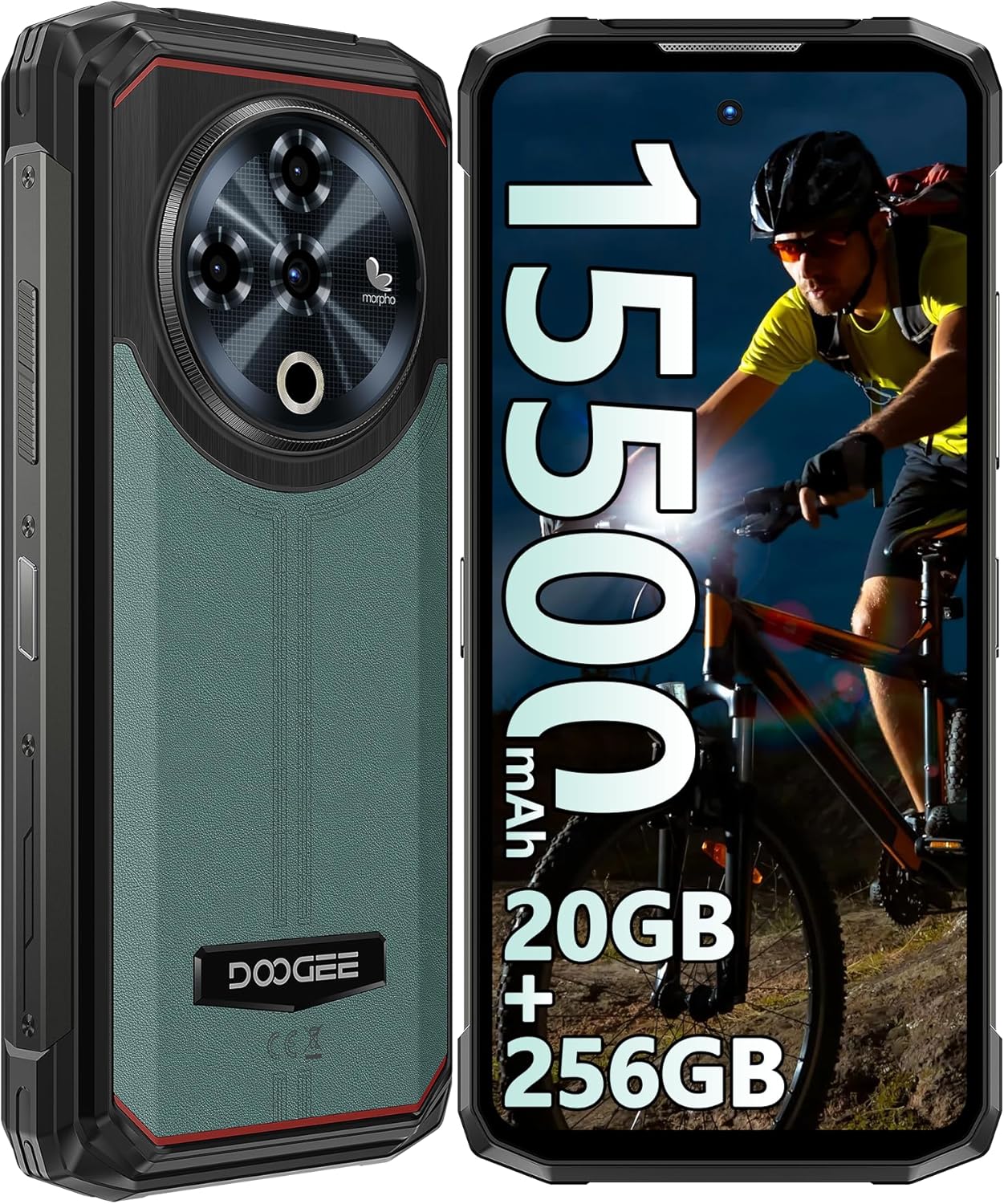
Obrázek 1: Přední a zadní část view of the DOOGEE Fire 6 Power Rugged Phone, highlighting its robust design and large display.
This device is IP68/IP69K certified for water and dust resistance and meets MIL-STD-810H standards for shockproof durability, making it an ideal companion for outdoor adventures and demanding work conditions.
2. Začínáme
2.1 Obsah balení
Ujistěte se prosím, že máte v balení všechny položky:
- DOOGEE Fire 6 Power Smartphone
- Napájecí adaptér (33W)
- USB-C kabel
- Nástroj pro vysunutí SIM karty
- Uživatelská příručka (tento dokument)
- Záruční list
2.2 Instalace SIM karty a TF karty
The DOOGEE Fire 6 Power supports a triple SIM card slot configuration, allowing for two Nano SIM cards and one TF (microSD) card simultaneously.
- Vyhledejte držák SIM karty na boku telefonu.
- Vložte nástroj pro vysunutí SIM karty do malého otvoru vedle zásobníku a jemně zatlačte, dokud zásobník nevyskočí.
- Opatrně vytáhněte držák SIM karty.
- Place your Nano SIM cards and/or TF card into the designated slots on the tray, ensuring correct orientation as indicated on the tray.
- Jemně zatlačte zásobník zpět do telefonu, dokud nezacvakne na místo.

Figure 2: Illustration of the triple card slot for two SIM cards and one TF card.
2.3 Počáteční nabíjení a zapnutí
Your device comes with a large 15500mAh battery. For optimal performance, fully charge the phone before first use.
- Připojte kabel USB-C k nabíjecímu portu telefonu.
- Druhý konec kabelu připojte k 33W napájecímu adaptéru.
- Zapojte napájecí adaptér do elektrické zásuvky.
- Na obrazovce se zobrazí indikátor nabíjení.
- Once charged, press and hold the Power button (located on the side) until the DOOGEE logo appears to power on the device.

Figure 3: The phone connected to its 33W fast charger, illustrating its large battery capacity.
The phone also supports 18W OTG reverse charging, allowing it to act as a power bank for other devices (OTG cable not included).

Figure 4: The phone demonstrating its 18W OTG reverse charging feature, capable of powering other devices.
2.4 Security Features: Fingerprint and Face ID
For enhanced security, the DOOGEE Fire 6 Power offers both side-mounted fingerprint recognition and facial recognition.
- To set up Fingerprint ID: Go to Settings > Security & privacy > Device unlock > Fingerprint. Follow the on-screen instructions to register your fingerprint.
- To set up Face ID: Go to Settings > Security & privacy > Device unlock > Face unlock. Follow the on-screen instructions to register your face.

Figure 5: Visual representation of the Face ID and side fingerprint unlock functionalities.
3. Obsluha vašeho zařízení
3.1 Displej a uživatelské rozhraní
The phone features a 6.56-inch HD+ IPS Notch-less Punch Display with a 90Hz dynamic refresh rate, providing a smooth and vivid visual experience.

Figure 6: The 6.56-inch HD+ IPS display, showcasing its vibrant colors and smooth 90Hz refresh rate.
The device runs on the Android 14 operating system, offering an intuitive interface, enhanced privacy controls, and optimized performance.

Figure 7: A visual representation of the Android 14 system, highlighting its modern interface and features.
3.2 Funkce fotoaparátu
Pořizujte úžasné fotografie a videa s všestranným systémem fotoaparátů:
- 50MP hlavní fotoaparát s umělou inteligencí: For high-resolution photos with AI scene recognition.
- 8MP přední fotoaparát: Pro ostré selfie a videohovory.
- 2MP makro fotoaparát: Pro detailní záběry malých objektů zblízka.

Obrázek 8: Přesview of the phone's camera system, including the 50MP main, 8MP front, and 2MP macro lenses.
The camera app includes features like audio note, beauty mode, watermark, filter options, composition lines, smile shutter, and AI scene recognition to enhance your photography experience.
Video 1: A demonstration of the DOOGEE Fire 6 Power's features, including camera capabilities and rugged design.
3.3 Top Position Dual Lamp Svítilna
The phone is equipped with a powerful 120LM top-mounted dual lamp flashlight, providing strong illumination for various situations. It can be controlled via a customized key and an APP function.
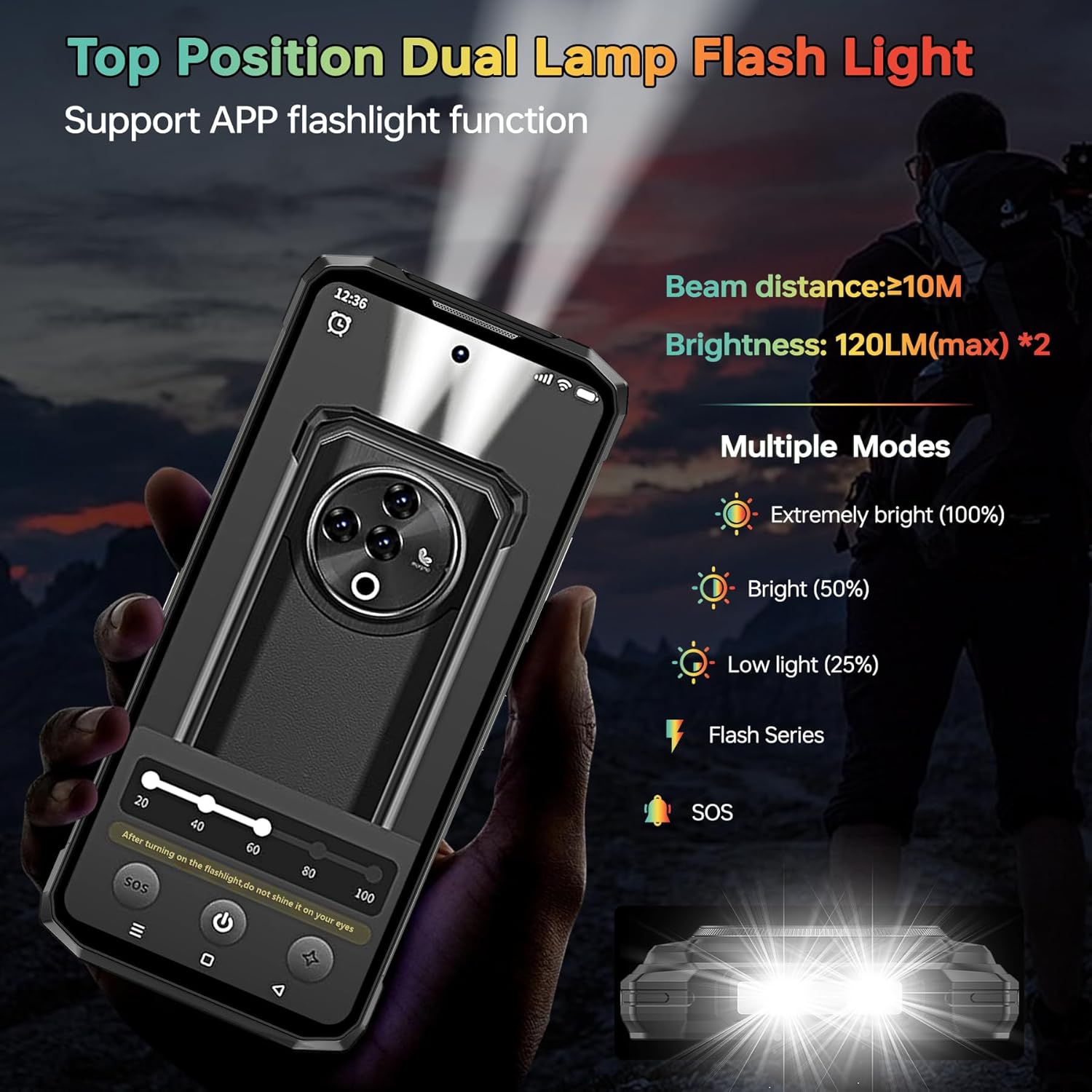
Figure 9: The powerful top-mounted dual lamp flashlight in action, illustrating its various modes and brightness levels.
3.4 Výkon a úložiště
Powered by the Unisoc T606 octa-core 12nm processor, the Fire 6 Power delivers smooth performance for multitasking and gaming. It comes with 20GB RAM (8GB physical + 12GB virtual) and 256GB internal storage, expandable up to 1TB with a TF card.

Figure 10: The Unisoc T606 octa-core processor, highlighting its 12nm technology and performance benefits.

Figure 11: Visual representation of the 20GB RAM and 256GB ROM, with an emphasis on 1TB TF card expandability.
3.5 Konektivita
Zařízení podporuje různé možnosti připojení:
- 4G síť: Supports a wide range of FDD and TDD bands for reliable cellular connectivity.
- NFC a Google Pay: Pro pohodlné bezkontaktní platby a přenos dat.
- GPS/GLONASS/Beidou/Galileo: Provides accurate geographic location information for navigation.
- Bluetooth 5.0: For wireless connection to accessories.
- Wi-Fi: Supports 2.4G and 5G Wi-Fi networks.
Figure 12: An illustration of the phone's comprehensive connectivity features, including Wi-Fi, Bluetooth, 4G, and the triple card slot.
4. Trvanlivost a údržba
The DOOGEE Fire 6 Power is built to be highly durable, with certifications for water, dust, and shock resistance.
- IP68 voděodolný: Vydrží ponoření do vody o hloubce 1.5 metru po dobu až 30 minut.
- Prachotěsnost IP69K: Plně chráněno proti vnikání prachu.
- MIL-STD-810H: Military-grade standard for shockproof durability, enduring multiple drop tests from various angles.
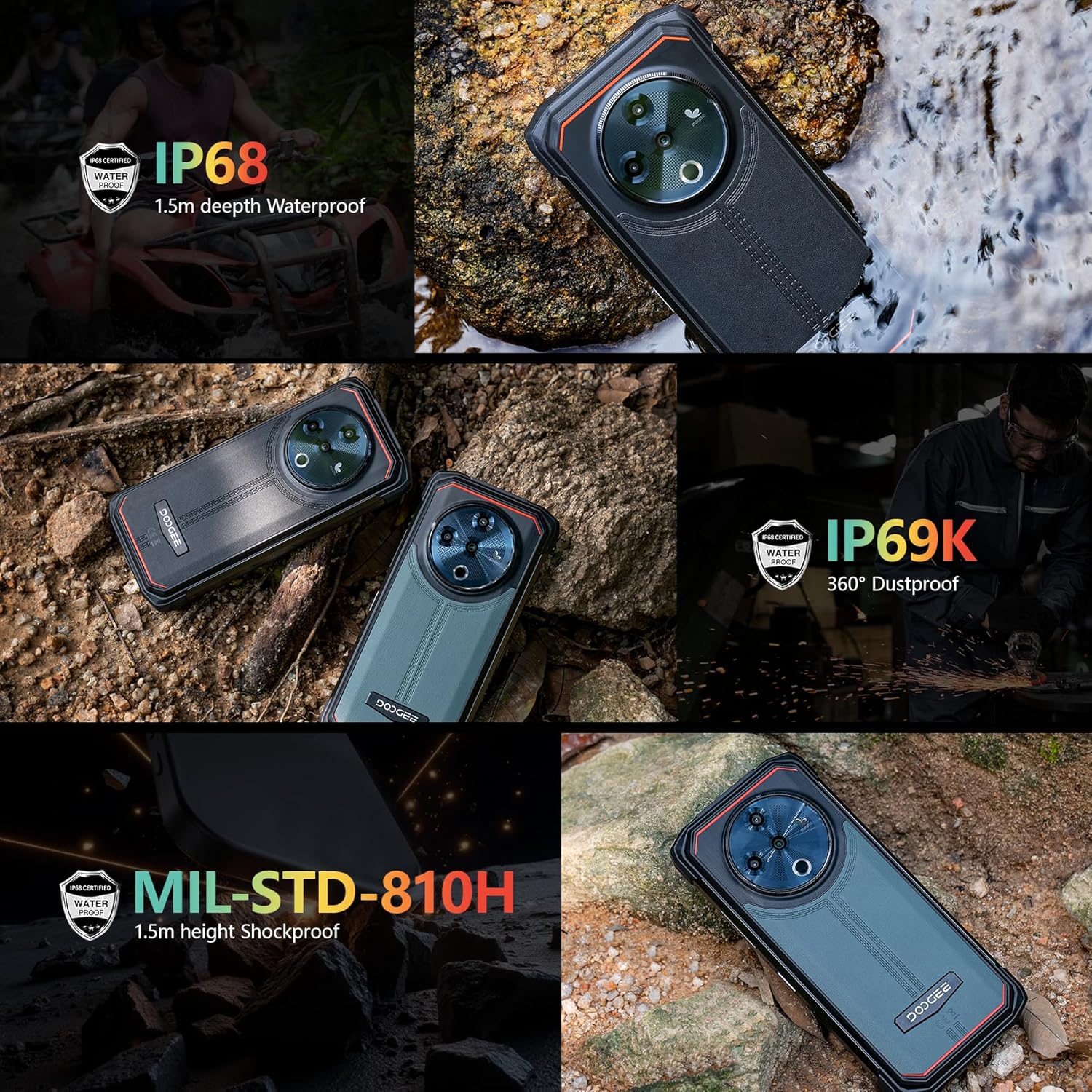
Figure 13: The phone demonstrating its IP68 waterproof, IP69K dustproof, and MIL-STD-810H shockproof capabilities in various environments.
To maintain the phone's ruggedness, ensure all port covers are securely closed before exposing the device to water or dust. Avoid intentional drops or extreme impacts beyond the certified limits.
5. Řešení problémů
5.1 Běžné problémy a řešení
| Problém | Možná příčina | Řešení |
|---|---|---|
| Telefon se nezapíná | Vybitá baterie, pád softwaru | Nabíjejte telefon alespoň 30 minut. Stiskněte a podržte tlačítko napájení po dobu 10–15 sekund pro vynucení restartu. |
| Slabý signál sítě | Out of coverage, incorrect SIM installation, incompatible frequency band | Move to an area with better coverage. Reinstall SIM card. Verify network compatibility with your local carrier (refer to specifications). |
| Aplikace pády/pomalý výkon | Too many apps running, low storage, software bug | Close background apps. Clear app cache. Free up storage space. Restart the phone. Update apps and system software. |
| Pomalé nebo žádné nabíjení | Faulty cable/adapter, dirty charging port | Use the original 33W charger and cable. Clean the charging port gently. Ensure port cover is fully open during charging. |
5.2 Kompatibilita se sítí
Před nákupemasing or if experiencing network issues, please verify that your local carrier's frequency bands are supported by the DOOGEE Fire 6 Power. The supported bands are:
- GSM: B2/3/5/8
- WCDMA: B1/2/4/5/8
- TDD: B34/38/39/40/41
- FDD: 1/2/3/4/5/7/8/18/19/20/25/26/28AB/66
6. Technické specifikace
| Funkce | Specifikace |
|---|---|
| Značka | DOOGEE |
| Číslo modelu | Fire 6 Power |
| Operační systém | Android 14 |
| Velikost displeje | 6.56 palce |
| Rozlišení displeje | 720 x 1612 |
| Velikost nainstalované paměti RAM | 20 GB (8 GB fyzického + 12 GB virtuálního) |
| Kapacita paměti | 256 GB (rozšiřitelné až na 1 TB pomocí TF karty) |
| Výkon baterie | 15500 XNUMX mAh |
| Rychlost nabíjení | Rychlé nabíjení 33W |
| Hlavní fotoaparát | 50MP AI fotoaparát |
| Přední kamera | 8 MP |
| Makro fotoaparát | 2 MP |
| Jas svítilny | 120LM (max) |
| Voděodolnost | IP68 |
| Odolnost proti prachu | IP69K |
| Odolnost proti otřesům | MIL-STD-810H |
| Bezdrátový nosič | Odemčený |
| Buněčná technologie | 4G LTE |
| Technologie připojení | LTE, Wi-Fi, Bluetooth 5.0, NFC, GPS/GLONASS/Beidou/Galileo |
| Hmotnost položky | 1.55 libry |
| Rozměry balení | 7.61 x 4.07 x 2.5 palce |
7. Záruka a podpora
For warranty information and technical support, please refer to the warranty card included in your product package or visit the official DOOGEE webUschovejte si doklad o koupi pro případné reklamace.
For further assistance, you may contact DOOGEE customer service through their official channels.