
Zavedení
The Kisonli S9 Portable Bluetooth Speaker delivers impressive sound quality in a compact design, suitable for various environments. Featuring a powerful 5W output and an internal magnetic horn, this speaker produces clear and dynamic audio. Its 1200mAh battery provides 3-6 hours of playback, making it ideal for outdoor activities, gatherings, or personal listening. The S9 supports multiple playback options, including Bluetooth, USB, TF card, and AUX, offering versatile listening choices. Simple controls allow for easy mode switching, track selection, and volume adjustment. Small and easy to carry, the S9 is a convenient option for music enthusiasts on the go.
Konec produktuview
Familiarize yourself with the Kisonli S9 speaker's components and controls.
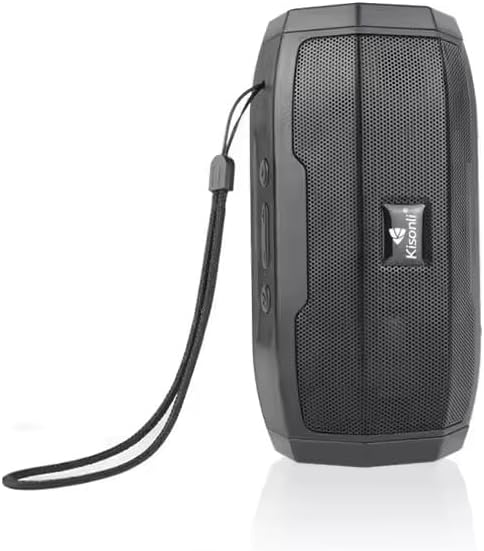
Obrázek 1: Přední view of the Kisonli S9 portable Bluetooth speaker, black color, with the Kisonli logo visible on the speaker grille. A wrist strap is attached to the side.
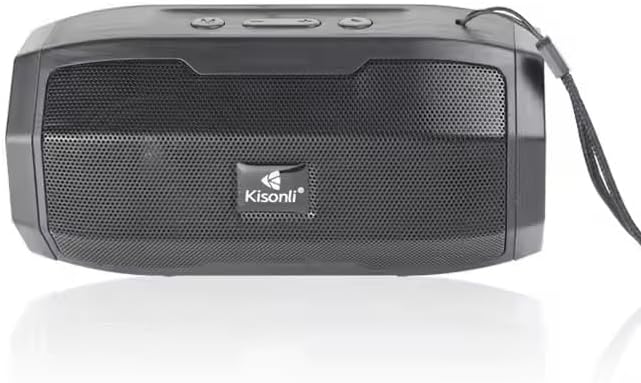
Obrázek 2: Shora dolů view of the Kisonli S9 speaker's control panel and ports, with labels indicating functions such as power switch, charging port, USB port, TF card slot, AUX input, and control buttons for volume, track, and mode.
Ovládací funkce:
- Přepínač ON/OFF: Located at the back, slides to power the speaker on or off.
- Battery Charging DC-5V Port: Micro USB port pro nabíjení reproduktoru.
- U Disk Playback / Intelligent Mobile Charging Interface: USB-A port for playing music from a USB drive or potentially charging a mobile device (check product specifications for charging capability).
- Přehrávání TF karty: Slot pro přehrávání hudby přímo z TF (MicroSD) karty.
- AUX and Audio Antenna: 3.5mm audio input for connecting external devices via an AUX cable. This port may also function as an antenna for FM radio if supported.
- Tlačítko Přehrát/Pozastavit: Ovládá přehrávání hudby.
- Tlačítko Další skladba / Zvýšení hlasitosti: Krátkým stisknutím přejdete na další skladbu, dlouhým stisknutím zvýšíte hlasitost.
- Last Song / Volume Down Button: Krátkým stisknutím přejdete na předchozí skladbu, dlouhým stisknutím snížíte hlasitost.
- BT/USB/AUX Modes Switch: Button to cycle through different playback modes (Bluetooth, USB, AUX, TF card).
Nastavení
1. Nabíjení reproduktoru
- Connect the provided USB charging cable to the DC-5V charging port on the speaker.
- Connect the other end of the USB cable to a standard USB power adapter (5V DC) or a computer's USB port.
- Kontrolka nabíjení se rozsvítí (barva se může lišit), což znamená, že se reproduktor nabíjí.
- Once fully charged, the indicator light may change color or turn off. A full charge typically takes a few hours.
2. Zapnutí/vypnutí
- Pro zapnutí přepněte vypínač do polohy „ON“. Uslyšíte zvukový signál.
- Chcete-li přístroj vypnout, přepněte vypínač do polohy „VYPNUTO“.
Návod k obsluze
1. Režim Bluetooth
- Zapněte reproduktor. Automaticky se přepne do režimu párování Bluetooth, což bude signalizováno blikající LED kontrolkou a zvukovým signálem.
- Na svém mobilním zařízení (chytrý telefon, tablet, počítač) povolte Bluetooth a vyhledejte dostupná zařízení.
- V seznamu zařízení vyberte „S9“.
- Po spárování přestane LED kontrolka blikat a uslyšíte potvrzovací zvuk.
- Nyní můžete přehrávat zvuk ze zařízení přes reproduktor.
2. USB Playback Mode
- Vložte USB flash disk s audio soubory ve formátu MP3 filedo portu USB.
- Press the Mode Switch button (BT/USB/AUX) until the speaker enters USB mode. It should automatically start playing music.
3. Režim přehrávání z TF karty
- Vložte kartu TF (MicroSD) s audio soubory ve formátu MP3 filedo slotu pro TF kartu.
- Press the Mode Switch button (BT/USB/AUX) until the speaker enters TF card mode. It should automatically start playing music.
4. Režim AUX vstupu
- Připojte jeden konec 3.5mm audio kabelu (není součástí balení) k portu AUX na reproduktoru.
- Připojte druhý konec audio kabelu do konektoru pro sluchátka nebo audio výstupu vašeho externího zařízení.
- Press the Mode Switch button (BT/USB/AUX) until the speaker enters AUX mode.
- Play audio from your external device. Volume control may need to be adjusted on both the speaker and the external device.
5. Ovládání hlasitosti a skladeb
- Zvýšit hlasitost: Long press the 'Next Song / Volume Up' button.
- Snížit hlasitost: Long press the 'Last Song / Volume Down' button.
- Další skladba: Short press the 'Next Song / Volume Up' button.
- Předchozí skladba: Short press the 'Last Song / Volume Down' button.
- Přehrát/pozastavit: Krátce stiskněte tlačítko „Přehrát/Pozastavit“.
Údržba
- Čištění: K čištění vnější strany reproduktoru používejte měkký, suchý hadřík. Nepoužívejte abrazivní čisticí prostředky ani rozpouštědla.
- Skladování: Reproduktor skladujte na chladném a suchém místě mimo dosah přímého slunečního záření a extrémních teplot.
- Péče o baterie: Chcete-li prodloužit životnost baterie, vyvarujte se častého úplného vybíjení. Reproduktor pravidelně nabíjejte, i když jej nepoužíváte, aby se baterie udržela v dobrém stavu.
- Voděodolnost: Tento reproduktor není vodotěsný. Zabraňte vystavení vodě nebo nadměrné vlhkosti.
Odstraňování problémů
| Problém | Možná příčina | Řešení |
|---|---|---|
| Reproduktor se nezapne. | Baterie je vybitá. | Nabíjejte reproduktor alespoň 2–3 hodiny. |
| Žádný zvuk. | Hlasitost je příliš nízká nebo ztlumená. Je vybrán nesprávný režim. | Increase volume on both speaker and connected device. Ensure correct playback mode (Bluetooth, USB, TF, AUX) is selected. |
| Nelze spárovat přes Bluetooth. | Speaker is not in pairing mode. Device Bluetooth is off. Too far from speaker. | Ensure speaker is in Bluetooth mode and flashing. Turn Bluetooth off and on again on your device. Move device closer to the speaker (within 10 meters). |
| USB/TF karta nepřehrává. | Nesprávný file formát. Karta/jednotka není správně vložena. | Zajistěte zvuk files are in MP3 format. Reinsert the USB drive or TF card firmly. Ensure speaker is in the correct mode. |
Specifikace
| Funkce | Specifikace |
|---|---|
| Název modelu | S9 |
| Výstupní výkon | 5W |
| Kapacita baterie | 1200 XNUMX mAh |
| Provozní svtage | DC 5V |
| Rozměry (D x Š x V) | 153 x 75 x 75 mm |
| Možnosti přehrávání | Bluetooth, USB (U disk), TF card, AUX |
| Životnost baterie | 3-6 hours (depending on volume and usage) |
| Barva | Černý |
| Hmotnost položky | 100 gramů |
| Zahrnuté komponenty | Rychlý průvodce |
| Země původu | Čína |
Záruka a podpora
This product is provided without an explicit warranty as per the product specifications. For any operational issues or questions not covered in this manual, please refer to the retailer or point of purchase for further assistance.