
Ergear EGESD7W-CA
ErGear Electric Standing Desk User Manual
Model: EGESD7W-CA | Brand: ErGear
Zavedení
Thank you for choosing the ErGear Electric Standing Desk. This manual provides detailed instructions for assembly, operation, maintenance, and troubleshooting to ensure optimal performance and longevity of your desk. Please read this manual thoroughly before installation and use, and retain it for future reference.
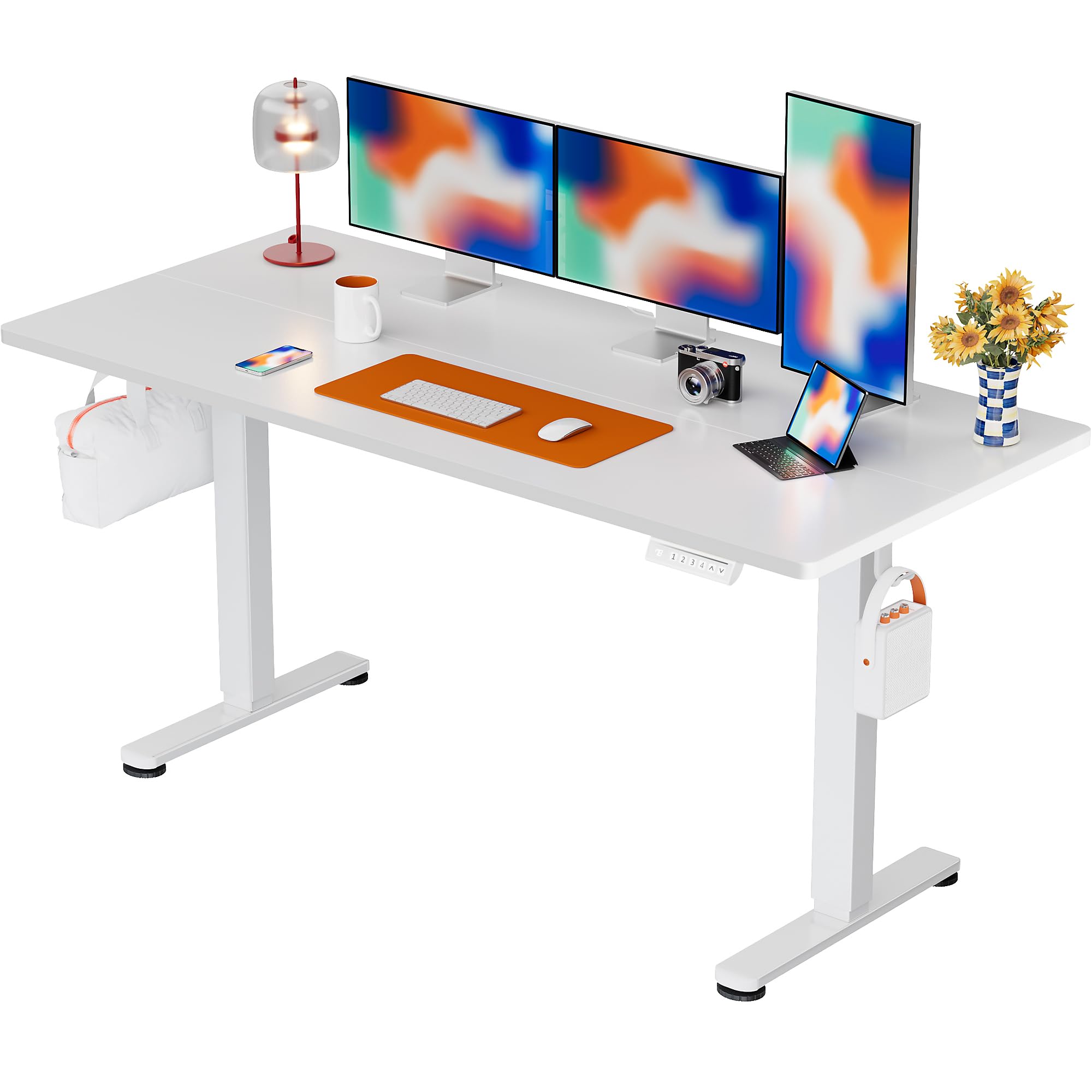
The ErGear Electric Standing Desk, 63x28 inch, in a white finish, featuring a spacious desktop and electric height adjustment capabilities.
Bezpečnostní informace
- Před montáží se ujistěte, že jsou všechny součásti přítomny a nepoškozené. Nepoužívejte, pokud některé součásti chybí nebo jsou vadné.
- Během práce držte děti a domácí zvířata v dostatečné vzdálenosti od stolu, abyste předešli zranění.
- Do not overload the desk. The maximum weight recommendation is 176 pounds (80 kg).
- Ensure the power cord is not pinched or damaged. Connect to a grounded outlet.
- Neumisťujte tekutiny přímo na ovládací panel nebo do blízkosti elektrických součástí.
- Pravidelně kontrolujte všechny šrouby a spoje, abyste se ujistili, že jsou pevné a bezpečné.
- Tento stůl je určen pouze pro vnitřní použití.
Obsah balení
Před zahájením montáže se prosím ujistěte, že balení obsahuje všechny následující komponenty:
- Desktop Boards ×2
- Leg with Motor ×1
- Noha ×1
- Leg Bases ×2
- Crossbar & Transmission Rod
- Controller & Power Cable
- Veškeré potřebné montážní nářadí a hardware
Montážní návod
Follow these steps carefully to assemble your ErGear Electric Standing Desk. An assembly video is also provided for visual guidance.
Official ErGear Electric Standing Desk Assembly Video. This video demonstrates the step-by-step process for setting up your desk.
Step 1: Assemble the Desk Legs
Attach the leg bases to the desk legs using the provided screws. Ensure they are securely fastened.

The stable T-shaped desk legs provide a sturdy foundation for the electric standing desk.
Step 2: Attach Side Plates and Transmission Rod
Connect the side plates to the desk legs. Insert the transmission rod fully into the left leg and secure it. If the two desk legs are not at the same height, insert the rod into the left leg and turn to adjust.
Krok 3: Sestavení a připevnění pracovní desky
Place the two desktop boards together, aligning the dowels. Secure the desktop to the assembled frame using the provided screws and brackets. Ensure all connections are tight.
Krok 4: Připojte kabely
Connect the motor and control panel cables to the main control box. Ensure all connections are firm and correctly oriented.
Step 5: Install Cable Hole Covers
Place the cable hole covers into the designated openings on the desktop to manage wires neatly.

Ergonomic guidelines for using the standing desk, showing optimal monitor and arm positions for both sitting and standing.
Návod k obsluze
Konec ovládacího paneluview
The desk features an intuitive control panel with height adjustment buttons and memory presets.
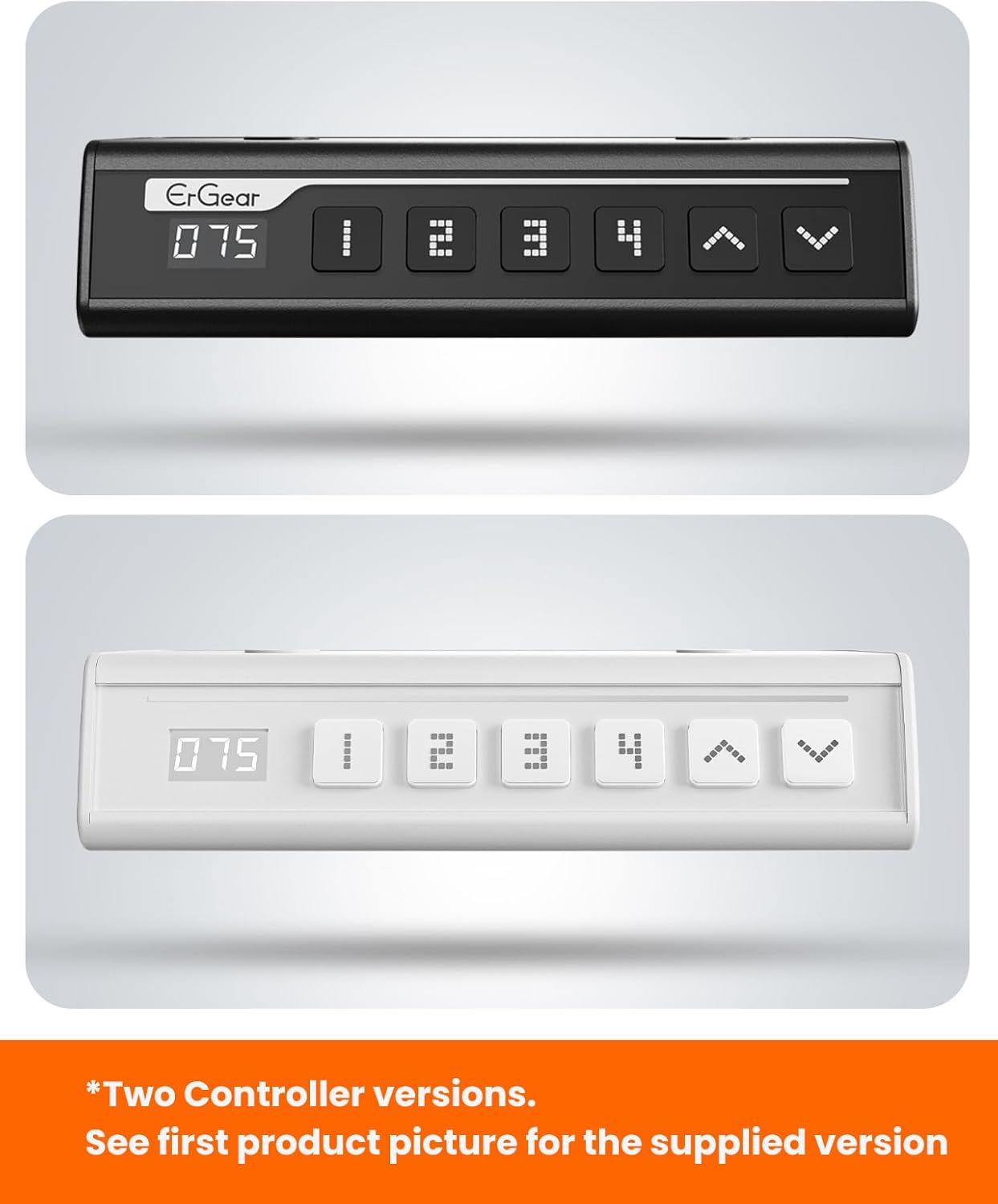
The ErGear control panel, available in two versions, features a digital height display and four programmable memory settings.
Nastavení výšky
- Použijte Nahoru (^) a Dolů (v) arrows to smoothly adjust the desk height between 28.35 inches and 46.46 inches.
- Uvolněte tlačítko v požadované výšce.
Předvolby paměti
The desk allows you to save up to 4 preferred height settings.
- Nastavte stůl do požadované výšky pomocí šipek nahoru/dolů.
- Stiskněte tlačítko M button (or equivalent memory set button). The display will flash.
- Stiskněte jedno z očíslovaných tlačítek předvoleb (1, 2, 3 nebo 4) do 3 sekund pro uložení aktuální výšky do dané předvolby.
- Chcete-li vyvolat uloženou výšku, jednoduše stiskněte odpovídající očíslované tlačítko předvolby. Stůl se automaticky přesune do uložené polohy.
This video demonstrates the smooth and quiet operation of the ErGear Electric Standing Desk, showcasing its height adjustment and memory preset features.
Údržba
- Čištění: Otřete pracovní plochu a rám měkkým hadříkemamp hadříkem. Nepoužívejte agresivní chemikálie ani abrazivní čisticí prostředky.
- Inspekce: Pravidelně kontrolujte utažení všech šroubů a spojů. V případě potřeby je dotáhněte.
- Správa kabelů: Ensure cables are neatly organized and not tangled or pinched to prevent damage.
Odstraňování problémů
If you encounter any issues with your ErGear Electric Standing Desk, please refer to the following common problems and solutions:
| Problém | Možná příčina | Řešení |
|---|---|---|
| Stůl se nehýbe | Power cable disconnected, motor error, overloaded desk. | Check power connections. Unplug for 30 seconds and plug back in. Reduce weight on the desk. |
| Nerovnoměrná výška | Transmission rod not fully inserted or adjusted. | Refer to Step 2 of assembly to ensure the transmission rod is correctly installed and adjusted. |
| Hluk během provozu | Normal operation sound, loose screws. | A slight motor sound is normal. Check and tighten any loose screws on the frame. |
| Předvolby paměti nefungují | Nesprávný postup ukládání. | Follow the memory preset instructions carefully (press M, then the number within 3 seconds). |
Specifikace
| Funkce | Detail |
|---|---|
| Značka | ErGear |
| Číslo modelu | EGESD7W-CA |
| Design stolu | Stojící stůl |
| Tvar | Obdélníkový |
| Rozměry produktu (D x Š x V) | 71.1 H x 160 Š x 118 V centimetrů |
| Velikost | 63 * 28 palce |
| Barva | Bílý |
| Minimální výška | 28.35 palce |
| Maximální výška | 46.46 palce |
| Tloušťka desky stolu | 1.5 centimetrů |
| Základní materiál | Legovaná ocel |
| Typ horního materiálu | Engineered Wood (Walnut Wood finish) |
| Speciální funkce | Adjustable Height, Electric, Ergonomic |
| Doporučená maximální hmotnost | 176 liber (80 kg) |
| Montáž Vyžadována | Ano (včetně veškerého montážního nářadí) |
Záruka a podpora
ErGear is committed to providing high-quality products and customer satisfaction. This product comes with:
- Dvouletá ochrana on the desktop and desk frame.
- Dvouletá ochrana on motors and electrical components.
For any questions, concerns, or warranty claims, please contact ErGear customer support. You can typically find contact information on the product packaging or the official ErGear website. Please have your model number (EGESD7W-CA) and purchase details ready when contacting support.

The ErGear Electric Standing Desk seamlessly integrates into various home office environments.
Ask a question about this manual
Ask about setup, troubleshooting, compatibility, parts, safety, or missing instructions. Manuals+ will review the question and use this page’s manual context to help answer it.