
1. Konec produktuview
The COUGAR FV150 RGB is a mid-tower gaming case designed for high-performance PC builds. It features a dual-chamber design, separating the main components from cables, storage drives, and the power supply unit (PSU) for a clean aesthetic and improved airflow. The case supports various motherboard form factors and offers extensive cooling options, including pre-installed ARGB fans.
Klíčové vlastnosti:
- Dvoukomorový design: Poskytuje jasné view of your build through glass panels while concealing cables and other components.
- Podpora GPU: Accommodates graphics cards up to 400mm in length, with options for vertical GPU orientation.
- Kompatibilita základní desky: Supports Mini-ITX, Micro-ATX, and ATX motherboards.
- Engineered Bottom Fan Bracket: Simplifies fan installation by allowing attachment prior to setup.
- Extensive Fan & Water Cooling Support: Multiple fan mounting points and radiator support up to 360mm.
- Seamless RGB Synchronization: Integrated universal fan hub for easy ARGB lighting control.
- Modern I/O Panel: Includes 2 x USB Type-A and 1 x USB 3.2 Type-C ports.
- Flexibilní úložiště: Supports combinations of 3.5" HDDs and 2.5" SSDs.
- Magnetické prachové filtry: Located on the top and right side for easy maintenance.

Obrázek 1.1: Úhlové view of the COUGAR FV150 RGB case, highlighting its dual-chamber design and pre-installed ARGB fans.
2. Nastavení a instalace
Follow these steps for proper installation of your PC components into the COUGAR FV150 RGB case.
2.1 Vybalení a počáteční kontrola
- Opatrně vyjměte pouzdro z obalu.
- Zkontrolujte pouzdro, zda během přepravy nevykazuje známky poškození.
- Remove the tempered glass side panel by unscrewing the thumb screws, if present, or by releasinzápadkový mechanismus.
2.2 Instalace základní desky
- Ensure the correct standoffs are installed for your motherboard form factor (Mini-ITX, Micro-ATX, or ATX).
- Vložte kryt I/O do zadního otvoru skříně.
- Opatrně zarovnejte základní desku s distančními sloupky a krytem I/O a poté ji zajistěte šrouby.
2.3 Instalace jednotky napájecího zdroje (PSU)
- The FV150 RGB supports bottom-mount PSUs.
- Slide the PSU into its designated compartment in the secondary chamber from the rear of the case.
- Secure the PSU with screws from the exterior rear of the case.
2.4 Instalace úložného disku
- Locate the drive bays in the secondary chamber.
- For 3.5" HDDs, slide the drive into the appropriate tray and secure it.
- For 2.5" SSDs, mount them to the designated brackets or trays.
2.5 Instalace grafické karty (GPU)
- Odstraňte potřebné kryty rozšiřujících slotů na zadní straně skříně.
- Vložte grafickou kartu (GPU) do slotu PCIe na základní desce a zajistěte ji šrouby.
- The case supports GPUs up to 400mm. For vertical GPU mounting, a separate riser cable and bracket (not included) are required.
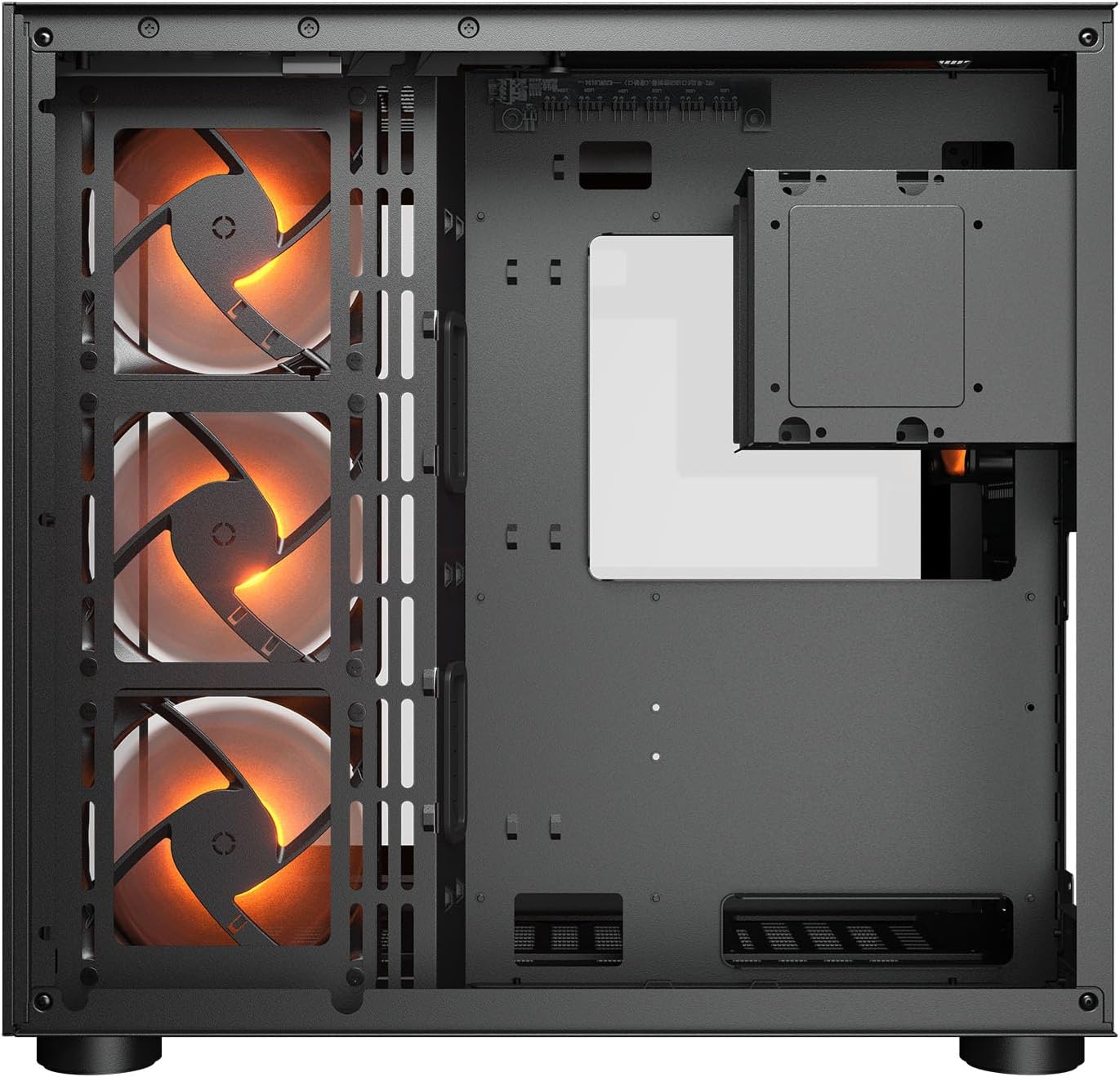
Obrázek 2.1: Vnitřní view illustrating the main chamber for motherboard and GPU installation, with pre-installed side fans.
2.6 Instalace ventilátoru a chladiče
- The case comes with 3 x 120mm ARGB side fans and 1 x 120mm ARGB rear fan pre-installed.
- Additional fans can be installed at the top (3 x 120mm or 2 x 140mm) and bottom (3 x 120mm or 2 x 140mm).
- Utilize the engineered bottom fan bracket for easier installation of bottom fans.
- For water cooling, radiators up to 360mm can be mounted on the top and 240mm on the side.

Image 2.2: Top internal view, showing potential mounting locations for additional cooling fans or radiators.
2.7 Správa kabelů
- Route all power and data cables through the cutouts to the secondary chamber.
- Využijte ample space and tie-down points in the secondary chamber to organize cables for optimal airflow and a clean appearance.
2.8 Connecting Front I/O Panel
- Connect the front panel cables (USB 3.2 Type-C, USB Type-A, audio, power, reset, LED) to the corresponding headers on your motherboard.
3. Návod k obsluze
Jakmile jsou všechny komponenty nainstalovány a připojeny, můžete systém zapnout.
3.1 Zapnutí
- Ujistěte se, že je vypínač zdroje napájení v poloze „ON“.
- Stiskněte tlačítko napájení na předním I/O panelu skříně.
3.2 Ovládání RGB osvětlení
- The integrated universal fan hub allows for easy synchronization of ARGB lighting.
- Connect the hub to your motherboard's ARGB header (5V 3-pin) to control lighting effects via motherboard software.
- Alternatively, use the dedicated RGB button on the front I/O panel to cycle through pre-set lighting modes if not connected to a motherboard header.
4. Údržba
Pravidelná údržba pomáhá zajistit optimální výkon a dlouhou životnost komponent vašeho počítače.
4.1 Čištění prachového filtru
- The COUGAR FV150 RGB features magnetic dust filters on the top and right side, along with a ventilated bottom cover.
- Gently remove the magnetic dust filters.
- Clean them using compressed air or by rinsing with water (ensure they are completely dry before reattaching).
- Periodically clean the ventilated bottom cover.
4.2 Obecné čištění
- Use a soft, dry cloth to wipe down the exterior surfaces of the case.
- For tempered glass panels, use a glass cleaner and a microfiber cloth to avoid streaks.
- Vyhněte se používání agresivních chemikálií nebo abrazivních materiálů, které by mohly poškodit povrchovou úpravu.
5. Řešení problémů
Tato část obsahuje řešení běžných problémů, se kterými se můžete setkat.
5.1 Systém se nezapíná
- Check PSU: Ensure the power supply unit is properly connected to the wall outlet and the PSU switch is in the 'ON' position.
- Připojení předního panelu: Ověřte, zda je kabel tlačítka napájení ze skříně správně připojen k konektoru na předním panelu základní desky.
- Internal Power Cables: Confirm all necessary power cables (24-pin ATX, 8-pin CPU, PCIe for GPU) are securely connected to the motherboard and components.
5.2 Ventilátory se netočí nebo RGB nefunguje
- Připojení ventilátoru: Ensure all fan power cables are securely connected to the fan hub or motherboard headers.
- RGB Connections: Verify the ARGB cables are correctly connected to the fan hub and the hub is connected to a 5V 3-pin ARGB header on the motherboard.
- Software/Button: If connected to the motherboard, check your motherboard's RGB control software. If not, try pressing the RGB button on the case's I/O panel to cycle modes.
5.3 Nefunkční USB porty
- Internal USB Headers: Confirm that the USB 3.0 and USB Type-C cables from the front I/O panel are correctly plugged into the corresponding headers on your motherboard.
- Ovladače základní desky: Ensure you have installed the latest chipset and USB drivers for your motherboard.
6. Specifikace
Detailed technical specifications for the COUGAR FV150 RGB Gaming Case.

Image 6.1: Case dimensions for planning your setup.
| Funkce | Specifikace |
|---|---|
| Název produktu | FV150 RGB |
| Formulář případu | Střední věž |
| Kompatibilita základní desky | Mini-ITX, Micro-ATX, ATX |
| Rozměry (Š x V x H) | 300 x 400 x 415 mm (11.8" x 15.7" x 16.3") |
| I/O panel | USB 3.2 Gen 2 Type-C x 1, USB-A 3.0 x 2, 4 Pole Headset Audio Jack, RGB Button |
| 3.5" Drive Bay | 2 |
| 2.5" Drive Bay | 1+1 (converted from 3.5" drive bays) |
| Rozšiřující sloty | 7+3 |
| Vertikální podpora GPU | Ano |
| Cooling Fan Support (Top) | 3 x 120 mm nebo 2 x 140 mm |
| Cooling Fan Support (Bottom) | 3 x 120 mm nebo 2 x 140 mm |
| Cooling Fan Support (Side) | 3 x 120 mm |
| Cooling Fan Support (Rear) | 1 x 120 mm |
| Pre-installed Fans (Side) | 3 x 120mm ARGB (Reversed) |
| Pre-installed Fans (Rear) | 1 x 120mm ARGB |
| Pre-installed Fan Speed | 1000 (± 10%) ot / min |
| Pre-installed Fan Connector | 5V 3 Pin (ARGB) / 3 Pin (Fan) |
| Maximální počet fanoušků | 10 |
| Water Cooling Support (Top) | 360mm / 280mm / 240mm |
| Water Cooling Support (Side) | 240 mm / 120 mm |
| Water Cooling Support (Rear) | 120 mm |
| RGB Hub Sync with M/B | Ano |
| Max. Délka grafické karty | 400 mm (15.7 palce) |
| Max. Výška chladiče CPU | 180 mm (7.1 palce) |
| Max. Délka PSU | 210 mm (8.3 palce) |
| Materiál | Kov |
| Hmotnost položky | 6.83 kg |
7. Informace o záruce
COUGAR products are manufactured to the highest quality standards. This product is covered by a manufacturer's warranty against defects in materials and workmanship. The specific duration and terms of the warranty may vary by region and retailer. Please retain your proof of purchase for warranty claims.
For detailed warranty information, please refer to the official COUGAR webwebu nebo se obraťte na svého místního prodejce.
8. Podpora
If you encounter any issues or have questions regarding your COUGAR FV150 RGB Gaming Case that are not covered in this manual, please contact COUGAR customer support.
- Navštivte oficiální web COUGAR webweb s nejčastějšími dotazy, ovladači ke stažení a kontaktními informacemi podpory.
- Contact your retailer for assistance with product returns or exchanges.