
1. Úvod
Welcome to the user manual for your Emerson CKSS7071 Sunrise Smartset Alarm Clock Radio. This device is designed to enhance your daily routine with its unique features, including a sunrise simulation, soothing sound options, Bluetooth connectivity, and an 8-color dimmable LED display. Please read this manual thoroughly to understand the full functionality and ensure proper use and care of your new alarm clock radio.
1 video: Nadview of the Emerson CKSS7071 Sunrise Smartset Alarm Clock Radio. This video demonstrates the key features and design of the product.
2. Důležité bezpečnostní informace
- Před použitím spotřebiče si přečtěte všechny pokyny.
- Uschovejte si tyto pokyny pro budoucí použití.
- Nepoužívejte toto zařízení v blízkosti vody.
- Čistěte pouze suchým hadříkem.
- Nezakrývejte žádné větrací otvory. Nainstalujte v souladu s pokyny výrobce.
- Neinstalujte v blízkosti zdrojů tepla, jako jsou radiátory, tepelné regulátory, kamna nebo jiná zařízení (včetně amplifikátory), které produkují teplo.
- Chraňte napájecí kabel před šlapáním nebo přiskřípnutím, zejména u zástrček, zásuvek a v místě, kde vychází z přístroje.
- Používejte pouze nástavce/příslušenství určené výrobcem.
- Odpojte toto zařízení během bouřky s blesky nebo když se delší dobu nepoužívá.
- Veškeré opravy svěřte kvalifikovanému servisnímu personálu. Servis je nutný, pokud bylo zařízení jakýmkoli způsobem poškozeno, například je poškozen napájecí kabel nebo zástrčka, pokud do zařízení vnikla tekutina nebo do něj spadly předměty, zařízení bylo vystaveno dešti nebo vlhkosti, nefunguje normálně. , nebo byla vypuštěna.
3. Obsah balení
Po otevření balení ověřte, zda jsou všechny položky přítomny:
- Emerson CKSS7071 Sunrise Smartset Alarm Clock Radio
- Napájecí adaptér
- Uživatelská příručka
4. Konec produktuview
4.1 Přední View

Obrázek 1: Přední view of the alarm clock, featuring the digital time display and the sunrise simulation light panel.
The front of the unit features the main 1.2-inch LED time display and the large circular light panel for sunrise simulation and ambient lighting. Indicators for AM/PM, Alarm 1/2, and Bluetooth status are also visible.
4.2 Strana View (Řízení)
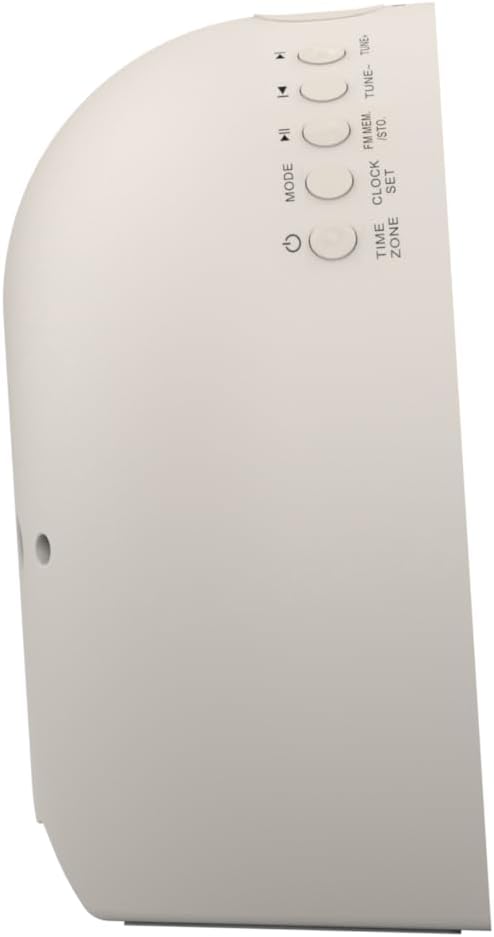
Obrázek 2: Strana view of the alarm clock, highlighting the control buttons for various functions.
The side panel houses the primary control buttons, including Power, Mode, Clock Set, Time Zone, Tune/Skip, and Volume controls. These buttons are used for setting time, alarms, and navigating audio functions.
4.3 Zadní View

Obrázek 3: Zadní view of the alarm clock, showing the speaker grille and power connection port.
The rear of the unit features the main speaker grille and the power input port for connecting the AC adapter.
5. Nastavení
5.1 Připojení napájení
- Plug the AC power adapter into the DC IN jack located on the back of the unit.
- Zapojte druhý konec adaptéru do standardní zásuvky ve zdi (AC 100–240 V, 50/60 Hz).
- Jednotka se automaticky zapne.
5.2 SmartSet Automatic Time Setting
The SmartSet system automatically sets the correct time and date as soon as you plug in the unit. It also maintains time and alarm settings during power disruptions or outages, provided the button cell battery is installed.
5.3 Instalace záložní baterie
A button cell battery (CR2032, included) is required for battery backup. This ensures that time and alarm settings are retained during a power outage.
- Vyhledejte přihrádku na baterie na spodní straně jednotky.
- Otevřete kryt bateriového prostoru.
- Insert one CR2032 button cell battery, ensuring the correct polarity (+/-).
- Bezpečně zavřete kryt bateriového prostoru.
6. Návod k obsluze
6.1 Setting the Clock Manually
- Stiskněte a podržte NASTAVENÍ HODIN knoflík. Začnou blikat číslice hodin.
- Použijte LADIT -/+ tlačítka pro nastavení hodiny. Stiskněte NASTAVENÍ HODIN potvrdit.
- Číslice minut budou blikat. Použijte LADIT -/+ pro nastavení minut. Stiskněte NASTAVENÍ HODIN potvrdit.
- Pokračujte v tomto postupu pro nastavení roku, měsíce a dne.
- Stiskněte NASTAVENÍ HODIN znovu pro ukončení režimu nastavení času.
6.2 Nastavení alarmů (Alarm 1 a Alarm 2)
The unit features dual alarms. Follow these steps for each alarm:
- Stiskněte a podržte POPLACH 1 or POPLACH 2 tlačítko. Číslice hodin budíku budou blikat.
- Použijte LADIT -/+ buttons to adjust the alarm hour. Press the respective POPLACH tlačítko pro potvrzení.
- Číslice minut budíku budou blikat. Použijte LADIT -/+ buttons to adjust the alarm minutes. Press the respective POPLACH tlačítko pro potvrzení.
- Select the alarm source (Buzzer, FM Radio, or Soothing Sound). Press the respective POPLACH tlačítko pro potvrzení.
- Upravte hlasitost budíku pomocí VOL -/+ buttons. Press the respective POPLACH tlačítko pro potvrzení.
- The alarm is now set. The alarm indicator (AL1 or AL2) will appear on the display.
6.3 Simulace východu slunce
The sunrise simulation feature gradually brightens the light panel before your set alarm time, mimicking a natural sunrise to gently wake you.
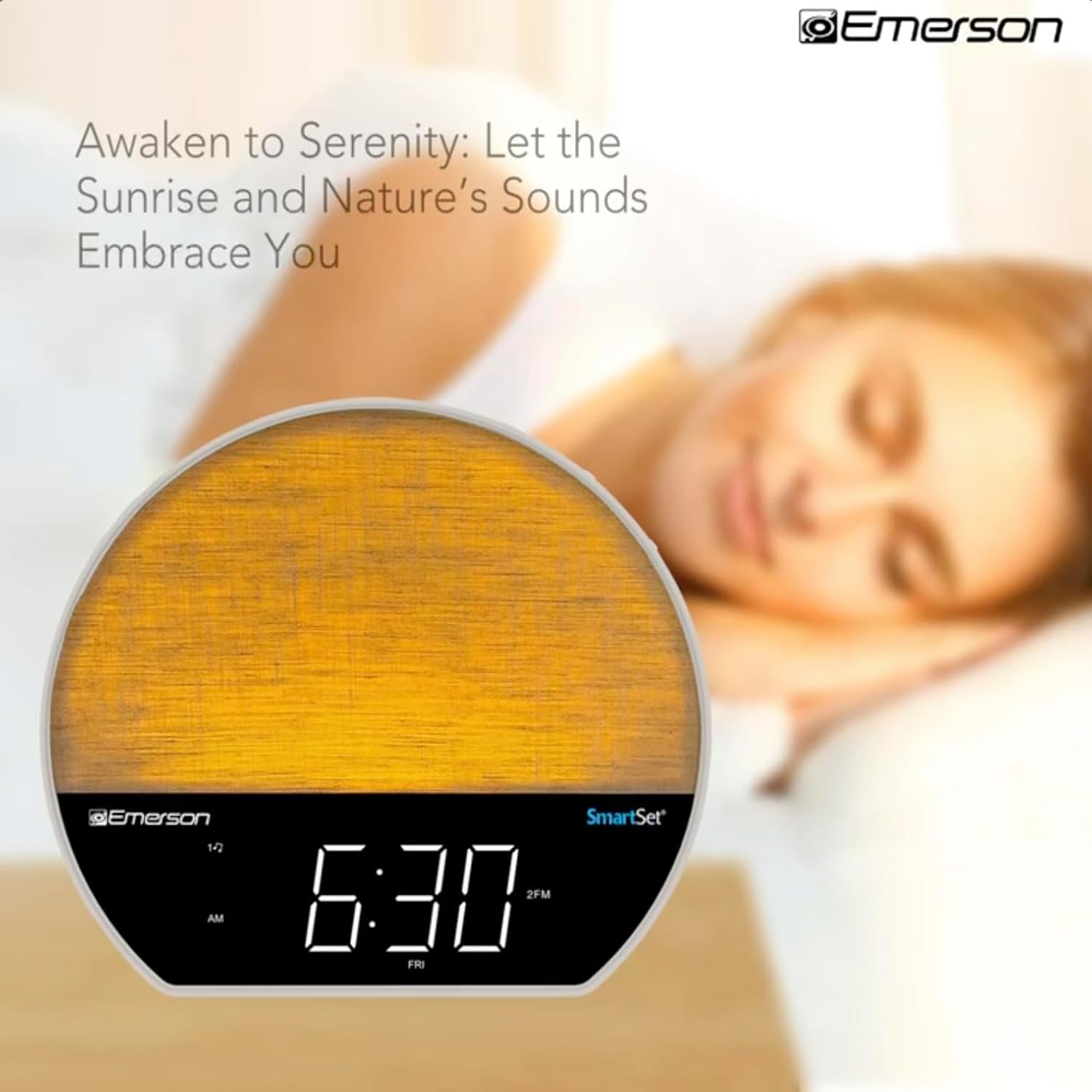
Obrázek 4: The alarm clock simulating a sunrise with a warm, increasinintenzita světla g.
To activate, ensure the sunrise option is selected during alarm setup. The light will begin to brighten 30 minutes before the alarm sounds.
6.4 Soothing Sounds and White Noise
The unit includes 6 soothing sounds and white noise to help with relaxation or waking up.
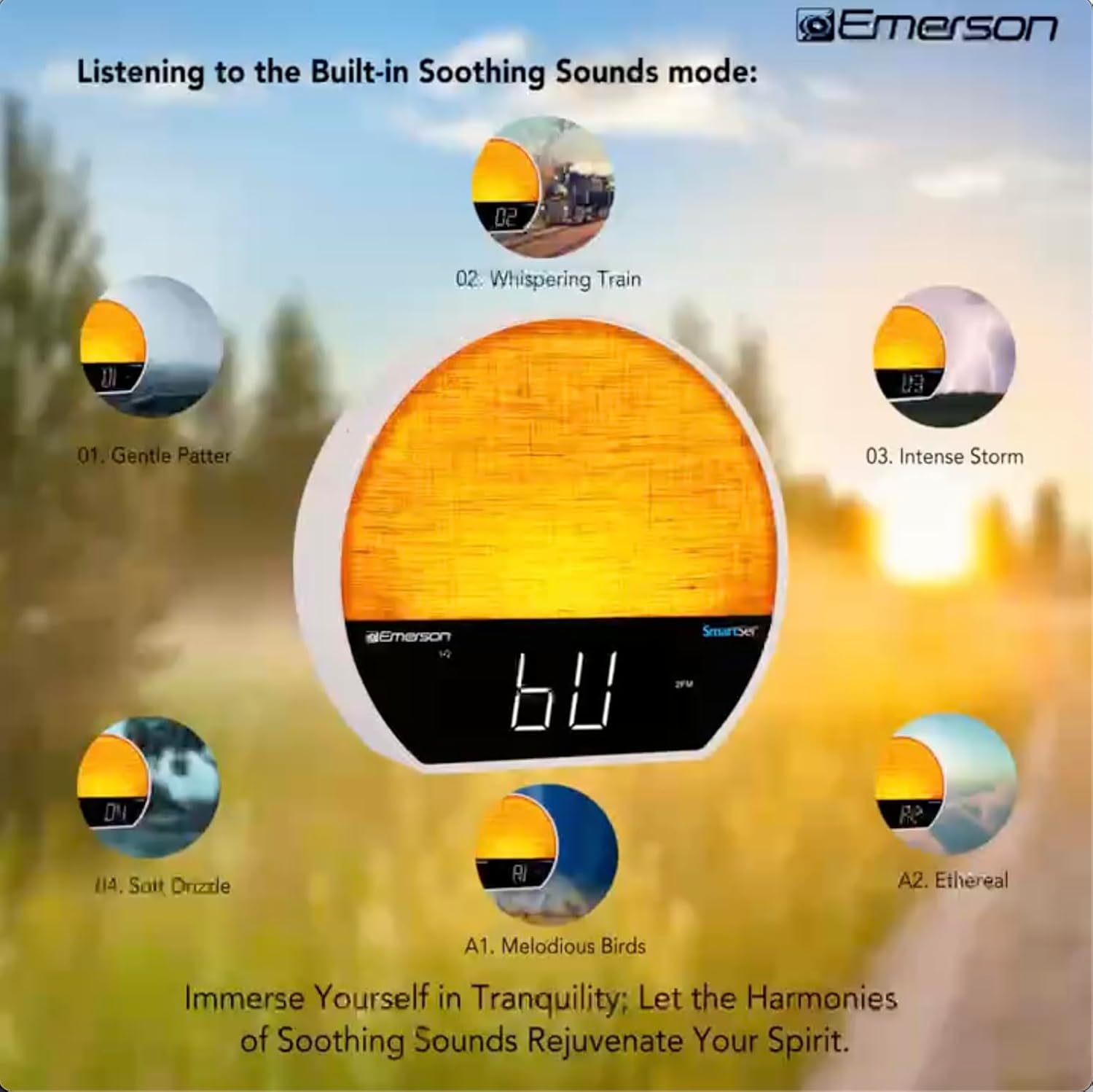
Obrázek 5: Visual representation of the six soothing sound modes available on the alarm clock.
- Stiskněte tlačítko MODE button repeatedly until the Soothing Sound mode is selected.
- Použijte LADIT -/+ buttons to cycle through the available sounds (e.g., Gentle Patter, Whispering Train, Intense Storm, Soft Drizzle, Melodious Birds, Ethereal, White Noise).
- Upravte hlasitost pomocí VOL -/+ tlačítka.
6.5 Funkce Bluetooth reproduktoru
Připojte svůj chytrý telefon nebo jiné zařízení s podporou Bluetooth pro bezdrátové streamování zvuku.

Obrázek 6: The alarm clock in Bluetooth mode, paired with a mobile device for audio streaming.
- Stiskněte tlačítko MODE button until 'BT' appears on the display, indicating Bluetooth mode.
- On your device, enable Bluetooth and search for 'Emerson CKSS7071'.
- Vyberte zařízení, které chcete spárovat. Po úspěšném spárování zazní potvrzovací tón.
- Nyní můžete přehrávat zvuk ze zařízení přes reproduktor budíku.
6.6 Provoz FM rádia
Nalaďte si své oblíbené FM rozhlasové stanice.
- Stiskněte tlačítko MODE tlačítko , dokud se na displeji nezobrazí „FM“.
- Stiskněte tlačítko LADIT -/+ buttons briefly to manually tune to a station.
- Stiskněte a podržte LADIT -/+ tlačítka pro automatické vyhledání další dostupné stanice.
- Chcete-li uložit stanici, stiskněte a podržte tlačítko FM MEM dokud nezačne blikat číslo předvolby. Použijte tlačítko LADIT -/+ vyberte číslo předvolby a poté stiskněte FM MEM znovu uložit.
6.7 LED Decor and Dimmer Control
Customize the ambient light with 8 different colors and adjust the brightness.

Obrázek 7: The alarm clock demonstrating its 8-color dimmable LED decor options.
- Stiskněte tlačítko SVĚTLO button to cycle through the 8 available colors or turn the light off.
- To adjust the brightness of the LED decor light, press and hold the SVĚTLO button. The brightness will cycle through 5 levels. Release the button at your desired brightness.
6.8 Display Dimmer Control
Adjust the brightness of the 1.2-inch LED time display.

Obrázek 8: The alarm clock illustrating the five distinct levels of display luminescence.
Stiskněte tlačítko DIMMER button (often combined with another function, refer to button labels) to cycle through 4 levels of display brightness (Bright, Moderate, Dim, Faint).
6.9 Časovač vypnutí
Set a timer for the audio to automatically turn off after a specified duration.

Obrázek 9: The alarm clock set for a sunset sleep timer, providing a harmonious end to the day.
- While audio is playing (FM or Soothing Sound), press the SPÁT tlačítko.
- Opakovaně stiskněte tlačítko SPÁT button to cycle through available sleep timer durations (e.g., 15, 30, 60, 90 minutes, or OFF).
- The audio will automatically turn off after the selected time.
6.10 Funkce odložení
Když zazní alarm, stiskněte tlačítko PODŘIMOVAT tlačítko (obvykle velké tlačítko nahoře) pro dočasné ztlumení budíku na několik minut. Budík se po uplynutí doby odložení znovu rozezní.
7. Údržba
7.1 Čištění
- Před čištěním vždy odpojte jednotku ze zásuvky.
- K čištění vnějších povrchů používejte měkký, suchý hadřík.
- Nepoužívejte tekuté čisticí prostředky, abrazivní čisticí prostředky ani chemické spreje, protože by mohly poškodit povrchovou úpravu.
7.2 Výměna baterie
If the time and alarm settings are not retained during a power outage, the button cell backup battery may need to be replaced. Follow the instructions in section 5.3 to replace the CR2032 battery.
8. Řešení problémů
| Problém | Možná příčina | Řešení |
|---|---|---|
| Jednotka se nezapne. | Napájecí adaptér není připojen nebo je vadný. | Ensure the AC adapter is securely plugged into the unit and a working wall outlet. |
| Nastavení času/budíku se po výpadku napájení ztratilotage. | Záložní baterie je vybitá nebo není nainstalována. | Install or replace the CR2032 button cell battery (see section 5.3). |
| Alarm se nespustí. | Budík není aktivován nebo je hlasitost příliš nízká. | Ensure the alarm is set and activated (AL1/AL2 indicator on). Increase alarm volume. |
| Zařízení Bluetooth se nemůže spárovat. | Unit not in Bluetooth mode or device too far. | Ensure the unit is in Bluetooth mode ('BT' displayed). Move your device closer to the unit. Try unpairing and re-pairing. |
| Špatný příjem FM rádia. | Anténa není vysunutá nebo je rušená. | Extend the FM wire antenna fully and reposition it for better reception. Avoid placing near other electronic devices. |
| Displej je příliš jasný/tmavý. | Display dimmer setting needs adjustment. | Stiskněte tlačítko DIMMER button to cycle through brightness levels (see section 6.8). |
9. Specifikace
| Funkce | Detail |
|---|---|
| Číslo modelu | CKSS7071 |
| Zdroj napájení | AC 100-240V, 50/60Hz (via AC adapter) |
| Zálohování baterie | 1 x knoflíková baterie CR2032 (součástí balení) |
| Typ zobrazení | 1.2palcový LED displej |
| Verze Bluetooth | V5.4 |
| Uklidňující zvuky | 6 Nature Sounds + White Noise |
| LED Decor Colors | 8 Dimmable Colors |
| Rozměry výrobku (Š x H x V) | 7.09 cm x 3.15 cm x 6.37 cm |
| Hmotnost | Neuvedeno |
10. Informace o záruce
Emerson products are manufactured to the highest quality standards. This product is covered by a limited warranty against defects in materials and workmanship for a period of one (1) year from the original date of purchase. This warranty does not cover damage caused by misuse, accident, unauthorized modification, or normal wear and tear. Proof of purchase is required for all warranty claims. Please retain your receipt.
11. Zákaznická podpora
If you have any questions, require assistance, or experience issues with your Emerson CKSS7071 Sunrise Smartset Alarm Clock Radio, please contact our customer support team.
- Webmísto: Visit the official Emerson webweb s nejčastějšími dotazy a zdroji podpory.
- E-mail: Viz obal produktu nebo oficiální webstránky pro e-mailový kontakt se zákaznickým servisem.
- Telefon: Viz obal produktu nebo oficiální webweb s telefonními čísly zákaznického servisu.
Please have your model number (CKSS7071) and proof of purchase ready when contacting support.


