
Konec produktuview
The XO BE18 is a stereo audio wireless Bluetooth headset featuring RGB lighting. It is designed for immersive listening experiences and convenient communication, offering multiple playback modes including Bluetooth, AUX, TF card, and FM radio.
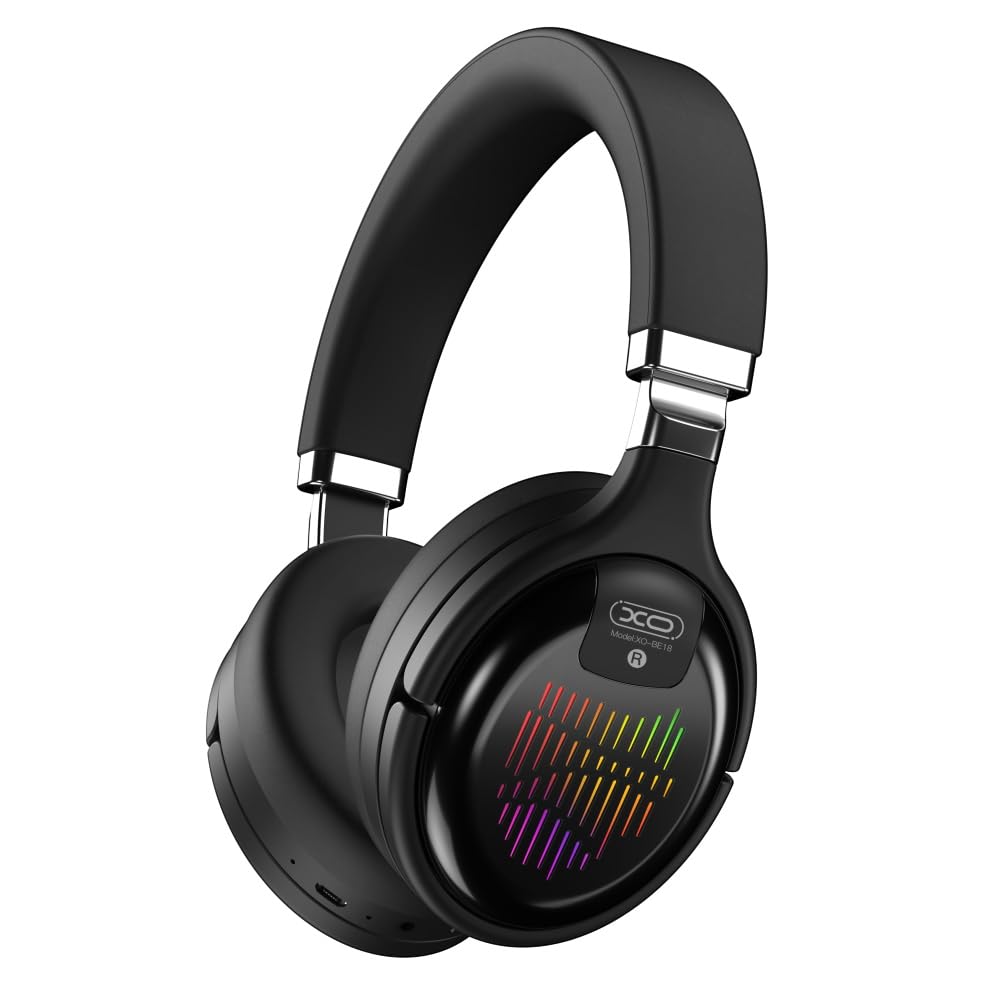
Image: The XO BE18 Wireless Bluetooth Headset, showcasing its over-ear design and integrated RGB lighting on the earcups.
Obsah balení
Ujistěte se prosím, že balení obsahuje všechny položky:
- XO BE18 Wireless Bluetooth Headset
- Nabíjecí kabel
- Uživatelská příručka (tento dokument)

Image: The XO BE18 headset shown within its retail packaging, indicating the included accessories.
Nastavení
Nabíjení náhlavní soupravy
- Najděte nabíjecí port na náhlavní soupravě.
- Connect the provided charging cable to the headset and a compatible USB power source (e.g., computer USB port, USB wall adapter).
- The LED indicator on the headset will typically show a specific color (e.g., red) during charging and change (e.g., turn off or blue) when fully charged.
- Plné nabití trvá přibližně 2.5 hodin.
Zapnutí/vypnutí
- Zapnutí: Press and hold the Power button for approximately 3-5 seconds until the LED indicator lights up and you hear an audible prompt.
- Vypnutí: Stiskněte a podržte tlačítko napájení přibližně 3–5 sekund, dokud nezhasne LED indikátor a neuslyšíte zvukový signál.
Návod k obsluze
Párování pomocí Bluetooth
- Zkontrolujte, zda je náhlavní souprava vypnutá.
- Press and hold the Power button for approximately 5-7 seconds until the LED indicator flashes rapidly (e.g., alternating blue and red), indicating pairing mode.
- Na svém zařízení (chytrý telefon, tablet, počítač) povolte Bluetooth a vyhledejte dostupná zařízení.
- Select "XO BE18" from the list of found devices.
- Po spárování bude LED indikátor obvykle pomalu blikat nebo se rozsvítí modře a uslyšíte potvrzovací tón.
Základní ovládací prvky
The headset features various buttons for controlling audio playback and calls. Refer to the image below for button locations.

Obrázek: Detail view of the XO BE18 headset earcup, highlighting the control buttons and ports.
- Vypínač: Stisknutím a podržením zapnete/vypnete zařízení. Krátkým stisknutím přehrajete/pozastavíte hudbu nebo přijmete/ukončíte hovory.
- Zvýšení hlasitosti (+): Krátkým stisknutím zvýšíte hlasitost. Dlouhým stisknutím přejdete na další skladbu.
- Snížit hlasitost (-): Krátkým stisknutím snížíte hlasitost. Dlouhým stisknutím přejdete na předchozí skladbu.
- Tlačítko režimu (M): Short press to switch between Bluetooth, AUX, TF card, and Radio modes.
RGB osvětlení
The headset features integrated RGB lighting on the earcups. This lighting typically activates automatically when the headset is powered on. Specific controls for the RGB lighting (if any) may be integrated with the mode button or a dedicated button not explicitly detailed.

Image: The XO BE18 headset displaying its colorful RGB lighting on the earcups.
Použití mikrofonu
The built-in microphone allows for hands-free calls. When a call comes in, press the Power button once to answer. Press again to end the call.
Režim AUX
Connect an audio cable (not included) from your device's 3.5mm audio jack to the headset's AUX port to use it in wired mode. The headset does not require power in AUX mode.
Režim karty TF
Vložte kartu TF (microSD) se zvukem files into the designated slot. Use the Mode button to switch to TF card mode.
Režim rádia
Use the Mode button to switch to Radio mode. The headset will automatically scan for available FM radio stations.
Údržba
- Čištění: K čištění sluchátek s mikrofonem používejte měkký, suchý hadřík. Nepoužívejte abrazivní čisticí prostředky ani rozpouštědla.
- Skladování: When not in use, store the headset in a cool, dry place. The headset features a portable folding design for compact storage.
- Péče o baterie: Chcete-li prodloužit životnost baterie, vyvarujte se častého úplného vybíjení. Pravidelně nabíjejte sluchátka, i když je nepoužíváte neustále.
- Vystavení vodě: Tato sluchátka nejsou vodotěsná. Zabraňte vystavení vodě nebo nadměrné vlhkosti.

Image: The XO BE18 headset shown in its folded configuration, demonstrating its portable design.
Odstraňování problémů
| Problém | Možné řešení |
|---|---|
| Sluchátka se nezapínají. | Ensure the headset is fully charged. Connect to a power source and try again. |
| Nelze spárovat se zařízením. |
|
| Žádný zvuk nebo nízká hlasitost. |
|
| Mikrofon nefunguje. |
|
| RGB osvětlení nefunguje. | Ensure the headset is powered on. If the issue persists, contact customer support. |
Specifikace
| Funkce | Detail |
|---|---|
| Název modelu | BE18 |
| Konektivita | Bezdrátové připojení (Bluetooth V5.0) |
| Bezdrátové Dosah | Asi 10 metrů |
| Audio technologie | Hi-Fis Audio, Intelligent Noise Reduction |
| Umístění uší | Na uchu |
| Kontrola hluku | Zvuková izolace |
| Mikrofon | Vestavěný |
| Kapacita baterie | 250 XNUMX mAh |
| Doba přehrávání hudby | Asi 4 hodiny |
| Doba hovoru | Asi 4 hodiny |
| Doba nabíjení | Asi 2.5 hodiny |
| Pohotovostní doba | Long Standby Capability |
| Výkon reproduktoru | 3 mW |
| Citlivost | 94 ± 3 dBm |
| Poměr S/N | >= 75 dB |
| Pracovní frekvence | 20Hz-20KHz |
| Režimy přehrávání | Bluetooth, AUX, TF Card, Radio |
| Bluetooth protokoly | A2DP, HSP, HFP |
| Rozměry (balení) | 195 x 195 x 80 mm |
| Barva | Černý |

Image: A detailed table outlining the technical specifications and product information for the XO BE18 headset.
Záruka a podpora
This product comes with a standard manufacturer's warranty. For specific warranty terms and conditions, please refer to the warranty card included in your product packaging or contact the retailer where you purchased the product.
For technical support or further assistance, please contact your retailer or visit the official XO webstránky (je -li k dispozici).