
Zavedení
Welcome to the GOBOULT Mirage Smart Watch user manual. This guide provides detailed instructions on how to set up, operate, and maintain your new smartwatch. Please read this manual thoroughly to ensure optimal performance and longevity of your device.
Konec produktuview
The GOBOULT Mirage Smart Watch is a feature-rich device designed to enhance your daily life with advanced health monitoring, communication, and fitness tracking capabilities. It features a vibrant 1.39-inch HD display, Bluetooth calling, and a durable zinc alloy frame.
Klíčové vlastnosti:
- 1.39palcový HD displej: Bright and clear screen with 500 nits brightness and 360x360 pixel resolution.
- Bluetooth volání: Make and receive calls directly from your wrist with a built-in speaker and microphone.
- Komplexní sledování zdraví: Includes SpO2, heart rate, blood pressure, sleep tracking, breath training, and menstrual cycle tracking.
- Více než 120 sportovních režimů: Track a wide range of physical activities with detailed metrics.
- Hlasový asistent AI: Hands-free control and access to features.
- Vodotěsnost IP67: Designed to withstand splashes and dust.
- Přizpůsobitelné ciferníky: Over 300 cloud-based watch faces to personalize your device.
- Chytrá upozornění: Dostávejte upozornění na hovory, zprávy a oznámení aplikací.
- Dlouhá výdrž baterie: Až 7 dní běžného používání.
Co je v krabici:
- GOBOULT Mirage Smart Watch (Coal Black)
- Nabíjecí kabel
- Uživatelská příručka
- Záruční list

Obrázek: Overview of the GOBOULT Mirage Smart Watch highlighting its main features.
Průvodce nastavením
1. Nabíjení chytrých hodinek
- Connect the magnetic charging cable to the charging pins on the back of your smartwatch.
- Zapojte USB konec kabelu do standardního USB napájecího adaptéru (doporučeno 5V/1A) nebo do USB portu počítače.
- The watch display will show a charging indicator. A full charge takes approximately 120 minutes.
- Před nabíjením se ujistěte, že jsou nabíjecí kontakty čisté a suché, aby nedošlo ke korozi.
2. Zapnutí/vypnutí
- Zapnutí: Press and hold the side button (digital crown) for a few seconds until the GOBOULT logo appears.
- Vypnout: From the watch face, swipe down to access quick settings, or navigate to the settings menu. Select "Power Off" and confirm. Alternatively, press and hold the side button until the power off option appears.
3. Párování s vaším smartphonem
- Download the official GOBOULT companion app from your smartphone's app store (available for iOS and Android).
- Ujistěte se, že je na vašem smartphonu povoleno Bluetooth.
- Open the GOBOULT app and follow the on-screen instructions to create an account or log in.
- In the app, select "Add Device" or a similar option to search for your smartwatch.
- Select "GOBOULT Mirage" from the list of available devices.
- Potvrďte požadavek na párování na smartphonu i na chytrých hodinkách.
- Once paired, the watch will synchronize data with your phone, and you can customize settings through the app.
Návod k obsluze
Základní navigace:
- Dotyková obrazovka: Přejetím prstem doleva/doprava, nahoru/dolů můžete procházet nabídky a oznámení. Klepnutím vyberete položky.
- Digital Crown (Side Button):
- Stiskněte jednou: Return to the watch face from any screen, or wake the screen.
- Stiskněte a podržte: Power on/off, or access the AI Voice Assistant (configurable).
- Střídat: Procházejte nabídky, seznamy nebo upravujte nastavení.
- Tlačítko zkratky: The second physical button on the side can be customized for quick access to specific functions, such as launching sports modes.

Image: Digital crown and button functionalities for navigation and quick access.
Monitorování zdraví
The GOBOULT Mirage Smart Watch offers a comprehensive suite of health tracking features. For accurate readings, ensure the watch is worn snugly on your wrist, about one finger's width from your wrist bone.
- Monitorování srdeční frekvence: The watch continuously tracks your heart rate. View data v reálném čase na hodinkách nebo podrobné trendy v aplikaci.
- Monitorování SpO2 (kyslíku v krvi): Measure your blood oxygen levels on demand. Navigate to the SpO2 function on your watch and remain still for accurate results.
- Monitorování krevního tlaku: Access the blood pressure feature on your watch for readings.
- Monitorování spánku: Wear your watch to bed to track your sleep patterns, including deep sleep, light sleep, and awake times. Data is available in the app.
- Breath Training Mode: Follow guided breathing exercises to help reduce stress and improve relaxation.
- Sledování aktivity: Sleduje kroky, vzdálenost a spálené kalorie během dne.
- Připomenutí pít vodu: Set reminders in the app to ensure you stay hydrated.
- Sedavé připomenutí: Dostávejte upozornění, když jste příliš dlouho neaktivní, která vás povzbudí k pohybu.
- Sledování menstruačního cyklu: For female users, track and predict menstrual cycles through the companion app.

Image: The watch's health sensors and a summary of its health monitoring capabilities.
Sportovní režimy
The GOBOULT Mirage Smart Watch supports over 120 sports modes to accurately track your workouts. From running to yoga, you can monitor your performance and progress.
Using Sports Modes:
- Access the sports mode menu from the watch's main interface or by using the dedicated shortcut button.
- Scroll through the list and select your desired activity (e.g., Running, Cycling, Yoga, Cricket, Badminton, Basketball).
- Tap to start the activity. The watch will begin recording data such as duration, heart rate, calories burned, and distance (where applicable).
- To pause or end an activity, swipe right or press the side button and follow the on-screen prompts.
- Review your workout summaries on the watch or in detail within the companion app.

Image: The watch interface showing various sports modes and quick access options.
Bluetooth Calling & Smart Notifications
With Bluetooth 5.3 connectivity, your GOBOULT Mirage Smart Watch allows you to manage calls and receive notifications directly on your wrist.
Bluetooth volání:
- Ujistěte se, že jsou hodinky spárované s telefonem přes Bluetooth.
- Uskutečňování hovorů: Pro zahájení hovoru přejděte na číselník nebo do seznamu kontaktů na hodinkách.
- Přijímání hovorů: When a call comes in, the watch will display the caller ID. You can answer or reject the call directly from your wrist using the built-in speaker and microphone.
- Contact Sync: Synchronize your phone contacts with the watch through the companion app for easy access.
Chytrá upozornění:
- Enable app notifications in the GOBOULT companion app on your smartphone.
- Your watch will display incoming messages, social media alerts, and other app notifications.
- Přejetím prstem nahoru nebo dolů po ciferníku view historii oznámení.

Image: Bluetooth calling features and interface on the smartwatch.

Image: Smart notifications and other quick access features like calculator and voice assistant.
Přizpůsobení
Ciferníky:
Personalize your GOBOULT Mirage Smart Watch with over 300 cloud-based watch faces. You can change the watch face directly from the device or through the companion app.
- Na hodinkách: From the watch face, press and hold the screen. Swipe left or right to browse available watch faces and tap to select.
- Přes aplikaci: Open the GOBOULT app, navigate to the watch face section, and explore a wider selection of designs. Download and apply your preferred watch face.

Obrázek: Přamples of customizable watch faces available for the smartwatch.
Další funkce
Hlasový asistent AI:
Activate the AI Voice Assistant (compatible with Hey Siri and Ok Google) by long-pressing the digital crown or through a dedicated menu option. Use voice commands to perform various tasks hands-free.
Najít můj telefon:
If your paired smartphone is misplaced, use the "Find My Phone" feature on your watch to make it ring or vibrate, helping you locate it quickly.
- Go to the watch menu.
- Select the "Find Phone" option.
- The connected phone will ring or vibrate.
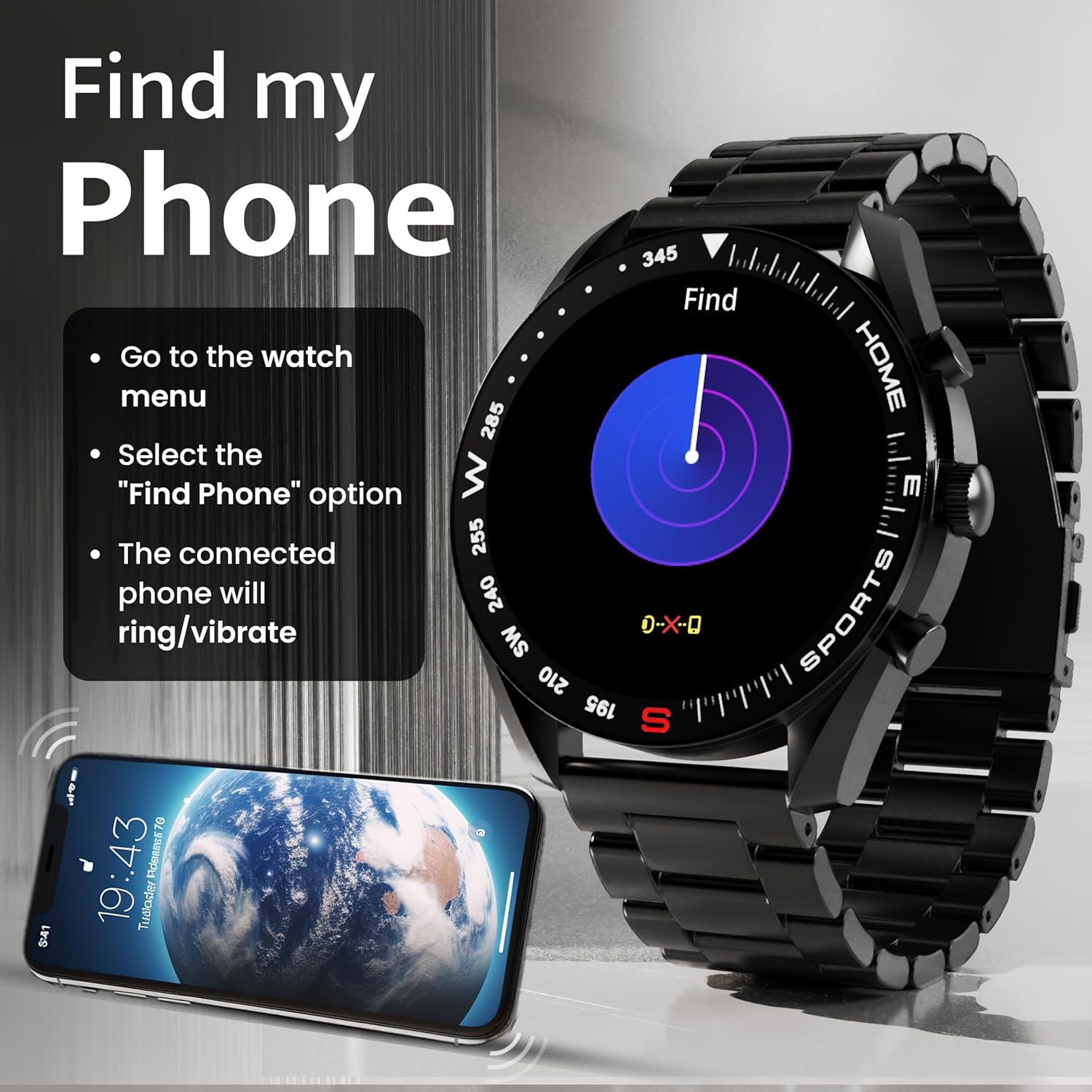
Image: How to use the 'Find My Phone' feature on the smartwatch.
Mini hry:
The watch includes several mini-games for entertainment, such as 2048, Battleship, Hamster, and Young Bird.

Obrázek: Přamples of mini-games available on the smartwatch.
Údržba
Cleaning Your Smart Watch:
- Otřete obrazovku a tělo hodinek měkkým hadříkem, který nepouští vlákna.
- Pro odolnou špínu lehceamphadřík vodou. Nepoužívejte agresivní chemikálie ani abrazivní materiály.
- Clean the charging pins regularly with a dry cloth or cotton swab to ensure proper charging.
Voděodolnost (IP67):
The GOBOULT Mirage Smart Watch is IP67 water-resistant, meaning it is protected against dust ingress and can withstand immersion in water up to 1 meter for up to 30 minutes. However, it is not suitable for swimming, showering with hot water, or diving. Avoid exposure to high-pressure water or corrosive liquids.

Image: Information regarding the IP67 water and dust resistance of the smartwatch.
Nastavení popruhu:
The watch comes with a metallic strap adjustment tool. Refer to the included instructions or a professional for adjusting the strap length to ensure a comfortable and secure fit.

Image: The watch's zinc alloy frame and the metallic strap adjustment tool.
Odstraňování problémů
- Hodinky se nezapínají: Ujistěte se, že jsou hodinky plně nabité. Připojte je k nabíjecímu kabelu a nechte je nabíjet alespoň 30 minut, než se je pokusíte znovu zapnout.
- Nelze spárovat s telefonem:
- Ujistěte se, že máte v telefonu i hodinkách povoleno Bluetooth.
- Ensure the watch is within the Bluetooth range (up to 10 meters).
- Restartujte telefon i chytré hodinky.
- Clear the Bluetooth cache on your phone or forget the device and try pairing again.
- Ensure the GOBOULT companion app is updated to the latest version.
- Nepřesné zdravotní údaje: Ujistěte se, že hodinky máte pevně na zápěstí, ne příliš těsně ani příliš volně. Vyčistěte senzory na zadní straně hodinek. Během měření se vyvarujte nadměrného pohybu.
- Nezobrazují se oznámení:
- Check if notifications are enabled for the specific apps in the GOBOULT companion app.
- Ensure your phone's notification settings allow the GOBOULT app to display alerts.
- Ověřte, zda jsou hodinky správně připojeny k telefonu přes Bluetooth.
- Krátká výdrž baterie: Reduce screen brightness, disable unnecessary features like continuous heart rate monitoring if not needed, and limit the number of active notifications. Ensure the watch is fully charged.
- Dotyková obrazovka nereaguje: Restartujte hodinky. Pokud problém přetrvává, ujistěte se, že je obrazovka čistá a suchá.
Specifikace
| Funkce | Detail |
|---|---|
| Název modelu | Mirage |
| Velikost displeje | 1.39 palců HD |
| Rozlišení displeje | 360 x 360 pixelů |
| Jas | 500 Nits Peak Brightness |
| Konektivita | Bluetooth 5.3 |
| Voděodolnost | IP67 |
| Materiál rámu | Slitina zinku |
| Typ baterie | Lithium Polymer |
| Průměrná životnost baterie | Až 7 dny |
| Doba nabíjení | Přibližně 120 minut |
| Kompatibilita operačního systému | iOS, Android |
| Hmotnost položky | 106 g |
| Zahrnuté komponenty | Smart Watch, Charging Cable, User Manual, Warranty Card |
Záruka a podpora
Informace o záruce:
Your GOBOULT Mirage Smart Watch comes with a manufacturer's warranty. Please refer to the included Warranty Card for specific terms, conditions, and duration of the warranty. Keep your purchase receipt as proof of purchase.
Zákaznická podpora:
If you encounter any issues or have questions not covered in this manual, please contact GOBOULT customer support. Contact details can typically be found on the Warranty Card or the official GOBOULT webmísto.