
1. Úvod
The Sparkleiot ESP32-C3 Mini is a high-performance, energy-efficient IoT development board based on the Espressif ESP32-C3 dual-mode WLAN chip. This 32-bit RISC-V CPU includes an FPU for single-precision floating-point arithmetic, offering robust processing capabilities. It supports IEEE 802.11 b/g/n WLAN and Bluetooth 5.0 protocols, providing excellent RF performance. The board is compact, ideal for portable devices and small projects, and features a single-sided surface mount design.
Mezi klíčové vlastnosti patří:
- Powerful 32-bit RISC-V CPU up to 160 MHz.
- Integrated Wi-Fi (802.11 b/g/n) and Bluetooth 5.0.
- Ultra-low power consumption in Deep Sleep mode (approx. 43µA).
- Rich interfaces: 1x I2C, 1x SPI, 2x UART, 11x GPIO (PWM), 4x ADC.
- External IPEX antenna support for enhanced signal strength.
- Integrated 4MB Flash memory.
2. Nastavení
2.1 Přes palubuview
The ESP32-C3 Mini development board is designed for ease of use in various IoT applications. It features a USB-C port for power and data, along with pin headers for GPIO access.

Obrázek 1: Nahoře a dole view of the ESP32-C3 Mini Development Board.

Figure 2: ESP32-C3 Mini Development Board with pin headers.
2.2 napájecí zdroj
The board can be powered via the USB-C port or an external power supply. If using an external power supply, connect the positive lead to the 5V pin and the negative lead to the GND pin. The board supports an external power supply range of 3.3V to 6V. When an external power supply is connected, the USB port should not be used for power simultaneously. Ensure correct polarity to prevent damage to the board or power source.
2.3 Připojení antény
The board includes an IPEX antenna connector for attaching an external 2.4 GHz antenna. This is recommended for applications requiring stronger or more stable wireless signals. The board also has an onboard antenna.

Figure 3: Connecting an external 2.4G IPEX antenna.
By default, the onboard antenna is used. To use an external antenna, a modification to the resistor position on the board is required. Refer to the manufacturer's documentation or community resources for detailed instructions on this modification.
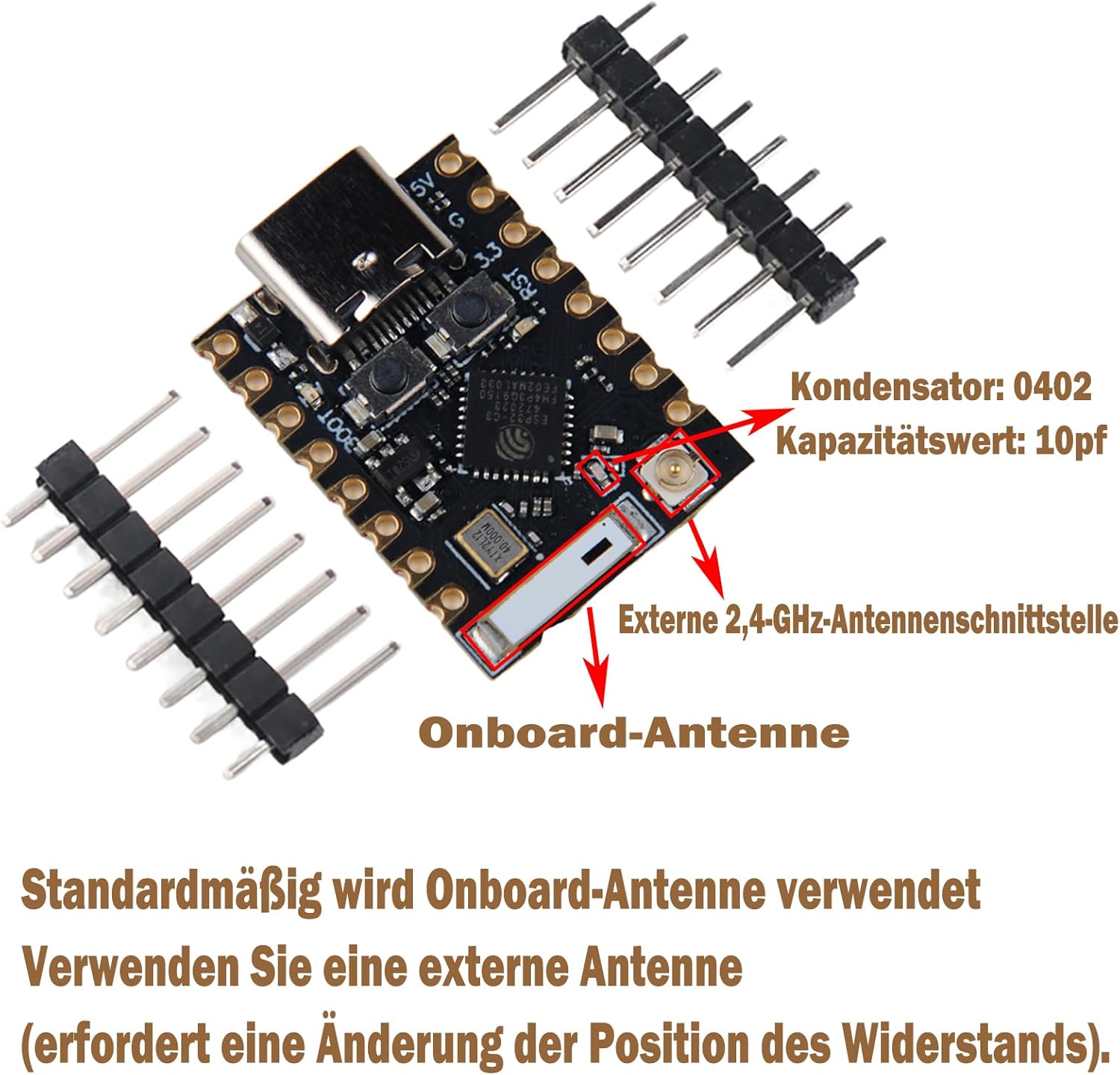
Figure 4: Onboard vs. External Antenna Interface.
2.4 Schéma zapojení pinů
Understanding the pinout is crucial for connecting peripherals and programming the board.

Figure 5: ESP32-C3 Mini Development Board Pinout and Dimensions.
The board provides 11 digital I/O pins (which can also function as PWM pins) and 4 analog I/O pins (which can function as ADC pins). It supports serial communication protocols including UART, I2C, and SPI.
3. Návod k obsluze
3.1 Programování hrací desky
The ESP32-C3 Mini can be programmed using various development environments, such as the Espressif IDF (IoT Development Framework) or Arduino IDE with the ESP32 core. Connect the board to your computer via the USB-C port. The board features a reset button and a bootloader mode button for programming and debugging.
- Resetovací tlačítko: Press to restart the board.
- Bootloader Button: Hold down the Boot button, then press and release the Reset button, then release the Boot button to enter bootloader mode for flashing new firmware.
3.2 Připojení Wi-Fi a Bluetooth
The ESP32-C3 supports 2.4 GHz Wi-Fi (802.11b/g/n) and Bluetooth 5.0. It can operate in Station mode, SoftAP mode, SoftAP+Station mode, or mixed mode for Wi-Fi. Refer to the Espressif documentation and examples for detailed programming instructions on establishing wireless connections.
3.3 Using Peripherals
Utilize the available interfaces (I2C, SPI, UART, GPIO, ADC) to connect sensors, actuators, and other modules. Consult the pinout diagram (Figure 5) for correct pin assignments. Ensure proper voltage levels when connecting external components to avoid damage.
4. Údržba
To ensure the longevity and proper functioning of your ESP32-C3 Mini Development Board, follow these maintenance guidelines:
- Zacházejte opatrně: Zabraňte pádu desky na zem nebo jejímu vystavení fyzickým nárazům.
- Statický výboj: S deskou vždy manipulujte v prostředí bezpečném pro elektrostatický výboj, abyste předešli poškození statickou elektřinou.
- Napájení: Use only power supplies within the specified voltage range (3.3V to 6V). Never short-circuit the positive and negative terminals, especially during soldering, as this can damage the board or power source.
- Čistota: Keep the board free from dust, dirt, and moisture. If cleaning is necessary, use a soft, dry brush or compressed air. Avoid using liquids.
- Skladování: Desku skladujte v suchém a chladném prostředí, mimo dosah přímého slunečního záření a extrémních teplot.
5. Řešení problémů
If you encounter issues with your ESP32-C3 Mini Development Board, consider the following troubleshooting steps:
- Bez napájení: Verify that the USB-C cable is securely connected and functional, or that the external power supply is providing the correct voltage (3.3V-6V) and is properly connected to the 5V and GND pins.
- Chyby programování: Ensure the correct board and port are selected in your IDE. Try entering bootloader mode manually (hold Boot, press/release Reset, then release Boot) before attempting to flash firmware. Check your code for syntax errors.
- Problémy s připojením k Wi-Fi/Bluetooth: Confirm that your antenna is properly connected (if using an external one) and that the resistor modification for external antenna use has been performed if necessary. Check your code for correct Wi-Fi/Bluetooth initialization and credentials.
- Periferní porucha: Double-check all wiring connections to your peripherals. Ensure that the correct pins are being used according to the pinout diagram and that the peripheral is receiving adequate power.
- Počítač nerozpoznal desku: Try a different USB-C cable or USB port. Ensure that the necessary USB drivers are installed on your computer.
6. Specifikace
| Funkce | Popis |
|---|---|
| CPU | ESP32-C3, 32-bit RISC-V single-core processor, up to 160 MHz |
| Wi-Fi | 802.11b/g/n, 2.4 GHz, Station/SoftAP/SoftAP+Station/Mixed modes |
| Bluetooth | Bluetooth 5.0 |
| Paměť | 400KB SRAM, 384KB ROM, 4MB integrated Flash |
| Spotřeba energie | Deep Sleep current consumption approx. 43µA |
| Rozhraní | 1x I2C, 1x SPI, 2x UART, 11x GPIO (PWM), 4x ADC |
| Anténa | Onboard antenna, 2.4G IPEX external antenna connector |
| Bezpečnostní funkce | Hardware cryptographic accelerators (AES-128/256, Hash, RSA, HMAC, Digital Signature, Secure Boot) |
| Rozměry | 22.52 x 18 mm |
| Provozní svtage | 3.3V - 6V (external power supply) |
| Integrovaná LED | Blue LED on GPIO8 |
7. Záruka a podpora
Information regarding product warranty and technical support is not available in the provided product data. For details on warranty coverage, return policies, or technical assistance, please refer to the Sparkleiot official webstránky nebo se obraťte na místo nákupu.


