
Brook Gen5X
Uživatelská příručka k bojové desce Brook Gaming Gen5X
Model: Gen5X
1. Úvod
The Brook Gaming Gen5X Fighting Board is an ultimate multi-platform PCB designed for fighting game enthusiasts and custom arcade stick builders. It offers lightning-fast response times and broad compatibility across various gaming consoles and PC, ensuring a superior gaming experience. This manual provides detailed instructions for setup, operation, maintenance, and troubleshooting to help you get the most out of your Gen5X Fighting Board.

Image: The Brook Gaming Gen5X Fighting Board, a black circuit board with blue terminal blocks and various connectors, designed for custom arcade stick builds.
2. Klíčové vlastnosti
- Univerzální kompatibilita: Seamlessly connect your favorite controllers across multiple platforms including PS5, XB Series, XS, NS (Nintendo Switch), and PC, transforming your gaming experience.
- Pro-Level Performance: Enjoy lightning-quick response times and reduced input lag, giving you the edge needed to dominate in fast-paced competitive games.
- Uživatelsky přívětivé nastavení: Easily configure the Gen5X with a straightforward interface and included instructions, allowing you to start gaming within minutes.
- Future-Proof with Firmware Updates: Stay ahead of the game with regular firmware updates that ensure compatibility with the latest gaming titles and features.
- Express Yourself with a Vibrant RGB Design: Supports RGB-LED effects and lets you freely choose from 5 presets to showcase your individuality and create a unique gaming atmosphere.
3. Nastavení a instalace
The Gen5X Fighting Board is designed for integration into custom arcade sticks or fight pads. Proper wiring and connection are crucial for optimal performance.
3.1. Připojení vodičů
Connect your joystick and button inputs to the corresponding terminals on the Gen5X board. Ensure all connections are secure and follow the provided wiring diagrams for your specific arcade stick layout. The board features clearly labeled screw terminals for easy and reliable connections.
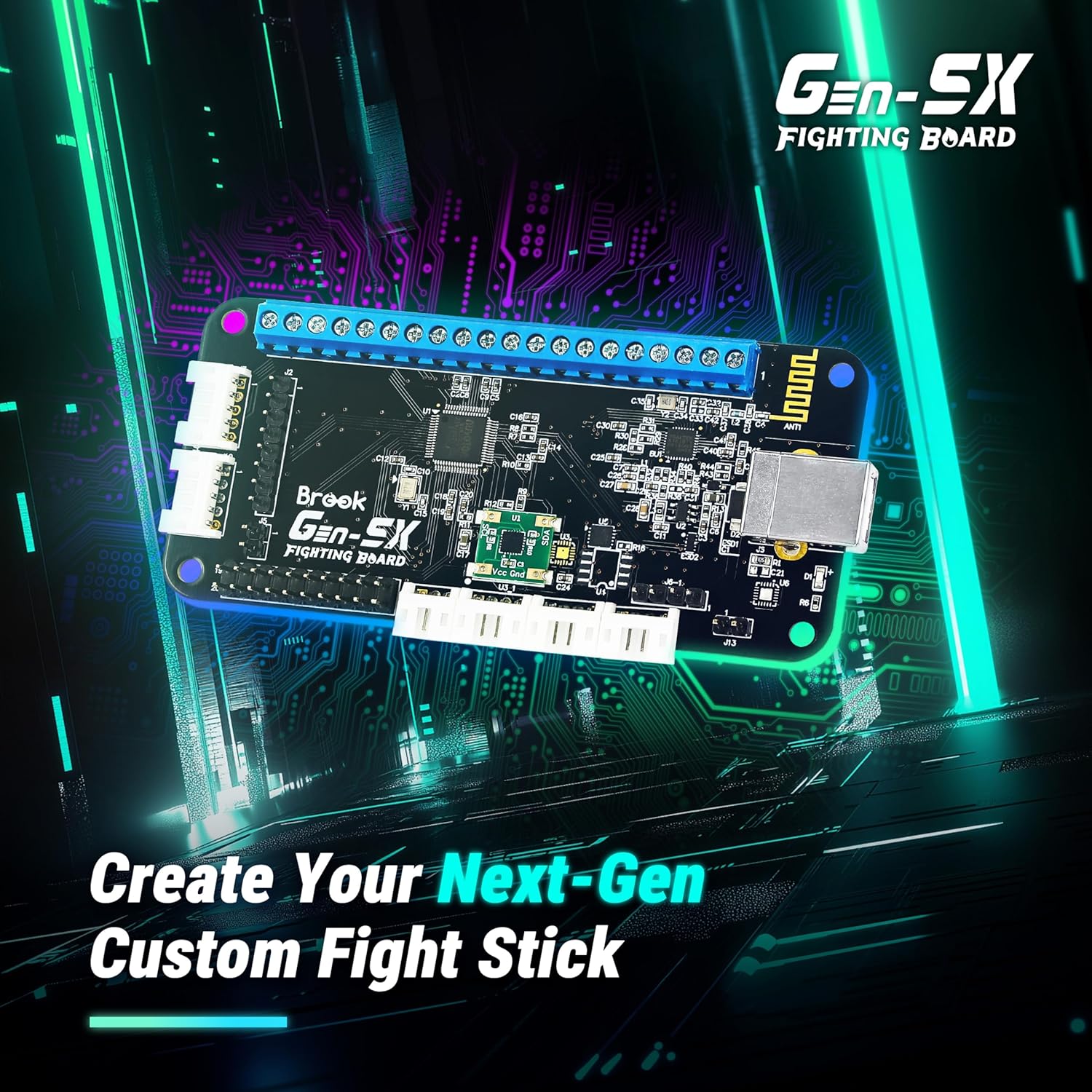
Image: The Gen5X Fighting Board shown on a circuit board background, illustrating its purpose in creating next-generation custom fight sticks.
3.2. Platform Connection
Once wired, connect the Gen5X Fighting Board to your desired gaming platform (PS5, Xbox Series, Nintendo Switch, or PC) via a standard USB cable. The board will automatically detect the platform in most cases. For specific platform modes or advanced configurations, refer to the official Brook website for detailed instructions and firmware updates.

Image: The Gen5X Fighting Board positioned near various gaming consoles (PS5, Xbox Series X/S, Nintendo Switch), highlighting its multi-platform compatibility.
4. Návod k obsluze
4.1. Základní obsluha
After successful connection, your custom fight stick will function as a standard controller for the detected platform. All button and joystick inputs will correspond to their respective functions in games.
4.2. Přizpůsobení RGB osvětlení
The Gen5X Fighting Board supports RGB-LED effects, allowing you to personalize your fight stick's appearance. You can choose from 5 preset lighting effects to match your style or gaming setup. Refer to the official Brook documentation for specific button combinations or software tools to cycle through and select RGB presets.

Image: A custom arcade stick featuring illuminated buttons with vibrant RGB lighting, demonstrating the customization options of the Gen5X board.
4.3. Pokročilé funkce
The Gen5X board includes several advanced features to enhance your gameplay:
- Funkce Turbo: Configure buttons for rapid-fire inputs with adjustable hit rates (e.g., 05, 10, 15, 20, 25 hits/sec).
- Režimy ovládání joystickem: Switch between Left Stick (LS), D-Pad (DPAD), and Right Stick (RS) input modes for the joystick, offering flexibility for different games.
- Emulace touchpadu: Emulate touchpad functionality for compatible games, particularly useful for PlayStation titles.
- SOCD (Simultaneous Opposing Cardinal Directions) Modes: The board supports various SOCD cleaning modes to comply with tournament rules and personal preference. These modes determine how simultaneous opposite direction inputs (e.g., Left + Right) are processed.

Image: Icons representing Turbo, Joystick Control Mode (LS/DPAD/RS), and Touchpad emulation, highlighting the advanced assist features of the Gen5X Fighting Board.
SOCD Mode Table:

Image: A table illustrating different SOCD (Simultaneous Opposing Cardinal Directions) modes, showing how conflicting directional inputs are resolved by the Gen5X board.
5. Údržba
To ensure the longevity and optimal performance of your Brook Gaming Gen5X Fighting Board, follow these maintenance guidelines:
- Udržujte v čistotě: Regularly clean the board and connections with a soft, dry cloth. Avoid using liquid cleaners or solvents.
- Vyhněte se vlhkosti: Protect the board from moisture and extreme temperatures. Do not expose it to water or high humidity.
- Zabezpečená připojení: Pravidelně kontrolujte všechna kabelová připojení, abyste se ujistili, že jsou bezpečná a bez koroze.
- Aktualizace firmwaru: Keep the firmware updated to ensure compatibility with new consoles, games, and to benefit from performance improvements. Visit the official Brook webstránky s nejnovějším firmwarem a pokyny k aktualizaci.
6. Řešení problémů
Pokud narazíte na problémy s bojovou deskou Gen5X, vyzkoušejte následující kroky pro řešení potíží:
- Bez napájení/rozpoznání:
- Ensure the USB cable is securely connected to both the board and the console/PC.
- Zkuste jiný port USB nebo kabel.
- Verify that the console/PC drivers are correctly installed (for PC).
- Buttons/Joystick Not Responding:
- Check all individual button and joystick wiring connections on the board. Ensure they are firmly seated in the screw terminals.
- Test the buttons/joystick with a different controller or on another device to rule out component failure.
- Input Lag/Performance Issues:
- Ujistěte se, že používáte vysoce kvalitní USB kabel.
- Check for the latest firmware updates for the Gen5X board.
- Ensure no other background applications are consuming excessive resources on your PC.
- Platform Detection Issues:
- Some platforms may require specific button combinations to enter a particular mode upon connection. Refer to the official Brook website for platform-specific connection guides.
If problems persist after attempting these steps, please contact Brook customer support for further assistance.
7. Specifikace
| Specifikace | Detail |
|---|---|
| Značka | Potok |
| Název modelu | Gen5X |
| Hardwarová platforma | Nintendo Switch, PC, PlayStation 5, Xbox Series S, Xbox Series X |
| Procesor | ARMv7 |
| BERAN | LPDDR4 |
| Technologie připojení | USB |
| Hmotnost položky | 1.76 unce |
| Rozměry balení | 4.8 x 3.03 x 1.14 palce |
| Barva | Černý |
8. Záruka a podpora
Brook products are designed for reliability and performance. For information regarding warranty coverage, please refer to the warranty policy available on the official Brook Gaming webUschovejte si doklad o koupi pro případné reklamace.
For technical support, firmware updates, detailed wiring diagrams, and frequently asked questions, please visit the official Brook Gaming support page:
Visit the Brook Official Store Page
Pravidelná kontrola úředníka website for firmware updates is highly recommended to ensure optimal performance and compatibility with the latest gaming systems and titles.
Ask a question about this manual
Ask about setup, troubleshooting, compatibility, parts, safety, or missing instructions. Manuals+ will review the question and use this page’s manual context to help answer it.