
Okin DS2.451.3W.01.WU.110
Okin Dual Motor Electric Standing Desk Frame
Uživatelská příručka
1. Úvod
This manual provides detailed instructions for the assembly, operation, and maintenance of your Okin Dual Motor Electric Standing Desk Frame. Please read this manual thoroughly before installation and use to ensure proper function and safety.
The Okin Dual Motor Electric Standing Desk Frame is designed to enhance your workspace by allowing seamless transitions between sitting and standing positions. It features a robust steel construction, dual high-performance motors, and an intuitive memory controller for personalized height settings.
2. Bezpečnostní informace
- Always ensure the desk is properly anchored to the floor to prevent tipping.
- Nepřekračujte maximální hmotnostní limit 270 lb (122.5 kg).
- Během provozu držte děti a domácí zvířata v dostatečné vzdálenosti od stolu.
- Ensure no obstacles are in the path of the desk frame during height adjustments.
- Do not open the motor housing or control box. Refer all servicing to qualified personnel.
- Před čištěním nebo prováděním jakékoli údržby odpojte napájení.
3. Seznam součástí
Before beginning assembly, verify that all components are present and undamaged. The package includes the following:
- Desk Frame (legs, crossbar, feet)
- Memory Controller
- Napájecí adaptér a kabel
- Motor Connection Cables
- Assembly Hardware (screws, washers, Allen wrenches)
- Instalační manuál
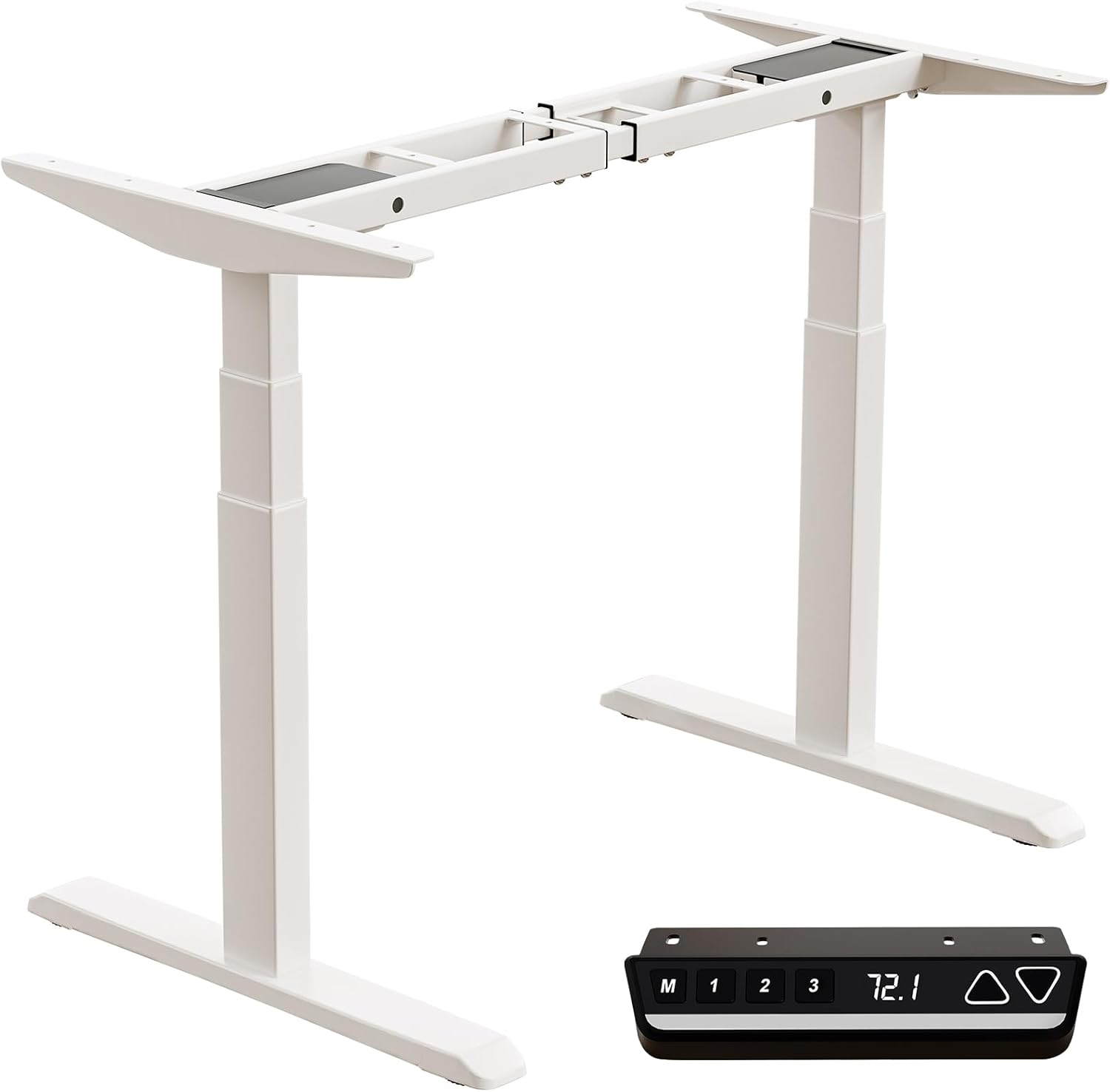
Image: All components of the Okin Dual Motor Electric Standing Desk Frame, including the white frame, feet, and the black memory controller.
4. Nastavení a montáž
The Okin Dual Motor Electric Standing Desk Frame is designed for easy assembly. A complete installation manual is included with your product. Follow the steps below for a general overview:
- Rozbalte komponenty: Opatrně vyjměte všechny díly z obalu a položte je na čistý, rovný povrch.
- Sestavení nohou a chodidel: Attach the feet to the bottom of the desk legs using the provided hardware.
- Připojení příčníku: Secure the adjustable crossbar between the two leg columns. Ensure it is extended to your desired width for your desktop.
- Install Motors and Controller: Connect the dual motors to the leg columns and the control box. Mount the memory controller to your preferred location on the desk frame, ensuring the extra-long cable provides flexibility for placement (left or right).
- Připevnit pracovní plochu (není součástí balení): Place your chosen desktop (recommended sizes: 47.2"x23.6" to 78.8"x39.4", minimum thickness 0.6") onto the assembled frame and secure it using appropriate screws.
- Správa kabelů: Organize and secure all cables to prevent tangling and ensure smooth operation.

Image: Diagram illustrating the assembly of the desk frame and the placement of a desktop, with suggested desktop dimensions and minimum thickness.

Obrázek: Nad hlavou view showing the flexible placement of the controller on either the left or right side of the desk frame, highlighting the 51.2-inch extra-long cable for convenience.
5. Návod k obsluze
The Okin Electric Standing Desk Frame features an intuitive control panel for easy height adjustment and memory functions.

Image: Close-up of the multi-function intelligent keypad, showing buttons for memory presets (M, 1, 2, 3), LED screen display, and up/down arrows.
- Nastavení výšky: Použijte Nahoru (▲) a Dolů (▼) arrow buttons to smoothly raise or lower the desk to your desired height. The current height is displayed on the LED screen. The desk operates at a quiet 48 dB.
- Předvolby paměti: The controller allows you to save up to three favorite height settings.
- Nastavte si stůl do požadované výšky.
- Stiskněte tlačítko M tlačítko. Na displeji se zobrazí „S-“.
- Do 3 sekund stiskněte požadované tlačítko paměti (1, 2nebo 3) to save the current height.
- Pro vyvolání uložené výšky jednoduše stiskněte příslušné tlačítko paměti (1, 2nebo 3).
- Change Display Unit (CM/IN): The controller allows you to switch between centimeters (CM) and inches (IN) for height display. Refer to the detailed installation manual for specific instructions on how to toggle this setting.

Image: Visual representation of the desk frame adjusting from its minimum height of 23.7 inches to its maximum height of 49.3 inches.
6. Údržba
To ensure the longevity and optimal performance of your Okin Electric Standing Desk Frame, follow these simple maintenance guidelines:
- Čištění: Wipe with a dry cloth. Avoid using abrasive cleaners or solvents that could damage the finish.
- Pravidelné kontroly: Pravidelně kontrolujte všechny šrouby a spoje, zda jsou pevně utažené. V případě potřeby je dotáhněte.
- Správa kabelů: Ensure cables remain tidy and are not pinched or tangled, which could affect motor operation.
- Rozložení hmotnosti: Distribute weight evenly on the desktop to prevent strain on the motors and frame.
7. Řešení problémů
If you encounter any issues with your desk frame, please refer to the following common troubleshooting tips:
- Stůl se nehýbe:
- Zkontrolujte, zda je napájecí kabel bezpečně zapojený do zásuvky ve zdi i do ovládací jednotky.
- Ensure all motor connection cables are properly seated.
- If the display shows an error code, consult the detailed installation manual for specific error interpretations and solutions.
- Nerovnoměrný pohyb:
- Ujistěte se, že stůl je na rovném povrchu.
- Verify that the weight on the desktop is evenly distributed and does not exceed the maximum capacity.
- Neobvyklé zvuky:
- While the desk operates quietly (48 dB), any new or loud noises may indicate an issue. Check for loose components or obstructions.
If the problem persists after attempting these solutions, please contact Okin customer support for assistance.
8. Specifikace
| Funkce | Specifikace |
|---|---|
| Číslo modelu | DS2.451.3W.01.WU.110 |
| Značka | Okin |
| Barva | Bílý |
| Základní materiál | Legovaná ocel |
| Minimální výška | 23.7 palců (60 cm) |
| Maximální výška | 49.3 palců (125 cm) |
| Crossbar Length (Adjustable) | 43.3 palce až 70.9 palce (110 cm až 180 cm) |
| Crossbar Width (Fixed) | 19.1 palců (48.6 cm) |
| Maximální nosnost | 270 lb (122.5 kg) |
| Rychlost | 1.4 palce za sekundu |
| Úroveň hluku | 48 dB |
| Typ motoru | Duální motor |
| Rozměry produktu (D x Š x V) | 42.52"D x 14.17"W x 8.66"H (packaged) |
| Hmotnost položky | 70.55 liber (32 kg) |

Image: Detailed dimensions of the adjustable steel frame, showing minimum and maximum lengths and heights.

Image: Illustration of the 3-stage sturdy frame design, emphasizing strong support and excellent durability.

Image: Visual representation highlighting the two high-performance motors and the 270 lbs weight capacity of the desk frame.
9. Záruka a podpora
Okin is committed to providing quality products and customer satisfaction. While specific warranty details are not provided in this manual, please refer to your purchase documentation or the product listing on Amazon for warranty information.
For any questions, concerns, or assistance with setup or operation, our dedicated support team is ready to help. You can typically find contact information for Okin America support on the product's Amazon page or through the Okin brand store: Obchod Okin na Amazonu.
Ask a question about this manual
Ask about setup, troubleshooting, compatibility, parts, safety, or missing instructions. Manuals+ will review the question and use this page’s manual context to help answer it.