
WOLFANG WB03
Uživatelská příručka k dětské chůvičce WOLFANG WB03 1080P
Model: WB03
1. Úvod
Thank you for choosing the WOLFANG WB03 Baby Monitor. This device is designed to provide reliable and secure monitoring of your baby, offering peace of mind through advanced features and a clear display. This manual provides essential information for setting up, operating, and maintaining your baby monitor.
The WOLFANG WB03 features a 5-inch HD display, a 1080P camera with 360-degree rotation and zoom, infrared night vision, two-way audio, temperature detection, and cry detection. It operates on a secure, non-Wi-Fi connection, ensuring privacy and stability.
2. Obsah balení
Zkontrolujte prosím balení, zda neobsahuje následující položky:
- rodičovská jednotka (monitor)
- Dětská jednotka (kamera)
- Uživatelská příručka
- 2 x napájecí adaptéry
- 2 x USB kabely
- Nástěnný držák
- Šrouby pro montáž na zeď
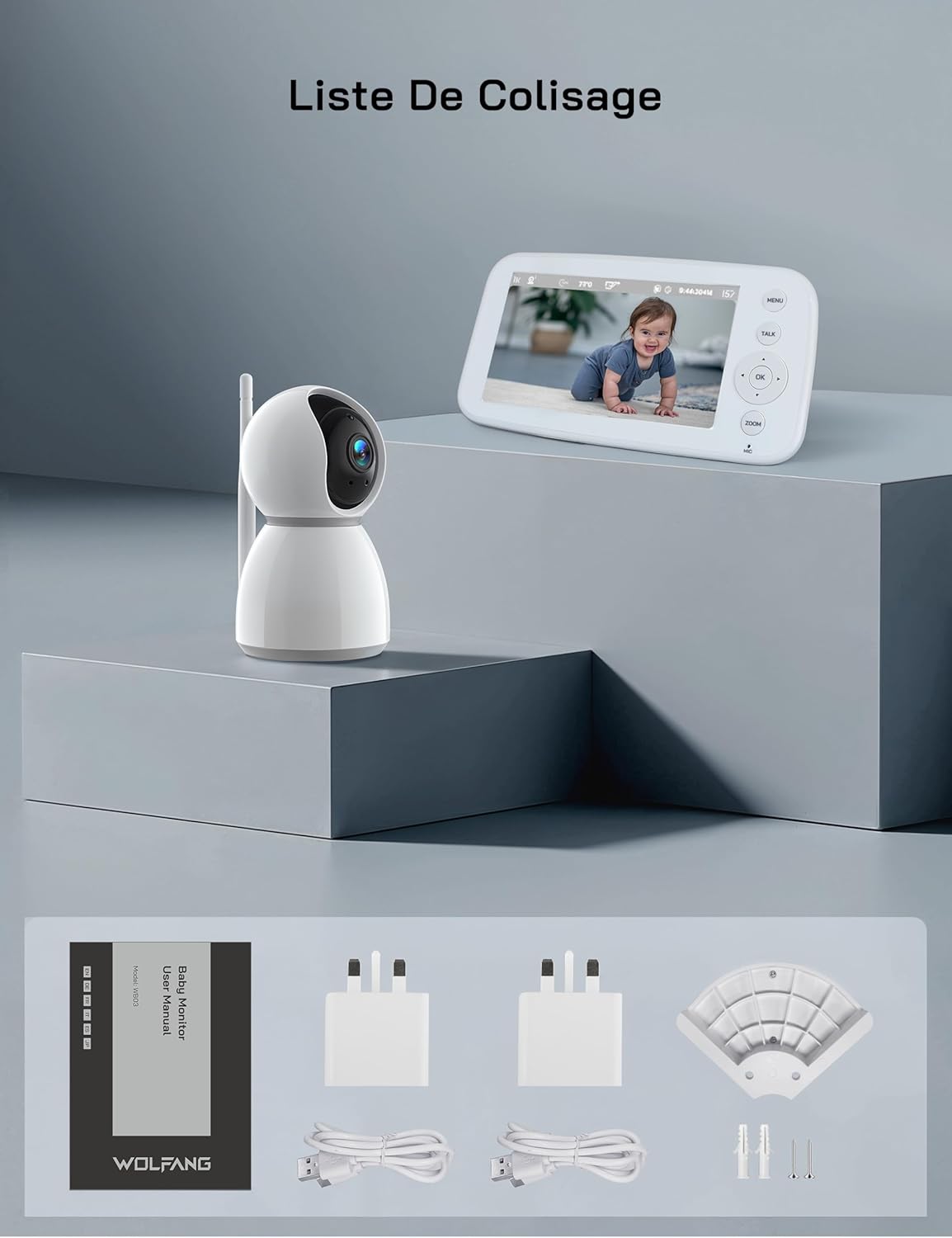
Obrázek 2.1: Visual representation of the WOLFANG WB03 baby monitor package contents, including the monitor, camera, user manual, two power adapters, two USB cables, and wall mounting hardware.
3. Konec produktuview
The WOLFANG WB03 system consists of a Parent Unit (monitor) and a Baby Unit (camera). Familiarize yourself with the components and their functions.

Obrázek 3.1: The WOLFANG WB03 baby monitor system, featuring a white parent unit with a screen displaying a baby, and a white pan-tilt camera unit.
rodičovská jednotka (monitor)
- 5palcový HD displej: For clear video feed.
- Ovládací tlačítka: Menu, Talk, OK, Navigation (Up/Down/Left/Right), Zoom.
- Mikrofon: For two-way talk.
- Reproduktor: For audio from the baby unit and lullabies.
- Anténa: Pro bezdrátové připojení.
- Napájecí port: Type-C for charging.
Dětská jednotka (kamera)
- 1080P Camera Lens: High-resolution video capture.
- Infračervené LED diody: Pro noční vidění.
- Mikrofon: To pick up baby's sounds.
- Reproduktor: For two-way talk and lullabies.
- Teplotní senzor: To monitor room temperature.
- Anténa: Pro bezdrátové připojení.
- Napájecí port: Type-C for continuous power.

Obrázek 3.2: An illustration highlighting key features of the WOLFANG WB03 baby monitor, including VOX Mode, Night Vision, 8 Lullabies, Remote Pan/Tilt, Type-C charging, Two-Way Intercom, 2350 mAh Battery, and Temperature Detection.
4. Pokyny k nastavení
4.1 Nabíjení rodičovské jednotky
- Connect one USB cable to a power adapter and plug it into the Parent Unit's Type-C port.
- Zapojte napájecí adaptér do elektrické zásuvky.
- Charge the Parent Unit for at least 3 hours before first use. The battery indicator on the screen will show charging status.
4.2 Napájení dětské jednotky
- Connect the second USB cable to a power adapter and plug it into the Baby Unit's Type-C port.
- Plug the power adapter into a wall outlet. The Baby Unit requires continuous power to operate.
- The Baby Unit will automatically power on once connected to power.
4.3 Placement of the Baby Unit
Umístěte dětskou jednotku na místo, které poskytuje volný view of your baby. Ensure it is at least 1.5 to 2 meters (5 to 6 feet) away from the Parent Unit to avoid audio feedback (bip sound).
- Place the camera on a flat, stable surface, such as a dresser or shelf.
- Alternatively, use the included wall mount bracket to secure the camera to a wall.
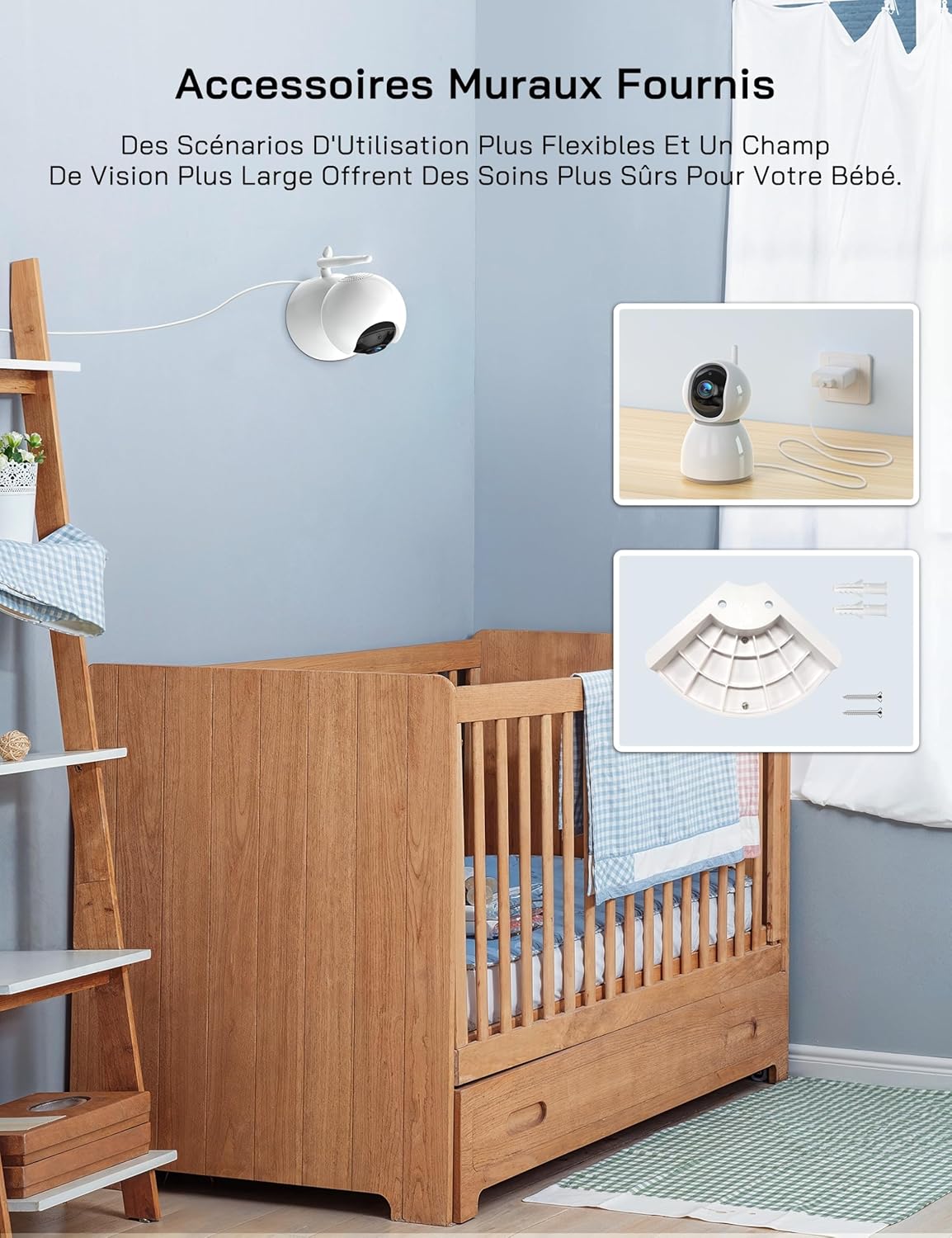
Obrázek 4.1: An image showing the included wall mount bracket and screws, demonstrating how the camera can be securely mounted to a wall above a crib.
4.4 Párování (pokud je to nutné)
The Parent Unit and Baby Unit are pre-paired at the factory. If the connection is lost or you are adding additional cameras (up to 4 cameras supported), follow these steps:
- Na rodičovské jednotce stiskněte tlačítko MENU tlačítko.
- Navigate to the Camera icon (📷) and select it.
- Choose an empty camera channel (e.g., CAM 2, CAM 3, CAM 4).
- Select the 'Pair' option. The monitor will display 'Pairing...'.
- Within 10 seconds, press the pairing button on the back of the Baby Unit.
- Once paired, the video feed from the Baby Unit will appear on the Parent Unit screen.
5. Návod k obsluze
5.1 Zapnutí/vypnutí
- nadřazená jednotka: Press and hold the Power button on the side of the monitor to turn it on or off.
- Dětská jednotka: The camera powers on automatically when connected to a power source. Disconnect from power to turn off.
5.2 Základní monitorování
Once both units are powered on and paired, the Parent Unit will automatically display the live video feed from the Baby Unit.
5.3 Otáčení, naklánění a zoom
The camera offers 360-degree horizontal rotation and 90-degree vertical tilt, along with 2x digital zoom.
- Pan/Tilt: Use the navigation buttons (Up/Down/Left/Right) on the Parent Unit to adjust the camera's viewúhel.
- Lupa: Stiskněte tlačítko ZOOM button on the Parent Unit to activate 2x digital zoom. Use navigation buttons to move the zoomed area.

Obrázek 5.1: An image showing the camera's 360-degree rotation and 2x zoom capability, with the monitor displaying the zoomed view dítěte.
5.4 Obousměrná komunikace
Communicate with your baby remotely using the two-way talk feature.
- Stiskněte a podržte MLUVIT button on the Parent Unit.
- Speak clearly into the microphone on the Parent Unit. Your voice will be transmitted to the Baby Unit.
- Uvolněte MLUVIT button to hear your baby's sounds again.

Obrázek 5.2: An image depicting the two-way talk feature, with a mother in the kitchen communicating with her baby in the nursery via the monitor.
5.5 Infračervené noční vidění
The Baby Unit automatically activates infrared night vision in low-light conditions, providing a clear black-and-white video feed.

Obrázek 5.3: Two images demonstrating the clear infrared night vision feature, showing a sleeping baby in a dimly lit room.
5.6 Monitorování teploty
The Baby Unit continuously monitors the room temperature and displays it on the Parent Unit screen. An alarm will sound if the temperature exceeds 30°C (86°F) or falls below 14°C (57.2°F).
5.7 Cry Detection (VOX Mode)
The VOX (Voice Operated eXchange) mode conserves battery life by turning off the screen when no sound is detected. The screen will automatically activate when your baby cries or makes significant noise.
- To enable/disable VOX mode or adjust sensitivity (Low/Medium/High), navigate to the VOX settings in the Parent Unit's menu.
- If you wish to keep the screen on continuously, you must disable cry detection and the automatic screen off feature in the settings.
5.8 ukolébavky
Monitor obsahuje 8 uklidňujících ukolébavek, které pomohou uklidnit vaše dítě.
- Stiskněte tlačítko MENU button on the Parent Unit.
- Navigate to the Music icon (🎵) and select it.
- Choose a lullaby to play or select 'Loop' for continuous playback.
5.9 Připomenutí krmení
Set a timer to remind you of feeding times.
- Stiskněte tlačítko MENU button on the Parent Unit.
- Navigate to the Timer icon (🕑) and select it.
- Set your desired feeding interval (e.g., 2h, 3h, 4h).
5.10 Multi-Camera Support and Split Screen
The WOLFANG WB03 supports connecting up to 4 cameras simultaneously. The 5-inch screen supports split-screen display for simultaneous viewing or scheduled rotation of camera feeds.
- To switch between cameras or activate split-screen mode, access the camera settings in the Parent Unit's menu.
- Můžete view multiple cameras at once in split-screen or set a timed rotation to cycle through each camera's view.
6. Údržba
6.1 Čištění
- Otřete povrchy rodičovské a dětské jednotky suchým, měkkým hadříkem.
- Nepoužívejte čisticí spreje ani tekuté čisticí prostředky.
6.2 Péče o baterie (rodičovská jednotka)
- Chcete-li maximalizovat životnost baterie, vyhněte se častému úplnému vybíjení.
- If storing the unit for an extended period, charge the battery to about 50% and store it in a cool, dry place.
7. Řešení problémů
| Problém | Řešení |
|---|---|
| Monitor beeps or produces feedback noise. | Ensure the Baby Unit and Parent Unit are at least 1.5 to 2 meters (5 to 6 feet) apart. Proximity can cause audio interference. |
| No video/audio on the Parent Unit. |
|
| Fotoaparát se nezapne. | The camera must be continuously plugged into a power source. Ensure the power adapter and cable are securely connected and the outlet is functional. |
| Screen turns off automatically. | This is likely due to VOX mode. If you want the screen to stay on, disable cry detection and the automatic screen off feature in the Parent Unit's settings. |
| Temperature alarm sounds frequently. | Check the room temperature displayed on the monitor. Adjust the room's climate control if necessary to keep the temperature within the safe range (14°C to 30°C). |
8. Specifikace
| Funkce | Detail |
|---|---|
| Název modelu | WB03 |
| Parent Unit Display Size | 5 palců |
| Rozlišení fotoaparátu | 1080P |
| Rozlišení monitoru | 720P |
| Technologie připojení | Bezdrátové (FHSS) |
| Požadavek na Wi-Fi | Žádný |
| Parent Unit Battery Capacity | 2350 XNUMX mAh |
| Výdrž baterie (normální režim) | Přibl. 8 hodin |
| Battery Life (VOX Mode) | Cca. 10+ hodin |
| Úhel otáčení kamery | 360 stupňů |
| Úhel náklonu kamery | 90 stupňů |
| Digitální zoom | 2x |
| Speciální funkce | Two-Way Audio, Infrared Night Vision, Temperature Detection, Cry Detection, Feeding Alarm, 8 Lullabies, Split Screen, Wall Mountable |
| Rozměry produktu (D x Š x V) | 16 x 8.3 x 1.9 cm |
| Hmotnost položky | 411 gramů |
| Doporučené použití | Baby Monitoring (Indoor) |
9. Záruka a podpora
9.1 Informace o záruce
WOLFANG poskytuje 2letá záruka na produkt and accessory upgrade services. We are committed to delivering high-quality imaging products and support.
9.2 Zákaznická podpora
Our customer service team is available 24 hours a day on weekdays to assist you. If you have any questions, require assistance, or need support, please contact us via our official email:
support.vc@wolfang.co
We aim to resolve any issues to your satisfaction as quickly as possible.
Ask a question about this manual
Ask about setup, troubleshooting, compatibility, parts, safety, or missing instructions. Manuals+ will review the question and use this page’s manual context to help answer it.