
1. Úvod
Děkuji za nákupasing the Andoer 4K 30fps Tiny Action Camera. This compact and versatile camera is designed to capture your adventures in stunning 4K resolution. With its wide-angle lens, built-in WiFi, and various mounting options, it is ideal for a wide range of outdoor activities, including diving, surfing, and skiing.
This manual provides detailed instructions on how to set up, operate, and maintain your camera to ensure optimal performance and longevity. Please read this manual thoroughly before using the product and keep it for future reference.
2. Bezpečnostní informace
Dodržujte prosím následující bezpečnostní opatření, abyste předešli zranění nebo poškození zařízení:
- Do not expose the camera to extreme temperatures, direct sunlight for prolonged periods, or high humidity.
- Uchovávejte fotoaparát a jeho příslušenství mimo dosah dětí a domácích zvířat.
- Používejte pouze určený nabíjecí kabel a napájecí adaptér.
- Do not attempt to disassemble, repair, or modify the camera yourself. Contact authorized service personnel for assistance.
- Před ponořením fotoaparátu do vody se ujistěte, že je vodotěsné pouzdro řádně utěsněno.
- Zabraňte pádu fotoaparátu na zem nebo jeho vystavení silným nárazům.

Varování: To avoid suffocation hazard, keep plastic bags away from babies and children.
3. Obsah balení
Ověřte, zda jsou v balení obsaženy všechny níže uvedené položky:
- 1 x Andoer 4K Tiny Action Camera
- 1 x zadní klip
- 1 x Magnetic Lanyard
- 1 x Camera Frame
- 1 x Vodotěsné pouzdro
- 2 x Mounting Bases
- 1 x Buckle Mount
- 1 x Long Screw Mount
- 1 x Držák na řídítka
- 1 x Mount Adapter
- 1 x Popruh
- 1 x nabíjecí kabel typu C
- 1 x Uživatelská příručka (tento dokument)
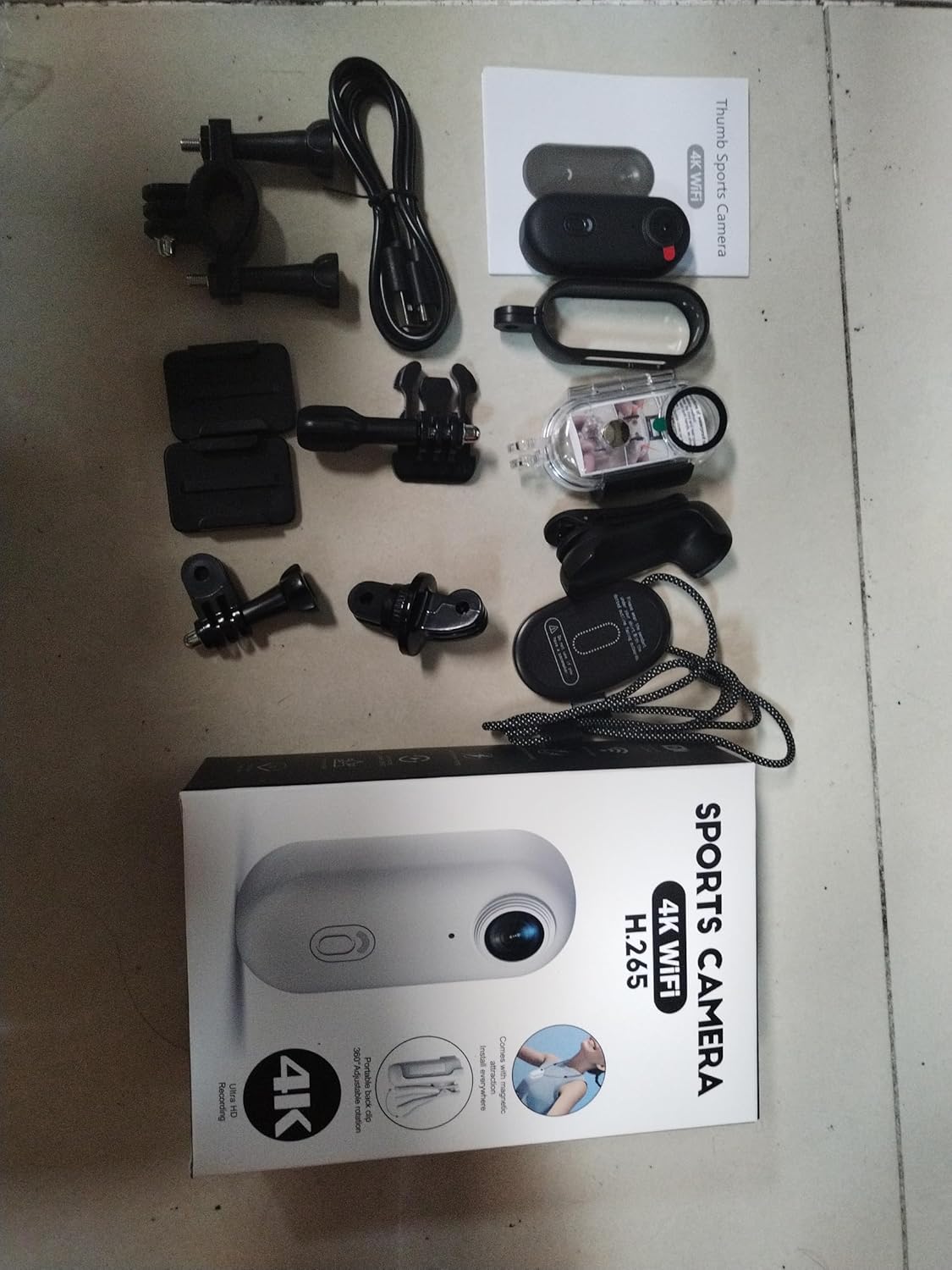
Illustration of the complete package contents.

Detailní view of the camera and its included accessories.
4. Konec produktuview
The Andoer Tiny Action Camera is designed for portability and ease of use. Familiarize yourself with its main components:

Přední view of the Andoer Tiny Action Camera.
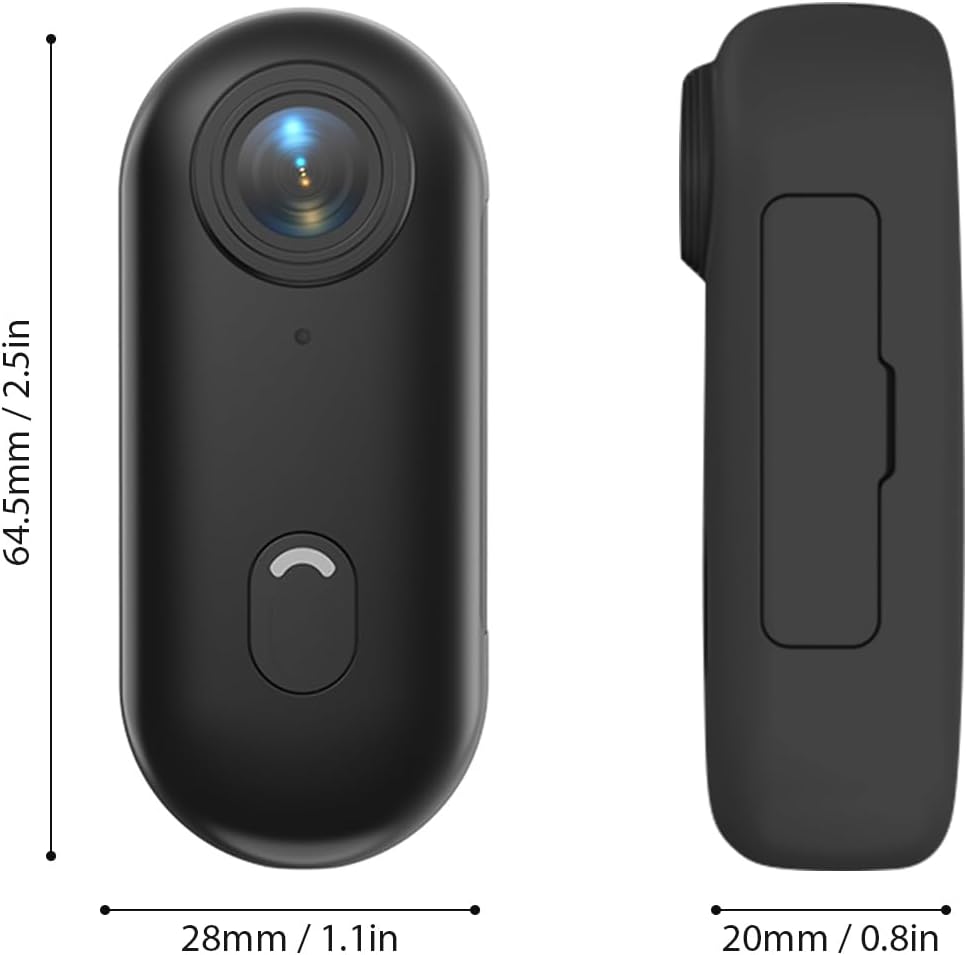
Fyzické rozměry kamery.
- Čočka: 120° wide-angle lens for expansive shots.
- Tlačítko napájení / režimu: Used for powering on/off and switching modes.
- Kontrolka: Displays camera status (recording, charging, WiFi connection).
- Mikrofon: Snímá zvuk.
- Port USB-C: Pro nabíjení a přenos dat.
- Slot pro microSD kartu: Pro vložení paměťové karty.
5. Nastavení
5.1 Nabíjení baterie
The camera has a built-in 800mAh lithium battery. Before first use, fully charge the camera.
- Connect the included Type-C charging cable to the camera's USB-C port.
- Druhý konec kabelu připojte k napájecímu adaptéru USB 5V/2A (není součástí balení) nebo k portu USB počítače.
- The indicator light will show charging status (refer to the camera's light indicator guide for specific colors/patterns).
- Plné nabití trvá přibližně 120 minut.
5.2 Vložení paměťové karty
A MicroSD (TF) card (not included) is required for recording videos and photos. The camera supports cards up to 256GB.
- Vyhledejte slot pro kartu MicroSD na fotoaparátu.
- Vložte kartu MicroSD kontakty dolů, dokud nezacvakne na místo.
- Chcete-li kartu vyjmout, jemně ji zatlačte, dokud nevyskočí.
Poznámka: It is recommended to format the MicroSD card in the camera before first use to ensure compatibility and optimal performance. Refer to the app or camera settings for formatting options.
5.3 Způsoby montáže
The camera offers multiple versatile mounting options:
- Vestavěné magnety: The camera has built-in magnets, allowing direct attachment to any iron surface.
- Magnetická šňůrka na krk: Attach the camera to the magnetic lanyard to wear it around your neck for convenient hands-free recording.

Using the magnetic lanyard for hands-free recording.
- Zadní klip: Use the included back clip to securely attach the camera to your collar, pocket, or backpack strap.
- Vodotěsné pouzdro: For underwater activities or protection from harsh elements, enclose the camera in the waterproof case. This case allows the camera to be submerged up to 30 meters. Ensure the case is properly sealed before use.
- Montážní příslušenství: Utilize the camera frame, mounting bases, buckle mount, long screw mount, handlebar mount, and mount adapter to attach the camera to helmets, bicycles, and other equipment.

Examples of multiple installation methods for the camera.
6. Návod k obsluze
6.1 Zapnutí/vypnutí
- Zapnutí: Press and hold the Power/Mode button for a few seconds until the indicator light illuminates.
- Vypnout: Press and hold the Power/Mode button again for a few seconds until the indicator light turns off.
6.2 Nahrávání videa
The camera records videos in 4K resolution at 30 frames per second (4K 30fps) in MP4 format.
- Ujistěte se, že je fotoaparát zapnutý a je vložena karta MicroSD.
- Press the Power/Mode button once to start video recording. The indicator light will change to indicate recording is in progress (e.g., flashing red).
- Press the Power/Mode button again to stop recording. The indicator light will return to standby mode.
6.3 Fotografování
The camera captures photos at 3840x2160 resolution in JPEG format.
- Ujistěte se, že je fotoaparát zapnutý a je vložena karta MicroSD.
- (If in video mode, short press the Power/Mode button to switch to photo mode if applicable, or use the app).
- Press the Power/Mode button briefly to take a photo. The indicator light may flash once to confirm the capture.
6.4 Připojení k Wi-Fi a používání aplikací
The camera supports WiFi connection, allowing you to control it and view/share content via a smartphone application.
- Download the dedicated smartphone application (refer to the product packaging or manufacturer's website for the app name and download links).
- Zapněte fotoaparát.
- Activate WiFi on the camera (usually by a long press or specific button combination, refer to camera's light indicator guide). The camera will broadcast a WiFi network.
- On your smartphone, go to WiFi settings and connect to the camera's WiFi network (SSID and password typically found on the camera or in the app instructions).
- Open the app. You should now be able to see a live preview, control recording, adjust settings, and transfer files.
6.5 Nahrávání ve smyčce
Kamera podporuje nahrávání ve smyčce, které automaticky přepíše nejstarší záznamy filekdyž je paměťová karta plná, což zajišťuje nepřetržitý záznam.
- This feature is typically enabled by default or can be configured via the smartphone app.
- When the memory card reaches its capacity, the camera will automatically delete the oldest video segments to make space for new recordings.
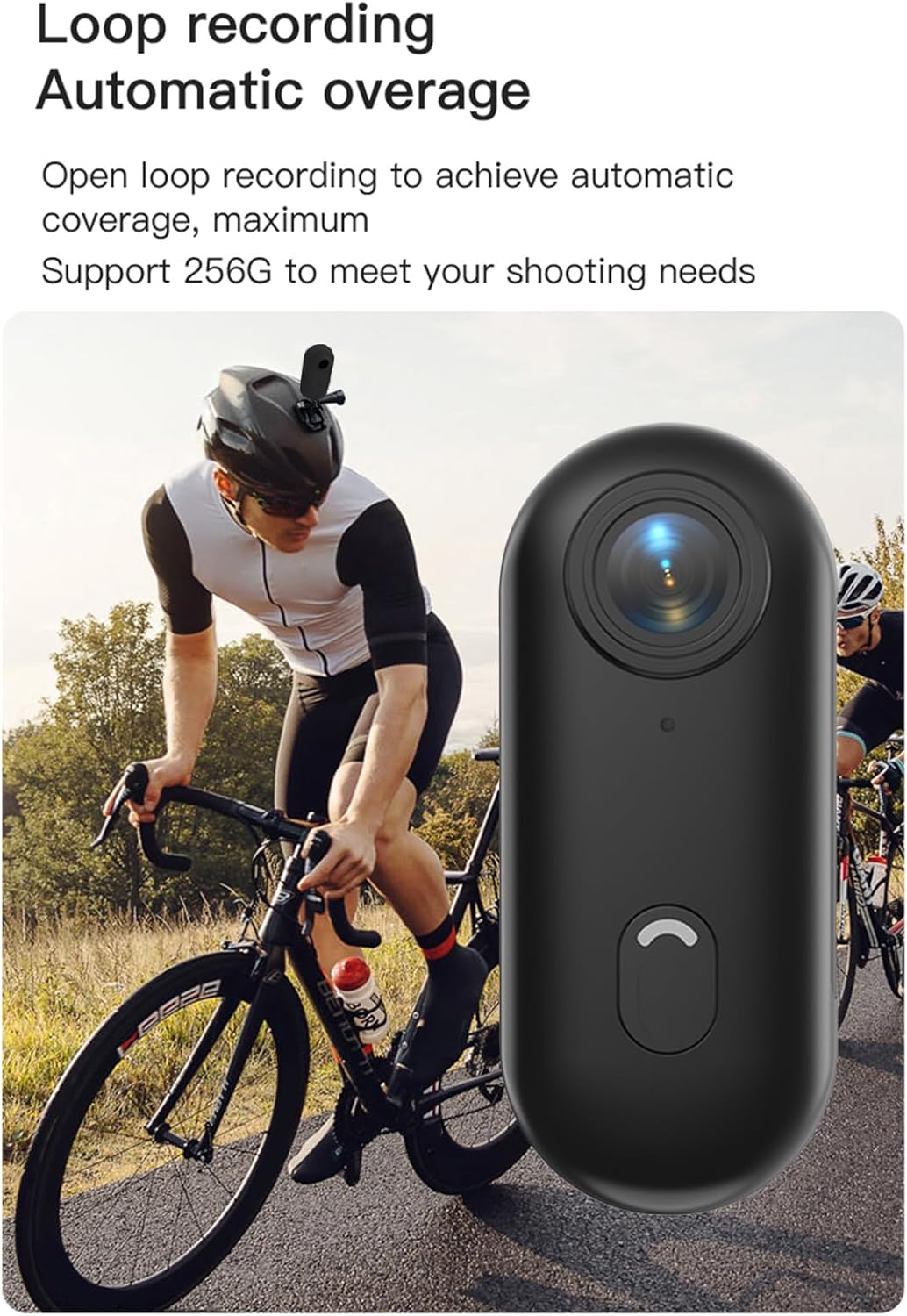
Loop recording functionality ensures continuous capture.
7. Údržba
- Čištění: K čištění těla fotoaparátu používejte měkký, suchý hadřík. Na objektiv použijte speciální hadřík a roztok na čištění objektivů. Nepoužívejte agresivní chemikálie ani abrazivní materiály.
- Skladování: Pokud fotoaparát nepoužíváte, skladujte jej na chladném a suchém místě, mimo dosah přímého slunečního záření a extrémních teplot.
- Péče o baterie: Pro dlouhodobé skladování nabijte baterii přibližně na 50 % každé několik měsíců, aby se zachovala její životnost.
- Vodotěsné pouzdro: After using the waterproof case in saltwater, rinse it thoroughly with fresh water and allow it to air dry. Check the O-ring seal regularly for any debris or damage.
8. Řešení problémů
| Problém | Možná příčina | Řešení |
|---|---|---|
| Fotoaparát se nezapne. | Slabá baterie; vadná baterie; problém s tlačítkem napájení. | Plně nabijte fotoaparát. Pokud problém přetrvává, kontaktujte podporu. |
| Nelze se připojit k Wi-Fi. | WiFi not enabled on camera; incorrect password; app issue. | Ensure camera WiFi is active. Re-enter password. Restart camera and phone. Reinstall app. |
| Nahrávání se neočekávaně zastaví. | Memory card full; slow memory card; battery low. | Check memory card space. Use a high-speed (Class 10 or U3) MicroSD card. Charge battery. |
| Špatná kvalita videa/fotek. | Znečištěný objektiv; špatné světelné podmínky; nesprávné nastavení. | Clean the lens. Ensure adequate lighting. Check resolution settings in the app. |
| Únik vody ve vodotěsném pouzdře. | Improperly sealed case; damaged O-ring. | Ensure case is securely latched. Check O-ring for debris or damage and replace if necessary. |
9. Specifikace
| Funkce | Detail |
|---|---|
| Rozlišení videa | 4K 30 snímků za sekundu |
| Rozlišení fotografie | 3840x2160 |
| Formát videa | MP4 |
| Formát fotografie | JPEG |
| Úhel objektivu | 120° široký úhel |
| Konektivita | WiFi |
| Kapacita baterie | Lithiová baterie 800mAh |
| Doba nabíjení | Přibl. 120 minut |
| Nabíjecí svtage | 5V/2A |
| Podpora paměťových karet | TF karta, až 256 GB |
| Typ rozhraní | Typ-C |
| Vodotěsnost (s pouzdrem) | Až 30 mil |
| Rozměry produktu | 64.5 x 28 x 20mm (2.54 x 1.1 x 0.8 palce) |
| Hmotnost položky | Approx. 11.3 ounces (camera only) |
| Provozní teplota | -10 °C až 60 °C (14 °F až 140 °F) |
| Skladovací teplota | -10 °C až 60 °C (14 °F až 140 °F) |
10. Záruka a podpora
Andoer products are manufactured to the highest quality standards. This product is covered by a limited warranty against defects in materials and workmanship from the date of purchase. Please retain your proof of purchase for warranty claims.
For technical support, troubleshooting assistance, or warranty inquiries, please contact Andoer customer service through the retailer where you purchased the product or visit the official Andoer webstránky pro kontaktní informace.
Webmísto: Andoer Official Store on Amazon