
SCULPFUN S9 Pro
SCULPFUN S9 Pro 10W Laser Engraver Instruction Manual
Model: S9 Pro | Brand: SCULPFUN
Konec produktuview
The SCULPFUN S9 Pro is a high-precision 10W laser engraver and cutter machine designed for versatile applications. It offers powerful engraving and cutting capabilities on a wide range of materials, including wood, leather, plastic, acrylic, and metal. With its advanced features, the S9 Pro ensures detailed and efficient results for various crafting and prototyping projects.

Figure 1: SCULPFUN S9 Pro 10W Laser Engraver, showcasing its robust frame and laser module.
Klíčové vlastnosti
- Výkonný 10W laserový modul: Enables precise engraving and cutting on various materials. Capable of cutting up to 20mm wood and 15mm acrylic.
- Velká pracovní plocha: A generous 400mm x 410mm (15.75" x 16.14") area for diverse project sizes.
- Vysoká přesnost: Features a 0.06mm ultra-fine laser focus and 0.01mm precision for detailed work.
- Široká kompatibilita: Compatible with popular engraving software like LaserGRBL and LightBurn, supporting Windows and MAC systems. Supports various file formats including JPG, PNG, DXF, SVG, AI, G-code, NC, and BMP.
- Zvýšená bezpečnost: Equipped with a laser filter cover that blocks 98% of ultraviolet light, double safety power switch, and pre-drilled holes for secure wiring. Includes a steel pad to protect surfaces and mitigate fire hazards.
Průvodce nastavením
The SCULPFUN S9 Pro is designed for straightforward assembly. Follow these steps for initial setup:
- Rozbalení: Opatrně vyjměte všechny součásti z obalu. Zkontrolujte, zda jsou přítomny všechny součásti uvedené v dodacím listu.
- Sestava rámu: Assemble the main frame of the engraver. The parts are typically labeled for easy identification. Refer to the included quick-start guide for visual instructions.
- Instalace laserového modulu: Securely attach the laser module to the gantry. Ensure it is firmly in place.
- Zapojení: Connect all necessary cables, including power and data cables, according to the provided diagrams. Ensure connections are secure.
- Instalace softwaru: Install the recommended engraving software (e.g., LaserGRBL or LightBurn) on your computer. Drivers may be required for proper communication.
- Počáteční kalibrace: Perform initial calibration steps as outlined in the software or quick-start guide to ensure proper laser alignment and focus.
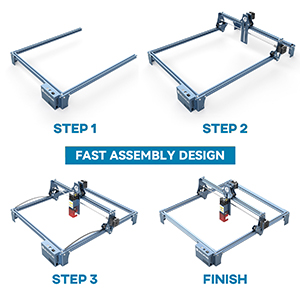
Figure 2: Visual representation of the fast assembly process for the SCULPFUN S9 Pro.

Figure 3: Diagram illustrating the 400x410mm large carving area of the engraver.
Návod k obsluze
Operating the SCULPFUN S9 Pro involves preparing your design, setting up the material, and initiating the engraving or cutting process through the software.
Software Compatibility and Usage
The S9 Pro is compatible with a variety of mature engraving software, ensuring flexibility for users:
- Podporovaný software: LaserGRBL, LightBurn, Benbox, GrblController, LiteFire.
- Operační systémy: Supports Windows (XP, 7, 8, 10) and MAC systems (with LightBurn).
- File Formáty: Compatible with JPG, PNG, DXF, SVG, AI, G-code, NC, BMP, and more.

Figure 4: Illustration of the broad software compatibility, including LaserGRBL and LightBurn.
Material Preparation and Laser Focus
Proper material placement and laser focusing are crucial for optimal results.
- Umístění materiálu: Place your material flat on the working area. Use the included steel pad to protect your work surface from laser damage and fire hazards.
- Laser Focusing: The S9 Pro features a 0.06mm ultra-fine laser focus. Adjust the laser module height to achieve the sharpest possible focus on your material. This ensures precise engraving and cutting.
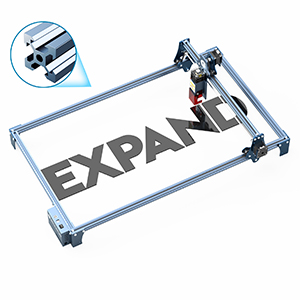
Figure 5: Demonstrating the adjustment of the laser module for optimal focus on the material.

Figure 6: Illustration of the high-density and sharp laser beam, highlighting its effective cutting range and ultra-fine focus.
Engraving and Cutting Materials
The S9 Pro is capable of processing a wide array of materials:
| Typ materiálu | Schopnosti | Poznámky |
|---|---|---|
| Dřevo | Engraving & Cutting (up to 20mm) | Plywood, light wood, walnut, teak. Adjust settings for different wood densities. |
| Akryl | Engraving & Cutting (up to 15mm) | Clear and colored acrylic. |
| Kůže | Gravírování a řezání | Ideal for personalized leather goods. |
| Kov | Rytina | Requires specific settings for different metal types. |
| Plast | Gravírování a řezání | Test on a small area first to avoid melting or fumes. |
| Fabric/Cloth | Rytina | Suitable for denim and other textiles. |

Obrázek 7: Přamples of cutting depth on various materials like plywood, MDF, light wood, acrylic, walnut, and teak.

Obrázek 8: Vizuální examples of wood carving, leather carving, acrylic carving, steel carving, wood cutting, leather cutting, acrylic cutting, and cloth carving.
Údržba
Regular maintenance ensures the longevity and optimal performance of your SCULPFUN S9 Pro.
- Čištění: Regularly clean the laser lens and the working area to remove dust, debris, and residue from engraving/cutting. Use a soft, lint-free cloth and appropriate cleaning solutions if necessary.
- Systém podpory vzduchu: If using an air assist system, ensure the nozzle is clear and free from blockages to maintain efficient airflow.
- Chlazení: To prevent overheating and prolong laser module life, allow the laser to cool for approximately 15 minutes after every 4 hours of continuous operation.
- Laser Module Lifespan: The laser module has a finite lifespan, typically around one year with regular use. Performance may decline over time, particularly for cutting thicker materials. Replacement modules can be sourced from the manufacturer or authorized dealers.
- Mazání: Periodically check and lubricate the moving parts, such as the guide rails and lead screws, to ensure smooth operation.
Odstraňování problémů
This section addresses common issues you might encounter with your SCULPFUN S9 Pro.
| Problém | Možná příčina | Řešení |
|---|---|---|
| Laser nefunguje nebo má slabý výkon | Loose connection, laser module issue, incorrect software settings, dirty lens. | Check all cable connections. Verify laser power settings in software. Clean the laser lens. If issues persist, the laser module may need replacement. |
| Poor engraving/cutting quality (e.g., blurry, incomplete cuts) | Incorrect focus, wrong speed/power settings, material issues, dirty lens. | Re-focus the laser. Adjust speed and power settings based on material type and thickness. Ensure material is flat and clean. Clean the laser lens. |
| Software not connecting to engraver | Incorrect COM port, driver issues, software version incompatibility. | Verify the correct COM port is selected in the software. Reinstall drivers. Ensure software is up-to-date or compatible with your firmware. Restart both computer and engraver. |
| Machine not moving or erratic movement | Loose belts, motor issues, power supply problem, software command error. | Check and tighten timing belts. Ensure power supply is stable. Restart software and machine. Consult manufacturer support if motors are unresponsive. |
For more detailed troubleshooting, refer to the official SCULPFUN support resources or online communities for LaserGRBL and LightBurn.
Specifikace
- Model: S9 Pro
- Výstupní výkon laseru: 10,000 mW (10 W)
- Třída laseru: 4
- Engraving Precision: 0.01 mm
- Laserové ostření: 0.06mm ultra-fine
- Pracovní oblast: 400 mm × 410 mm (15.75" × 16.14")
- Rozměry produktu: 22.4 x 20.4 x 3 palce
- Hmotnost položky: 9.68 libry
- Výrobce: SCULPFUN
- Země původu: Čína
Záruka a podpora
For detailed warranty information, product support, or to purchase replacement parts (such as laser modules), please refer to the official SCULPFUN webnebo se obraťte přímo na jejich zákaznický servis. Uschovejte si účtenku jako doklad o koupi pro případné reklamace.
Oficiální obchod SCULPFUN: Visit SCULPFUN Store on Amazon
Ask a question about this manual
Ask about setup, troubleshooting, compatibility, parts, safety, or missing instructions. Manuals+ will review the question and use this page’s manual context to help answer it.