
1. Úvod
This manual provides essential information for the proper setup, operation, and maintenance of your ASHATA Telescope Eyepiece Camera. Please read this manual thoroughly before using the device to ensure optimal performance and longevity.
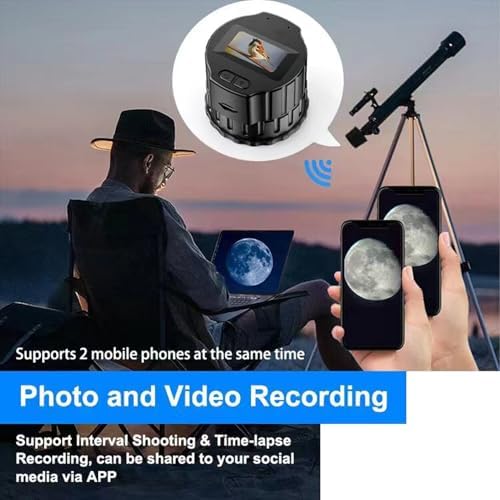
Image 1.1: The ASHATA Telescope Eyepiece Camera.
2. Konec produktuview
The ASHATA Telescope Eyepiece Camera is designed for astrophotography and general observation, allowing you to capture high-resolution photos and videos through your telescope or microscope. It features a 16MP sensor for 1080P recording and offers seamless connectivity with mobile devices.
Klíčové vlastnosti:
- Zobrazení ve vysokém rozlišení: Capture 16MP photos and 1080P HD videos.
- Široká kompatibilita: Designed for 28mm to 50mm optical telescopes and microscopes.
- Bezdrátové připojení: Connects to your smartphone via built-in Wi-Fi for real-time viewing, control, and sharing.
- Přenosný design: Compact and lightweight (0.2 lbs) for easy transport.
- Dlouhá výdrž baterie: Integrated 1000mAh battery provides up to 150 minutes of continuous use on a 1-hour charge.
- Rozšiřitelné úložiště: Podporuje paměťové karty až do 256 GB.

Image 2.1: The eyepiece camera connected to a telescope, displaying images on two mobile phones simultaneously. It supports photo and video recording, including interval shooting and time-lapse, shareable via the app.
3. Pokyny k nastavení
3.1 Attaching the Camera to Your Telescope/Microscope
- Ensure your telescope or microscope eyepiece barrel is between 28mm and 50mm in diameter.
- Gently rotate the ASHATA Eyepiece Camera to attach it securely to the eyepiece of your optical device. Do not overtighten.
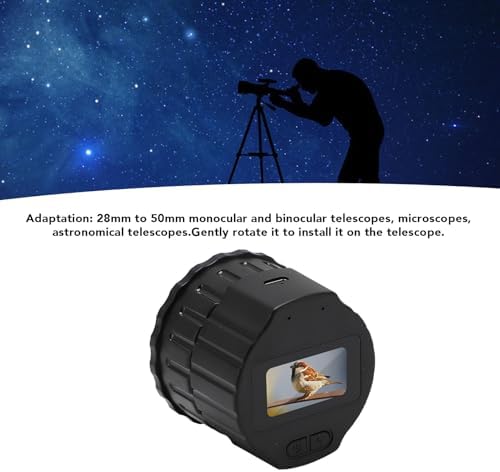
Image 3.1: The eyepiece camera mounted on a telescope, demonstrating its compatibility with 28mm to 50mm optical devices.
3.2 Počáteční nabíjení
Before first use, fully charge the camera using the provided Type-C USB cable. Connect the cable to the camera's Type-C port and a standard USB power adapter (not included) or a power bank.
3.3 Instalace a připojení aplikace
- Download the dedicated application for the ASHATA Eyepiece Camera from your smartphone's app store.
- Povolte na svém smartphonu Wi-Fi.
- Power on the eyepiece camera.
- Connect your smartphone to the camera's Wi-Fi network. The network name and password can typically be found in the camera's display or a sticker on the device.
- Open the application to establish a connection and begin live viewIng.
4. Návod k obsluze
4.1 Pořizování fotografií a videí
Once connected to the app, you can control the camera directly from your smartphone. The app interface will provide options for:
- Fotografování: Tap the camera icon to take a still image.
- Nahrávání videa: Tap the video icon to start and stop recording.
- Intervalové snímání: Set specific time intervals for automatic photo capture.
- Časosběrné nahrávání: Capture a series of images over time to create a time-lapse video.

Image 4.1: The eyepiece camera capturing a bird, with the live feed displayed on a connected smartphone, illustrating real-time observation and recording capabilities.
4.2 Nastavení zaostření
The camera features manual focus. Adjust the focus ring on the camera or your optical device until the image on your smartphone screen is clear and sharp.

Image 4.2: The eyepiece camera displaying a full view angle, indicating the field of view zachycený.
4.3 Sdílení obsahu
The companion app allows for immediate sharing of captured photos and videos to social media platforms or other applications on your smartphone.
5. Údržba
5.1 Nabíjení baterie
The built-in 1000mAh Li-ion battery can be recharged using any standard Type-C phone charger or power bank. A full charge takes approximately 1 hour and provides up to 150 minutes of continuous operation.

Image 5.1: The eyepiece camera highlighting its USB Type-C charging port and support for memory cards up to 256GB.
5.2 Skladování
The camera supports external memory cards up to 256GB for storing your photos and videos. Ensure the memory card is inserted correctly into the designated slot.
5.3 Čištění
Use a soft, dry cloth to clean the exterior of the camera. For the lens, use a specialized lens cleaning cloth and solution to avoid scratches. Do not use abrasive cleaners or solvents.
6. Řešení problémů
- Kamera se nezapíná: Ujistěte se, že je baterie nabitá. Připojte ke zdroji napájení a zkuste to znovu.
- Nelze se připojit k chytrému telefonu: Verify Wi-Fi is enabled on both devices. Ensure you have selected the correct camera Wi-Fi network and entered the correct password. Restart both the camera and your smartphone.
- Obrázek je rozmazaný: Adjust the manual focus on the camera or your optical device. Ensure the camera is securely attached and aligned with the eyepiece.
- No image on app: Confirm the camera is powered on and successfully connected via Wi-Fi. Check if the app has necessary permissions on your phone.
- Nelze ukládat fotografie/videa: Check if a memory card is inserted and has sufficient free space. Ensure the memory card is not corrupted.
7. Specifikace
| Značka | ASHATA |
| Název modelu | ASHATAsyeu4rtdng |
| Popis čočky okuláru | ABS digital camera lens |
| Rozměry produktu (D x Š x V) | 3.93" × 3.93" × 2.75" (100 mm × 100 mm × 70 mm) |
| Typ zaměření | Manuální ostření |
| Kompatibilní zařízení | Telescopes (28mm to 50mm aperture) |
| Poměr zoomu | 2 |
| Výrobce | ASHATA |
| Kapacita baterie | 1000 XNUMX mAh |
| Doba nabíjení | Přibl. 1 hodina |
| Doba nepřetržitého používání | Přibl. 150 minut |
| Podpora úložiště | Paměťová karta až 256 GB |
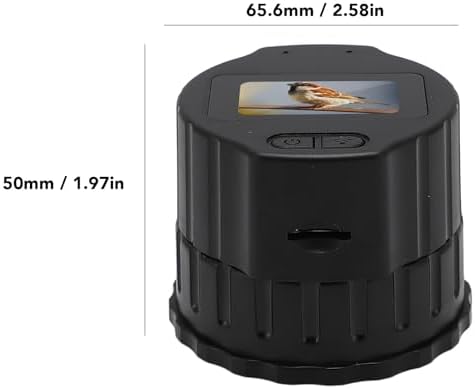
Obrázek 7.1: Rozměrový view of the eyepiece camera, showing its compact size.
8. Záruka a podpora
For warranty information or technical support, please refer to the contact details provided with your purchase or visit the official ASHATA webmísto. Uschovejte si doklad o koupi pro případ záručních reklamací.