
1. Úvod
This manual provides detailed instructions for the installation, operation, and maintenance of your Sharkoon MK6 RGB Micro ATX PC Case. Please read this manual thoroughly before beginning assembly to ensure proper setup and optimal performance.
The Sharkoon MK6 RGB is a compact Micro ATX PC case designed with a modern glass aesthetic, featuring tempered glass panels on the front and side. It includes three pre-installed addressable RGB PWM fans for efficient cooling and customizable lighting. The case supports BTF motherboards and offers ample space for various components, including large graphics cards and extensive cooling solutions.
2. Nastavení a instalace komponent
Before starting, ensure you have all necessary tools, including a screwdriver set and anti-static wrist strap.
2.1 Otevření případu
Carefully remove the tempered glass side panel by unscrewing the retaining thumbscrews, typically located at the rear of the case. Gently slide the panel off and set it aside on a soft, flat surface to prevent scratches.
2.2 Instalace základní desky
- Install the I/O shield into the designated opening at the rear of the case.
- Align your Micro ATX or BTF motherboard with the standoffs inside the case. Ensure all standoffs match the motherboard's mounting holes.
- Zajistěte základní desku pomocí dodaných šroubů. Nepřetahujte je.
2.3 Instalace jednotky napájecího zdroje (PSU)
The MK6 RGB supports bottom-mount power supplies up to 23.5 cm in length.
- Zasuňte zdroj do určené přihrádky ve spodní zadní části skříně.
- Secure the PSU to the case using screws from the rear panel.
2.4 Instalace úložného disku
The case accommodates up to two 3.5" HDDs or three 2.5" SSDs.
- 3.5" pevné disky: Locate the drive cage, typically near the PSU shroud. Mount the HDDs using the provided trays or screws.
- 2.5" SSD disky: SSDs can be mounted on dedicated brackets behind the motherboard tray or within the drive cage.
2.5 Instalace grafické karty (GPU)
The MK6 RGB supports graphics cards up to 41 cm in length and includes a rubberized graphics card holder for support.
- Odstraňte potřebné kryty slotů PCIe ze zadní strany skříně.
- Vložte grafickou kartu do příslušného slotu PCIe na základní desce.
- Secure the graphics card with screws. Adjust the graphics card holder to provide additional support if needed.
2.6 Instalace chladicího systému
The case comes with three pre-installed 120mm addressable RGB PWM fans. Two fans are inverted on the side for intake, and one is at the rear for exhaust. The case supports up to eight fans in total.
- Další ventilátory: Install additional 120mm or 140mm fans in available mounting positions (top, bottom, side) as required for optimal airflow.
- Liquid Cooling Radiators: The case supports a 360mm radiator and an additional 240mm radiator. Mount radiators to the designated areas (e.g., top, side) using appropriate screws.
2.7 Správa kabelů
Pro vedení kabelů využijte výřezy pro vedení kabelů a úchyty za přihrádkou základní desky. Zlepší se tím proudění vzduchu a estetika.

Obrázek 1: Vnitřní view of the Sharkoon MK6 RGB PC case, highlighting the pre-installed fans and drive bay locations.

Obrázek 2: Vnitřní view showing the motherboard tray and various cutouts for efficient cable management.

Obrázek 3: Vnitřní view illustrating the available mounting points for liquid cooling radiators.

Obrázek 4: Vnitřní view displaying the adjustable graphics card holder for enhanced GPU support.
3. Návod k obsluze
3.1 Zapnutí
After all components are installed and cables are connected, close the side panel. Connect your monitor, keyboard, mouse, and power cable to the PC. Press the power button on the front panel to start your system.
3.2 Ovládání RGB osvětlení
The MK6 RGB includes an RGB controller that provides connections for up to four LED elements and up to four PWM fans. The pre-installed fans are connected to this controller.
- Default Modes: The RGB lighting will typically cycle through default patterns upon startup.
- Ovládání softwaru: If connected to a compatible motherboard, RGB lighting can be controlled via the motherboard's RGB synchronization software. Refer to your motherboard manual for specific instructions.
- Ruční ovládání: Some cases may feature a dedicated button on the front panel to cycle through RGB modes. Consult the case's quick start guide for this feature.
3.3 Front Panel Connectivity
The front panel features modern TRRS and USB-C ports for broad compatibility with various devices. Connect your peripherals and storage devices as needed.

Obrázek 5: Přední strana view of the Sharkoon MK6 RGB PC case, showcasing the tempered glass panel and visible RGB fans.
4. Údržba
Pravidelná údržba pomáhá zajistit optimální výkon a dlouhou životnost komponent vašeho počítače.
4.1 Čištění prachového filtru
The case features dust filters to prevent dust accumulation. Regularly clean these filters to maintain good airflow.
- Locate and remove the dust filters (e.g., top, bottom, front).
- Clean the filters using compressed air or by rinsing them with water. Ensure they are completely dry before reinstallation.
4.2 Tempered Glass Cleaning
Use a soft, lint-free cloth and a non-abrasive glass cleaner to clean the tempered glass panels. Avoid harsh chemicals that could damage the glass or coatings.
4.3 Čištění ventilátoru
Over time, dust can accumulate on fan blades, reducing cooling efficiency. Use compressed air to gently clean the fan blades. Ensure the system is powered off before cleaning.
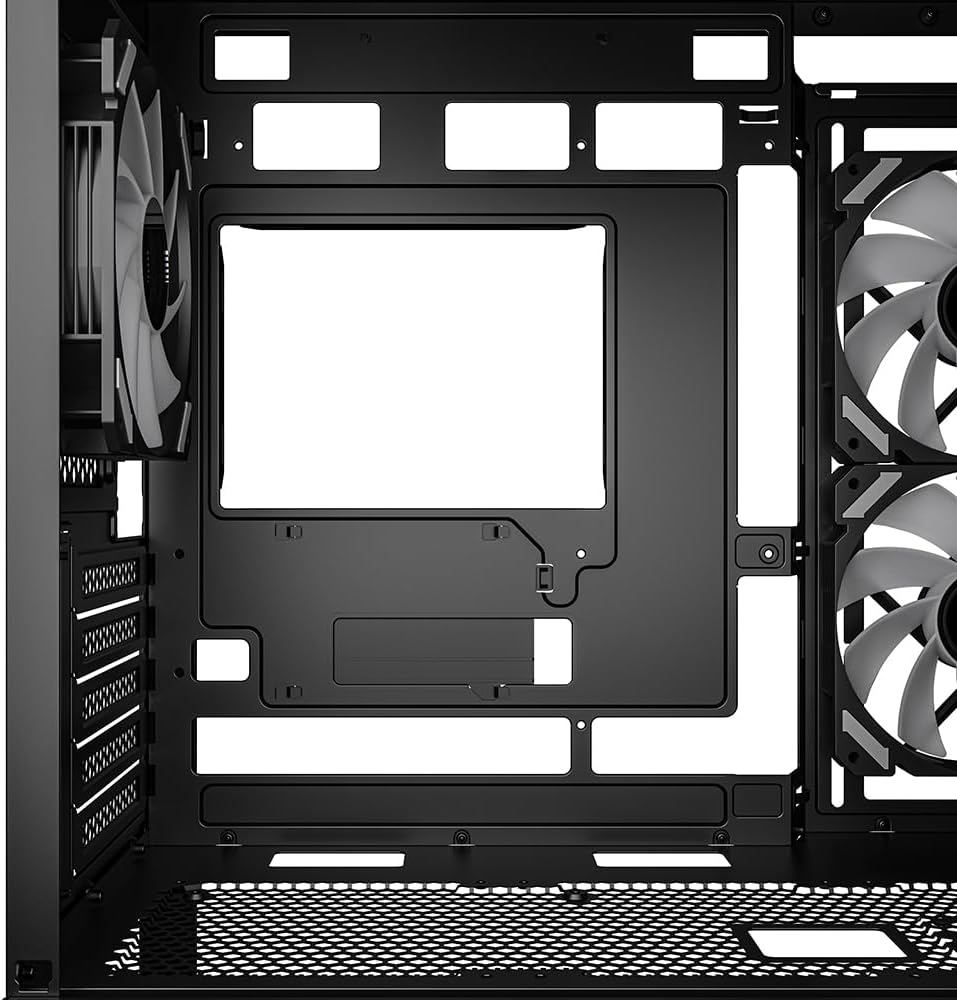
Obrázek 6: Nahoře view of the Sharkoon MK6 RGB PC case, illustrating the removable magnetic dust filter for easy cleaning.
5. Řešení problémů
Tato část se zabývá běžnými problémy, se kterými se můžete setkat.
5.1 Systém se nezapíná
- Napájení: Verify that the PSU is properly connected to the wall outlet and the power switch on the PSU is in the 'ON' position.
- Konektory na předním panelu: Ensure the power button cable from the front panel is correctly connected to the motherboard's front panel header.
- Vnitřní součásti: Check that all major components (motherboard, CPU, GPU, RAM) are securely seated and connected to the PSU.
5.2 Fans Not Spinning or RGB Not Lighting Up
- Připojení ventilátoru: Confirm that all fan power cables are securely connected to the motherboard or the RGB controller.
- RGB Controller Power: Ensure the RGB controller itself is receiving power, typically via a SATA power connector from the PSU.
- Software/Button: If using software control, check the software settings. If there's a physical RGB button, try cycling through modes.
5.3 Poor Airflow or Overheating
- Prachové filtry: Vyčistěte všechny ucpané prachové filtry.
- Orientace ventilátoru: Ensure fans are oriented correctly for optimal airflow (intake at front/side, exhaust at rear/top).
- Správa kabelů: Zlepšete správu kabelů, abyste snížili překážky proudění vzduchu.
6. Specifikace
| Funkce | Detail |
|---|---|
| Název modelu | MK6 RGB |
| Značka | Sharkoon |
| Typ pouzdra | Střední věž |
| Kompatibilita základní desky | Micro ATX, BTF |
| Materiál | Tvrzené sklo |
| Barva | Černý |
| Rozměry produktu (DxŠxV) | 17.13 x 8.86 x 17.52 palce (43.5 x 22.5 x 44.5 cm) |
| Hmotnost položky | 13.42 libry (6.1 kg) |
| Výška chladiče CPU | Až 17 cm |
| Graphics Card Length Clearance | Až 41 cm |
| Vůle délky PSU | Až 23.5 cm |
| Drive Bays | 2x 3.5" HDD or 3x 2.5" SSD |
| Předinstalované ventilátory | 3x 120mm Addressable RGB PWM Fans |
| Maximální podpora ventilátorů | Až 8 ventilátorů |
| Podpora radiátorů | 1x 360 mm, 1x 240 mm |
| Přední I / O porty | TRRS, USB-C, USB 3.0 (1 port listed in specs) |
| Způsob chlazení | Vzduch |
| Typ montáže napájecího zdroje | Spodní montáž |
7. Informace o záruce
For detailed warranty information regarding your Sharkoon MK6 RGB PC Case, please refer to the official Sharkoon website or contact your local retailer. Warranty terms and conditions may vary by region and purchase location.
8. Technická podpora
If you encounter any issues or require technical assistance beyond the scope of this manual, please visit the official Sharkoon support website for FAQs, driver downloads, and contact information. You may also reach out to your point of purchase for support.