
1. Úvod
Thank you for choosing the Sharkoon AK6 RGB ATX PC Case. This manual provides essential information for the proper installation, operation, and maintenance of your new PC case. Please read this guide thoroughly before beginning the assembly process to ensure optimal performance and longevity of your components.
2. Bezpečnostní informace
- Před instalací nebo demontáží jakýchkoli součástí uvnitř skříně počítače vždy odpojte napájecí zdroj ze zásuvky.
- Handle tempered glass panels with care. They are fragile and can break if dropped or subjected to impact.
- Avoid exposing the case to extreme temperatures, humidity, or direct sunlight.
- Keep small parts and screws out of reach of children.
- Ensure proper grounding to prevent electrostatic discharge (ESD) damage to sensitive electronic components.
3. Obsah balení
Prosím, ověřte, zda jsou v balení přítomny všechny položky:
- PC skříň Sharkoon AK6 RGB ATX
- Accessory box (containing screws, cable ties, and other small parts)
- Uživatelská příručka (tento dokument)
4. Konec produktuview
The Sharkoon AK6 RGB ATX PC Case is designed with a modern glass aesthetic, featuring seamless integration of tempered glass on the front and side panels. It includes four pre-installed 120mm addressable RGB PWM fans for optimal airflow and visual appeal. The case supports a wide range of components, including BTF motherboards, and offers ample space for high-performance hardware.

Figure 4.1: Front interior view of the Sharkoon AK6 RGB PC case, showcasing the pre-installed addressable RGB fans and the spacious main chamber.

Obrázek 4.2: Úhlové view of the Sharkoon AK6 RGB PC case, highlighting the tempered glass side panel and the top mesh for ventilation.

Obrázek 4.3: Zadní view of the Sharkoon AK6 RGB PC case, showing the I/O shield cutout, rear exhaust fan mount, and expansion slots.
Přední I/O panel
The front I/O panel is located on the side of the case and includes:
- Tlačítko napájení
- Tlačítko Reset
- 2 x USB Ports (Type-A)
- 1 x port USB Type-C
- Audio Jacks (TRRS)
5. Nastavení a instalace
Follow these steps to install your components into the Sharkoon AK6 RGB PC Case.
5.1 Příprava případu
- Umístěte pouzdro na rovný a stabilní povrch.
- Carefully remove the tempered glass side panel by unscrewing the thumb screws at the rear and gently pulling the panel away.
- Remove the rear metal side panel by unscrewing the thumb screws.
5.2 Instalace základní desky
The AK6 RGB supports Mini-ITX, Micro-ATX, ATX, and BTF motherboards.
- Install the I/O shield into the cutout at the rear of the case (if not pre-installed on your motherboard).
- Align your motherboard with the standoffs inside the case. Ensure all standoffs match the motherboard's mounting holes.
- Zajistěte základní desku příslušnými šrouby z krabice s příslušenstvím.
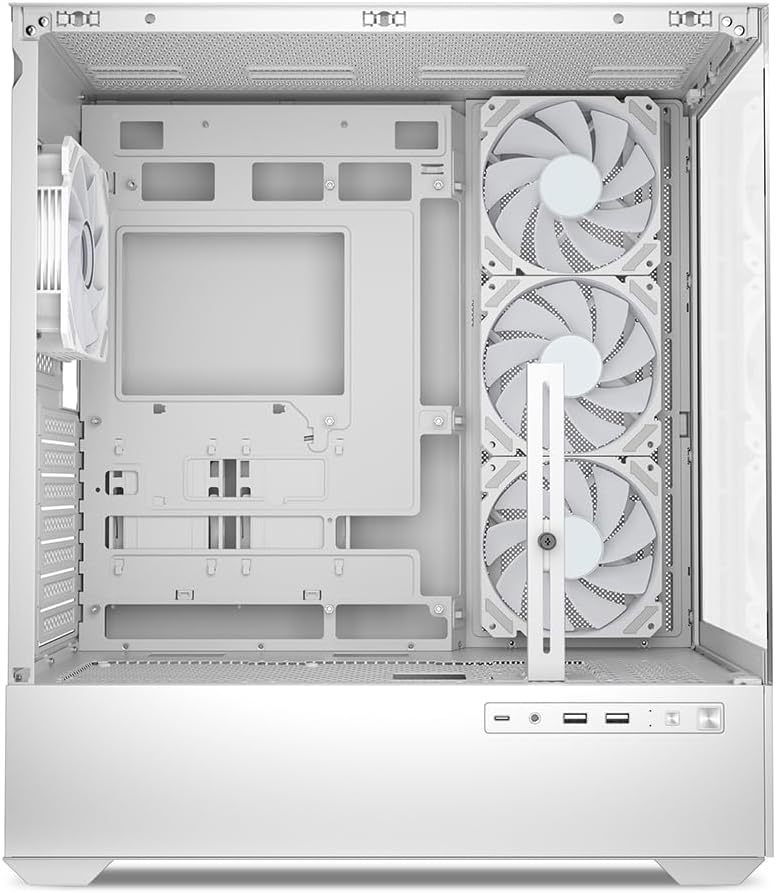
Obrázek 5.1: Interiér view of the Sharkoon AK6 RGB PC case, illustrating the motherboard tray, cable management cutouts, and front fan mounting points.
5.3 Instalace napájecího zdroje
The case features a bottom-mount power supply design.
- Slide the power supply unit (PSU) into the dedicated compartment at the bottom rear of the case.
- Align the PSU with the screw holes at the rear of the case.
- Secure the PSU with the provided screws.
5.4 Instalace paměťového zařízení
The AK6 RGB supports up to two 3.5" HDDs or four 2.5" SSDs.
- For 3.5" HDDs: Locate the drive cages beneath the PSU shroud. Slide the HDD into a drive tray and secure it with screws.
- For 2.5" SSDs: SSDs can be mounted on the dedicated brackets behind the motherboard tray or on the 3.5" drive trays using adapter screws.
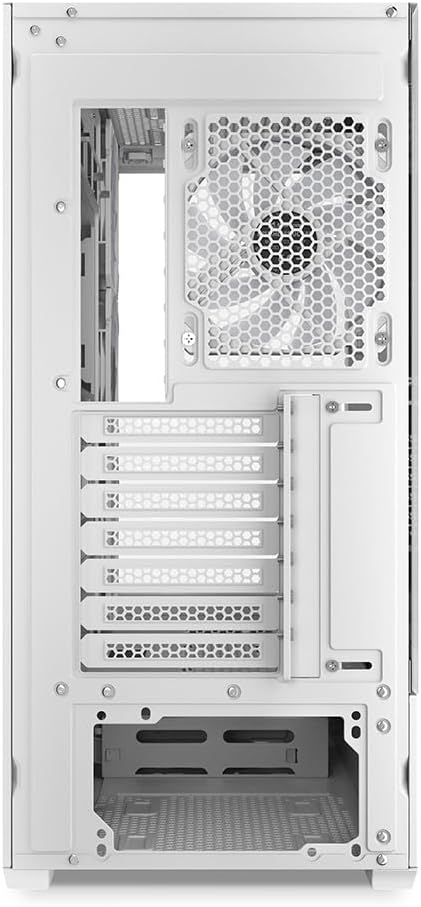
Obrázek 5.2: Zadní interiér view of the Sharkoon AK6 RGB PC case, detailing the drive cages for 3.5-inch HDDs and 2.5-inch SSDs, and the power supply shroud area.
5.5 Instalace grafické karty a rozšiřující karty
- Odstraňte potřebné kryty rozšiřujících slotů na zadní straně skříně.
- Vložte grafickou kartu nebo jiné rozšiřující karty do příslušných slotů PCIe na základní desce.
- Secure the cards with screws. The case includes a rubberized graphics card support for larger cards.
5.6 CPU Cooler and Radiator Installation
The case supports CPU coolers up to 17 cm in height and allows for extensive liquid cooling setups.
- Nainstalujte chladič procesoru podle pokynů výrobce.
- For liquid cooling, the case can accommodate a 360mm radiator at the top and an additional 280mm radiator.
5.7 Správa kabelů
Utilize the cable management cutouts and tie-down points behind the motherboard tray to route and secure cables. This improves airflow and aesthetics.
6. Návod k obsluze
6.1 Zapnutí
After all components are installed and cables are connected, replace the side panels. Connect the power cable to your PSU and a wall outlet, then press the power button on the front I/O panel to start your system.
6.2 Ovládání ventilátorů RGB
The AK6 RGB comes with four pre-installed addressable RGB PWM fans. These fans are connected to an RGB controller which also provides connections for up to four LED elements and four PWM fans. The RGB lighting can typically be controlled via your motherboard's RGB software (if compatible) or through a dedicated button on the case (if present and connected).
6.3 Optimalizace proudění vzduchu
The case is designed for ideal airflow, with three inverted fans drawing air from the side into the case. The top and rear fan mounts allow for additional exhaust fans. Ensure proper fan orientation for optimal cooling performance.

Obrázek 6.1: Přample of a fully assembled system within the Sharkoon AK6 RGB PC case, featuring various components and active RGB lighting.
7. Údržba
Pravidelná údržba pomáhá zajistit dlouhou životnost a výkon komponent vašeho počítače.
- Prachové filtry: Periodically clean the removable dust filters (e.g., on the top and bottom) to maintain optimal airflow and prevent dust buildup inside the case. Use compressed air or a soft brush.
- Skleněné panely: Tvrzené skleněné panely čistěte měkkým hadříkem, který nepouští vlákna, a čističem skla. Vyhněte se abrazivním materiálům, které by mohly poškrábat povrch.
- Čištění interiéru: K odstranění prachu z vnitřních součástí a ventilátorů použijte stlačený vzduch. Před čištěním se ujistěte, že je systém vypnutý a odpojený od sítě.
8. Řešení problémů
If you encounter issues with your PC case, refer to the following common troubleshooting steps:
- Bez napájení: Ensure the power supply is properly connected to the wall outlet and the motherboard. Check all internal power cables (24-pin ATX, 8-pin CPU, PCIe power).
- Ventilátory se netočí/RGB nefunguje: Verify that all fan and RGB cables are correctly connected to the motherboard or the included RGB controller. Check your motherboard's BIOS/UEFI settings or RGB software for fan speed and lighting control.
- Přední I/O porty nefungují: Confirm that the front panel connectors (USB, audio, power/reset switches) are correctly plugged into the corresponding headers on your motherboard.
- Přehřívání: Ensure all fans are spinning correctly and oriented for proper airflow. Clean dust filters and internal components. Verify CPU cooler installation.
For further assistance, please contact Sharkoon support.
9. Specifikace
| Funkce | Specifikace |
|---|---|
| Značka | Sharkoon |
| Název modelu | AK6 RGB |
| Číslo modelu | C-AK6W |
| Typ pouzdra | ATX věž |
| Barva | Bílý |
| Materiál | Tvrzené sklo |
| Kompatibilita základní desky | Mini ITX, Micro ATX, ATX, BTF |
| Typ montáže napájecího zdroje | Spodní montáž |
| Způsob chlazení | Vzduch |
| Předinstalované ventilátory | 4 x 120mm Addressable RGB PWM Fans |
| Maximální výška chladiče CPU | 17 cm |
| Maximální délka grafické karty | 41 cm (with rubberized support) |
| Maximální délka PSU | 23.5 cm |
| Podpora radiátorů | Top: up to 360mm, Additional: up to 280mm |
| Drive Bays | 2x 3.5" HDD nebo 4x 2.5" SSD |
| Přední I / O porty | 2 x USB Type-A, 1 x USB Type-C, Audio (TRRS) |
| Hmotnost položky | 6.1 kg |
| Speciální funkce | RGB Lighting, Unique Glass Appearance, BTF Motherboard Support |
10. Záruka
Sharkoon products are manufactured to high quality standards. For detailed warranty information, please refer to the warranty card included with your product or visit the official Sharkoon webZáruka se obvykle vztahuje na vady materiálu a zpracování při běžném používání.
11. Podpora
If you require technical assistance or have questions regarding your Sharkoon AK6 RGB ATX PC Case, please visit the official Sharkoon website for support resources, FAQs, and contact information. You may also find updated drivers or software for the RGB controller there.
Webmísto: www.sharkoon.com