
JBMJGKYMA-A
Uživatelská příručka
66 Inch Large Computer Desk with Power Outlet and USB Charging Port
1. Konec produktuview
This manual provides essential information for the assembly, operation, and maintenance of your new 66-inch large computer desk. Designed for home office or professional workspaces, this desk features a spacious desktop, an ergonomic monitor stand, integrated power outlets, and ampúložná řešení le.

Figure 1.1: Fully assembled 66-inch computer desk.
2. Bezpečnostní pokyny
- Vždy pečlivě dodržujte montážní pokyny, abyste předešli zranění nebo poškození.
- Nepřetěžujte stůl ani police nad jejich uvedenou nosnost.
- Před použitím se ujistěte, že jsou všechny šrouby a spojovací prvky bezpečně utažené. Pravidelně kontrolujte a v případě potřeby dotahujte.
- Keep liquids away from the integrated power outlet and USB ports to avoid electrical hazards.
- Umístěte stůl na rovný povrch, abyste zajistili jeho stabilitu.
- Během montáže udržujte malé části mimo dosah dětí.
3. Obsah balení
Před zahájením montáže ověřte, zda jsou všechny níže uvedené komponenty přítomny a nepoškozené. Pokud některé díly chybí nebo jsou poškozené, kontaktujte zákaznickou podporu.
| Část | Popis | Množství |
|---|---|---|
| A | Main Desktop Panel | 1 |
| B | Monitor Stand Panel | 1 |
| C | Side Shelf Panels | 2 |
| D | Kovové nohy rámu | 4 |
| E | Crossbar Supports | 2 |
| F | Mobilní File Výstavce | 1 |
| G | Jednotka zásuvky | 1 |
| H | Sada hardwaru (šrouby, imbusový klíč atd.) | 1 |
4. Nastavení a montáž
Follow these steps to assemble your computer desk. It is recommended to have two people for assembly.
- Rozbalení a identifikace součástí: Lay out all components on a clean, soft surface to prevent scratches. Refer to the "Package Contents" section to identify each part.
- Sestavte hlavní rám: Attach the metal frame legs (D) to the main desktop panel (A) using the provided screws from the hardware pack (H). Do not fully tighten screws yet.
- Install Crossbar Supports: Secure the crossbar supports (E) between the metal frame legs to enhance stability. Tighten all frame screws once the frame is stable.
- Připevnění bočních polic: Mount the side shelf panels (C) to the designated areas on the metal frame. Ensure they are level and secure.
- Instalace stojanu na monitor: Place the monitor stand panel (B) onto the top of the desk frame, aligning it with the pre-drilled holes. Secure it with screws.
- Integrovaná zásuvka: Insert the power outlet unit (G) into the recessed opening on the desktop. Ensure it sits flush and is securely in place.
- Sestavte mobil File Výstavce: Follow the separate instructions provided with the mobile file drawer (F) for its assembly. Once assembled, it can be placed under the desk.
- Konečné utažení: Jakmile jsou všechny součásti na svém místě, pečlivě utáhněte všechny šrouby a upevňovací prvky. Nepřetahujte.

Figure 4.1: Desk dimensions and component layout.
5. Provoz a použití
Your computer desk is designed for versatile use in various settings. Here's how to best utilize its features:
- Stojan na monitor: The elevated monitor stand is designed to hold up to two monitors, promoting an ergonomic viewing angle to reduce neck strain.
- Integrovaná zásuvka: Use the built-in power strip with outlets and USB charging ports to conveniently power your devices directly from your desk. Ensure the desk's power cord is plugged into a grounded wall outlet.
- Úložné police: Utilize the open shelves on the sides for books, office supplies, or decorative items.
- Mobilní File Výstavce: The scrollable file drawer provides ample space for documents and can be moved as needed for flexible storage.
- PC Tower Space: A dedicated space is provided on the lower left shelf for a computer tower, keeping it off the floor and easily accessible.


Figure 5.1: Features: Recessed power strip and ampúložiště.
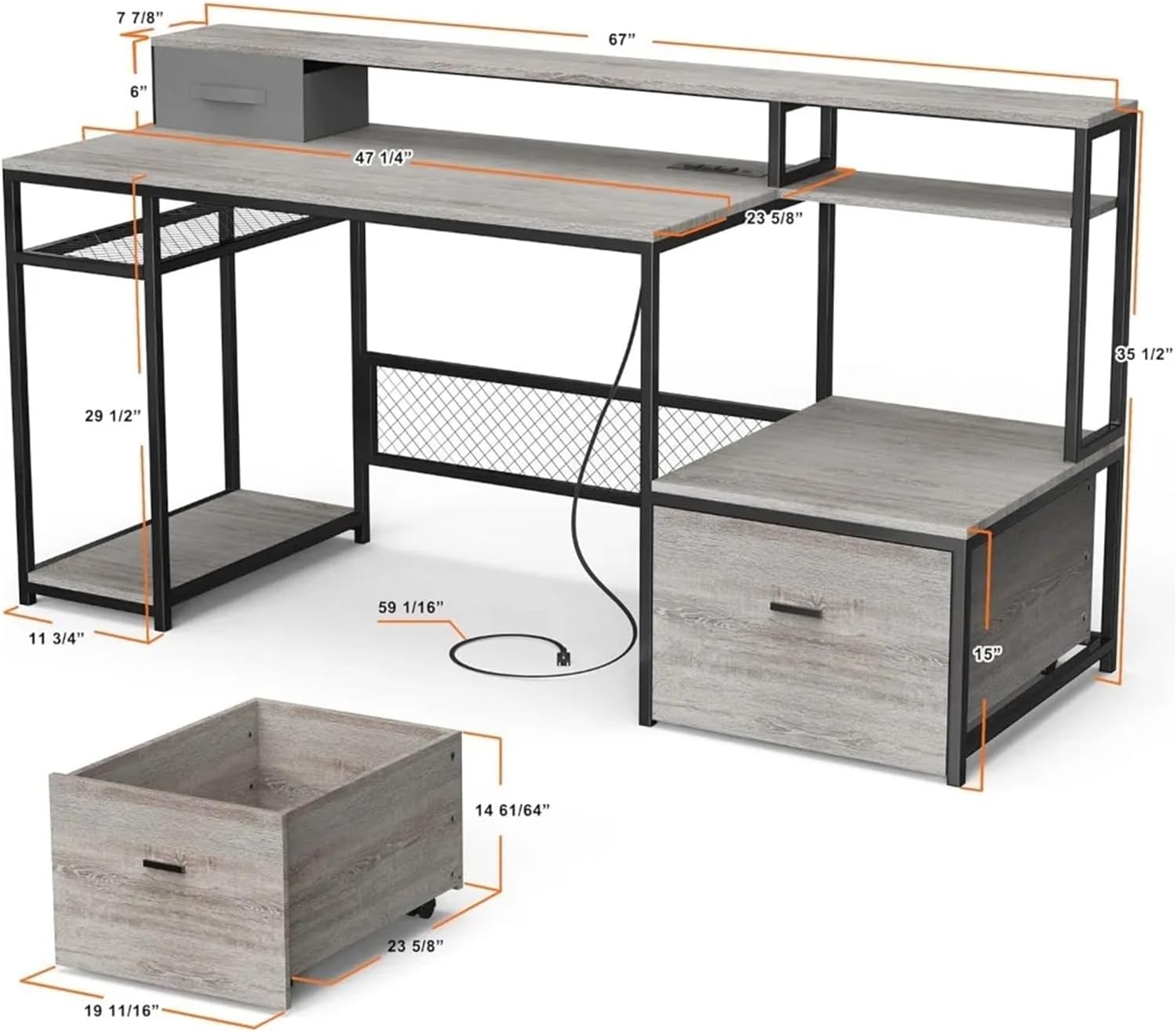
Figure 5.2: Ergonomic benefits of the monitor stand.
6. Údržba
Správná péče prodlouží životnost a vzhled vašeho stolu.
- Čištění: Otřete povrchy měkkým, damp hadříkem. Nepoužívejte agresivní chemikálie ani abrazivní čisticí prostředky, které by mohly poškodit povrchovou úpravu.
- Rozlití: Veškeré rozlité tekutiny ihned setřete, abyste zabránili vzniku skvrn nebo poškození dřevěného povrchu.
- Spojovací materiál: Pravidelně kontrolujte všechny šrouby a vruty, zda jsou pevně utažené. V případě potřeby je dotáhněte.
- Teplo a vlhkost: Avoid placing hot items directly on the desk surface. Use coasters for drinks.
7. Řešení problémů
| Problém | Možná příčina | Řešení |
|---|---|---|
| Stůl se kymácí | Nerovná podlaha; uvolněné upevňovací prvky | Adjust the leveling feet (if present) or place shims under legs. Tighten all assembly screws. |
| Zásuvka nefunguje | Not plugged in; circuit breaker tripped; faulty unit | Ensure the desk's power cord is securely plugged into a working wall outlet. Check your home's circuit breaker. If issues persist, contact customer support. |
| Zásuvka se zasekává nebo se neposouvá hladce | Obstruction; misaligned rails; debris | Check for any items blocking the drawer. Ensure drawer rails are properly aligned and free of debris. |
8. Specifikace
| Funkce | Detail |
|---|---|
| Rozměry produktu (D x Š x V) | Approx. 66.9" x 23.6" x 35.5" (170cm x 60cm x 90cm) |
| Main Desktop Dimensions | Přibližně 120 cm x 47.25 cm (60" x 23.6") |
| Rozměry stojanu monitoru | Přibližně 170 cm x 67 cm (20" x 7.87") |
| Materiál | Engineered Wood (MDF), Metal Frame |
| Barva | Šedý dub |
| Zásuvka napájení | Integrated with AC outlets and USB charging ports |
| Hmotnostní kapacita | (Not specified in input, general desk capacity) |
| Číslo modelu | JBMJGKYMA-A |
Poznámka: Všechny rozměry jsou přibližné a mohou se mírně lišit.
9. Záruka a podpora
This product comes with a standard manufacturer's warranty against defects in materials and workmanship. For specific warranty details, please refer to the documentation included with your purchase or contact the retailer.
For technical support, missing parts, or any inquiries regarding your product, please contact the manufacturer or retailer directly. Please have your model number (JBMJGKYMA-A) and purchase information ready when contacting support.
Ask a question about this manual
Ask about setup, troubleshooting, compatibility, parts, safety, or missing instructions. Manuals+ will review the question and use this page’s manual context to help answer it.