
AT&T EL51503
AT&T EL51503 DECT 6.0 Cordless Home Phone User Manual
Model: EL51503
Zavedení
Welcome to your new AT&T EL51503 DECT 6.0 Cordless Home Phone system. This manual provides comprehensive instructions for setting up, operating, and maintaining your phone system. Designed for busy households, this system offers clear, interference-free communication with advanced features.

Image: The AT&T EL51503 cordless phone system, showing the main base unit with one handset and four additional charging cradles with handsets.
Klíčové vlastnosti
Your AT&T EL51503 cordless phone system comes equipped with several features designed for convenience and clarity.
Backlit Screen & Lighted Keypad

High-contrast text on the white backlit screen ensures easy readability of incoming caller ID or call history records. The lighted handset keypad allows for effortless dialing even in low-light conditions.
Extra velký displej

The large screen makes it easy to read information at a glance, improving user experience for all.
Velká tlačítka

Featuring large font and extra-large backlit keys, this design is particularly helpful for users with visual impairments, ensuring comfortable and accurate dialing.
Technologie DECT 6.0
This cordless telephone transmits secure signals via DECT 6.0 channel, ensuring crystal clear sounds, interference-free communication, and a stable operation range up to 1000 ft outdoors.
Co je v krabici
Ověřte, zda váš balíček obsahuje všechny níže uvedené položky:
- 1 základní jednotka
- 5 Sluchátka
- 4 Adaptors (for charging cradles)
- 5 baterie
- 1 Kabel telefonní linky
- Průvodce rychlým startem
Nastavení
1. Instalace baterie
Each handset requires a battery pack for operation. Ensure correct polarity when inserting.
- Otevřete kryt bateriového prostoru na zadní straně sluchátka.
- Connect the battery pack connector securely into the jack inside the compartment.
- Vložte bateriový blok do přihrádky.
- Zavřete kryt prostoru pro baterie.
2. Charging the Handsets
For optimal performance, charge each handset for at least 16 hours before initial use.
- Place each handset face forward into its respective charging cradle or the main base unit.
- The CHARGE light on the handset will illuminate, indicating proper charging.
3. Připojení základní jednotky
Connect the base unit to a power outlet and your telephone line.
- Zapojte větší konec napájecího adaptéru do elektrické zásuvky, která není ovládána vypínačem ve zdi.
- Zapojte menší konec napájecího adaptéru do zdířky POWER na zadní straně základní jednotky.
- Zapojte jeden konec telefonního kabelu do zdířky TEL LINE na zadní straně základní jednotky.
- Zapojte druhý konec telefonního kabelu do telefonní zásuvky ve zdi.
Důležité: Use only the power adapter and telephone line cord provided with this product.
Operating Your Phone System
Uskutečňování a přijímání hovorů
- Pro uskutečnění hovoru: Stiskněte TELEFON / FLASH or REPRODUKTORa poté vytočte číslo.
- Přijetí hovoru: Stiskněte TELEFON / FLASH or REPRODUKTOR když zazvoní telefon.
- Ukončení hovoru: Stiskněte VYP/ZRUŠIT or place the handset back in the cradle.
Používání hlasitého telefonu
The simulated full-duplex speakerphone allows for natural, two-way conversations.
- Během hovoru stiskněte REPRODUKTOR to switch to speakerphone mode.
- Stiskněte REPRODUKTOR again to switch back to handset mode, or press VYP/ZRUŠIT pro ukončení hovoru.
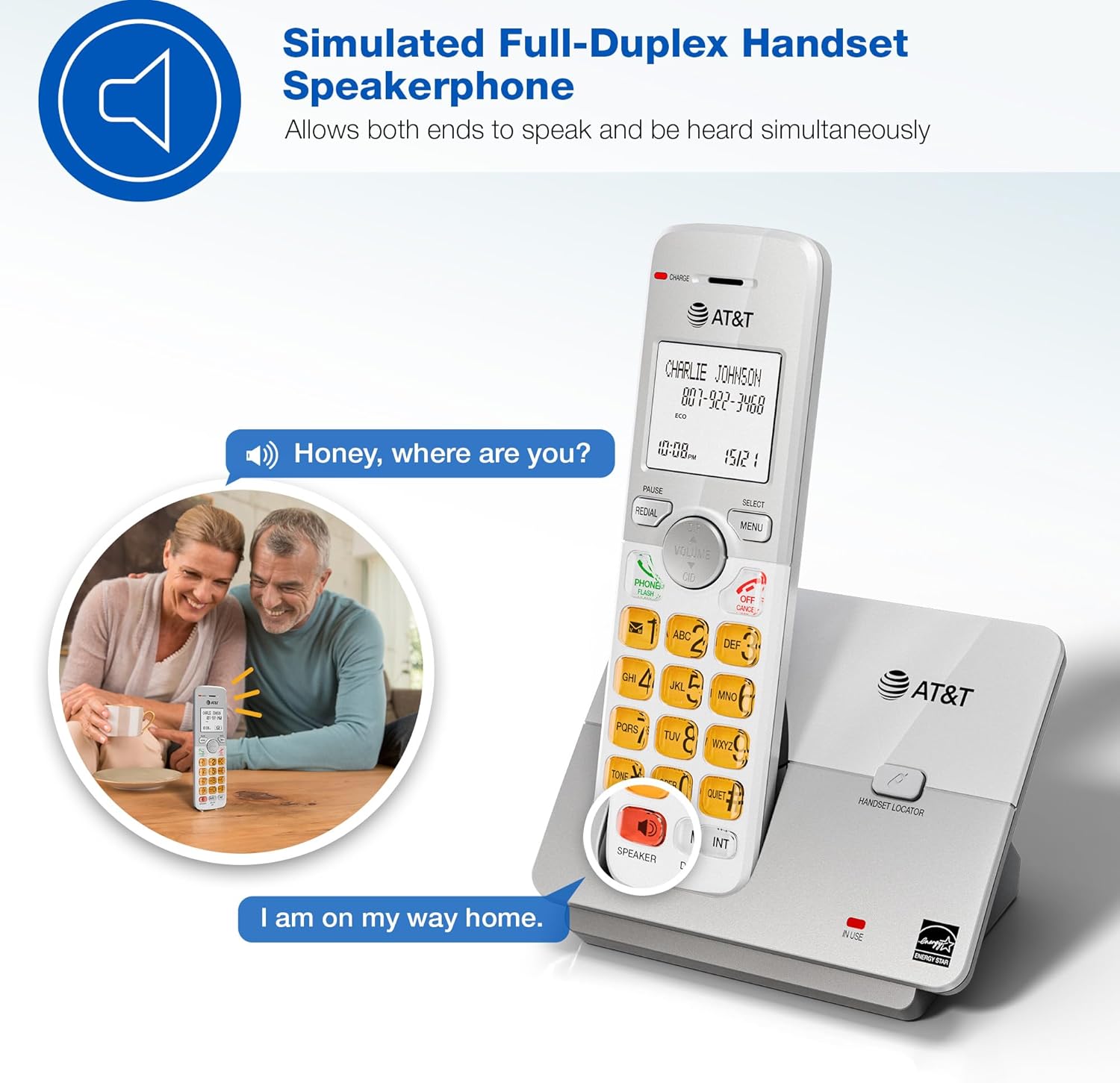
Image: A couple smiling while using the phone's speakerphone feature, demonstrating simultaneous speaking and hearing.
Telefonní seznam
Store up to 50 names and numbers for quick dialing.
- To add an entry: Press MENU, navigate to "Phonebook", then "Add New Entry". Follow the on-screen prompts.
- To dial from phonebook: Press DIR, scroll to the desired entry, then press TELEFON / FLASH or REPRODUKTOR.

Image: The phone's display showing a phonebook directory with contact names, illustrating the ability to store up to 50 names and numbers.
Caller ID / Call Waiting
View incoming caller information and manage multiple calls.
- Incoming calls display on the large, backlit LCD screen.
- Na review Caller ID history: Press CID (up/down arrow) to scroll through recent calls.
- To call back a number from Caller ID: Select the entry and press TELEFON / FLASH.

Image: A close-up of the phone's LCD screen displaying an incoming caller's name and number, along with the current time and date.
Režim Eco
The phone system features an ECO mode to manage power consumption, extending battery life and reducing energy use.
- ECO mode is typically activated automatically when the handset is close to the base unit.
- Look for the "ECO" indicator on the handset display.
Funkce interkomu
Use the intercom feature to communicate between handsets.
- To initiate an intercom call: Press INT on any handset.
- If you have multiple handsets, you may be prompted to select which handset to call.
- To end an intercom call: Press VYP/ZRUŠIT.
Tichý režim
Temporarily silence the ringer on all handsets and the base unit for a set period.
- To activate Quiet Mode: Press MENU, navigate to "Quiet Mode", and set the desired duration.
- Incoming calls will still be logged in Caller ID history.
Údržba
Proper care ensures the longevity of your phone system.
- Čištění: Wipe the phone and base unit with a soft, slightly damp hadříkem. Nepoužívejte čisticí spreje ani agresivní chemikálie.
- Péče o baterie:
- Avoid overcharging by leaving handsets on the charger for extended periods after they are fully charged.
- If the phone will not be used for a long time, remove the battery from the handset.
- Vyměňte baterie, když se výkon sníží.
- Umístění: Uchovávejte telefon mimo dosah zdrojů tepla, přímého slunečního záření a vlhkosti.
Odstraňování problémů
If you experience issues with your phone system, try these common solutions:
| Problém | Řešení |
|---|---|
| Žádný oznamovací tón |
|
| Sluchátko se nenabíjí |
|
| Špatná kvalita zvuku / Statický šum |
|
| Nezobrazuje se ID volajícího |
|
Specifikace
| Funkce | Detail |
|---|---|
| Číslo modelu | EL51503 |
| Typ telefonu | Bezdrátový telefon DECT 6.0 |
| Počet sluchátek | 5 (rozbalitelné) |
| Zobrazit | Podsvícený LCD |
| Klávesnice | Osvětlené |
| Hlasitý telefon | Simulated Full-Duplex Handset Speakerphone |
| Kapacita telefonního seznamu | 50 jmen a čísel |
| Paměť ID volajícího | 50 hovorů |
| Režim Eco | Ano |
| Interkom | Ano |
| Zdroj napájení | Elektrický s kabelem (základní jednotka) |
| Baterie | 5 baterie specifická pro daný produkt (součástí balení) |
| Barva | Černý |
| Materiál | Plast |
| Výrobce | VTech |
| Rozměry produktu (základna) | 4.76 x 3.29 x 6.81 palce (D x Š x V) |
| Hmotnost položky | 3.16 libry |
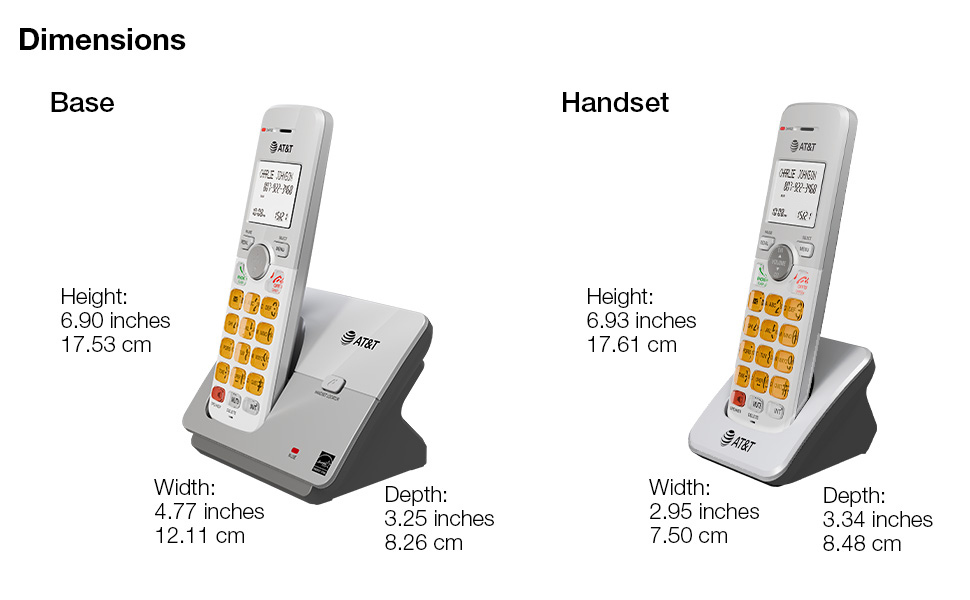
Image: A diagram illustrating the dimensions of both the base unit and a single handset, including height, width, and depth in inches and centimeters.
Záruka a podpora
For warranty information and technical support, please refer to the quick start guide included in your package or visit the official AT&T support webmísto.
- Výrobce: VTech
- Značka: AT&T
- Online podpora: Visit the AT&T Store on Amazon
K dispozici jsou také plány ochrany s rozšířeným krytím:
- Dvouletý ochranný plán
- Dvouletý ochranný plán
- Kompletní ochrana (měsíční tarif)
Podrobnosti o těchto plánech naleznete v seznamu produktů nebo se obraťte na svého prodejce.
Ask a question about this manual
Ask about setup, troubleshooting, compatibility, parts, safety, or missing instructions. Manuals+ will review the question and use this page’s manual context to help answer it.