
1. Úvod
Thank you for choosing the MESTEK TH11 Digital Temperature and Humidity Meter. This device is designed for precise measurement of ambient temperature, relative humidity, wet bulb temperature, and dew point temperature. Its portable and user-friendly design makes it suitable for a wide range of applications, from home environments to industrial and agricultural settings. Please read this manual thoroughly before use to ensure proper operation and to maximize the lifespan of your instrument.

Image 1.1: The MESTEK TH11 meter highlighting its multi-functional capabilities including ambient temperature, humidity, wet bulb, and dew point measurements.
2. Bezpečnostní informace
- Nepokoušejte se přístroj rozebírat nebo upravovat.
- Chraňte zařízení před vodou a vlhkostí, abyste předešli jeho poškození.
- Nevystavujte zařízení po delší dobu extrémním teplotám nebo přímému slunečnímu záření.
- Pro zajištění přesných údajů vyměňte baterie ihned po zobrazení indikátoru slabé baterie.
- Použité baterie zlikvidujte v souladu s místními předpisy.
- Zařízení čistěte měkkým, suchým hadříkem. Nepoužívejte abrazivní čisticí prostředky ani rozpouštědla.
3. Konec produktuview
3.1. Obsah balení
Po otevření balíku se prosím ujistěte, že jsou všechny položky přítomny a v dobrém stavu:
- 1 x MESTEK TH11 Digital Temperature and Humidity Meter
- 3 x AAA baterie
- 1 x látkový vak
- 1 x Šroubovák
- 1 x Uživatelská příručka

Image 3.1: The complete packing list for the MESTEK TH11, showing all included accessories.
3.2. Součásti zařízení
Familiarize yourself with the main parts of your MESTEK TH11 meter:
- Senzor sondy: Located at the top, this high-precision Swiss SHT30 sensor measures temperature and humidity.
- Displej: A backlit LCD for clear reading of measurement values.
- Funkční klávesy: Buttons for power, mode selection, unit switching, and data hold.
- Přihrádka na baterie: Located at the rear for AAA battery installation.

Image 3.2: Labeled diagram of the MESTEK TH11, indicating the probe sensor, display screen, and function keys, along with its dimensions.
3.3. Funkce displeje
The backlit LCD provides clear readings and important indicators:
- Duální displej: Shows both temperature and humidity simultaneously.
- Podsvícení: Zlepšuje viditelnost za zhoršených světelných podmínek.
- Indikace slabé baterie: Ikona se zobrazí, když je potřeba vyměnit baterie.
- Pozastavení dat (HOLD): Zmrazí aktuální měření na displeji.
- MAX/MIN: Displays maximum or minimum recorded values.
- WB/DP: Indicates Wet Bulb or Dew Point temperature mode.
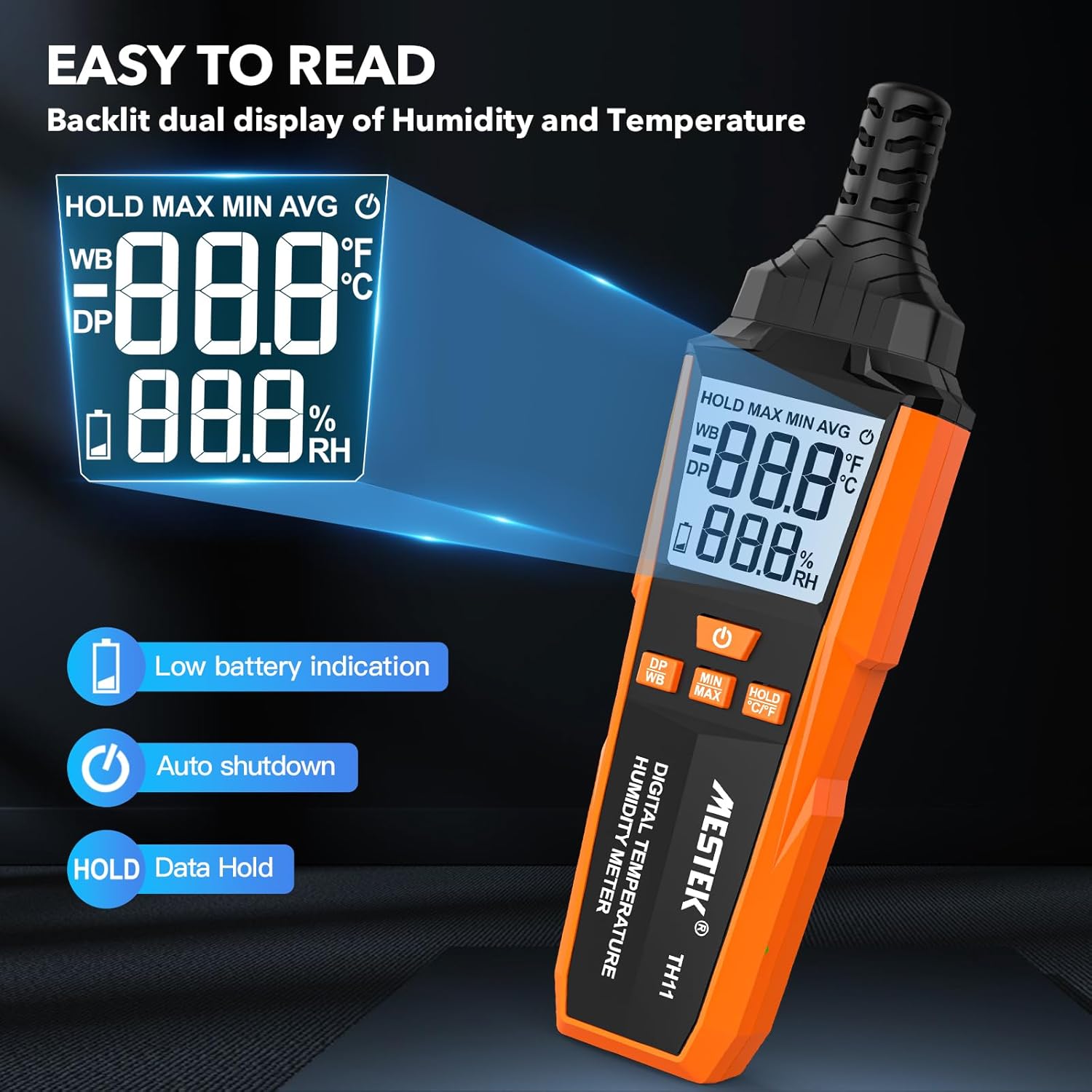
Image 3.3: The MESTEK TH11's backlit display, illustrating its clarity and indicators for low battery and data hold.
4. Nastavení
4.1. Instalace baterie
The MESTEK TH11 requires 3 AAA batteries for operation. Follow these steps to install them:
- Vyhledejte kryt přihrádky na baterie na zadní straně zařízení.
- Use the provided screwdriver to loosen the screw on the battery compartment cover.
- Odstraňte kryt.
- Vložte 3 baterie typu AAA a dbejte na správnou polaritu (+/-) vyznačenou uvnitř přihrádky.
- Nasaďte kryt prostoru pro baterie a utáhněte šroub.
5. Návod k obsluze
5.1. Zapnutí/vypnutí
- Chcete-li zařízení zapnout, stiskněte Tlačítko napájení ().
- Chcete-li zařízení vypnout, stiskněte a podržte tlačítko Tlačítko napájení for approximately 2 seconds. The device also features an automatic shutdown function after 30 minutes of inactivity to conserve battery life.

Image 5.1: The automatic shutdown feature of the MESTEK TH11, activating after 30 minutes of inactivity.
5.2. Přepínání jednotek (°C/°F)
- Chcete-li přepínat mezi stupni Celsia (°C) a Fahrenheita (°F), stiskněte a podržte tlačítko HOLD °C/°F button po dobu přibližně 2 sekund.
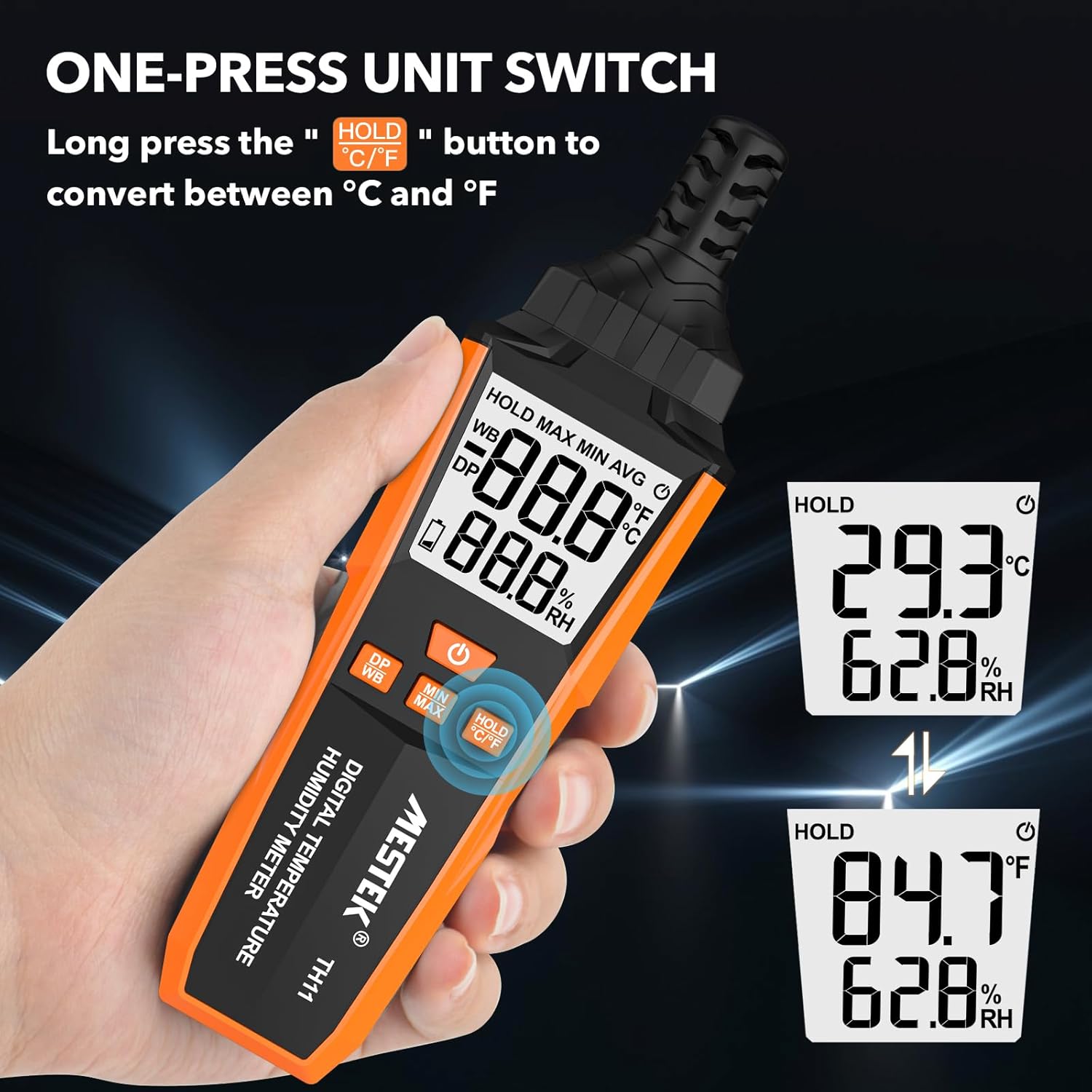
Image 5.2: The MESTEK TH11 showing how to switch between Celsius and Fahrenheit temperature units.
5.3. Funkce uchování dat
- To freeze the current measurement on the display, short press the HOLD °C/°F button. The "HOLD" icon will appear on the screen.
- Press the button again to exit the data hold mode.

Image 5.3: The MESTEK TH11 display indicating the active HOLD function.
5.4. Minimum/Maximum Value Measurement
- Na view the maximum recorded temperature and humidity, short press the Tlačítko MIN/MAX. The "MAX" icon will appear.
- Stiskněte tlačítko Tlačítko MIN/MAX znovu k view the minimum recorded values. The "MIN" icon will appear.
- Press the button a third time to return to real-time measurement.

Image 5.4: The MESTEK TH11 displaying the maximum and minimum recorded temperature and humidity values.
5.5. Wet Bulb / Dew Point Mode
- To switch between Wet Bulb (WB) and Dew Point (DP) temperature display, short press the DP/WB button. The corresponding icon will be shown on the display.
6. Aplikace
The MESTEK TH11 Digital Temperature and Humidity Meter is versatile and can be used in various environments:
- Domov: Monitor indoor climate in bedrooms, children's rooms, and living areas for comfort and health.
- Kancelář: Ensure optimal working conditions by monitoring office temperature and humidity.
- Zemědělství: Ideal for gardens, greenhouses, and agricultural crops to maintain suitable growing conditions.
- Průmysl: Useful in warehouses, cellars, and facilities with air conditioning systems for environmental control.
- Specializovaná prostředí: Suitable for maternity wards and areas requiring precise climate control.

Obrázek 6.1: Příkladamples of the MESTEK TH11's diverse applications in home, plant, storage, and warehouse settings.
6.1. Ambient Temperature and Relative Humidity Reference Values
For optimal conditions in various environments, consider the following reference values:
| Prostředí | Teplota | Relativní vlhkost (RH) |
|---|---|---|
| Human Body Comfort | 15-25 °C | 45%-75% RH |
| Room Environment | 40%-70% RH | |
| Library/Art Gallery/Museum | 40%-60% RH | |
| Electronic Equipment/Communication Room | 45%-60% RH | |
| Agricultural/Cotton/Wool Textiles Storage | 40%-60% RH | |
| Dairy Products Storage | 50%-60% RH | |
| Fruit Storage | 60%-70% RH | |
| Best Convalescent Environment | 30%-50% RH |
Table 6.1: Reference values for ambient temperature and relative humidity in various settings.
7. Specifikace
| Parametr | Hodnota |
|---|---|
| Číslo modelu | ČT11 |
| Značka | MESTEK |
| Hmotnost | 210 g |
| Rozměry (D x Š x V) | 18.8 x 5.4 x 3.4 cm |
| Barva | Pomerančový |
| Styl | Moderní |
| Zdroj napájení | Napájení z baterie |
| Typ baterie | 3 x AAA alkalické baterie |
| Measurement Accuracy (Temperature) | ±0.1 °C |
| Styl zobrazení | Digitální |
| Typ montáže | Handheld / Freestanding |
| Speciální funkce | High Accuracy, Backlit Display, Data Hold, Min/Max, Auto Shutdown, Low Battery Indicator |
| rozsah vlhkosti | 0-99% RH |
| Teplotní rozsah | -20 °C ~ 60 °C (-4 °F ~ 140 °F) |
| Teplotní rozsah rosného bodu | -50 °C ~ 60 °C (-58 °F ~ 140 °F) |
| Rozsah teplot mokrého teploměru | -20 °C ~ 60 °C (-4 °F ~ 140 °F) |
| Typ snímače | Swiss SHT30 High-Precision Sensor |
| Sampsazba ling | Přibližně 1 sekunda |
8. Údržba
- Čištění: Zařízení otřete měkkým, suchým hadříkem. Nepoužívejte tekuté čisticí prostředky ani zařízení neponořujte do vody.
- Skladování: Pokud zařízení delší dobu nepoužíváte, vyjměte baterie, abyste zabránili jejich vytečení. Skladujte zařízení na chladném a suchém místě, mimo dosah přímého slunečního záření a extrémních teplot.
- Péče o senzor: The probe sensor is delicate. Avoid touching it directly or exposing it to dust and debris.
9. Řešení problémů
- Zařízení se nezapne:
Check if the batteries are installed correctly with the right polarity. Ensure the batteries are not depleted; replace them if necessary. - Nepřesné údaje:
Ensure the device has been in the environment for at least 15 minutes to stabilize. Check for any obstructions around the sensor. Replace old batteries. - Displej je slabý nebo bliká:
To obvykle znamená nízký stav baterie. Vyměňte baterie. - Tlačítka nereagují:
Try powering off and on the device. If the issue persists, replace the batteries.
10. Záruka a podpora
The MESTEK TH11 Digital Temperature and Humidity Meter comes with a Záruka 24 měsíců from the date of purchase, covering manufacturing defects. Additionally, MESTEK provides doživotní technickou podporu pro tento produkt.
If you encounter any issues, have questions, or require assistance, please do not hesitate to contact our customer support team. We are committed to providing satisfactory solutions.
For support, please refer to the contact information provided on the MESTEK official webweb nebo vaše nákupní platforma.