
1. Úvod
This manual provides instructions for the safe and efficient use of your CCYLEZ Bone Conduction Speaker, Model CCYLEZivfe1mhwxk-12. This portable speaker utilizes bone conduction technology to deliver sound directly through vibrations on solid mediums, offering a unique and immersive audio experience. It is designed for versatile application in various environments, including wet conditions.
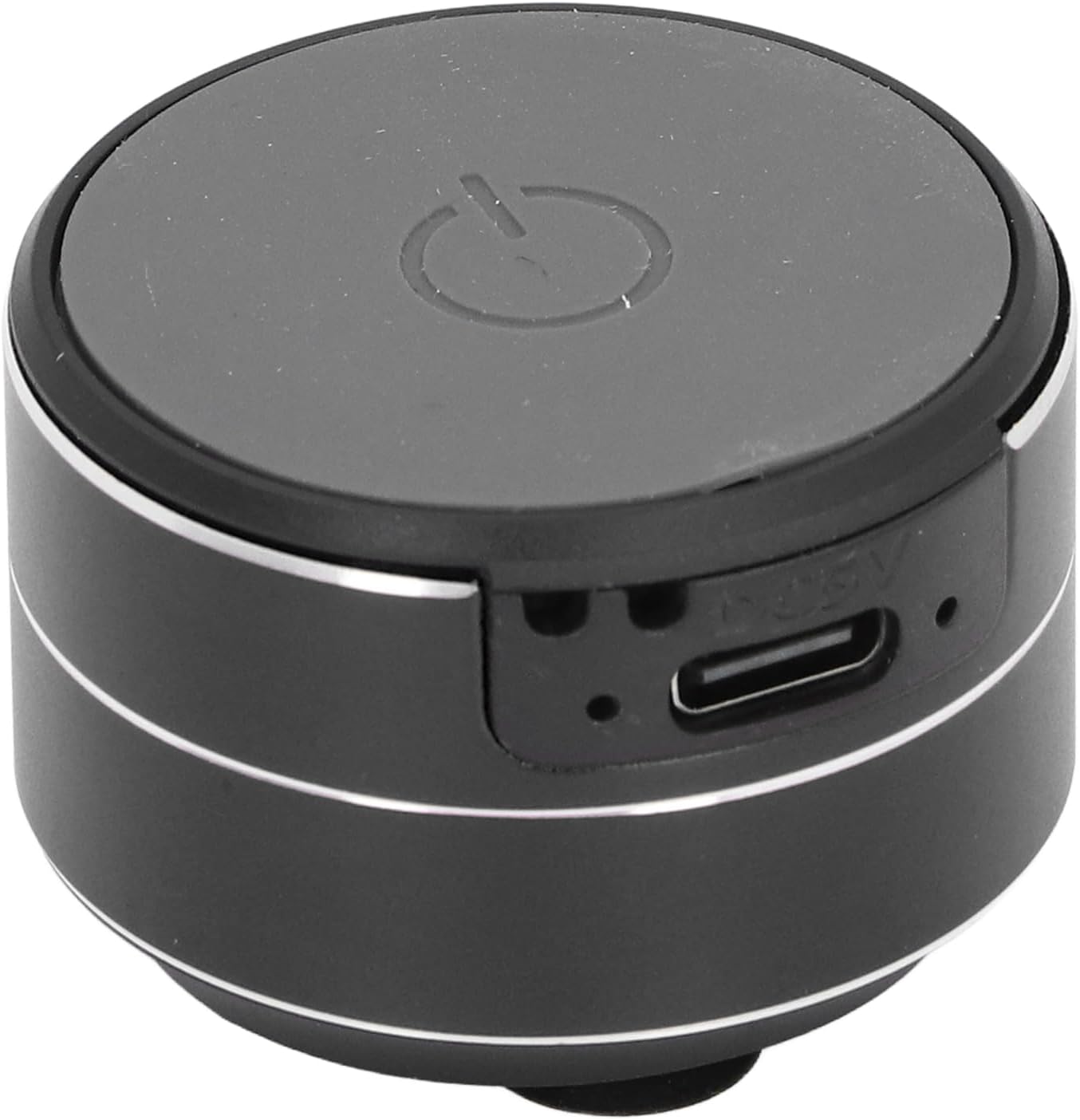
Obrázek 1.1: Přední strana view of the CCYLEZ Bone Conduction Speaker, highlighting the power button and charging port.
2. Obsah balení
Ověřte prosím, zda jsou ve vašem balení obsaženy všechny níže uvedené položky:
- 1 x CCYLEZ Bone Conduction Speaker
- 1 x datový kabel USB
- 1 x závěsné lano
- 1 x oboustranná páska
- 1 x Uživatelská příručka (tento dokument)

Image 2.1: The CCYLEZ Bone Conduction Speaker shown with its accompanying accessories.
3. Bezpečnostní informace
Pro zajištění bezpečného provozu a prevenci poškození dodržujte prosím následující bezpečnostní pokyny:
- Před použitím reproduktoru si pečlivě přečtěte všechny pokyny.
- Nevystavujte zařízení extrémním teplotám (horkým nebo nízkým) ani přímému slunečnímu záření po delší dobu.
- Udržujte reproduktor mimo dosah dětí a domácích zvířat.
- Používejte pouze specifikovaný nabíjecí objemtage of 5V. Using higher voltage může poškodit zařízení.
- Nepokoušejte se reproduktor rozebírat, opravovat ani upravovat sami. V případě potřeby se obraťte na kvalifikovaný servisní personál.
- Vyvarujte se pádu reproduktoru nebo jej nevystavujte silným nárazům.
4. Nastavení
4.1 Počáteční nabíjení
Before first use, fully charge the speaker. Connect the provided USB data cable to the speaker's charging port and a standard 5V USB power adapter (not included) or a computer USB port. The charging port is located on the side of the speaker.

Image 4.1: Close-up of the speaker's side, indicating the USB charging port.
4.2 Zapnutí/vypnutí
To power on the speaker, press and hold the power button located on the top surface until you hear an audible prompt or see an indicator light. To power off, press and hold the same button again.
4.3 Připojení Bluetooth
Once powered on, the speaker will automatically enter Bluetooth pairing mode. On your smartphone, tablet, or other Bluetooth-enabled device, navigate to the Bluetooth settings and search for available devices. Select 'CCYLEZ Speaker' (or a similar name) from the list to connect.
4.4 Dual Speaker Pairing (True Stereo)
For an immersive stereo experience, you can pair two CCYLEZ Bone Conduction Speakers together:
- Ujistěte se, že jsou oba reproduktory vypnuté.
- Power on both speakers simultaneously. They will automatically attempt to find and pair with each other.
- Once successfully paired, one speaker will act as the master and the other as the slave.
- Connect your device via Bluetooth to the master speaker as described in Section 4.3. Audio will now play through both speakers in stereo.
4.5 Možnosti montáže
The speaker offers versatile mounting options to optimize sound transmission through different surfaces:
- Základna přísavky: The speaker is equipped with a suction cup base for stable attachment to smooth, non-porous surfaces like glass, tiles, or metal. Ensure the surface is clean and dry for optimal adhesion.
- Oboustranná páska: For more permanent or textured surfaces, use the provided double-sided tape. Attach one side to the speaker's base and the other to your desired surface.
- Závěsné lano: Utilize the included hanging rope to suspend the speaker, allowing it to vibrate against various objects or simply hang freely.

Image 4.2: Detail of the speaker's suction cup base for secure mounting.
5. Návod k obsluze
Once connected via Bluetooth, you can control audio playback directly from your paired device. The speaker itself typically does not have volume or track control buttons, relying on the connected source device for these functions.
- Ovládání hlasitosti: Adjust the volume using the controls on your connected smartphone, tablet, or computer.
- Ovládání přehrávání: Play, pause, skip tracks, or repeat using the media controls on your connected device.
- Optimální zvuk: Experiment with placing the speaker on different surfaces. Hard, resonant surfaces like wooden tables, glass, or metal panels will produce distinct sound characteristics.
6. Údržba
Správná péče prodlouží životnost vašeho reproduktoru:
- Čištění: Otřete reproduktor měkkým, suchým nebo lehce vlhkým hadříkem.amp hadříkem. Nepoužívejte agresivní chemikálie, abrazivní čisticí prostředky ani rozpouštědla.
- Péče o přísavku: For optimal adhesion, periodically clean the suction cup base with water and allow it to air dry. Ensure the mounting surface is also clean and free of dust or grease.
- Skladování: Pokud reproduktor delší dobu nepoužíváte, skladujte jej na chladném a suchém místě, mimo dosah přímého slunečního záření a extrémních teplot.
- Baterie: To maintain battery health, avoid fully discharging the battery frequently and recharge it regularly, even if not in use.
7. Řešení problémů
Pokud narazíte na problémy s reproduktorem, podívejte se na následující běžné problémy a jejich řešení:
- Žádný zvuk:
- Ujistěte se, že je reproduktor zapnutý a plně nabitý.
- Verify that the speaker is successfully connected to your device via Bluetooth.
- Check the volume levels on both the speaker (if applicable) and your connected device. Ensure neither is muted.
- Zkuste znovu připojit Bluetooth.
- Nelze spárovat přes Bluetooth:
- Ensure the speaker is in pairing mode (usually indicated by a flashing light).
- Turn off and then turn on the speaker and your device's Bluetooth.
- Přesuňte zařízení blíže k reproduktoru (do 10 metrů).
- Vymažte předchozí připojení Bluetooth na zařízení a zkuste spárování znovu.
- Špatná kvalita zvuku / zkreslení:
- Bone conduction sound quality is highly dependent on the surface it's placed on. Experiment with different surfaces (e.g., wood, glass, metal) to find the best sound.
- Ensure the speaker is firmly attached to the surface. Loose contact can cause distortion.
- Reduce the volume on your connected device if distortion occurs at high levels.
- Check for any physical obstructions or damage to the speaker's vibrating surface.
- Reproduktor se nenabíjí:
- Ensure the USB cable is securely connected to both the speaker and the power source.
- Zkuste jiný kabel USB nebo napájecí adaptér.
- Verify the power source is active and providing 5V output.
8. Specifikace
| Číslo modelu | CCYLEZivfe1mhwxk-12 |
| Materiál | Hliníková slitina |
| Typ připojení | Bluetooth 5.3 |
| Vzdálenost připojení | Cca. 10m / 32.81ft |
| Výstup reproduktoru | 3 W, 4Ω |
| Velikost reproduktoru | Přibližně 27 mm / 1.06 palce |
| Frekvenční odezva | 20 Hz - 20 kHz |
| Poměr signálu k šumu | ≥75 dB |
| Zkreslení | ≤ 0.1 % |
| Nabíjecí svtage | 5V |
| Typ baterie | Built-in 3.7V 400mAh Lithium Ion Battery |
| Vodotěsný | Ano |
9. Informace o záruce
This CCYLEZ Bone Conduction Speaker is covered by a limited warranty. The specific terms and duration of the warranty may vary by region and retailer. Please refer to the warranty card included in your product packaging for detailed information. Alternatively, you may contact CCYLEZ customer support or the retailer from whom you purchased the product for warranty inquiries.
10. Zákaznická podpora
For technical assistance, product support, or any questions regarding your CCYLEZ Bone Conduction Speaker, please contact our customer support team. You can typically find contact information through the retailer where you purchased the product or by visiting the official CCYLEZ brand webmísto.
Please have your model number (CCYLEZivfe1mhwxk-12) and purchase details ready when contacting support to facilitate a quicker resolution.