
1. Úvod
Thank you for choosing the FEELWORLD P215-9HSD 21.5 Inch Broadcast Production Monitor. This monitor is designed for professional video production environments, offering a 1920x1080 Full HD display, multiple input/output options including 4K HDMI and 3G-SDI, and advanced monitoring features. This manual provides essential information for the safe and efficient operation of your device. Please read it thoroughly before use and retain it for future reference.

Obrázek 1.1: Přední strana view of the FEELWORLD P215-9HSD monitor, highlighting its 21.5-inch screen, Full HD 1920x1080 resolution, 3000:1 contrast, and 250 nits brightness.
2. Bezpečnostní informace
- Zdroj napájení: Use only the provided 3A DC power adapter. Ensure the power supply voltage je ve specifikovaném rozsahu.
- Větrání: Do not block ventilation openings. Ensure adequate airflow around the monitor to prevent overheating.
- Voda a vlhkost: Do not expose the monitor to rain, moisture, or immerse it in water. If liquid enters the unit, disconnect power immediately and contact service personnel.
- Čištění: Před čištěním odpojte napájení. Použijte měkký, suchý hadřík. Nepoužívejte tekuté ani aerosolové čisticí prostředky.
- Umístění: Place the monitor on a stable surface. Avoid placing it in direct sunlight, near heat sources, or in environments with excessive dust or vibration.
- Servis: Nepokoušejte se tento výrobek opravit sami. Veškerý servis svěřte kvalifikovanému servisnímu personálu.
3. Obsah balení
Ověřte, zda jsou všechny níže uvedené položky součástí balení. Pokud některé položky chybí nebo jsou poškozené, kontaktujte prosím svého prodejce.
- FEELWORLD P215-9HSD 21.5 Inch Broadcast Production Monitor
- 3A DC Power Adapter
- V Battery Plate
- Mini HDMI kabel
- Sada pro sčítání
- Slunečník
- U držák
- Návod k obsluze
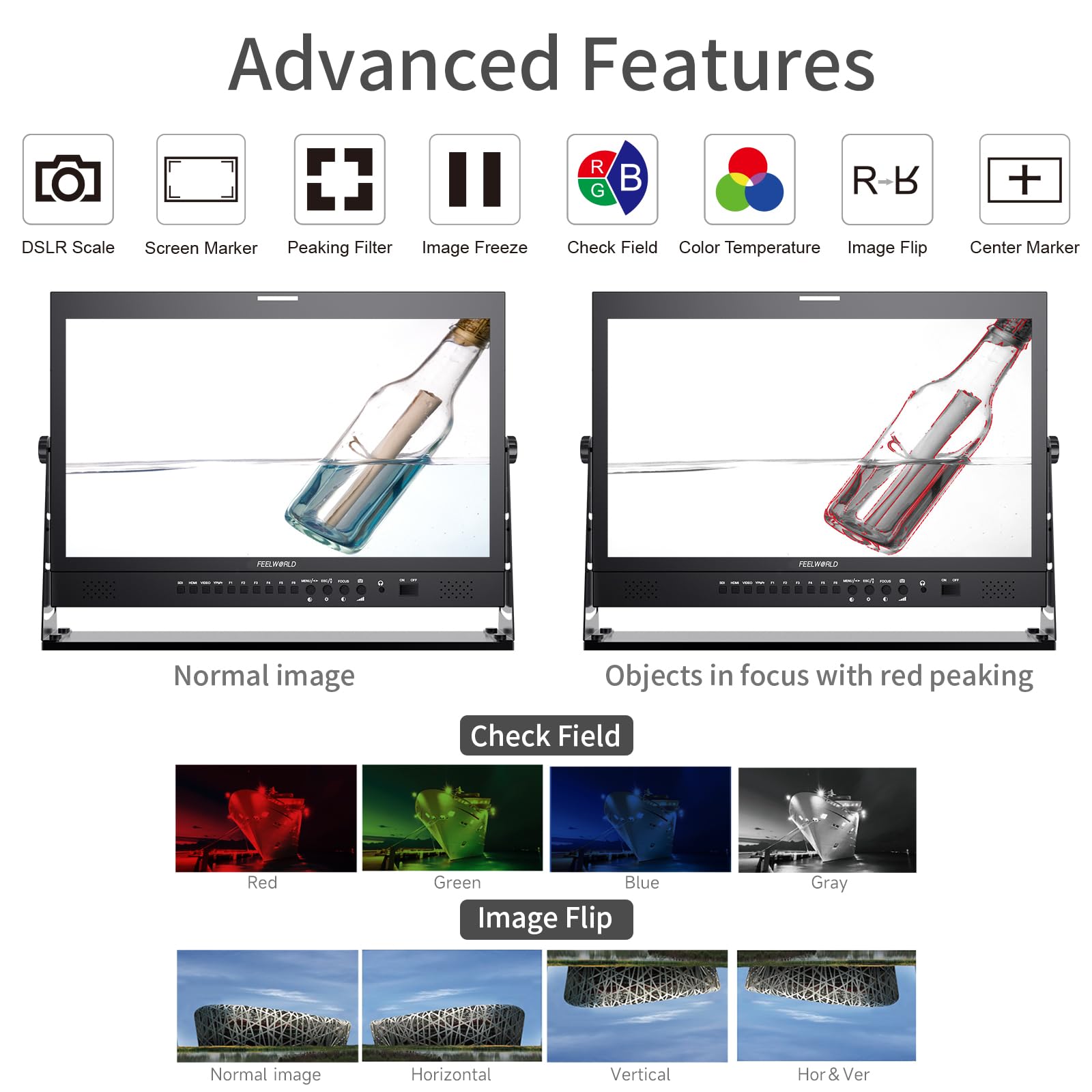
Figure 3.1: Included accessories with the FEELWORLD P215-9HSD monitor, showing the monitor, Mini HDMI cable, V battery plate, 3A power adapter, Tally Kit, Jib Crane Bracket (U bracket), and Operation Manual.
4. Konec produktuview
4.1 Ovládací prvky na předním panelu
The front panel features various buttons and indicators for controlling the monitor's functions and navigating the On-Screen Display (OSD) menu.
- Tlačítka pro výběr vstupu: SDI, HDMI, VIDEO, YPbPr for selecting video sources.
- Funkční tlačítka (F1-F6): Customizable shortcut buttons for quick access to frequently used features.
- MENU/ESC/◄/► Buttons: Used for OSD menu navigation, entering sub-menus, and adjusting settings.
- FOCUS Button: Activates peaking focus assist.
- Tlačítko ON/OFF: Zapíná nebo vypíná monitor.
- Vestavěné reproduktory: Pro monitorování zvuku.
- 3.5mm Stereo Earphone Jack: Pro soukromý zvukový monitoring.
4.2 Připojení zadního panelu
The rear panel provides all necessary input and output ports for connecting video and audio sources, as well as power.
- DVI vstup: Digital Visual Interface input.
- HDMI vstup/výstup: High-Definition Multimedia Interface for both input and loop-through output.
- YPbPr Input: Vstup komponentního videa.
- Video vstup / výstup: Kompozitní video vstup a smyčkový výstup.
- Audio vstup/výstup: RCA connectors for analog audio.
- 3G-SDI Input/Output: Serial Digital Interface for professional video input and loop-through output.
- XLR konektor: For professional audio input.
- DC Barrel (5.5, 2.1): Power input for the 3A DC adapter.
- Port pro upgrade USB: Pro aktualizace firmwaru.
- Vstup LAN: Ethernetový port.
- TALLY Port: DP-9 connector for Tally light control.

Figure 4.1: Top section shows the front panel OSD operation buttons. Bottom section details the rear panel connections including DVI, HDMI, YPbPr, Video, Audio, 3G-SDI, XLR, DC power, USB, LAN, and Tally.
Obrázek 4.2: Detail view of the rear panel, emphasizing the 3G-SDI, HDMI, Video, and Audio input/output connections, along with the USB upgrade port and DC power input.
5. Nastavení
5.1 Montáž monitoru
The monitor comes with an adjustable U bracket for desktop placement. Ensure the bracket is securely attached to the monitor and placed on a stable, flat surface. The monitor also supports VESA mounting for alternative setups (mounting hardware not included).
5.2 Připojení napájení
- Connect the provided 3A DC power adapter to the DC barrel input on the rear of the monitor.
- Zapojte napájecí adaptér do vhodné zásuvky.
- Alternatively, attach a compatible V-mount battery to the V Battery Plate on the rear of the monitor for portable power.
5.3 Připojení zdrojů videa
Connect your video source (camera, video switcher, etc.) to the appropriate input port on the monitor's rear panel.
- HDMI: Use an HDMI cable (Mini HDMI cable included) to connect to the HDMI IN port.
- 3G-SDI: Use an SDI cable to connect to the 3G-SDI IN port.
- YPbPr: Use component video cables to connect to the YPbPr IN ports.
- Video: Use a composite video cable to connect to the VIDEO IN port.
If you need to loop out the signal to another device, connect an appropriate cable from the corresponding OUT port (HDMI OUT, 3G-SDI OUT, VIDEO OUT) to your next device.
6. Návod k obsluze
6.1 Zapnutí/vypnutí
Stiskněte tlačítko ON/OFF button on the front panel to power the monitor on or off.
6.2 Výběr vstupu
Press the corresponding input button (SDI, HDMI, VIDEO, YPbPr) on the front panel to switch between video sources.
6.3 Navigace v nabídce OSD
Stiskněte tlačítko MENU button to open the On-Screen Display menu. Use the ◄ a ► buttons to navigate through menu options and adjust values. Press MENU again to confirm a selection or ESC pro opuštění nabídky.
6.4 Pokročilé funkce
The monitor includes several advanced features to assist with professional monitoring:
- Asistent zaostření Peaking: Highlights sharp edges in the image to aid in achieving precise focus. Activate with the SOUSTŘEDIT button or assign to a function button.
- Středová značka: Zobrazí zaměřovací kříž uprostřed obrazovky.
- Značka obrazovky: Provides various aspect ratio markers (e.g., 16:9, 4:3, 2.35:1) and safety area markers.
- Zmrazení obrázku: Pozastaví aktuální snímek videa.
- Převrácení obrázku: Flips the image horizontally, vertically, or both. Useful for specific mounting orientations.
- Camera 5D II Mode: Optimizes display for Canon 5D Mark II camera output.
- Kontrolní pole: Pro kalibraci barev zobrazuje pouze kanály Red, Green, Blue nebo Mono.
- Pixel to Pixel: Zobrazí obraz v jeho nativním rozlišení bez změny měřítka.
- Přiblížit vše: Magnifies the entire image.
- U/D & L/R Zoom: Allows independent vertical and horizontal zooming.
- Poměr stran: Upraví poměr stran displeje.
- Nastavení teploty barev: Allows fine-tuning of the display's color temperature.
Figure 6.1: Visual demonstration of advanced features including Peaking Filter (red peaking), Check Field (Red, Green, Blue, Gray channels), and Image Flip (Normal, Horizontal, Vertical, Horizontal & Vertical).
6.5 Tally Light System
The monitor features a 3-color Tally light system (Red, Green, Yellow) on both the front and rear panels, controlled via the DP-9 Tally port. This allows for clear indication of live, preview, and standby states in a multi-camera setup.
- Červený: Indicates the camera is live (On Live).
- Zelený: Indicates the camera is on preview (On Preview).
- Žlutá: Indicates the camera is on standby (Standby).

Figure 6.2: Illustration of the Red, Green, and Yellow Tally lights and their corresponding states (On Live, Standby, On Preview), controlled via the DP-9 Barrel on the rear.
7. Údržba
- Čištění obrazovky: Jemně otřete obrazovku měkkým hadříkem, který nepouští vlákna. V případě odolných skvrn lehceampOtřete hadřík vodou nebo čisticím roztokem určeným pro obrazovky. Nestříkejte tekutinu přímo na obrazovku.
- Čištění Casing: K otření povrchu monitoru použijte měkký, suchý hadřík.asing. Vyhněte se abrazivním čisticím prostředkům nebo rozpouštědlům.
- Skladování: Pokud monitor delší dobu nepoužíváte, skladujte jej na chladném a suchém místě, mimo dosah přímého slunečního záření a extrémních teplot.
- Aktualizace firmwaru: Pravidelně kontrolujte oficiální stránky FEELWORLD website for any available firmware updates to ensure optimal performance and access to new features. Use the USB Upgrade Port for this purpose.
8. Řešení problémů
Pokud se s monitorem setkáte s problémy, podívejte se na následující běžné problémy a jejich řešení:
| Problém | Možná příčina | Řešení |
|---|---|---|
| Žádná síla | Napájecí adaptér není připojen nebo je vadný; problém se zásuvkou. | Ensure power adapter is securely connected to monitor and outlet. Test outlet with another device. Check if V-mount battery is charged and properly installed. |
| Žádný video signál | Incorrect input selected; cable not connected or faulty; source device not outputting signal. | Select the correct input source (HDMI, SDI, etc.). Check all video cables for secure connection. Verify the source device is powered on and outputting video. Try a different cable. |
| Obrázek je zkreslený nebo má nesprávné barvy | Incorrect display settings; faulty cable; source issue. | Reset monitor settings to default via OSD menu. Check cable connections. Verify source device output. Adjust color temperature settings. |
| Žádný zvuk | Audio cable not connected; volume too low; source device not outputting audio. | Ensure audio cables are connected (if applicable). Increase monitor volume. Check audio settings on the source device. |
| Tally light not working | Tally cable not connected or faulty; switcher not sending Tally signal. | Ensure the Tally Kit is correctly wired and connected to the DP-9 port. Verify your video switcher is configured to send Tally signals. |
9. Specifikace
Detailed technical specifications for the FEELWORLD P215-9HSD Broadcast Production Monitor:
- Velikost obrazovky: 21.5 palce
- Nativní rozlišení: 1920 x 1080 (Full HD)
- Typ displeje: LED IPS Panel
- Poměr stran: 16:9
- Jas: 400 cd/m²
- Viewúhel: 160 stupňů (H/V)
- Kontrastní poměr: 3000:1
- Barevná hloubka: 8bitový, 16.7 milionů barev
- Video vstupy: 1x HDMI, 1x 3G-SDI, 1x YPbPr, 1x Video, 1x DVI
- Video výstupy: 1x HDMI, 1x 3G-SDI, 1x Video
- Zvukové vstupy: Analog Audio (RCA), XLR
- Audio výstupy: 3.5mm Stereo Earphone Jack, Built-in Speakers
- Příkon: DC 12V (3A)
- Technologie připojení: HDMI, 3G-SDI
- Speciální vlastnosti: Peaking Focus Assist, Center Marker, Screen Marker, Image Freeze, Image Flip, Camera 5D II Mode, Check Field, Pixel to Pixel, Zoom All, U/D & L/R Zoom, Aspect Ratio, Color Temperature Adjustment, 3-Color Tally Light
Obrázek 9.1: Přesview of key specifications and features including 8-bit color, HDMI input/output, 3G-SDI input/output, 1920x1080 resolution, 3000:1 contrast, and 250 nits brightness.
10. Záruka a podpora
The FEELWORLD P215-9HSD Broadcast Production Monitor comes with a 1letá záruka výrobce od data nákupu. Tato záruka se vztahuje na vady materiálu a zpracování při běžném používání.
For warranty claims, technical support, or service inquiries, please contact your authorized FEELWORLD dealer or visit the official FEELWORLD website for customer service contact information. Please retain your proof of purchase for warranty validation.
For more information about FEELWORLD products, visit the Obchod FEELWORLD na Amazonu.