
1. Úvod
Thank you for choosing the JISULIFE FA13R Auto-Oscillating Clip-on Fan. This versatile fan is designed to provide personal cooling comfort in various settings, functioning as both a clip-on and a stand-up desk fan. With its powerful battery, multiple speed settings, and oscillation features, it offers a convenient and efficient cooling solution. Please read this manual carefully before use to ensure proper operation and maintenance.
2. Bezpečnostní pokyny
Abyste předešli poškození produktu nebo zranění sebe či ostatních, dodržujte prosím následující bezpečnostní opatření:
- Neponořujte ventilátor do vody nebo jiných kapalin.
- Keep the fan away from open flames, heat sources, and direct sunlight.
- Nevkládejte prsty ani žádné předměty do mřížky ventilátoru, když je v provozu.
- Ensure the fan is placed on a stable surface when used as a stand-up fan, or securely clipped when used as a clip-on fan.
- K nabíjení používejte pouze dodaný kabel USB-A na USB-C.
- Tento spotřebič není určen pro použití osobami (včetně dětí) se sníženými fyzickými, smyslovými nebo duševními schopnostmi nebo nedostatečnými zkušenostmi a znalostmi, pokud na ně nedohlíží osoba odpovědná za jejich bezpečnost nebo jim nebyla poskytnuta instrukce ohledně používání spotřebiče.
- Do not attempt to disassemble, repair, or modify the fan. Contact customer support if service is required.
- Unplug the fan from the power source when not in use for extended periods or before cleaning.
3. Obsah balení
Zkontrolujte prosím balení, zda neobsahuje následující položky:
- JISULIFE FA13R Fan x1
- Kabel USB-A na USB-C x1
- Uživatelská příručka x1
4. Konec produktuview
The JISULIFE FA13R fan features a robust design with multiple functionalities for enhanced user experience.

The JISULIFE FA13R fan in its stand-up configuration, showcasinjeho kompaktní design a zelená barva.
Klíčové vlastnosti:
- Duální funkce: Can be used as a stand-up desk fan or a clip-on fan.
- 5 nastavení rychlosti: Includes a Nature Wind Mode for gentle, fluctuating airflow.
- Auto-Oscillation: 90-degree horizontal oscillation for wider coverage.
- Vertikální rotace: Manual 25-degree vertical adjustment.
- Funkce časovače: Set for 1, 2, or 4 hours.
- Tichý provoz: Equipped with a brushless DC motor for powerful yet quiet performance.
- Dlouhá výdrž baterie: 8000mAh battery provides 5 to 28 hours of runtime.
- Odolná konstrukce: Made from ABS Plastic and Alloy Metal.

A composite image detailing various aspects of the fan: LED indicators for clear display of settings, a silicone base for stable desktop or clip use, and the use of premium ABS material for durability and comfort.

An exploded diagram illustrating the internal structure of the fan, highlighting features such as the double-layer enclosed electric engine room, brushless motor, deflector fan cover, and flexible airfoil fan blades, all contributing to noise reduction.
5. Nastavení
Using as a Stand-up Fan:
- Place the fan on a flat, stable surface such as a desk or table.
- Ensure the silicone base is fully in contact with the surface for maximum stability.
Using as a Clip-on Fan:
- Open the strong clasp clip at the base of the fan.
- Attach the clip securely to the edge of a table, shelf, stroller, or any suitable surface. Ensure the clip has a firm grip to prevent the fan from falling.
Nastavení úhlu ventilátoru:
- The fan head can be manually tilted up or down by 25 degrees to direct airflow.
- For horizontal oscillation, refer to the Operating Instructions section.
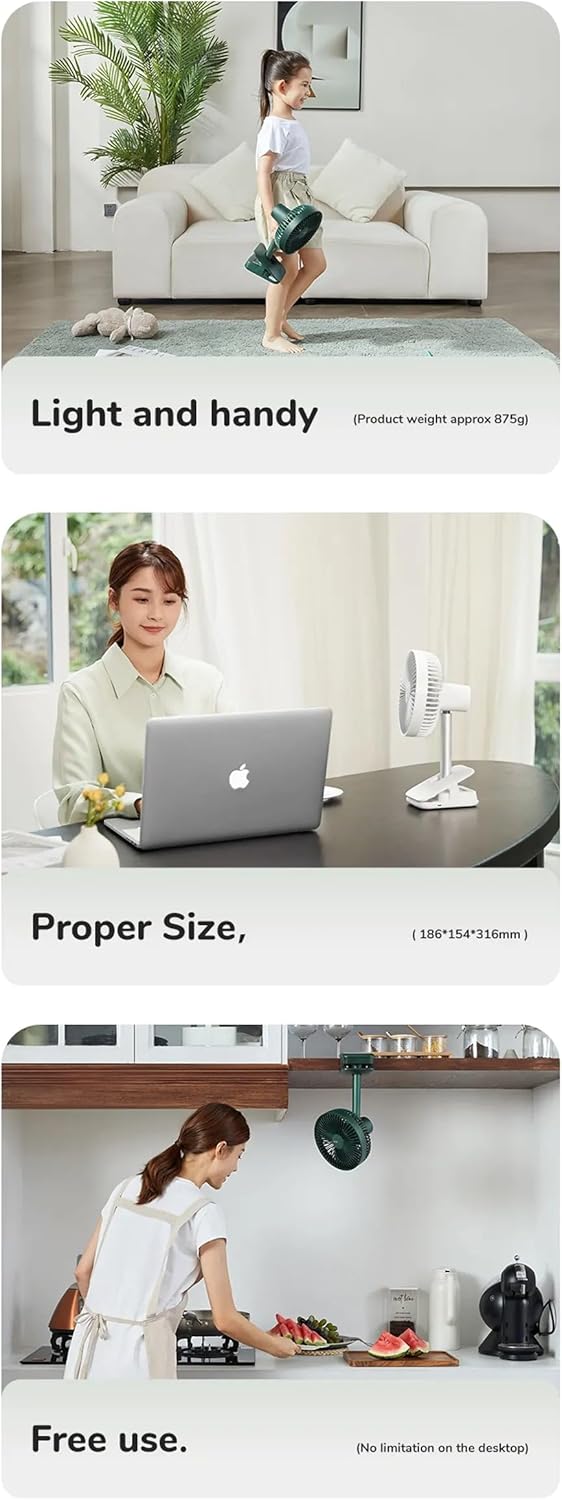
This series of images illustrates the fan's practical applications: its light and handy design (approx. 875g), its proper size for desktop use (18.6D x 31.6W x 15.4H cm), and its free use capability, including clipping under a cabinet, showing no limitation on desktop placement.
6. Návod k obsluze
The fan features a simple button control interface located on its base.

Detail of the fan's control panel, featuring buttons for power and fan speed, along with LED lights indicating active timer settings (1h, 2h, 4h) and fan speeds (1-4).
Zapnutí/vypnutí a ovládání rychlosti:
- Stiskněte tlačítko Tlačítko napájení (pravé tlačítko) once to turn the fan on at Speed 1.
- Stiskněte tlačítko Tlačítko napájení repeatedly to cycle through Speed 1, Speed 2, Speed 3, Speed 4, Speed 5 (Nature Wind Mode), and then Off.
- The LED indicators on the control panel will show the current speed setting.
Ovládání oscilace:
- While the fan is on, press the Oscillation/Timer Button (levé tlačítko) once to activate 90-degree horizontal auto-oscillation.
- Stiskněte tlačítko Oscillation/Timer Button znovu pro zastavení oscilace.
Nastavení časovače:
- While the fan is on, press and hold the Oscillation/Timer Button (levé tlačítko) to set the timer.
- Each press will cycle through 1 hour, 2 hours, 4 hours, and then turn the timer off.
- The corresponding LED indicator (1h, 2h, 4h) will light up to show the active timer setting. The fan will automatically turn off after the set time.
Nabíjení ventilátoru:
- Connect the provided USB-A to USB-C cable to the charging port on the fan's base.
- Connect the other end of the cable to a USB power adapter (DC5V-2A/1A recommended) or a computer USB port.
- Kontrolka nabíjení se během nabíjení rozsvítí a po úplném nabití zhasne.
- A full charge typically takes 6-10 hours. The 8000mAh battery provides 5-28 hours of operation depending on the speed setting.
7. Údržba
Pravidelné čištění pomáhá udržovat výkon ventilátoru a prodlužuje jeho životnost.
Čištění ventilátoru:
- Ensure the fan is turned off and unplugged from any power source before cleaning.
- The front fan cover is detachable for easy cleaning. Gently twist or unclip the cover as indicated in the diagram to remove it.
- Use a soft, dry cloth to wipe dust from the fan blades and the interior of the fan cover. For stubborn dirt, a slightly damp Lze použít hadřík, ale dbejte na to, aby se do skříně motoru nedostala voda.
- Důležité: Do not wash the main body of the fan with water. Use a dry cloth to wipe it.
- Once clean, reattach the front fan cover securely.

The fan's front cover is shown detached, indicating its removable design for easy cleaning. A warning symbol advises against washing the main body with water.
Skladování:
Pokud ventilátor delší dobu nepoužíváte, skladujte jej na chladném a suchém místě, mimo dosah přímého slunečního záření a extrémních teplot.
8. Řešení problémů
If you encounter issues with your JISULIFE FA13R fan, please refer to the following common problems and solutions:
- Ventilátor se nezapne:
- Ensure the battery is charged. Connect the fan to a power source using the USB-C cable.
- Pevně stiskněte tlačítko napájení.
- Slabé proudění vzduchu:
- Increase the fan speed using the Power Button.
- Check if the fan grille or blades are obstructed by dust or debris. Clean the fan as described in the Maintenance section.
- Fan not oscillating:
- Press the Oscillation/Timer Button to activate oscillation.
- Ensure the fan is on a stable surface and not obstructed.
- Fan not charging:
- Ensure the USB-C cable is properly connected to both the fan and the power source.
- Zkuste jiný USB napájecí adaptér nebo USB port.
- Zkontrolujte, zda není nabíjecí kabel poškozený.
If the problem persists, please contact JISULIFE customer support for assistance.
9. Specifikace
| Funkce | Specifikace |
|---|---|
| Značka | JISULIFE |
| Model | FA13R |
| Kapacita baterie | 8000 3.7 mAh / 29.6 V / XNUMX Wh |
| Doba běhu | 5–28 hodin (v závislosti na rychlosti) |
| Doba nabíjení | 6-10 hodin |
| Vstup | DC5V-2A/1A (Type-C) |
| Jmenovitý výkon | 5.5W |
| Maximální rychlost ventilátoru | 4.0 m/s |
| Kmitání | 90 stupňů horizontálně |
| Vertikální rotace | 25 degrees manual |
| Materiál | ABS Plastic, Alloy Metal |
| Rozměry | 18.6 D x 31.6 W x 15.4 V centimetrů |
| Hmotnost | Přibl. 875 g |
10. Záruka a podpora
JISULIFE products are designed and manufactured to the highest quality standards. For information regarding warranty coverage, technical support, or service inquiries, please refer to the warranty card included with your purchase or visit the official JISULIFE webstránky. Uschovejte si prosím doklad o koupi pro případ reklamace.