
Zavedení
The Xvive U9 Violin Wireless System provides a reliable 2.4GHz wireless connection for violins and violas, ensuring clear audio transmission with minimal latency. This system is designed for musicians seeking freedom of movement without compromising sound quality. This manual will guide you through the setup, operation, and maintenance of your Xvive U9 system.

Image: The Xvive U9 Violin Wireless System attached to a violin, showcasing its compact design and wireless capabilities.
Co je v krabici
Before you begin, please ensure all components are present in your Xvive U9 package:
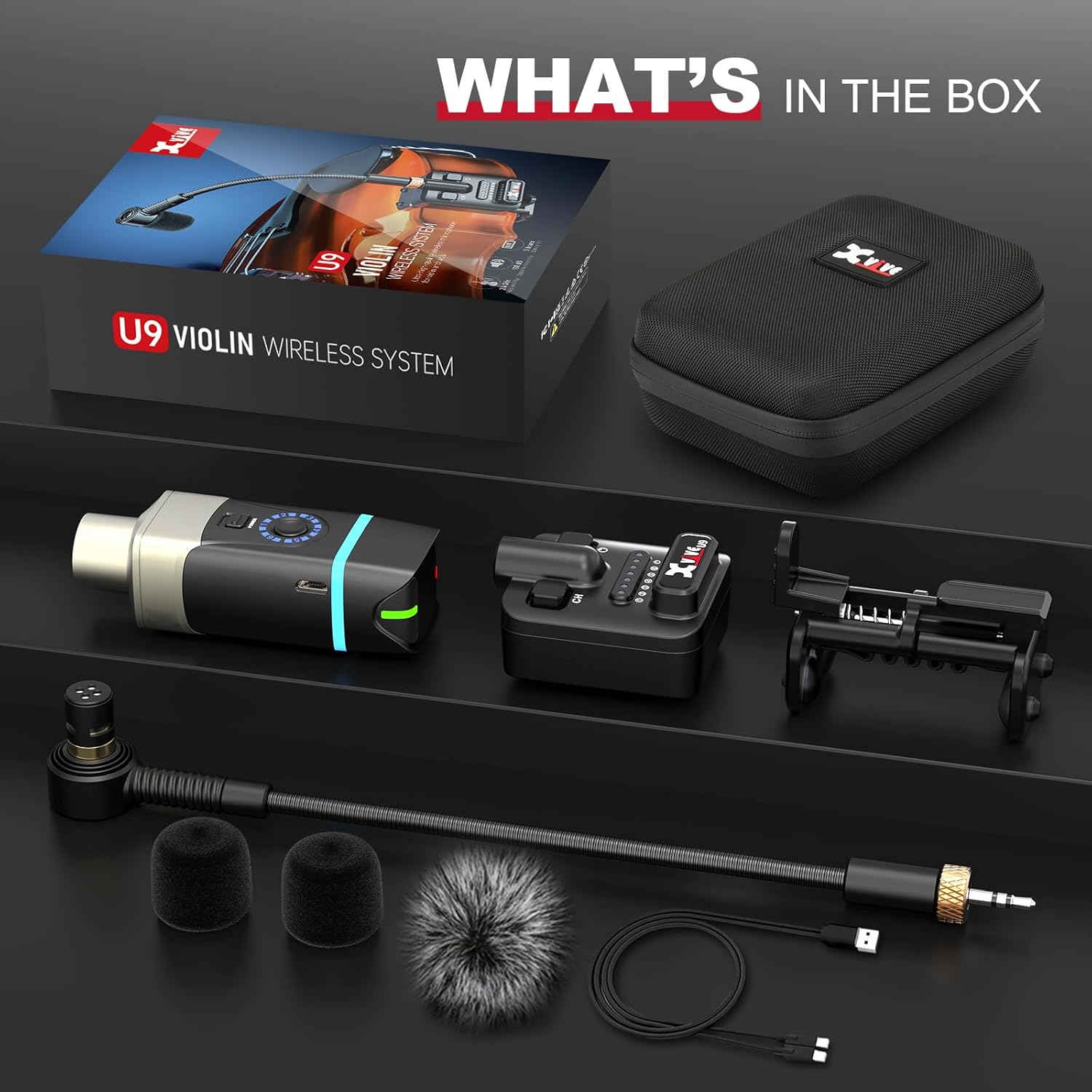
Image: All components of the Xvive U9 Violin Wireless System laid out, including the transmitter, receiver, microphone, clips, and charging cable.
- Xvive U9 Transmitter (x1)
- Xvive U9 Receiver (x1)
- Mikrofon (1x)
- Violin/Viola Clip (x1)
- Foam Windscreen (x2)
- Fur Windshield (x1)
- USB kabel (x1)
- Carry Case (x1)
Pokyny pro nastavení
- Nabijte jednotky: Both the transmitter and receiver have built-in rechargeable Lithium Polymer batteries. Use the provided dual USB-C cable to charge both units simultaneously. A red light indicates low battery, and a solid light indicates charging.
- Připojení mikrofonu: Secure the microphone to your violin or viola using the adjustable clip. The clip is designed to securely attach to the instrument's side, preventing accidental falls.

Image: Close-up of the adjustable clip securing the microphone to the edge of a violin, showing the 30-40mm/1.18-1.57" adjustment range.
- Připojení mikrofonu k vysílači: Plug the microphone's 3.5mm jack into the input port on the Xvive U9 Transmitter.
- Připojení přijímače k audio zařízení: Plug the Xvive U9 Receiver into your desired audio input device, such as a vocal processor, ampmixér neboli mixér.
- Zapnutí: Press and hold the power button on both the transmitter and receiver until the indicator lights illuminate.
- Vyberte kanál: The transmitter has a channel switch button. Use this to select one of the available 6 channels. Ensure both the transmitter and receiver are set to the same channel for optimal connection. The system operates on the 2.4GHz ISM band for clear broadcasting.
For a visual guide on setup and initial testing, please refer to the official product video below:
Video: Official Xvive U9 Violin Wireless System demonstration, showing unboxing, setup, and sound test.
Návod k obsluze
Bezdrátový výkon
The Xvive U9 system offers a working range of over 100 feet, providing ample freedom for live performances, presentations, or studio use. Its 2.4GHz operation ensures stable and clear signal integrity.

Image: A musician playing a violin equipped with the Xvive U9 system, highlighting the 90ft stable wireless transmission and 2.4G WiFi compatibility.
Zvuk s nízkou latencí
Experience distraction-free performance with less than 5ms of latency. This ultra-low latency ensures that your audio feedback is instant and uncompromised, crucial for live playing.

Image: A close-up of a musician playing a violin with the Xvive U9 system, emphasizing the ultra-low 5ms latency and high audio quality (48 kHz, 24 bit, 108 dB SNR).
Charakteristika mikrofonu
The system includes a supercardioid condenser microphone, designed to enhance the clarity and richness of your music. Its directional pickup pattern helps to isolate your instrument's sound while minimizing ambient noise.

Image: A diagram illustrating the supercardioid pickup pattern of the condenser microphone, along with its sensitivity (-45dB) and Max. SPL (142dB) specifications.
Údržba
- Nabíjení: Recharge the transmitter and receiver using the provided USB-C cable when the battery indicator shows low power. A full charge provides up to 5 hours of battery life.
- Čištění: Use a soft, dry cloth to clean the units. Do not use liquid cleaners or solvents. The included foam windscreens and fur windshield can be cleaned gently or replaced as needed to maintain sound quality.
- Skladování: Store the system in its compact carry case when not in use to protect it from dust and physical damage.
Odstraňování problémů
- Žádný zvuk: Ensure both the transmitter and receiver are powered on and set to the same channel. Check all cable connections. Verify the audio device input is correctly configured.
- Rušení/špatný signál: The 2.4GHz band can be susceptible to interference from Wi-Fi routers or other wireless devices. Try switching to a different channel on both the transmitter and receiver. Ensure there are no large obstructions between the transmitter and receiver.
- Indikace slabé baterie: If the red lights appear on the units, recharge them using the dual USB-C cable.
Specifikace
| Funkce | Specifikace |
|---|---|
| Název modelu | U9 |
| Bezdrátová frekvence | Pásmo 2.4 GHz ISM |
| Pracovní rozsah | Over 100 feet (approx. 30 meters) |
| Latence | Méně než 5 ms |
| Životnost baterie | Až 5 hodin |
| Typ baterie | Lithium Polymer (2 součástí balení) |
| Nabíjecí port | USB-C |
| Kompatibilní zařízení | Housle, Viola |
| Typ mikrofonu | Supercardioid Condenser |
| Hmotnost položky | 1.15 libry |
| Rozměry produktu | 1 x 1 x 1 palce |
Záruka a podpora
For warranty information, technical support, or any inquiries regarding your Xvive U9 Violin Wireless System, please refer to the official Xvive website or contact Xvive customer service directly. Keep your proof of purchase for warranty claims.