
1. Úvod
Thank you for choosing the Duux Bora Smart Dehumidifier. This manual provides essential information for the safe and efficient operation of your device. Please read it thoroughly before use and retain it for future reference.
The Bora dehumidifier is designed to create a healthier indoor environment by effectively managing high humidity levels. It can remove up to 30 liters of moisture per day, helping to prevent mold and bacterial growth. Featuring an integrated hygrostat for automatic humidity regulation and an active carbon filter for odor removal, the Bora ensures cleaner air. Remote control is available via the Duux application.
2. Důležité bezpečnostní pokyny
Při používání elektrických spotřebičů vždy dodržujte základní bezpečnostní opatření, abyste snížili riziko požáru, úrazu elektrickým proudem a zranění.
- Před použitím spotřebiče si přečtěte všechny pokyny.
- Ujistěte se, že napájecí zdroj odpovídá objtage specifikováno na typovém štítku.
- Neprovozujte odvlhčovač s poškozeným kabelem nebo zástrčkou.
- Uchovávejte spotřebič mimo dosah zdrojů tepla, přímého slunečního záření a hořlavých materiálů.
- Neblokujte vstupy nebo výstupy vzduchu.
- Vždy umístěte jednotku na stabilní a rovný povrch.
- Před čištěním, údržbou nebo pokud přístroj nepoužíváte, odpojte jej ze zásuvky.
- Neponořujte jednotku, napájecí kabel ani zástrčku do vody ani jiných kapalin.
- Tento spotřebič není určen pro použití osobami (včetně dětí) se sníženými fyzickými, smyslovými nebo duševními schopnostmi nebo nedostatečnými zkušenostmi a znalostmi, pokud na ně nedohlíží osoba odpovědná za jejich bezpečnost nebo jim nebyla poskytnuta instrukce ohledně používání spotřebiče.
- Děti by měly být pod dozorem, aby bylo zajištěno, že si se spotřebičem nebudou hrát.
3. Konec produktuview
Familiarize yourself with the components of your Duux Bora Dehumidifier.

Obrázek 3.1: Přední view of the Duux Bora Dehumidifier, showing its sleek design and a smartphone displaying the control app interface.

Obrázek 3.2: Zadní view of the dehumidifier, highlighting the removable air filter cover and the continuous drainage port.

Obrázek 3.3: Top panel of the dehumidifier, displaying the digital screen and touch controls for various functions.
Klíčové komponenty:
- Ovládací panel: Located on the top, with digital display and touch buttons.
- Vstup/Výstup vzduchu: Pro nasávání a vyfukování vzduchu.
- Nádrž na vodu: 4-liter capacity, located at the bottom front.
- Filtr s aktivním uhlím: Located behind the rear air inlet.
- Průběžný odvodňovací otvor: For connecting a hose for continuous operation.
- Kolečka: Pro snadnou mobilitu.
4. Nastavení
- Rozbalení: Opatrně vyjměte odvlhčovač z obalu. Veškerý obalový materiál si uschovejte pro budoucí přepravu nebo skladování.
- Umístění:
- Umístěte jednotku na pevný, rovný povrch.
- Pro zajištění správného proudění vzduchu se ujistěte, že kolem vstupních a výstupních otvorů vzduchu je alespoň 20 cm (8 palců) prostoru.
- Neumisťujte jednotku do blízkosti zdrojů tepla nebo na přímé sluneční světlo.
- The dehumidifier is suitable for various rooms up to 50 square meters, including basements, laundry rooms, and living areas.
- Připojení napájení: Zapojte napájecí kabel do uzemněné elektrické zásuvky. Ujistěte se, že hlasitosttage odpovídá požadavkům jednotky (240 voltů).
- Instalace vodní nádrže: Ensure the 4-liter water tank is correctly inserted into the unit.

Obrázek 4.1: The 4-liter water tank being pulled out from the dehumidifier for emptying or inspection.
- Průběžné odvodnění (volitelné): For continuous operation without emptying the water tank, connect a suitable hose (not included) to the continuous drainage port at the back of the unit. Ensure the hose is sloped downwards to allow gravity drainage.
5. Návod k obsluze
5.1. Obsluha ovládacího panelu
Obrázek 5.1: Detailní view of the control panel with digital display and function buttons.
The control panel allows you to manage all functions of the dehumidifier. Refer to the icons on the panel for specific functions.
- Vypínač: Zapíná nebo vypíná jednotku.
- Výběr režimu: Cycle through various operating modes (e.g., Auto, Continuous, Laundry Drying).
- Nastavení vlhkosti: Adjust the desired humidity level using the up/down arrows. The integrated hygrostat will maintain this level.
- Časovač: Nastavte časovač pro automatické vypnutí.
- Rychlost ventilátoru: Select between 2 fan speeds.
5.2. Smart Control via Duux App
The Duux Bora can be controlled remotely using the Duux application on your smartphone or tablet.

Obrázek 5.2: The Duux mobile application displaying current humidity and control options for the Bora dehumidifier.
- Download the Duux app from your device's app store.
- Follow the in-app instructions to pair your Bora dehumidifier.
- Once connected, you can power the unit on/off, adjust settings, and receive notifications (e.g., when the water tank is full) from anywhere.
5.3. Laundry Drying Mode
The innovative Laundry Drying Mode is designed to efficiently dry clothes indoors.
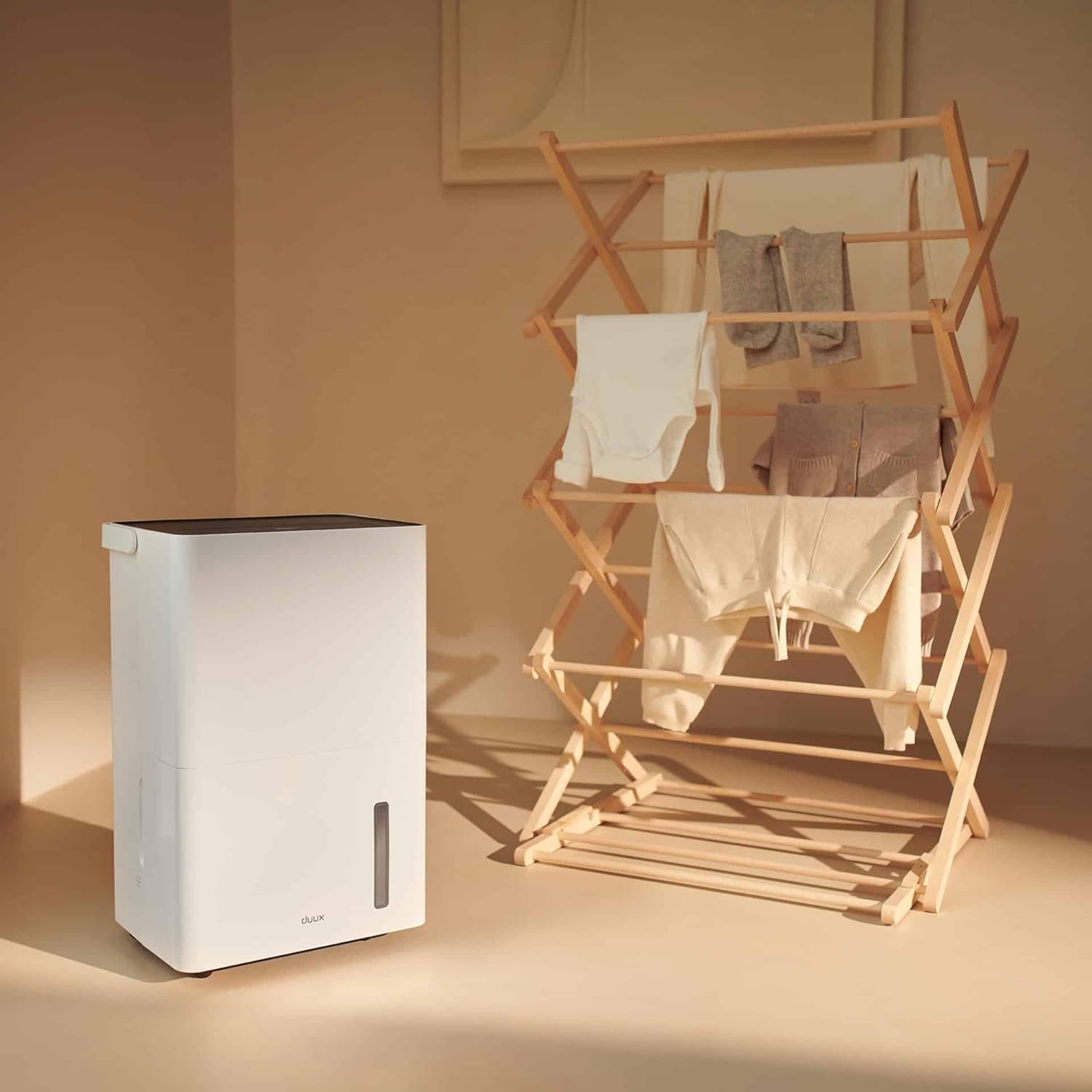
Obrázek 5.3: The dehumidifier positioned near a laundry rack, demonstrating its use in drying clothes.
- Activate this mode via the control panel or the Duux app.
- This mode operates continuously to remove moisture from the air, accelerating the drying process of laundry.
- It can significantly reduce energy consumption compared to traditional tumble dryers.
6. Údržba
Pravidelná údržba zajišťuje optimální výkon a dlouhou životnost vašeho odvlhčovače.
6.1. Vyprázdnění vodní nádrže
- When the water tank is full, the unit will automatically shut off and an indicator light will illuminate.
- Opatrně vytáhněte nádržku na vodu z přední strany jednotky.
- Vylijte nahromaděnou vodu do dřezu nebo odpadu.

Obrázek 6.1: A user emptying the collected water from the dehumidifier's tank into a sink.
- Reinsert the empty water tank firmly into the unit until it clicks into place. The unit will resume operation.
6.2. Čištění vzduchového filtru
The active carbon filter should be cleaned regularly (e.g., every two weeks or as needed) to maintain air quality and dehumidifier efficiency.
- Odpojte odvlhčovač ze zásuvky.
- Locate the filter cover at the back of the unit.
- Remove the filter cover and carefully pull out the active carbon filter.

Obrázek 6.2: A user demonstrating the removal of the active carbon filter from the rear of the dehumidifier.
- Clean the filter with a vacuum cleaner or wash it gently with lukewarm water. Allow it to air dry completely before reinstallation.
- Reinsert the dry filter and replace the filter cover.
6.3. Generální úklid
- Otřete vnější část jednotky měkkým, damp tkanina. Nepoužívejte abrazivní čisticí prostředky nebo rozpouštědla.
- Před čištěním se ujistěte, že je jednotka odpojena ze zásuvky.
7. Řešení problémů
Než kontaktujete zákaznickou podporu, prostudujte si prosím následující běžné problémy a jejich řešení:
| Problém | Možná příčina | Řešení |
|---|---|---|
| Jednotka se nezapne. | Chybí napájení; Napájecí kabel není zapojen do zásuvky; Nádržka na vodu je plná nebo nesprávně vložená. | Zkontrolujte připojení k elektrické síti; Vyprázdněte a znovu vložte nádržku na vodu správně. |
| Odvlhčovač nesbírá vodu. | Room temperature too low; Humidity level already low; Air filter clogged; Unit in fan-only mode. | Ensure room temperature is above 5°C (41°F); Check desired humidity setting; Clean air filter; Select dehumidification mode. |
| Jednotka je hlučná. | Jednotka není na rovném povrchu; Vzduchový filtr je ucpaný; Vnitřní součásti vibrují. | Umístěte na rovný povrch; Vyčistěte vzduchový filtr; Pokud hluk přetrvává, kontaktujte podporu. |
| Problémy s připojením k aplikaci. | Wi-Fi signal weak; Incorrect pairing procedure; App requires update. | Ensure strong Wi-Fi signal; Re-attempt pairing as per app instructions; Update Duux app. |
| Nepříjemný zápach z jednotky. | Active carbon filter needs cleaning or replacement. | Clean or replace the active carbon filter. |
8. Specifikace
| Funkce | Detail |
|---|---|
| Značka | Duux |
| Číslo modelu | DXDH30 |
| Barva | Bílý |
| Odvlhčovací kapacita | Až 30 litru/den |
| Kapacita vodní nádrže | 4 litrů |
| svtage | 240 voltů |
| Rozměry produktu (D x Š x V) | 24.7 x 33.7 x 51 cm |
| Hmotnost položky | 16.5 kg |
| Počet rychlostí | 2 |
| Automatické vypnutí | Ano (když je nádržka na vodu plná) |
| Speciální funkce | Integrated Hygrostat, Active Carbon Filter, Laundry Drying Mode, Smart App Control |
| Doporučená podlahová plocha | Až 50 metrů čtverečních |
| Zahrnuté komponenty | 1 aktivní uhlíkový filtr |
9. Záruka a náhradní díly
Duux products are manufactured to high-quality standards. While specific warranty details are not provided in this manual, please refer to your purchase documentation or the official Duux webstránky s komplexními informacemi o záruce.
Dostupnost náhradních dílů: Spare parts for the Duux Bora Dehumidifier are available for up to 10 years from the date of purchase, ensuring long-term usability and repairability.
10. Zákaznická podpora
If you encounter any issues not covered in the troubleshooting section or require further assistance, please contact Duux customer support.
- Visit the official Duux webweb s nejčastějšími dotazy, zdroji podpory a kontaktními informacemi.
- Utilize the Duux app for remote monitoring and potential in-app support features.