
1. Úvod
Děkuji za nákupasing the Audizio Genua DAB Radio. This manual provides essential information for the safe and efficient operation of your device. Please read it thoroughly before use and retain it for future reference. The Audizio Genua is a versatile DAB+/FM stereo radio featuring Bluetooth connectivity, USB playback, and an alarm function, designed for both home and portable use.
2. Bezpečnostní informace
- Zdroj napájení: Používejte pouze dodaný napájecí adaptér. Ujistěte se, že hlasitosttage odpovídá požadavkům vašeho regionu.
- Voda a vlhkost: Nevystavujte přístroj dešti, vlhkosti ani kapajícím/stříkajícím tekutinám. Na přístroj nestavte předměty naplněné tekutinami, například vázy.
- Větrání: Zajistěte dostatečné větrání. Neblokujte větrací otvory.
- Teplo: Udržujte jednotku mimo dosah zdrojů tepla, jako jsou radiátory, topná tělesa, sporáky nebo jiná zařízení (včetně amplifikátory), které produkují teplo.
- Čištění: Čistěte pouze suchým hadříkem.
- Servis: Nepokoušejte se tento výrobek opravit sami. Veškerý servis svěřte kvalifikovanému servisnímu personálu.
- Anténa: Do not bend or force the antenna.
3. Obsah balení
Po vybalení prosím zkontrolujte, zda jsou všechny položky přítomny a v dobrém stavu:
- Audizio Genua DAB Radio
- Dálkové ovládání
- Napájecí adaptér
- Quick Start Guide (language not guaranteed)
4. Konec produktuview
4.1 Ovládací prvky a displej na předním panelu

Obrázek 4.1: Přední strana view of the Audizio Genua DAB Radio.
The front panel features a clear color TFT display, two speaker grilles, and an array of control buttons and a central rotary knob. The display shows station information, track details, time, and menu options. Buttons include Menu, Preset, Scan, Dimmer, Alarm, and playback controls (Play/Pause, Skip). The central knob is used for volume adjustment, tuning, and selection.
4.2 Připojení zadního panelu
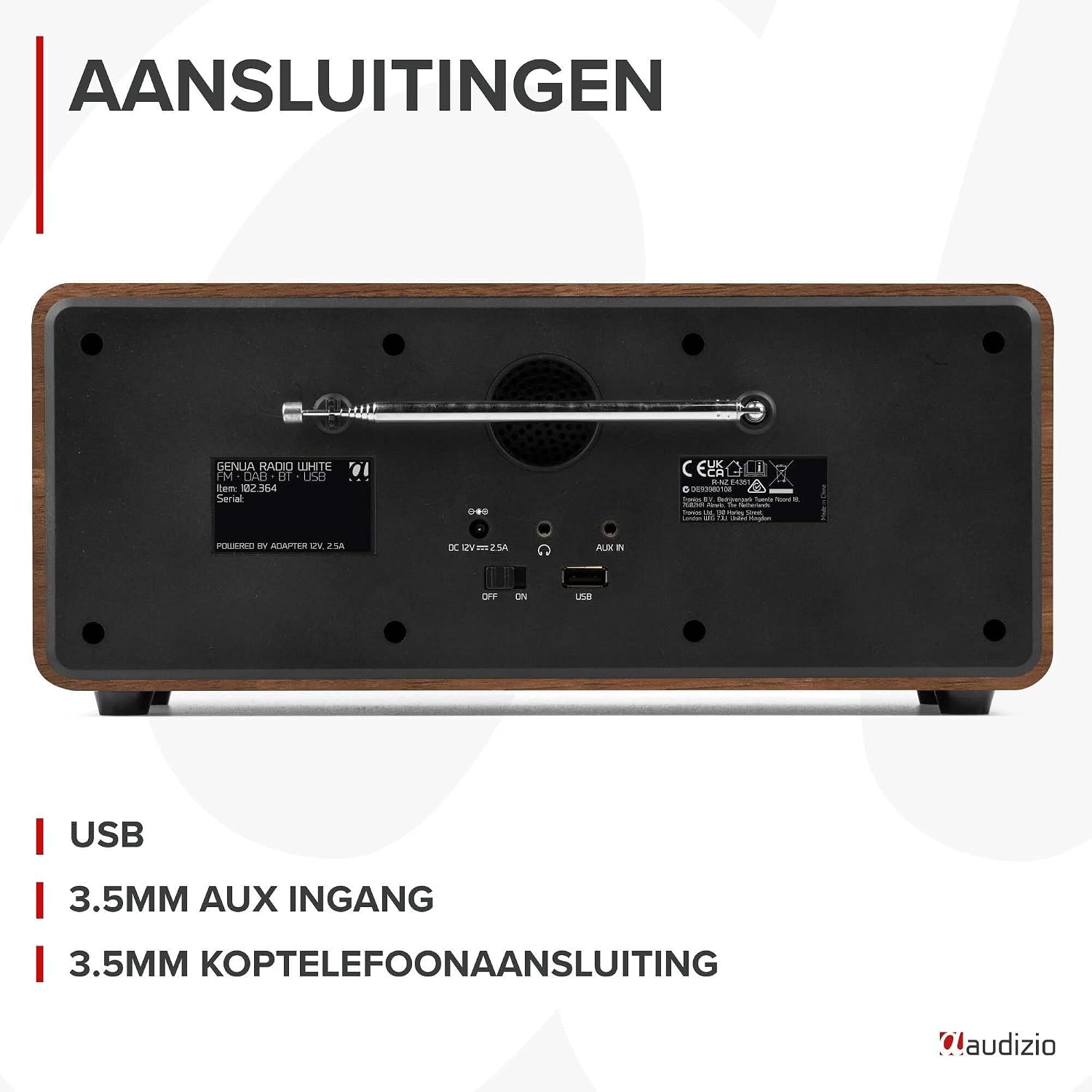
Obrázek 4.2: Zadní view of the Audizio Genua DAB Radio with connections.
The rear panel includes the telescopic antenna for radio reception, a USB port for media playback, a 3.5mm AUX input for external audio devices, a 3.5mm headphone output, a DC 12V power input, and a main power ON/OFF switch.
4.3 Dálkové ovládání

Figure 4.3: Remote control for the Audizio Genua DAB Radio.
The included remote control provides full functionality, allowing you to power on/off, adjust volume, change modes, navigate menus, set alarms, and control playback from a distance.
5. Nastavení
5.1 Připojení napájení
- Connect the power adapter to the DC 12V input on the rear of the radio.
- Zapojte napájecí adaptér do vhodné zásuvky.
- Flip the main power switch on the rear panel to the 'ON' position.
5.2 Nastavení antény
Pro optimální příjem rádia DAB+ a FM plně vysuňte teleskopickou anténu. Upravte její polohu pro dosažení nejlepší kvality signálu.
5.3 Initial Setup and Auto Scan
- Upon first power-on, the radio may prompt you to perform an auto-scan for DAB+ stations. Select 'Yes' or press the 'Scan' button.
- Rádio prohledá dostupné stanice DAB+ a uloží je. Tento proces může trvat několik minut.
- Jakmile je vyhledávání dokončeno, rádio se naladí na první dostupnou stanici.
6. Návod k obsluze
6.1 Výběr režimu
Press the 'Mode' button on the remote control or the 'Menu' button on the unit to cycle through available modes: DAB+, FM, Bluetooth, USB, and AUX In.
6.2 Provoz DAB+ rádia
- Vyberte režim DAB+.
- If no stations are found or you wish to rescan, press the 'Scan' button to perform a full scan.
- Use the 'Tune/Select' knob or the navigation buttons on the remote to browse through the list of available stations.
- Press the 'OK' button (on remote) or push the 'Tune/Select' knob to select a station.
- Ukládání předvoleb: To store a favorite station, press and hold the 'Preset' button until the preset menu appears. Use the knob/navigation to select a preset number (1-30) and press 'OK' to confirm.
- Vyvolání předvoleb: Briefly press the 'Preset' button, then use the knob/navigation to select the desired preset and press 'OK'.
6.3 Provoz FM rádia
- Vyberte režim FM.
- Automatické skenování: Press the 'Scan' button to automatically scan for and store available FM stations.
- Ruční ladění: Use the 'Tune/Select' knob to manually tune to a specific frequency.
- Ukládání předvoleb: Similar to DAB+ mode, press and hold 'Preset', select a number, and confirm.
- Vyvolání předvoleb: Briefly press 'Preset', select the desired preset, and confirm.
6.4 Připojení Bluetooth
- Vyberte režim Bluetooth. Na displeji se zobrazí „Párování“ nebo „Čekání na připojení“.
- Na smartphonu nebo jiném zařízení s podporou Bluetooth povolte Bluetooth a vyhledejte dostupná zařízení.
- Select "Audizio Genua" from the list of devices.
- Once paired, the radio will confirm the connection, and you can start playing audio from your device.
6.5 Přehrávání z USB
- Vložte USB flash disk obsahující MP3 filedo USB portu na zadním panelu.
- Select USB mode. The radio will automatically detect the USB drive and begin playing the first compatible audio file.
- Use the playback control buttons (Play/Pause, Skip Forward/Backward) on the unit or remote to manage your music.
6.6 Vstup AUX
- Connect an external audio device (e.g., MP3 player, smartphone) to the 3.5mm AUX IN port on the rear panel using an audio cable (not included).
- Vyberte režim AUX.
- Ovládejte přehrávání a hlasitost z externího zařízení.
6.7 Budík a časovač vypnutí
- Nastavení budíku: Press the 'Alarm' button on the unit or remote. Follow the on-screen prompts to set Alarm 1 and Alarm 2, including time, source (DAB/FM/Buzzer), and volume.
- Funkce odložení: Když zazvoní budík, stisknutím libovolného tlačítka (kromě tlačítka Napájení) aktivujete odložení. Budík se po nastaveném intervalu znovu spustí.
- Časovač vypnutí: Press the 'Sleep' button on the remote to set a sleep timer (e.g., 15, 30, 60 minutes). The radio will automatically turn off after the selected time.
6.8 Stmívač displeje
Press the 'Dimmer' button on the unit or remote to adjust the brightness of the display. This is useful for different lighting conditions or for use in a bedroom.
7. Údržba
- Čištění: K čištění vnějšího povrchu rádia používejte měkký, suchý hadřík. Nepoužívejte abrazivní čisticí prostředky, vosky ani rozpouštědla.
- Anténa: Handle the telescopic antenna with care to prevent damage.
- Skladování: Pokud rádio skladujete delší dobu, odpojte jej od napájení.
8. Řešení problémů
| Problém | Možná příčina | Řešení |
|---|---|---|
| Žádná síla | Power adapter not connected; Main power switch off | Ensure power adapter is securely connected and plugged in; Turn main power switch to 'ON' |
| Špatný příjem rádia (DAB+/FM) | Anténa není vysunutá; Oblast se slabým signálem; Rušení | Fully extend and adjust the telescopic antenna; Try repositioning the radio; Move away from other electronic devices |
| Bluetooth není párování | Radio not in Bluetooth mode; Device not discoverable; Already paired with another device | Select Bluetooth mode on the radio; Ensure Bluetooth is enabled on your device and it's in pairing mode; Disconnect from other Bluetooth devices |
| Přehrávání z USB nefunguje | USB disk nebyl správně vložen; Nekompatibilní file format; USB drive corrupted | Ensure USB drive is fully inserted; Check if files are in MP3 format; Try a different USB drive |
| Žádný zvuk | Příliš nízká hlasitost; Aktivováno ztlumení; Vybrán nesprávný zdroj | Increase volume; Check if mute is active; Ensure correct input source (DAB/FM/BT/USB/AUX) is selected |
9. Specifikace

Figure 9.1: Audizio Genua DAB Radio dimensions.
- Značka: Audizio
- Číslo modelu: Genua
- Barva: Bílý
- Speciální funkce: Bluetooth Connectivity, DAB+ Radio
- Technologie připojení: Aux, Bluetooth, USB
- Rozměry produktu (D x Š x V): 13.5 x 31 x 13.3 cm
- Technologie tuneru: DAB+
- Styl: Moderní
- Zdroj napájení: Elektrický kabel
- Podporovaná rádiová pásma: FM, DAB+
- Kompatibilní zařízení: Smartphone, Tablet, Laptop, MP3 Player, Headphones, Speaker
- svtage: 220 voltů
- Maximální výstupní výkon reproduktoru: 50 wattů
- Počet baterií: 1 Non-standard battery (Type of battery required)
- Typ obrazovky: TFT
- Hmotnost položky: 2.25 kg
10. Záruka a podpora
This product is covered by a standard manufacturer's warranty. For detailed warranty terms and conditions, please refer to the documentation provided at the time of purchase or contact your retailer. For technical support or service inquiries, please contact the Audizio customer support team through their official webwebu nebo vašeho nákupního místa.