
GUSGU Transparent Case with Wireless Keyboard
GUSGU Transparent Case with Wireless Keyboard User Manual
For iPad Air 13-inch (M3/M2) and iPad Pro 12.9-inch (6th/5th/4th/3rd Gen)
Zavedení
This manual provides comprehensive instructions for the setup, operation, and maintenance of your GUSGU Transparent Case with Wireless Keyboard. Please read this manual thoroughly to ensure proper use and to maximize the functionality of your device.
Kompatibilita
This keyboard case is designed for specific iPad models:
- iPad Air 13 palců (M3, 2025)
- iPad Air 13 palců (M2, 2024)
- iPad Pro 12.9 palců (6. generace, 2022)
- iPad Pro 12.9 palců (5. generace, 2021)
- iPad Pro 12.9 palců (4. generace, 2020)
- iPad Pro 12.9 palců (3. generace, 2018)
To verify your iPad model, check the back of your device for the model number (e.g., A2898).
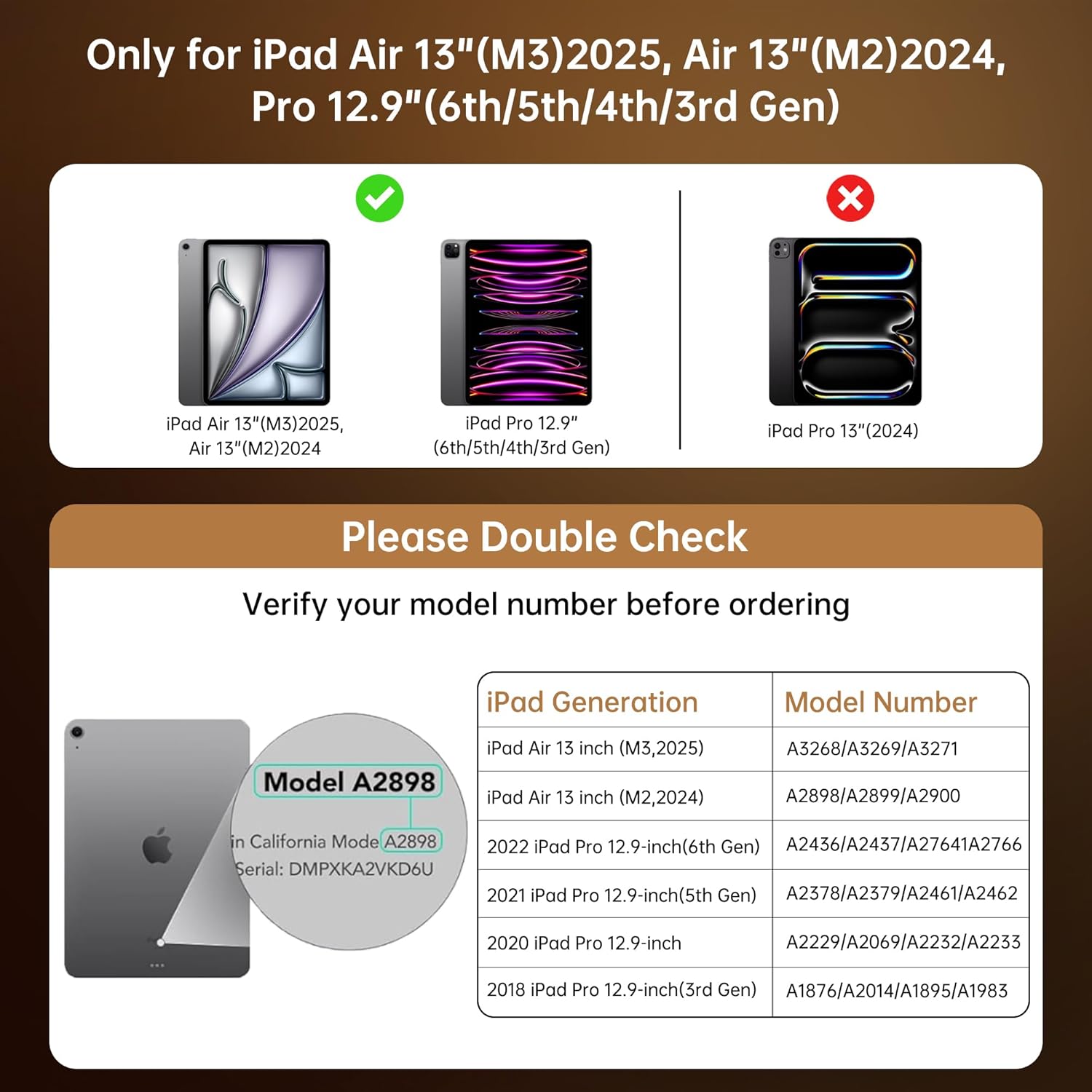
This chart provides essential compatibility information, detailing the specific iPad Air 13-inch (M3/M2) and iPad Pro 12.9-inch (6th/5th/4th/3rd Gen) models that are compatible with this keyboard case. It includes a visual guide on where to find your iPad's model number for verification.
Pokyny pro nastavení
- Insert Your iPad: Gently align your iPad with the case and press it into the protective frame until it is securely seated. Ensure all ports and buttons are accessible. The case provides secure, form-fit protection.
- Nabíjení klávesnice: Before first use, fully charge the keyboard. Connect the provided USB-C cable to the keyboard's charging port and to a power source. A full charge takes approximately 2 hours and provides up to 30 days of power.
- Pair the Keyboard via Bluetooth:
- Turn on the keyboard by sliding the power switch. The indicator light will flash, indicating it's in pairing mode.
- Na iPadu přejděte na Nastavení > Bluetooth.
- Zapněte Bluetooth.
- Select "GUSGU Keyboard" (or similar name) from the list of available devices.
- Follow any on-screen prompts to complete the pairing process. The indicator light will turn solid when successfully paired.

This graphic illustrates the efficient power management of the keyboard, showing that a 2-hour charge provides up to 30 days of usage, ensuring extended productivity.
Návod k obsluze
360° Rotating Stand & Multi-Angle ViewIng
The case features a 360° swivel stand and offers 5 adjustable viewing angles. This allows for seamless transitions between typing, sketching, and media viewrežimy.

This image displays the GUSGU Transparent Keyboard Case with an iPad, illustrating its versatile design. The main view shows the iPad attached to the keyboard, with smaller insets demonstrating how the case can rotate 360 degrees and be adjusted to multiple viewúhly pro psaní, kreslení nebo konzumaci médií.
- Režim psaní: Position the iPad upright for a laptop-like experience.
- Režim skici: Lay the iPad flat or at a low angle for comfortable drawing or writing.
- ViewRežim ing: Adjust the iPad to various angles for watching videos or presentations.

This image illustrates three practical ways to use the keyboard case: 'Sketch' mode, where the iPad is laid flat for drawing; 'Watch Videos' mode, with the iPad angled for comfortable viewing; and 'Video Call' mode, positioning the iPad upright for communication.
podsvícení klávesnice
The keyboard features 7 colors of backlight and 3 brightness levels for comfortable typing in various lighting conditions.
- Stiskněte tlačítko Žárovka key to cycle through backlight colors.
- Stiskněte tlačítko Fn + žárovka keys to adjust backlight brightness (3 levels).

A visual representation of the keyboard's customizable backlight feature, showcasing the seven distinct colors and three adjustable brightness levels available to personalize the typing experience.

Detailní záběr view of hands typing on the keyboard, emphasizing the comfortable and responsive typing experience provided by the backlit keys and scissor-switch mechanism with 1mm key travel.
Přesný trackpad
The integrated trackpad supports multi-touch gestures for intuitive navigation, similar to a laptop. Familiar gestures include:
- Výpad: Move your finger across the trackpad to navigate.
- Svitek: Pro posouvání nahoru nebo dolů použijte dva prsty.
- Štípání: Pro přiblížení nebo oddálení použijte dva prsty.
- Dvojité klepnutí: Vyberte položky nebo otevřete aplikace.
- Přepnout aplikace: Use three or four fingers to swipe between open applications (iPadOS dependent).

This image shows a hand interacting with the precision multi-touch trackpad, illustrating its responsiveness and support for various gestures, enhancing navigation and control.
Držák na tužky Apple
The case includes a dedicated magnetic holder for your Apple Pencil, ensuring it is securely stored and readily accessible without needing to remove the case.

This image highlights two key features: the robust, form-fitting protection provided by the case, particularly around the iPad's edges, and the convenient, integrated holder designed to securely store an Apple Pencil.
Funkce automatického spánku/probuzení
The case supports the iPad's auto sleep/wake function. Closing the case will put your iPad to sleep, and opening it will wake it up, conserving battery life.
Údržba
- Čištění pouzdra: Použijte měkký, damp cloth to wipe the exterior of the case. Avoid harsh chemicals or abrasive materials.
- Čištění klávesnice: Use a soft, dry cloth or a can of compressed air to clean between the keys. Do not spray liquid directly onto the keyboard.
- Skladování: When not in use for extended periods, ensure the keyboard is turned off to conserve battery. Store the case in a cool, dry place.
Odstraňování problémů
- Klávesnice se nepřipojuje:
- Ujistěte se, že je klávesnice zapnutá a plně nabitá.
- Check your iPad's Bluetooth settings to confirm Bluetooth is enabled and the keyboard is paired. If not, try re-pairing.
- Restartujte iPad i klávesnici.
- Klávesy nereagují:
- Ujistěte se, že je klávesnice připojena přes Bluetooth.
- Zkontrolujte úroveň nabití baterie klávesnice.
- Očistěte veškeré nečistoty z okolí kláves.
- Trackpad nefunguje:
- Ujistěte se, že je klávesnice připojena.
- Zkontrolujte nastavení iPadOS ohledně funkčnosti trackpadu.
- Restartujte iPad.
- Backlight Not Working/Changing:
- Ujistěte se, že je klávesnice zapnutá.
- Press the Light Bulb key or Fn + Light Bulb keys to cycle through options.
- Zkontrolujte stav baterie, protože nízký stav baterie může vypnout podsvícení.
Specifikace
| Značka | GUSGU |
| Kompatibilní zařízení | iPad Air 13-inch (M2/M3), iPad Pro 12.9-inch (6th/5th/4th/3rd Gen) |
| Popis klávesnice | Ergonomic Backlit Keyboard (7 colors, 3 brightness levels, scissor-switch, 1mm travel) |
| Trackpad | Precision Multi-Touch Trackpad |
| Zdroj napájení | Battery Powered (2-hour charge for 30-day power) |
| Rozložení klávesnice | QWERTY |
| Orientace rukou | Obouruký |
| Hmotnost položky | 2.86 libry |
| Rozměry balení | 12.13 x 10.24 x 1.18 palce |
Záruka a podpora
GUSGU provides lifetime customer support for this product. If you encounter any issues or have questions, please contact GUSGU customer service for assistance.
Pro další pomoc prosím navštivte Obchod GUSGU na Amazonu.
Ask a question about this manual
Ask about setup, troubleshooting, compatibility, parts, safety, or missing instructions. Manuals+ will review the question and use this page’s manual context to help answer it.