
JZAQ BT40
JZAQ BT40 Motorcycle Helmet Bluetooth Headset User Manual
Model: BT40
Zavedení
Thank you for choosing the JZAQ BT40 Motorcycle Helmet Bluetooth Headset. This manual provides detailed instructions for the proper installation, operation, and maintenance of your device. Please read this manual thoroughly before use to ensure optimal performance and safety.
Obsah balení
Ověřte, zda jsou v balení obsaženy všechny níže uvedené položky:
- 1 x Helmet Headset (BT40)
- 6 x Headphone VELCRO (Adhesive Pads)
- 1 x USB nabíjecí kabel
- 1 x Uživatelská příručka
- 2 x Noise Reducing Sponge Heads (Microphone Covers)

Image: The JZAQ BT40 Helmet Bluetooth Headset, including the main unit with speakers and microphone, USB charging cable, and various adhesive pads and microphone covers.
Specifikace
| Název modelu | BT40 |
| Verze Bluetooth | V5.0+EDR |
| Vzdálenost Bluetooth | Až 10 metrů (33 stop) |
| Typ baterie | 3.7V/600mA Lithium Battery |
| Doba nabíjení | Přibližně 2 hodiny |
| Pohotovostní doba | Až 500 hodin |
| Working Time (Playtime/Talk Time) | Až 90 hodin |
| Voděodolnost | IP67 Deep Waterproof Technology |
| Headphone Thickness | 0.35 palců (přibližně 9 mm) |
| Kontrola hluku | DSP Noise Cancelling Technology |
| Kompatibilní zařízení | Smartphones, MP3 Players, GPS Devices |

Image: A diagram illustrating the dimensions of the headset's earpieces, speaker, microphone, and control unit, highlighting the 0.35-inch thickness of the earpieces.
Nastavení a instalace
Follow these steps to properly install the BT40 headset into your helmet:
- Prepare Earphones: Take the helmet headphones from the box. Attach the "Magic Tape" (Velcro adhesive pads) to the back of both earphones.
- Umístění sluchátek: Remove the protective tape paper from the Velcro on the earphones. Carefully position and stick the earphones into the helmet's ear recesses on both sides. Ensure proper alignment before pressing firmly.
- Secure Headset: Once the Velcro is attached to the helmet, secure the headset earphones to these Velcro pads.
- Umístění mikrofonu: Position the microphone arm so that the microphone is close to your mouth for clear communication.
- Závěrečná kontrola: Ensure all components are securely attached and comfortable within the helmet.
Důležitá poznámka: Before ordering, please check the inner size of your helmet to ensure a comfortable fit for the headset. The headset's ultra-thin design (0.35 inches) is suitable for most helmets without causing discomfort.

Image: The BT40 headset featuring its ultra-thin speakers, designed to fit comfortably within helmet ear spaces without squeezing the ears.

Image: A motorcycle helmet with the JZAQ BT40 headset microphone arm visible, demonstrating typical installation.
Návod k obsluze
Zapnutí/vypnutí a párování
- Zapnutí: Press and hold the Power button (usually the middle button on the control unit) until the indicator light illuminates.
- Vypnout: Stiskněte a podržte tlačítko napájení, dokud kontrolka nezhasne.
- Párování: When powered on for the first time or when entering pairing mode, the headset will automatically search for Bluetooth devices. On your smartphone or other Bluetooth-enabled device, search for "BT40" in the Bluetooth settings and select it to connect.
- Automatické připojení: After initial pairing, the headset will automatically connect to the last paired device when powered on, if the device is within range.
Správa hovorů
- Přijmout hovor: The headset supports automatic answering of incoming calls.
- Ukončit hovor: Press the Power button once to end an active call.
- Odmítnout hovor: Press and hold the Power button for approximately 2 seconds to reject an incoming call.
Přehrávání hudby
- Přehrát/pozastavit: Press the Power button once to play or pause music.
- Zvýšit hlasitost: Press the "+" button to increase volume.
- Snížit hlasitost: Press the "-" button to decrease volume.
- Další skladba: Press and hold the "+" button for approximately 2 seconds to skip to the next track.
- Předchozí skladba: Press and hold the "-" button for approximately 2 seconds to go to the previous track.
Hlasový asistent
- Aktivovat Voice Assistant: Double-click the Power button to activate your smartphone's voice assistant (e.g., Siri, Google Assistant).

Obrázek: Podrobný view of the headset's control unit, showing the volume up (+), power/play/pause, and volume down (-) buttons, along with the microphone.
Video: Overview of the JZAQ Motorcycle Helmet Bluetooth Headset BT40, demonstrating its components and basic features.
Údržba
- Čištění: K čištění sluchátek s mikrofonem používejte měkký, suchý hadřík. Nepoužívejte agresivní chemikálie ani abrazivní materiály.
- Vystavení vodě: While the headset is IP67 waterproof, prolonged submersion or exposure to high-pressure water jets should be avoided. Ensure the charging port cover is securely closed when not charging.
- Skladování: Sluchátka skladujte na chladném a suchém místě mimo dosah přímého slunečního záření a extrémních teplot.
- Péče o baterie: Chcete-li prodloužit životnost baterie, vyvarujte se častého úplného vybíjení. Pravidelně nabíjejte sluchátka, i když je delší dobu nepoužíváte.
- Microphone Sponge: Replace the noise-reducing sponge head on the microphone if it becomes worn or damaged to maintain optimal voice clarity.
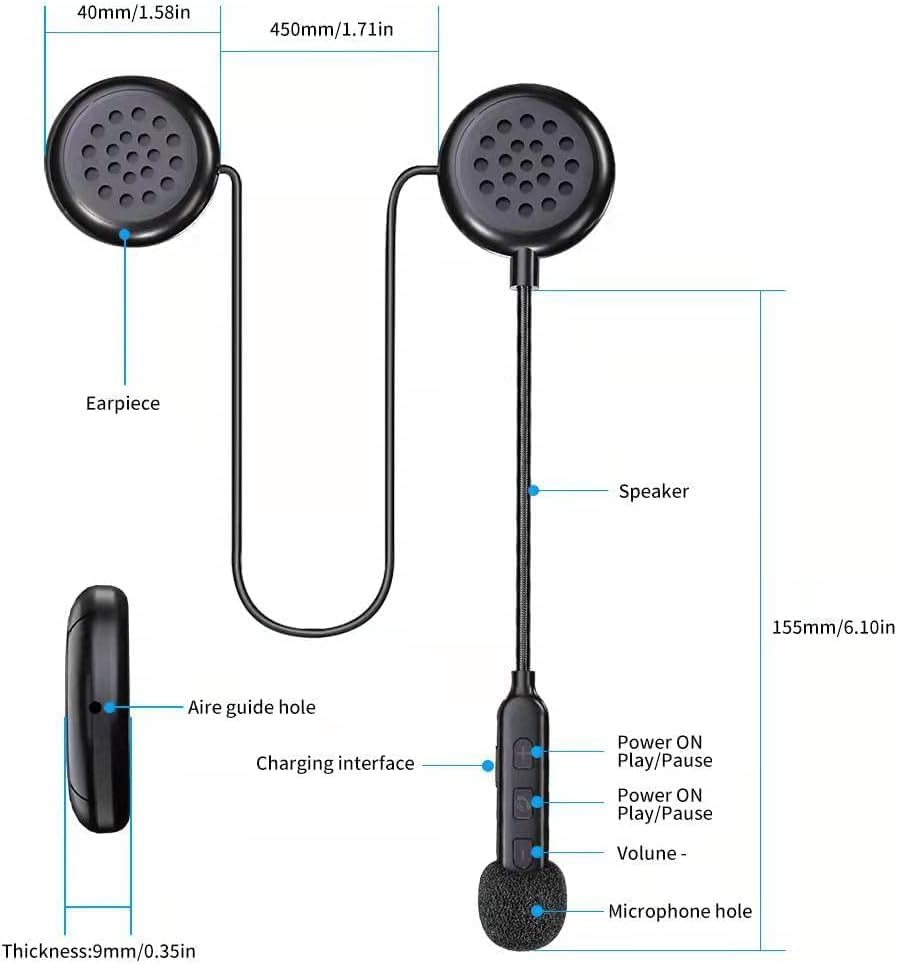
Image: The BT40 headset with water droplets, demonstrating its IP67 deep waterproof capability, suitable for use in rainy or snowy conditions.
Odstraňování problémů
| Problém | Možná příčina | Řešení |
|---|---|---|
| Sluchátka se nezapínají. | Slabá baterie. | Charge the headset for at least 2 hours using the provided USB cable. |
| Nelze spárovat se zařízením. | Bluetooth is off on the device; headset is not in pairing mode; too far from device. | Ensure Bluetooth is enabled on your device. Make sure the headset is powered on and in pairing mode. Move the headset closer to the device (within 10 meters). Try restarting both devices. |
| Žádný zvuk nebo nízká hlasitost. | Volume too low on headset or connected device; improper connection. | Increase volume using the "+" button on the headset and on your connected device. Re-pair the headset with your device. |
| Microphone not picking up voice clearly. | Microphone not positioned correctly; damaged sponge cover. | Adjust the microphone arm so the microphone is close to your mouth. Replace the noise-reducing sponge head if it is worn. |
| Přerušované připojení. | Rušení; zařízení je příliš daleko; slabá baterie. | Move away from sources of strong electromagnetic interference. Ensure the headset is within 10 meters of the connected device. Charge the headset. |
Záruka a podpora
For warranty information or technical support, please refer to the contact details provided with your purchase or visit the official JZAQ website. If you experience any dissatisfaction or issues, please contact customer service for assistance.
Kontakt: Please refer to your purchase documentation or the seller's information on the platform where you purchased the product.
Ask a question about this manual
Ask about setup, troubleshooting, compatibility, parts, safety, or missing instructions. Manuals+ will review the question and use this page’s manual context to help answer it.