
Zavedení
The AlphaTheta HP-TX01 is a dedicated transmitter designed for professional wireless DJ headphones, enabling ultra-low latency sound transfer. It connects to any DJ mixer equipped with a PHONE or 3.5 mm stereo mini jack monitor output, providing a seamless wireless audio experience. This compact and lightweight device is engineered for portability and reliable performance in professional DJ environments.
Bezpečnostní informace
Please read all safety instructions before using the AlphaTheta HP-TX01 transmitter. Keep this manual for future reference.
- Nevystavujte zařízení dešti, vlhkosti ani extrémním teplotám.
- Zabraňte pádu zařízení nebo jeho vystavení silným nárazům.
- Používejte pouze dodaný nabíjecí kabel USB-C nebo kompatibilní certifikovaný kabel.
- Nepokoušejte se jednotku rozebírat ani upravovat. Veškerý servis svěřte kvalifikovanému personálu.
- Uchovávejte mimo dosah dětí.
Obsah balení
Ověřte, zda jsou v balení přítomny všechny položky:
- AlphaTheta HP-TX01 Transmitter Unit
- Nabíjecí kabel USB-C
- Uživatelská příručka (tento dokument)
Konec produktuview
Familiarize yourself with the components of your HP-TX01 transmitter.
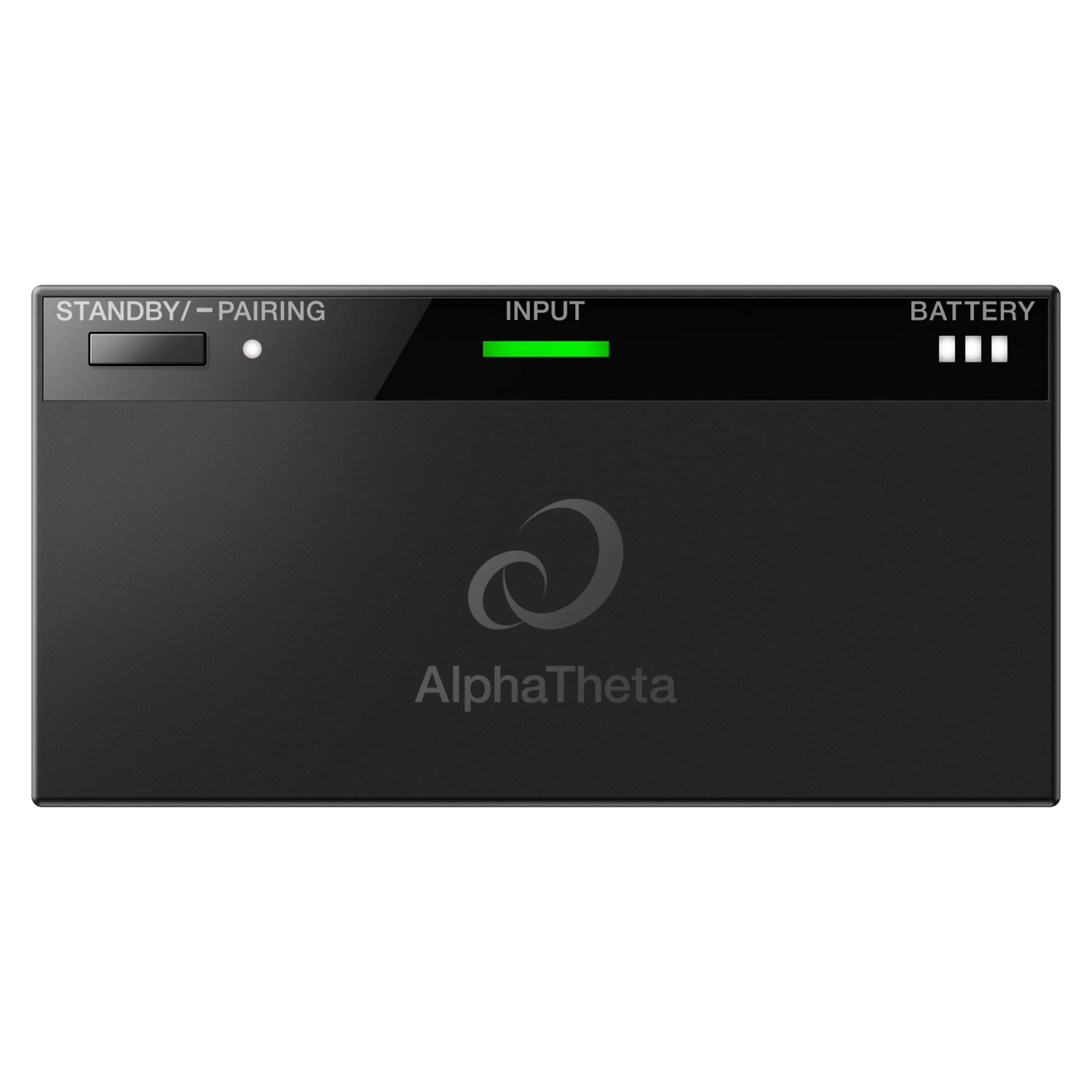
Obrázek 1: Nahoře View of HP-TX01 Transmitter. This image displays the top surface of the AlphaTheta HP-TX01 transmitter, highlighting the STANDBY/PAIRING button, the INPUT indicator light, and the BATTERY level indicator.

Obrázek 2: Zadní View of HP-TX01 Transmitter. This image shows the rear panel of the transmitter, featuring the 3.5mm audio INPUT jack and the DC 5V USB-C charging port.
Ovládací prvky a indikátory:
- STANDBY/PAIRING Button: Used to power on/off the device and initiate pairing with compatible headphones.
- INPUT Indicator: Illuminates to show an active audio input signal.
- BATTERY Indicator: Zobrazuje aktuální úroveň nabití baterie.
- INPUT Jack (3.5mm): Connects to the audio output of a DJ mixer.
- DC 5V (USB-C) Port: Used for charging the transmitter's internal battery.
Nastavení
1. Charging the Transmitter
- Connect the supplied USB-C charging cable to the DC 5V port on the transmitter.
- Connect the other end of the USB-C cable to a USB power adapter (not included) or a powered USB port.
- The BATTERY indicator will show charging status. Charge fully before first use.
2. Connecting to a DJ Mixer
- Ensure your DJ mixer is powered off or its monitor output volume is set to minimum.
- Connect a 3.5mm stereo audio cable (not included) from the PHONE or 3.5 mm stereo mini jack monitor output of your DJ mixer to the INPUT jack on the HP-TX01 transmitter.
- Power on your DJ mixer and adjust the monitor output volume as needed.

Figure 3: Transmitter Connected to DJ Mixer. This image illustrates the HP-TX01 transmitter connected to a DJ mixer, with a pair of professional DJ headphones positioned next to it, demonstrating a typical setup.
Návod k obsluze
1. Zapnutí/vypnutí
- Zapnutí: Press and hold the STANDBY/PAIRING button for approximately 2 seconds until the indicators light up.
- Vypnutí: Press and hold the STANDBY/PAIRING button for approximately 3 seconds until the indicators turn off.
2. Pairing with Headphones
The HP-TX01 transmitter is designed to work with compatible AlphaTheta professional wireless DJ headphones (e.g., HDJ-F10) using SonicLink technology.
- Ujistěte se, že je vysílač zapnutý.
- Place your compatible AlphaTheta wireless DJ headphones into pairing mode (refer to your headphone's user manual for specific instructions).
- On the HP-TX01 transmitter, press and hold the STANDBY/PAIRING button for approximately 5 seconds until the STANDBY/PAIRING indicator begins to flash rapidly. This indicates the transmitter is in pairing mode.
- Once the headphones and transmitter successfully pair, the STANDBY/PAIRING indicator on the transmitter will change to a solid light, and the headphones will indicate a successful connection.
Poznámka: The HP-TX01 is specifically designed for AlphaTheta professional wireless DJ headphones. Compatibility with other brands or models is not guaranteed.
3. Audio Transmission
- After successful pairing and connection to a DJ mixer, audio from the mixer will be wirelessly transmitted to your headphones.
- The INPUT indicator on the transmitter will illuminate when an audio signal is detected.
- Adjust the volume directly on your connected headphones.
Údržba
Čištění
- Otřete vnější povrch vysílače měkkým, suchým hadříkem.
- Nepoužívejte abrazivní čisticí prostředky, vosky ani rozpouštědla.
- Ensure no liquids enter the ports or openings.
Skladování
- Vysílač skladujte na chladném a suchém místě mimo dosah přímého slunečního záření a extrémních teplot.
- Pokud baterii skladujete delší dobu, pravidelně ji nabíjejte, aby byla v dobrém stavu.
Odstraňování problémů
| Problém | Možná příčina | Řešení |
|---|---|---|
| Žádná síla | Baterie je vybitá. | Charge the transmitter using the USB-C cable. |
| No audio output to headphones |
|
|
| Poor audio quality / Dropouts |
|
|
| Transmitter not pairing |
|
|
Specifikace
| Číslo modelu | HP-TX01 |
| Značka | AlphaTheta |
| Technologie připojení | Wireless (SonicLink) |
| Vstupní Jack | 3.5 mm stereo mini jack |
| Nabíjecí port | USB-C (DC 5V) |
| Hmotnost položky | 10.08 unce (přibližně 285.8 gramů) |
| Materiál pouzdra | Plast |
| Specifické použití pro produkt | Professional DJing |
Informace o záruce
The AlphaTheta HP-TX01 Transmitter comes with a 2-letá záruka výrobce. This warranty covers defects in materials and workmanship under normal use. Please retain your proof of purchase for warranty claims. For full terms and conditions, please refer to the official AlphaTheta webwebu nebo kontaktujte zákaznickou podporu.
Podpora
For further assistance, technical support, or warranty inquiries, please visit the official AlphaTheta webnebo kontaktujte jejich oddělení zákaznických služeb.
- Oficiální Webmísto: www.alphatheta.com
- Služby zákazníkům: Viz kontaktní sekci na oficiálních stránkách webweb s telefonními čísly nebo e-mailovou podporou.