
1. Úvod a konecview
The Meliconi TLC EVO.5 is a pre-programmed infrared remote control designed for seamless operation with all Thomson and TCL televisions that feature integrated DTT (Digital Terrestrial Television). This remote is ready to use right out of the box, requiring no complex programming before accessing 100% of the original remote control functions.
It includes dedicated direct access keys for popular streaming services such as Netflix, YouTube, and Amazon Prime Video, making it ideal for controlling modern smart televisions. The SMART HOME button provides quick access to your TV's application menu. Secondary functions can be accessed via the "M" key. The remote features a wide-angle, long-range infrared signal for reliable control and retains its configuration even when batteries are removed.
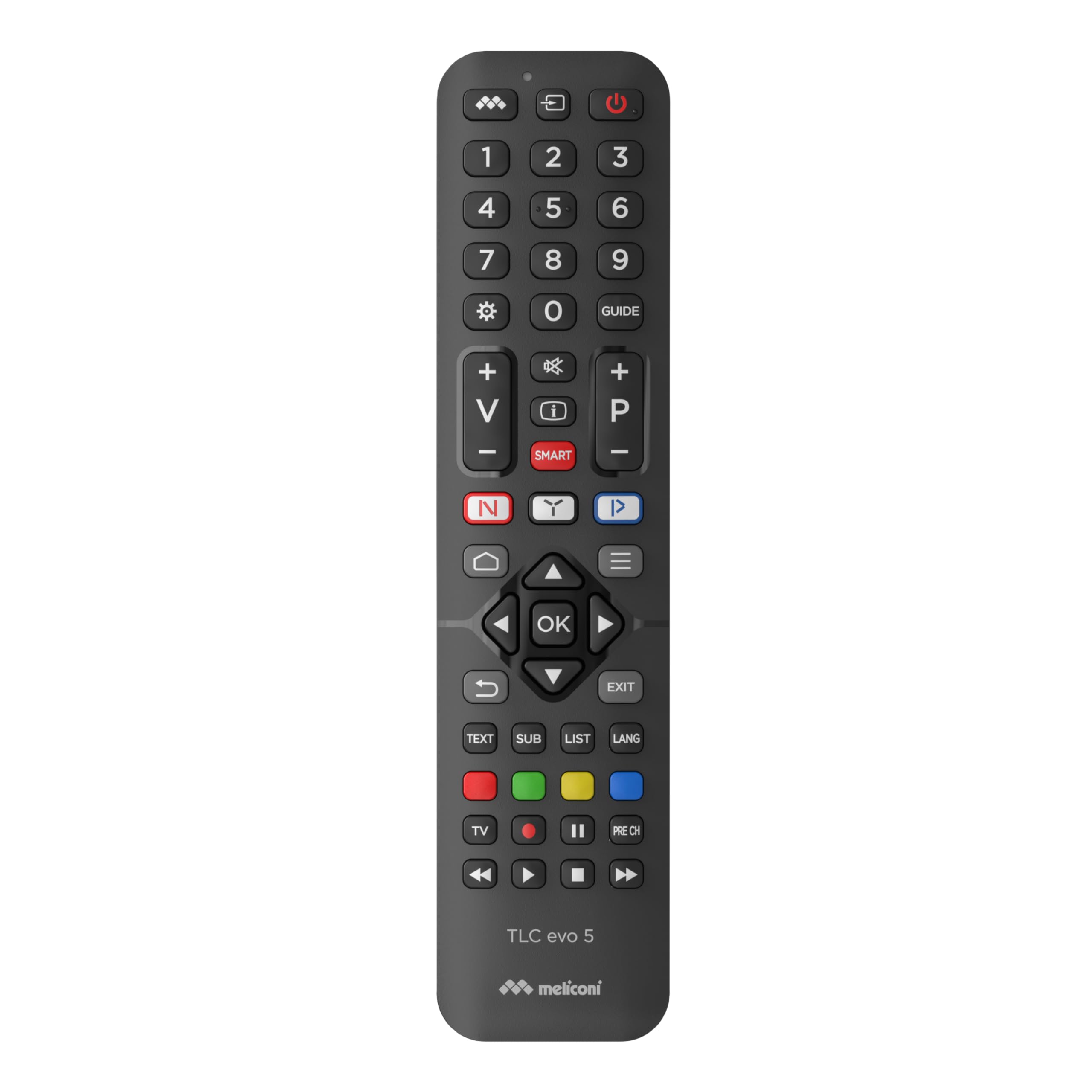
Obrázek 1: Úhlové view of the Meliconi TLC EVO.5 remote control, showcasinjeho ergonomický design a rozložení tlačítek.
2. Nastavení
2.1. Instalace baterie
- Najděte kryt prostoru pro baterie na zadní straně dálkového ovladače.
- Posuňte kryt dolů nebo stiskněte západku (pokud je k dispozici) a otevřete přihrádku.
- Insert two (2) 1.5V AAA/LR03 alkaline batteries, ensuring the correct polarity (+ and -) as indicated inside the compartment. The remote features mechanical anti-inversion protection for batteries.
- Nasaďte zpět kryt přihrádky na baterie a zasuňte jej zpět na místo, dokud bezpečně nezacvakne.
Poznámka: Batteries are not included with the remote control. Always use new, high-quality alkaline batteries for optimal performance. The remote retains its configuration even without batteries.

Obrázek 2: Shora dolů view of the remote control, showing the full button layout, useful for identifying the battery compartment on the reverse side.
2.2. First Use (No Programming Required)
The Meliconi TLC EVO.5 remote control is pre-programmed for Thomson and TCL televisions. After installing the batteries, it is ready for immediate use. Simply point the remote at your television and begin operating it as you would with your original remote control.
3. Návod k obsluze
This section details the primary functions of the Meliconi TLC EVO.5 remote control.

Image 3: The remote control positioned next to a television, illustrating its intended use.
3.1. Základní funkce
- Tlačítko napájení (⏻): Zapíná nebo vypíná televizi.
- Číselná tlačítka (0-9): Selects TV channels directly.
- Zvýšení/snížení hlasitosti (+/-): Nastavuje hlasitost televizoru.
- Kanál nahoru/dolů (P+/P-): Postupně mění televizní kanály.
- Tlačítko ztlumení (🔇): Ztlumí nebo zruší ztlumení zvuku televizoru.
- Navigation Arrows (▲ ▼ ◄ ►) and OK Button: Používá se k navigaci v nabídkách a potvrzování výběrů.
- Tlačítko Konec: Ukončí aktuální menu nebo funkci.
- Back/Return Button (↶): Vrátí se na předchozí obrazovku nebo nabídku.
3.2. Smart Functions and Direct Access Keys
- Tlačítko Netflix (N): Poskytuje přímý přístup ke streamovací službě Netflix.
- YouTube Button (▶): Provides direct access to the YouTube video platform.
- Tlačítko Amazon Prime Video (▶): Provides direct access to the Amazon Prime Video streaming service.
- SMART HOME Button (⌂): Opens the television's smart home or application menu.
- "M" Key: Accesses secondary functions, which may vary depending on your television model. Refer to your TV's original manual for specific secondary functions.

Image 4: A user holding the remote control, demonstrating its comfortable grip and ease of use for accessing smart TV features.
3.3. Infrared Signal
The remote control utilizes a wide-angle, long-range infrared signal. For optimal performance, ensure there is a clear line of sight between the remote control's emitter and the television's infrared receiver. An indicator light on the remote confirms signal transmission.
4. Údržba
4.1. Výměna baterie
When the remote control's response becomes sluggish or inconsistent, it is time to replace the batteries. Follow the steps outlined in Section 2.1. Battery Installation. Always replace both batteries simultaneously with new ones.
4.2. Čištění
Dálkový ovladač jemně otřete měkkým, suchým hadříkem. V případě odolných nečistot jej lehce otřete.ampOtřete hadřík vodou nebo jemným neabrazivním čisticím prostředkem. Nepoužívejte agresivní chemikálie, rozpouštědla nebo abrazivní materiály, protože by mohly poškodit povrch dálkového ovladače nebo jeho vnitřní součásti.
4.3. Skladování
Dálkový ovladač skladujte na chladném a suchém místě mimo dosah přímého slunečního záření, extrémních teplot a vysoké vlhkosti. Pokud dálkový ovladač nebudete delší dobu používat, doporučuje se vyjmout baterie, abyste zabránili jejich vytečení a možnému poškození.
5. Řešení problémů
- Dálkové ovládání nereaguje:
- Zkontrolujte, zda jsou baterie správně vloženy se správnou polaritou.
- Vyměňte baterie za nové.
- Ujistěte se, že mezi dálkovým ovladačem a infračerveným přijímačem televizoru nejsou žádné překážky.
- Zkontrolujte, zda je dálkový ovladač namířen přímo na televizor.
- Nefunkční konkrétní funkce:
- While the remote is designed to work with 100% of original functions, some advanced or TV-specific features might require the original TV remote or specific TV settings.
- Ensure your TV is a Thomson or TCL model with infrared capability.
- Indicator light not flashing:
- This usually indicates dead or incorrectly inserted batteries. Replace or reinsert batteries.
6. Specifikace
| Název modelu: | TLC Evo.5 |
| Značka: | Meliconi |
| Kompatibilní zařízení: | Thomson and TCL Televisions |
| Technologie připojení: | Infračervený |
| Speciální funkce: | Smart (Direct access to streaming services) |
| Barva: | Černý |
| Počet tlačítek: | Multiple, including 3 direct access keys |
| Typ ovladače: | Tactile Control |
| Zdroj napájení: | 2 x 1.5V AAA/LR03 Alkaline Batteries (not included) |
7. Podpora
For further assistance or inquiries regarding your Meliconi TLC EVO.5 remote control, please refer to the official Meliconi website or contact their customer support. Keep your purchase receipt for any warranty-related claims.
Můžete navštívit Meliconi Store on Amazon pro více informací o produktu.