
Zavedení
The Hotmoon Cocoon Pro White Noise Sound Machine is designed to create an optimal soundscape environment for various activities such as sleep, relaxation, study, work, or soothing infants. It features a comprehensive library of 388 high-fidelity sounds, a night light, a sleeping timer, and convenient app control for personalized routines.
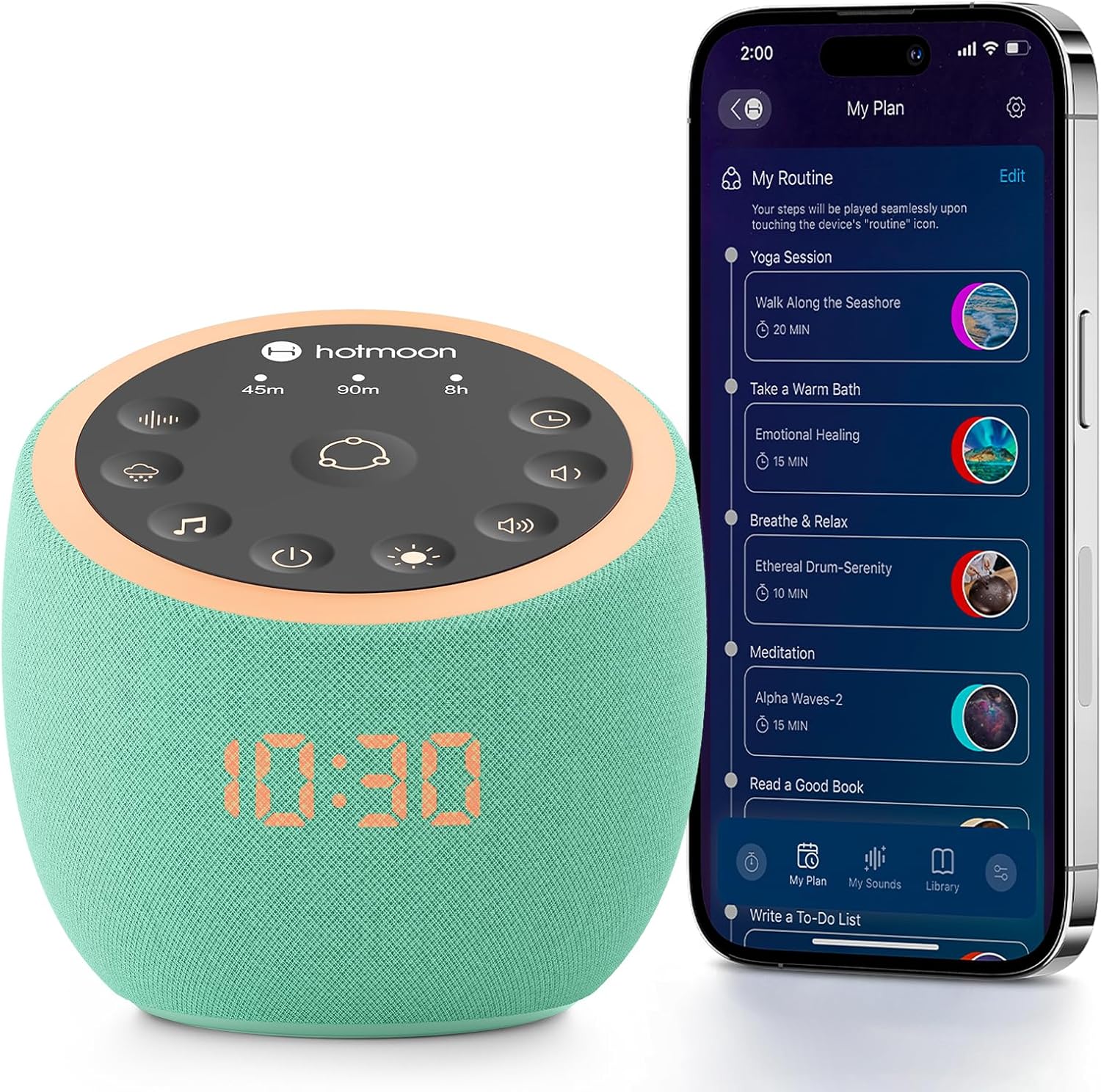
Image: The Hotmoon Cocoon Pro White Noise Sound Machine, a compact, mint-green device with a digital clock display, shown next to a smartphone illustrating its app control interface. The device features a top panel with various control icons.
Klíčové vlastnosti
- 388 High-Fidelity Sounds: Includes White noises, Fan sounds, Nature sounds, Lullabies, Alpha brainwaves, Zen sounds, Meditation melodies, High frequency sound, and more.
- Ovládání aplikace: Adjust settings remotely via a companion app on your smartphone.
- Zvuková tlačítka pro kutily: Three customizable buttons allow personalization with 1 to 9 sounds from the professional sound library.
- Barevná noční světla: Various professional anti-glare baby night lights for soothing sleep, with adjustable brightness and static/breath modes.
- Sleeping Timer: Set timers for 45 minutes, 90 minutes, or 8 hours.
- Vzestupný alarm: Features exclusive awakening melodies with volume fade-in. Clock brightness can be dimmed, turned off, or scheduled.
- Kompaktní design: Portable and suitable for travel.

Image: A visual representation highlighting the 388 sounds available on the Hotmoon Sound Machine, categorized by type, emphasizing no subscription fees.
Nastavení
1. Připojení napájení
Connect the sound machine to a power source using the provided cable. The device is not battery-operated and requires continuous power.
2. Stažení aplikace a připojení
- Download the official Hotmoon companion app from your smartphone's app store.
- Povolte na svém smartphonu Bluetooth.
- Open the Hotmoon app. The app will automatically detect and connect to your Cocoon Pro device via Bluetooth. No Wi-Fi password is required for initial setup.
Návod k obsluze
Ovládání aplikací
The primary method for controlling the Cocoon Pro is through its companion app. This allows for comprehensive customization and scheduling.
- Výběr zvuku: Browse and select from 388 high-fidelity sounds categorized by Weather (e.g., Heavy Rain, Light Rain, Thunder), Nature, Noise (e.g., Warm Pink Noise, White Noise), Brainwave Music, Instrumental, Lullaby, and more.
- Nastavení hlasitosti: Control the sound volume from 0-100% using a slider in the app.
- Ovládání světla:
- Turn the night light on/off.
- Customize light color and brightness.
- Select between Static or Breath light modes.
- Routine Setup: Create personalized routines for various activities (e.g., meditation, wake-up, bedtime).
- Combine multiple sounds and light settings.
- Schedule routines to turn on/off at specific times and repeat on selected days of the week.
- Zvuková tlačítka pro kutily: Assign up to 9 sounds to each of the three physical DIY buttons on the device for quick access.

Image: A smartphone screen displaying the Hotmoon app's sound library, showing various sound categories and options to customize the three physical sound buttons on the device.
Ovládání fyzickým tlačítkem
The device also features intuitive physical buttons for basic control without the app.
- Routine Button (Center): Press to activate pre-set or customized routines.
- Timer Buttons (45m, 90m, 8h): Select a specific duration for sound playback.
- Tlačítka pro výběr zvuku: Cycle through different sound categories (e.g., fan, rain, meditation).
- Tlačítka ovládání hlasitosti: Adjust sound volume up or down.
- Tlačítko ovládání světla: Turn the night light on/off and cycle through brightness levels.
- Vypínač: Zapněte nebo vypněte zařízení.

Image: A close-up of the Hotmoon Sound Machine's top panel, showing the illuminated touch-sensitive buttons for direct control of sounds, timers, volume, and light, enabling phone-free operation.
Údržba
To ensure the longevity and optimal performance of your Hotmoon Cocoon Pro:
- Udržujte zařízení čisté otíráním měkkým suchým hadříkem.
- Nepoužívejte tekuté čisticí prostředky nebo abrazivní materiály.
- Nevystavujte zařízení vodě ani nadměrné vlhkosti.
- Pokud se nepoužívá, skladujte na chladném a suchém místě.
Odstraňování problémů
Zařízení se nezapíná
- Ensure the power cable is securely connected to both the device and a working power outlet.
- Ověřte funkčnost zásuvky vyzkoušením s jiným zařízením.
Problémy s připojením aplikace
- Ujistěte se, že je na vašem smartphonu povoleno Bluetooth.
- Make sure the device is powered on and within Bluetooth range of your smartphone.
- Try restarting both the app and the sound machine.
Žádný zvukový výstup
- Check the volume level on both the device and within the app.
- Ensure a sound is selected and playing in the app.
Specifikace
| Atribut | Detail |
|---|---|
| Značka | Horký měsíc |
| Model | Cocoon Pro |
| Barva | Mint-green |
| Materiál | Akrylonitrilbutadienstyren (ABS) |
| Rozměry balení | 4.92 x 4.92 x 4.52 palce; 15.04 unce |
| Baterie | 1 Lithium Metal batteries required. (included) - Note: Device is not battery operated, this likely refers to a small internal battery for clock/memory. |
| Výrobce | Horký měsíc |
| První dostupný termín | 25. června 2025 |