
1. Úvod
This manual provides detailed instructions for the installation, operation, and maintenance of the Elitech Cold Storage Temperature Controller series. These controllers are designed for precise temperature management in various cold storage applications, ensuring optimal conditions for stored goods. Please read this manual thoroughly before installation and operation to ensure safe and efficient use.
2. Bezpečnostní opatření
- Zajistěte, aby veškeré zapojení provedl kvalifikovaný elektrikář v souladu s místními elektrotechnickými předpisy.
- Před zahájením jakékoli instalace, zapojení nebo údržby odpojte napájení.
- Do not operate the controller in environments with excessive moisture, dust, or corrosive gases.
- Ověřte napájení objtage matches the controller's specifications.
- Uchovávejte zařízení mimo dosah silného elektromagnetického rušení.
3. Konec produktuview
The Elitech temperature controller features a clear digital display, intuitive buttons for parameter setting, and robust construction for reliable performance in demanding environments. It typically includes inputs for temperature sensors and outputs for controlling refrigeration, defrost, and fan operations.
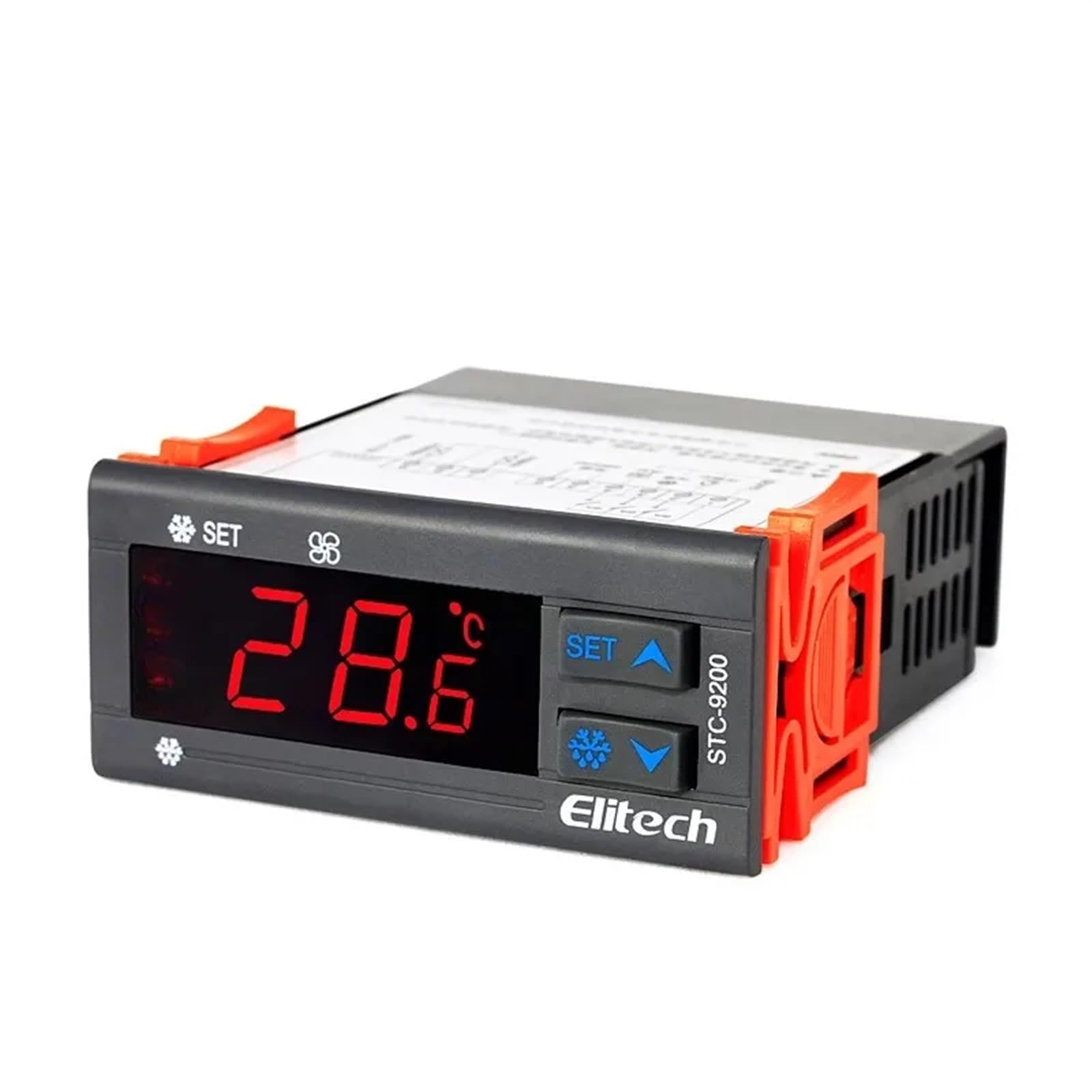
Obrázek 1: Přední view of an Elitech temperature controller (model EK-3010 shown). This image displays the digital display, control buttons (Up, OK/Set, Down), and indicators for various functions like refrigeration, defrost, and fan operation. The display shows a temperature reading of -44.5.
4. Specifikace
| Funkce | Popis |
|---|---|
| Napájení | AC 220V ±10%, 50/60Hz (Typical, may vary by model) |
| Rozsah měření teploty | -50 °C až 99 °C (-58 °F až 210 °F) (typické) |
| Kontrolní rozsah | -40 °C až 70 °C (-40 °F až 158 °F) (typické) |
| Rezoluce | 0.1 °C / 1 °F |
| Typ snímače | NTC sensor (Typical) |
| Kapacita reléového výstupu | Compressor: 10A/250VAC; Defrost: 10A/250VAC; Fan: 10A/250VAC (Typical) |
| Provozní teplota | 0 °C až 60 °C (32 °F až 140 °F) |
| Skladovací teplota | -30 °C až 75 °C (-22 °F až 167 °F) |
| Relativní vlhkost | 20 % až 85 % (bez kondenzace) |
Note: Specifications may vary slightly between different models (STC-9200, STC-8080A, STC-200, STC-9100, STC-1000X, EK-3020). Refer to the specific model's packaging or label for precise details.
5. Nastavení a instalace
5.1 Montáž
- Choose a suitable location for mounting the controller, away from direct heat sources, moisture, and vibrations.
- Zajistěte dostatečné větrání kolem jednotky.
- Cut a rectangular opening in the panel according to the controller's dimensions (refer to the product diagram for exact measurements).
- Insert the controller into the opening and secure it using the provided mounting clips.
5.2 Zapojení
VAROVÁNÍ: Před zapojováním se ujistěte, že je odpojeno napájení.
- Napájení: Connect the main power supply (L and N) to the designated terminals on the controller.
- Teplotní senzor: Connect the NTC temperature sensor to the sensor input terminals. Ensure correct polarity if applicable. The sensor should be placed in the area where temperature needs to be monitored and controlled.
- Compressor Output: Connect the compressor's power line to the compressor relay output terminals.
- Defrost Heater Output: Connect the defrost heater's power line to the defrost relay output terminals.
- Výkon ventilátoru: Connect the evaporator fan's power line to the fan relay output terminals.
Refer to the wiring diagram printed on the side of the controller or in the specific model's manual for precise terminal connections.
6. Návod k obsluze
6.1 Zapnutí/vypnutí
- To power on, connect the main power supply. The display will show the current temperature.
- Chcete-li vypnout napájení, odpojte hlavní zdroj napájení.
6.2 Viewing Teplota
The current measured temperature is continuously displayed on the front panel.
6.3 Nastavení parametrů
The controller allows adjustment of various parameters such as setpoint temperature, differential, defrost cycle, and fan operation. The exact procedure may vary slightly by model, but generally follows these steps:
- Stiskněte a podržte NASTAVIT/OK button for 3-5 seconds to enter parameter setting mode.
- Použijte UP a DOLŮ buttons to navigate through the parameter codes (e.g., F1, F2, P1, P2).
- Stiskněte NASTAVIT/OK na view hodnotu zvoleného parametru.
- Použijte UP a DOLŮ tlačítka pro úpravu hodnoty.
- Stiskněte NASTAVIT/OK again to confirm the new value and move to the next parameter, or press and hold NASTAVIT/OK to save all changes and exit the setting mode.
Mezi běžné parametry patří:
- Nastavená hodnota (SP): Požadovaná teplota.
- Differential (Hy): The temperature difference between the set point and the turn-on/off temperature.
- Defrost Cycle (Id): Interval between defrost cycles.
- Defrost Duration (Ed): Length of the defrost cycle.
- Fan Control (Fc): Settings for fan operation during refrigeration and defrost.
7. Údržba
7.1 Čištění
- Regularly clean the front panel with a soft, damp tkanina. Nepoužívejte abrazivní čisticí prostředky nebo rozpouštědla.
- Ensure the ventilation openings are free from dust and debris to prevent overheating.
7.2 Sensor Check
- Periodically inspect the temperature sensor and its wiring for any damage or corrosion.
- Ensure the sensor is securely placed and making proper contact.
8. Řešení problémů
| Problém | Možná příčina | Řešení |
|---|---|---|
| Display shows "EE" or "HH" | Sensor error or temperature out of range. | Check sensor connection and wiring. Replace sensor if damaged. Ensure temperature is within operating range. |
| Ovladač se nezapíná | Chybí napájení nebo je zapojení nesprávné. | Verify power connection and voltage. Check wiring according to diagram. |
| Kompresor neběží | Temperature not reaching set point, compressor delay, or wiring issue. | Check set point and differential. Wait for compressor delay. Verify compressor wiring. |
| Nepřesný údaj o teplotě | Sensor placement, sensor damage, or calibration needed. | Relocate sensor to a representative area. Check sensor for damage. Refer to manual for calibration procedure if available. |
9. Záruka a podpora
Elitech products are typically covered by a limited warranty against defects in materials and workmanship. The warranty period and terms may vary by region and specific product model. Please retain your purchase receipt as proof of purchase.
For technical support, warranty claims, or service inquiries, please contact your authorized Elitech distributor or visit the official Elitech website for contact information. When contacting support, please have your product model number and purchase date available.