
1. Konec produktuview
The DOOGEE V Pad 5G is a high-performance Android tablet designed for versatile use, from entertainment to productivity. It features a large 12-inch 2.4K IPS display, powerful MediaTek Dimensity 7050 5G Octa-Core processor, and an 8800mAh battery, ensuring a smooth and immersive user experience.
1.1 Obsah balení
Upon unboxing your DOOGEE V Pad 5G tablet, please verify that all the following items are included:
- 1* DOOGEE V Pad Tablet
- 1* Kabel typu C
- 1* 18W Charger
- 1* Jehla pro vyjmutí SIM karty
- 1 * Balicí krabice
- 1* Uživatelská příručka

The package includes the DOOGEE V Pad Tablet, a Type-C Cable, an 18W Charger, a SIM Card Removal Needle, the Packing Box, and this User Manual.
1.2 Rozložení zařízení
Seznamte se s fyzickými součástmi tabletu:
- Přední kamera: Při vodorovném držení se nachází uprostřed nahoře.
- Zobrazit: The 12-inch 2.4K IPS screen.
- Vypínač: Typically on the side, used to turn the device on/off or wake/sleep the screen.
- Tlačítka hlasitosti: Vedle tlačítka napájení slouží k nastavení hlasitosti.
- Port USB Type-C: At the bottom edge, for charging and data transfer.
- Mřížky reproduktorů: Quad speakers located on the sides for immersive audio.
- Slot pro SIM/TF kartu: Na boku pro vkládání SIM karet a rozšiřitelnou paměť.
- Modul zadní kamery: Located on the back, featuring the main camera.
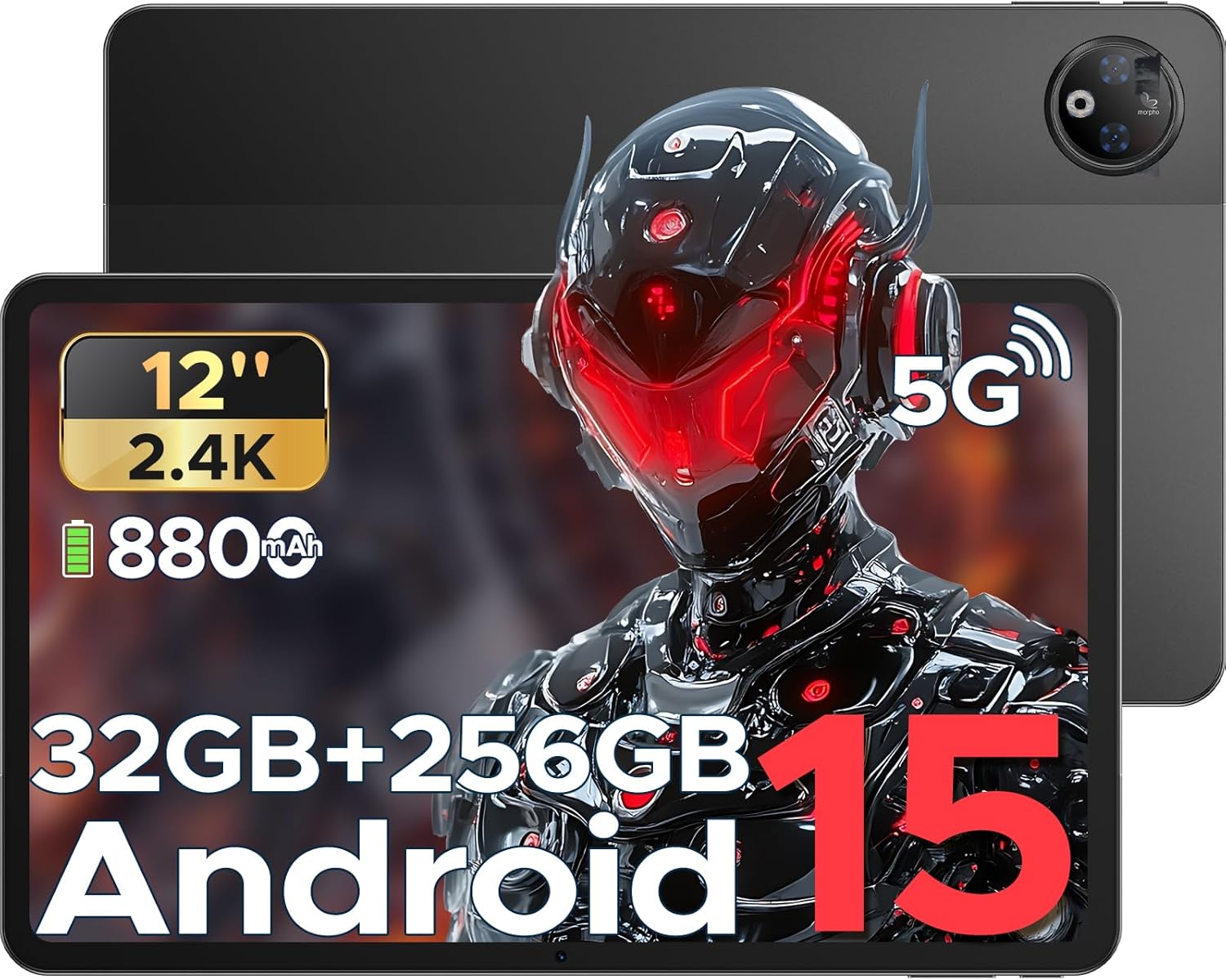
This image provides a general view of the DOOGEE V Pad 5G tablet, showing its front display and rear camera module.
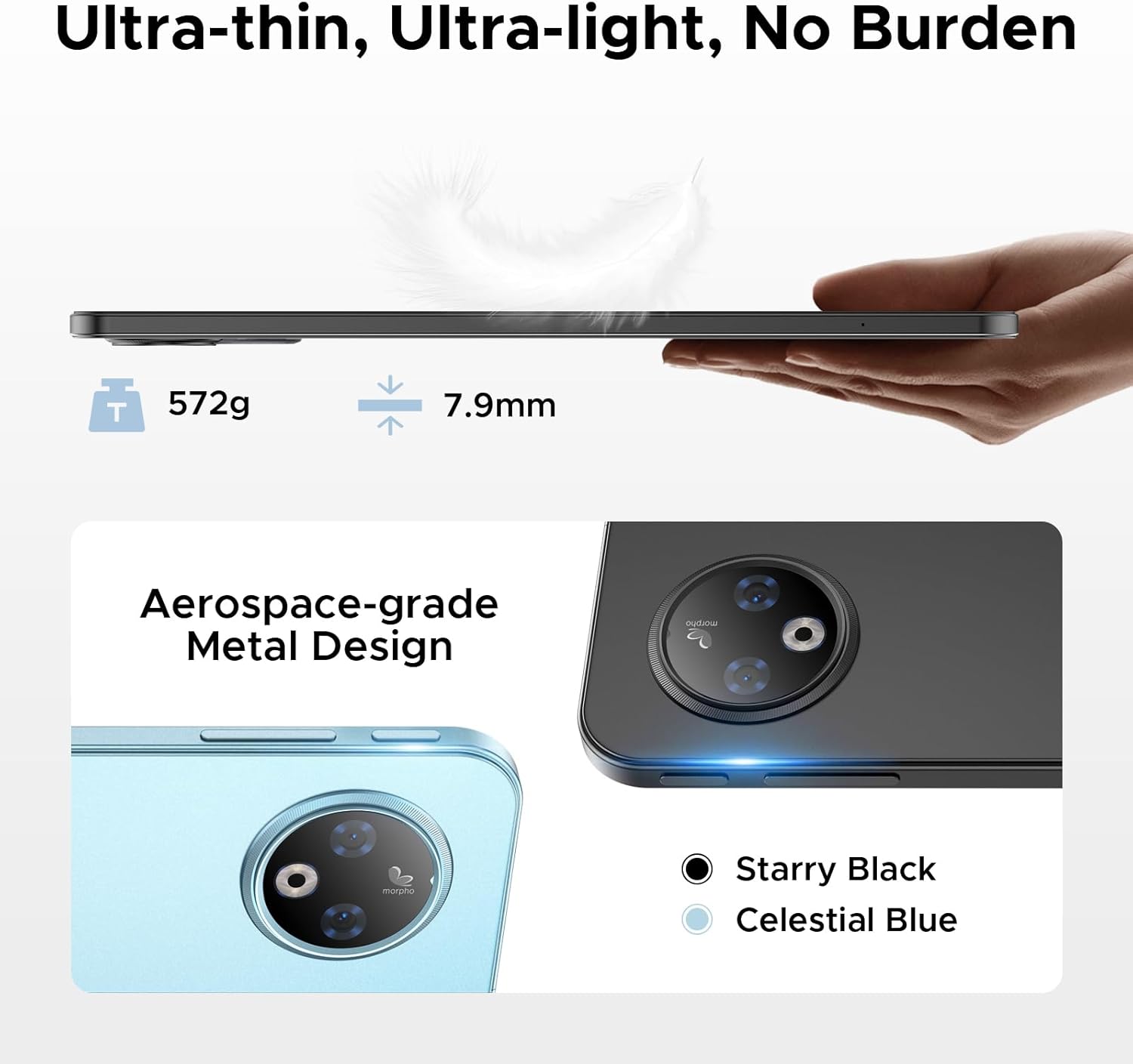
Strana view of the tablet illustrates its 7.9mm ultra-thin design and the placement of physical buttons and ports.
2. Začínáme
2.1 Nabíjení tabletu
Before first use, fully charge your tablet. Connect the provided Type-C cable to the tablet's charging port and the 18W charger to a power outlet. The tablet supports 18W fast charging and can also function as an emergency power bank for other devices via reverse charging.
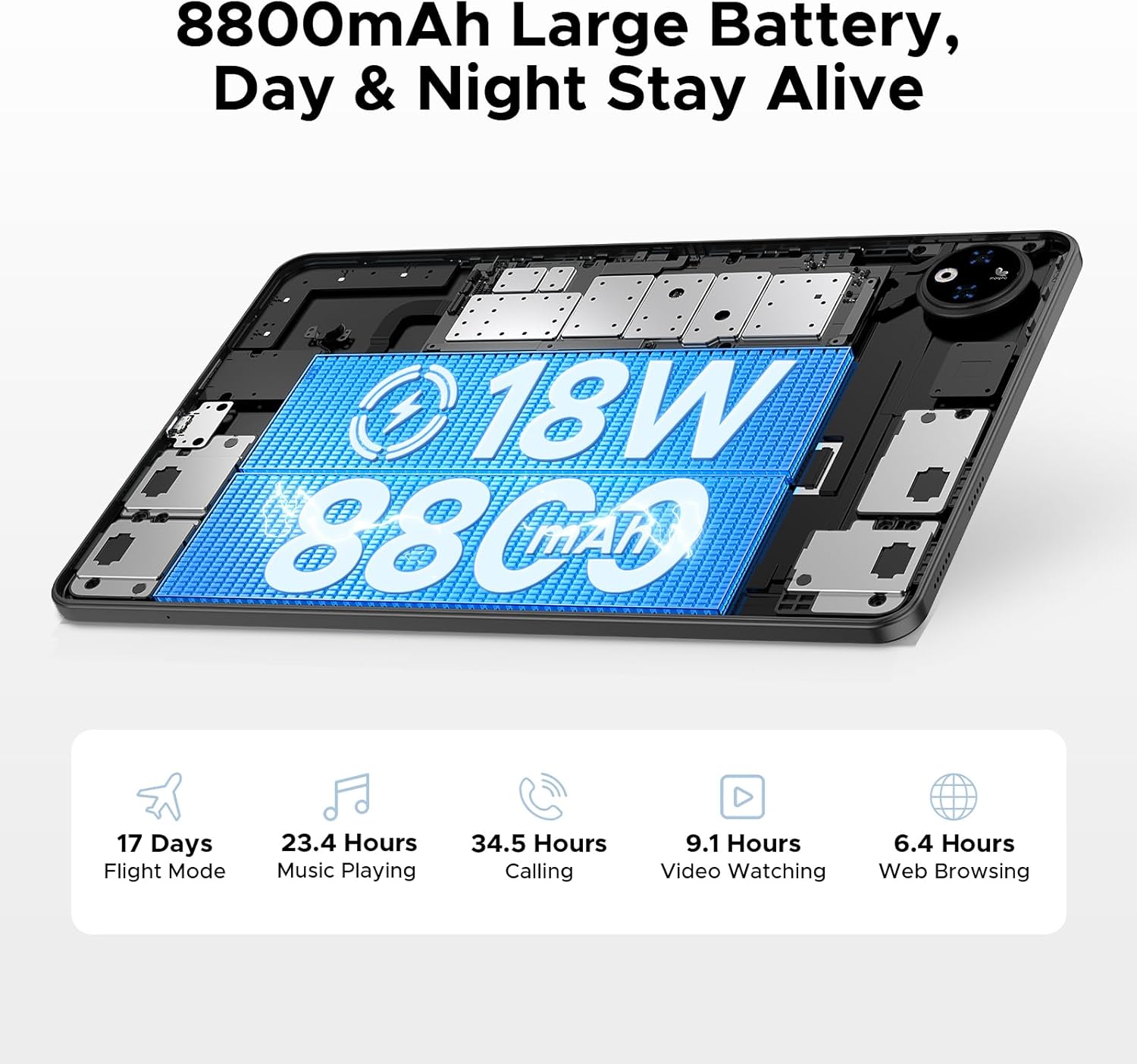
This image illustrates the tablet's large 8800mAh battery and its 18W fast charging feature, ensuring extended usage.
This video demonstrates the DOOGEE V Pad's powerful battery and its ability to support reverse charging, acting as an emergency power bank.
2.2 Zapnutí/vypnutí
- Zapnutí: Stiskněte a podržte tlačítko napájení, dokud se na obrazovce nezobrazí logo DOOGEE.
- Vypnutí: Stiskněte a podržte tlačítko Napájení, dokud se nezobrazí nabídka možností napájení. Vyberte možnost „Vypnout“ a potvrďte.
- Restartovat: From the power options menu, select 'Restart' and confirm.
2.3 Počáteční nastavení
The first time you power on your tablet, you will be guided through an initial setup process. Follow the on-screen prompts to:
- Vyberte svůj jazyk.
- Připojte se k síti Wi-Fi.
- Přihlaste se pomocí svého účtu Google nebo si vytvořte nový.
- Nastavte zámek obrazovky (PIN, vzorec, heslo nebo odemknutí obličejem).
- Review a přijměte obchodní podmínky.

The Android 15 logo signifies the tablet's operating system, which offers a smarter, smoother, and safer user experience.
2.4 Vložení SIM/TF karty
To insert a SIM card for cellular data or a TF (microSD) card for expanded storage:
- Vyhledejte slot pro SIM/TF kartu na boku tabletu.
- Use the provided SIM card removal needle to gently eject the tray.
- Place the Nano-SIM card(s) and/or TF card into the designated slots on the tray, ensuring correct orientation.
- Opatrně zasuňte zásobník zpět do tabletu, dokud nezacvakne na místo.

This diagram illustrates the tablet's dual SIM 5G NR connectivity, allowing for ultra-fast internet access and communication.
3. Ovládání tabletu
3.1 Navigace a gesta
The DOOGEE V Pad 5G utilizes intuitive touch gestures for navigation:
- Klepněte na: Výběr položky nebo otevření aplikace.
- Výpad: Pro procházení stránek nebo nabídek.
- Přiblížení/zvětšení prsty: Pro přiblížení nebo oddálení obrázků a web stránky.
- Dlouhé stisknutí: Pro přístup k kontextovým nabídkám nebo přesun ikon aplikací.
- Multitasking na rozdělené obrazovce: Utilize the smart split-screen feature to run two applications simultaneously, enhancing productivity.

This image shows the tablet's smart split-screen multitasking feature, allowing two applications to be viewed současně.
3.2 Připojení k Wi-Fi
To connect your tablet to a Wi-Fi network:
- Přejít na Nastavení > Síť a internet > Wi-Fi.
- Zapněte Wi-Fi.
- Vyberte požadovanou síť ze seznamu.
- Zadejte heslo, pokud se zobrazí výzva, a klepněte na Připojit.
The tablet supports Wi-Fi 6 for faster and more stable wireless connections.

This image highlights the benefits of WiFi 6 high-speed transmission on the tablet, ensuring faster and more stable wireless connectivity.
3.3 Používání kamer
The DOOGEE V Pad 5G is equipped with a 13MP rear camera and an 8MP front camera for capturing photos and videos. Open the Camera app to access various modes, including Portrait Mode, Beauty Mode, and Skew Correction for documents.

This image showcases the tablet's 13MP main camera and 8MP front camera capabilities, including various shooting modes for capturing lively moments.
3.4 Správa úložiště
Your tablet comes with 256GB of internal storage (ROM) and 32GB of RAM (8GB physical + 24GB extended virtual RAM). If you require more space, the tablet supports up to 2TB of expandable memory via a TF card (sold separately).

This image highlights the tablet's generous 256GB internal storage and 32GB RAM (8GB physical + 24GB virtual), along with the option to expand storage up to 2TB using a TF card.
3.5 Funkce umělé inteligence Gemini
The DOOGEE V Pad 5G integrates Gemini AI, offering a range of intelligent functionalities to enhance your productivity and creativity:
- Tvorba obsahu: Assist in generating ideas and drafting content.
- Vyhledávání a shrnutí informací: Quickly find and summarize information from various sources.
- Analýza obrazu: Understand and interpret visual content.
- Vývoj kódu: Provide assistance in programming tasks.
- Výuka jazyků: Support language acquisition and practice.
- Chytrý asistent: Act as a personal assistant for daily tasks and queries.

This image illustrates the various functions of the built-in Gemini AI, including content creation, information retrieval, image analysis, code development, language learning, and smart assistant capabilities.

This image demonstrates Gemini Live, enabling real-time AI conversations for various tasks, offering helpful tips and information.

This image illustrates Gemini Deep Research's ability to process vast amounts of data and provide instant, summarized insights.
3.6 Další funkce
The tablet includes several other useful features:
- Odemknutí obličejem: Bezpečně odemkněte tablet pomocí rozpoznávání obličeje.
- Přesný navigační systém: Supports GPS, Beidou, GLONASS, and Galileo for accurate location tracking and navigation.
- Funkce FM rádia: Enjoy local radio broadcasts (requires headphones to be plugged in).
- Vestavěný WPS Office na úrovni počítače: Pre-integrated WPS Office suite (Word, Excel, PPT) for productivity on the go.

This image highlights additional features such as facial recognition unlock, dual card slots, and Bluetooth 5.2 connectivity.

This image illustrates the tablet's precise navigation system, supporting GPS, Beidou, GLONASS, and Galileo for accurate location tracking.

This image shows the pre-integrated WPS Office suite (Word, Excel, PPT), allowing for PC-level productivity on the tablet.

This image explains the FM Radio function, noting that headphones must be plugged in to activate it.
4. Údržba a péče
Proper maintenance ensures the longevity and optimal performance of your DOOGEE V Pad 5G tablet.
4.1 Životnost baterie
The tablet features an 8800mAh semi-solid state battery designed for extended life, with up to 800 charge and discharge cycles and an estimated 3-year lifetime. To maximize battery health:
- Avoid extreme temperatures. The tablet is designed to withstand cold conditions down to -10°C for up to 6 hours of video playback, but prolonged exposure to extreme heat or cold can degrade battery performance.
- Používejte pouze dodanou nabíječku a kabel.
- Vyhněte se častému úplnému vybíjení baterie.

This image details the tablet's advanced semi-solid state battery technology, which enhances low-temperature performance, offers 800 charge and discharge cycles, and has a 3-year lifetime.

This image demonstrates the tablet's durability in extreme cold, capable of operating at -10°C for 6 hours of video playback.
4.2 Ochrana očí
The 12-inch 2.4K IPS display features eye-caring modes to reduce blue light and protect your eyes during prolonged use. You can switch between Warm Mode, Standard Mode, and Cool Mode in the display settings to find your preferred viewpohodlí.

This image highlights the tablet's eye-caring mode, which reduces blue light emissions and offers Warm, Standard, and Cool display settings for user comfort.
5. Řešení problémů
This section addresses common issues you might encounter with your DOOGEE V Pad 5G tablet.
5.1 Běžné problémy a řešení
| Problém | Možné řešení |
|---|---|
| Tablet se nezapne | Ujistěte se, že je baterie nabitá. Stiskněte a podržte tlačítko napájení po dobu alespoň 10–15 sekund, abyste vynutili restart. |
| Problémy s připojením Wi-Fi | Restart your Wi-Fi router. Forget the network on your tablet and reconnect. Ensure Wi-Fi is enabled. |
| Pomalý výkon | Close unused apps. Clear cache of frequently used apps. Restart the tablet. Check for system updates. |
| Aplikace padá nebo zamrzávají | Clear the app's cache and data (Settings > Apps > [App Name] > Storage). Reinstall the app. Ensure the app is updated. |
| Dotykový displej nereaguje | Restart the tablet. If the issue persists, consider a factory reset (data will be lost). |
5.2 Obnovení továrního nastavení
If your tablet experiences persistent software issues, a factory reset may resolve them. Varování: A factory reset will erase all data from your tablet, including apps, photos, and settings. Back up important data before proceeding.
- Přejít na Nastavení > Systém > Obnovit možnosti.
- Klepněte Vymazat všechna data (obnovení továrního nastavení).
- Potvrďte své rozhodnutí a v případě potřeby zadejte PIN/vzor/heslo.
- Klepněte Vymažte všechna data to begin the reset process.
6. Specifikace
Detailed technical specifications for the DOOGEE V Pad 5G tablet:
| Funkce | Specifikace |
|---|---|
| Model | V Pad |
| Procesor | MediaTek Dimensity 7050 5G Octa-Core (2.6GHz, 6nm) |
| Zobrazit | 12-inch 2.4K IPS (1200*2000 pixels), 90Hz Refresh Rate |
| BERAN | 32 GB (8 GB fyzická + 24 GB rozšiřitelná) |
| Interní úložiště | 256GB ROM |
| Rozšiřitelné úložiště | Až 2 TB přes TF kartu (prodává se samostatně) |
| Baterie | 8800mAh, 18W Fast Charging, Reverse Charging Support |
| Zadní kamera | 13 MP |
| Přední kamera | 8 MP |
| Operační systém | Android 15 |
| Konektivita | 5G, Wi-Fi 6 (2.4/5GHz), Bluetooth 5.2 |
| Navigace | GPS, Beidou, GLONASS, Galileo, AGPS |
| Rozměry (DxŠxV) | 11 x 6.8 x 0.3 palce |
| Hmotnost položky | 14.7 unce |
7. Záruka a podpora
DOOGEE products are manufactured to the highest quality standards. For specific warranty details and terms, please refer to the warranty card included in your product package or visit the official DOOGEE webmísto.
For technical support, troubleshooting assistance, or service inquiries, please contact DOOGEE customer support through their official channels. You can find more information and support resources by visiting the Obchod DOOGEE na Amazonu.