
1. Úvod a konecview
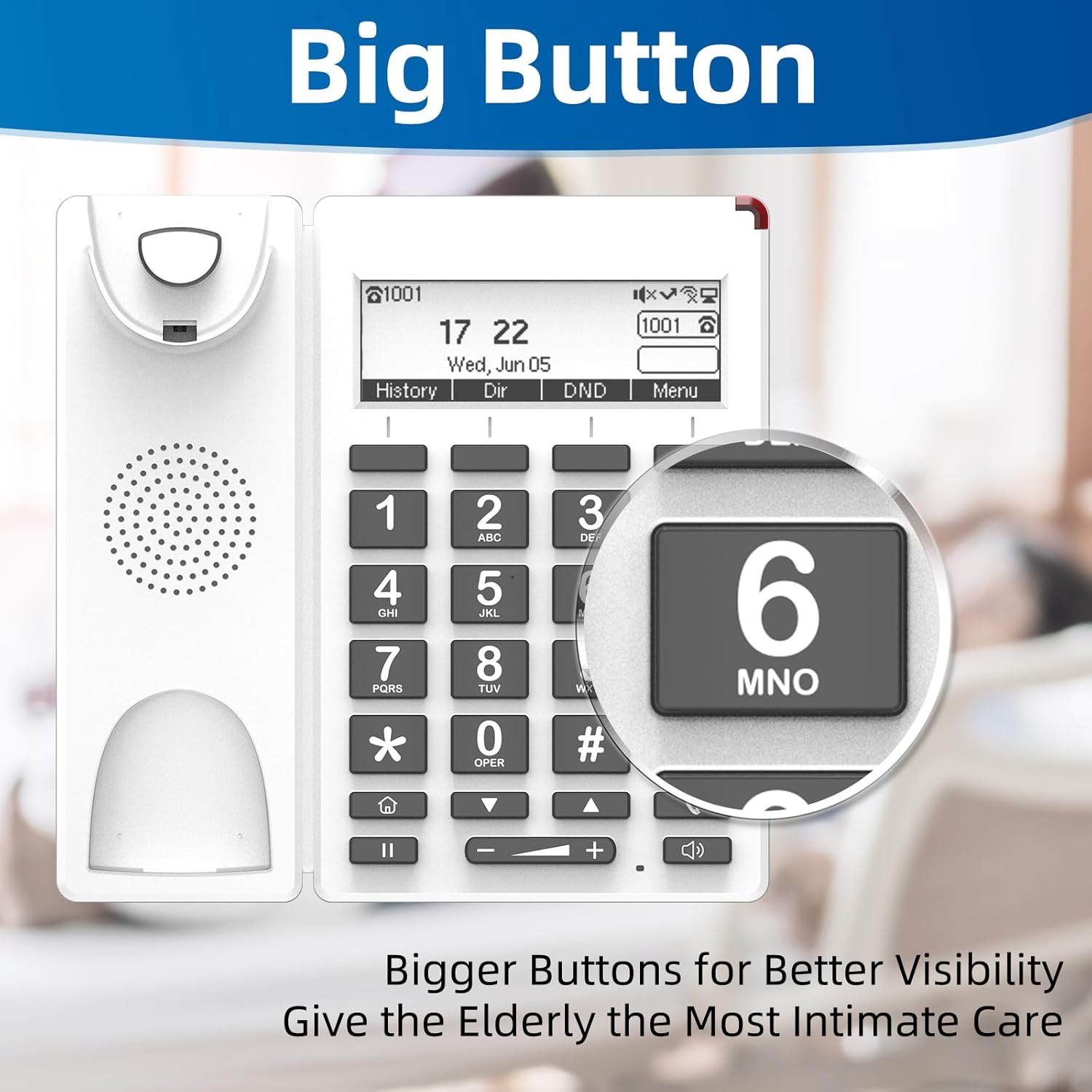
The FLYINGVOICE FIP12WP is a Voice over Internet Protocol (VoIP) phone specifically designed to be user-friendly for seniors, including those in nursing homes, hospitals, or living independently. It features large, easy-to-read buttons, adjustable volume, and dedicated quick-dial keys to ensure reliable and accessible communication.

2. Klíčové vlastnosti
- Customized ABC Keys for Quick Dialing: Easily program the A, B, and C keys to store emergency contacts or frequently called numbers, providing instant access during urgent situations.
- Big Buttons & HELP Key: Large, easy-to-see buttons are designed for users with reduced vision. A dedicated HELP key provides immediate access to emergency assistance.
- Adjustable Enhanced Volume: Handset volume exceeds 90dB and speakerphone volume exceeds 110dB, ensuring clear calls even for users with hearing loss. Volume adjustments are conveniently made via on-phone buttons.
- Červená kontrolka: A bright red light on top alerts users to incoming calls or missed messages, beneficial for those with hearing impairments.
- Design pro montáž na stěnu: The phone can be easily wall-mounted to save space and prevent accidental knock-overs.
- Podsvícený LCD displej: Provides clear visibility of time, date, and call information.
- HD kvalita hlasu: Podporuje kodeky G.722, G.711 WB, Opus a AMR-WB pro vynikající čistotu zvuku.
- Wi-Fi and PoE Support: Offers flexible connectivity options, including 2.4G Wi-Fi and Power over Ethernet (PoE) for simultaneous data and power transmission.


3. Nastavení
Follow these steps to set up your FIP12WP VoIP Phone:
- Připojení sluchátka: Plug one end of the coiled handset cord into the handset and the other end into the designated port on the phone base. Ensure it clicks securely into place.
- Attach the Stand (for Desktop Use): If using the phone on a desktop, align the stand with the slots on the back of the phone and push firmly until it snaps into place. This allows for a 45-degree desktop angle.
- Montáž na stěnu (volitelné): For wall mounting, use the provided screws to secure the phone to a wall. The phone is designed for a 15-degree wall-mount angle.
- Napájení a síťové připojení: Connect the phone to your network and power source. The FIP12WP supports both Wi-Fi (2.4G) and Power over Ethernet (PoE) for simplified cabling. If using PoE, connect an Ethernet cable from a PoE-enabled switch or injector to the phone's LAN port. If not using PoE, connect the power adapter (not included) to the phone and a standard power outlet, then connect an Ethernet cable to the LAN port for network access.


4. Návod k obsluze
Uskutečňování a přijímání hovorů
- Chcete-li zavolat: Lift the handset or press the speakerphone button. Dial the desired number using the large numeric keypad. Press the dial key (often represented by a phone icon) to initiate the call.
- Using Quick Dial Keys (A, B, C): Press and hold one of the pre-programmed A, B, or C keys to automatically dial the assigned contact. These keys are ideal for frequently called family members or caregivers.
- Emergency Calls with HELP Button: In an emergency, press the dedicated HELP button. This will automatically dial a pre-configured emergency number, providing quick access to assistance.
- Chcete-li přijmout hovor: When the phone rings, lift the handset or press the speakerphone button to answer. The red indication light will also flash for incoming calls.
- Adjusting Volume During a Call: Use the volume up (+) and volume down (-) buttons located below the keypad to adjust the handset or speakerphone volume during an active call.
Displej a indikátory
- The backlit LCD display shows the current time, date, and call status.
- The red indication light on top of the phone will illuminate for missed calls or new messages.
5. Údržba
Pro zajištění dlouhé životnosti a optimálního výkonu vašeho telefonu FIP12WP dodržujte tyto pokyny pro údržbu:
- Čištění: Use a soft, dry cloth to wipe down the phone's surface. For stubborn marks, a slightly damp cloth with mild soap can be used, but ensure no liquid enters the phone's openings. Do not use harsh chemicals or abrasive cleaners.
- Kabel sluchátka: Periodically check the coiled handset cord for any kinks or damage. Replace if necessary to maintain clear audio.
- Umístění: Place the phone in a stable location, away from direct sunlight, excessive heat, moisture, and strong electromagnetic fields.
- Napájení: Ensure the power supply (if used) is securely connected and not damaged.
6. Řešení problémů
If you encounter issues with your FIP12WP phone, try the following solutions:
| Problém | Možná příčina | Řešení |
|---|---|---|
| No dial tone / Cannot make calls | Network connection issue, power issue, or VoIP service not registered. | Check Ethernet cable connection or Wi-Fi status. Ensure power adapter is connected (if not using PoE). Verify VoIP service registration status on the phone's display. Restart the phone and your network router. |
| Neslyším volajícího / Volající neslyší mě | Volume too low, handset not properly connected, or network quality issue. | Adjust volume using the +/- buttons. Ensure handset cord is securely plugged in. Check network stability. |
| Red indication light is on constantly | Missed calls or new voicemail messages. | Check your call history or voicemail. The light should turn off once messages are cleared. |
| Phone not connecting to Wi-Fi | Incorrect Wi-Fi password, out of range, or router issue. | Double-check Wi-Fi password. Move phone closer to the router. Restart router. |
If the problem persists after trying these steps, please contact FLYINGVOICE customer support for further assistance.
7. Specifikace
- Číslo modelu: FIP12WP
- Rozměry produktu: 7.72 x 3.07 x 10.63 palce
- Barva: Bílý
- Materiál: Plast
- Typ telefonu: Drátový VoIP telefon
- Zdroj napájení: Kabelové elektrické (podporuje PoE)
- Typ systému odpovědí: Digitální
- Kompatibilní zařízení: VoIP services, PSTN/ISDN networks, Caller ID services, Conference call-capable devices
- Možnost konferenčního hovoru: 3-cestný
- Víceřádkový provoz: Provoz na jedné lince
- Hlasitost sluchátka: Více než 90 dB
- Hlasitost hlasitého telefonu: Více než 110 dB
- Wi-Fi: 2.4G Wi-Fi
- Klíče DSS: 4 (A/B/C/HELP)

8. Záruka a podpora
FLYINGVOICE is committed to providing high-quality products and customer satisfaction. For any technical assistance or inquiries regarding your FIP12WP phone, please utilize the following resources:
- 1-to-1 Tech Support: Contact FLYINGVOICE directly for personalized technical support.
- Nástroje pro vzdálenou správu: The phone can be centrally managed via FLYINGVOICE FACS (Cloud-based) and FDC (Local Network) management tools, which may be utilized by your service provider or IT administrator for remote configuration and troubleshooting.
- Informace o záruce: Please refer to the warranty card included with your product or visit the official FLYINGVOICE webpodrobné záruční podmínky naleznete na webu.
