
1. Úvod
Thank you for choosing the EVRAIN T8 PRO Mini PC. This compact and powerful device is designed for various computing needs, featuring an 8-inch touch screen, robust connectivity options, and efficient performance. This manual provides essential information for setting up, operating, maintaining, and troubleshooting your Mini PC to ensure optimal performance and longevity.
2. Konec produktuview
2.1. Obsah balení
- EVRAIN T8 PRO Mini PC
- Napájecí adaptér
- Uživatelská příručka (tento dokument)
2.2. Rozložení zařízení a porty
Familiarize yourself with the various ports and features of your EVRAIN T8 PRO Mini PC.

Figure 2.2.1: Front and Rear Port Layout of the EVRAIN T8 PRO Mini PC. The image displays the mini PC with its 8-inch touch screen showing a Windows desktop. Below it, two detailed diagrams illustrate the front and rear ports. The rear ports include two RJ45 Gigabit LAN ports, two USB 3.0 ports, a DisplayPort (DP), an HDMI port, and a DC power input. The front ports include a 3.5mm audio jack, a Type-C port, two USB 3.0 ports, two USB 2.0 ports, a TF-card slot, and the power button.

Figure 2.2.2: EVRAIN T8 PRO Mini PC Dimensions and Port Identification. This image provides a visual representation of the mini PC's dimensions (8.3 inches wide, 5.1 inches deep, 1.57 inches high) and clearly labels all available ports on both the front and rear panels. Rear ports include Double Gigabit LAN ports, USB 3.0, DP, HDMI, and DC. Front ports include Jack, Type-C, USB 3.0, USB 2.0, TF-card, and Power button.
- 8palcová dotyková obrazovka: Integrated display for direct interaction.
- Dual Gigabit LAN Ports (RJ45): For stable wired network connections.
- Porty USB 3.0 (x4): High-speed data transfer for peripherals.
- Porty USB 2.0 (x2): Pro připojení standardních USB zařízení.
- Port HDMI: Pro připojení k externím displejům.
- DisplayPort (DP): Pro připojení k externím displejům.
- Port typu C: Versatile port for data and display.
- 3.5mm audio jack: Pro sluchátka nebo externí reproduktory.
- Slot pro TF kartu: For expandable storage via microSD cards.
- Vstup DC napájení: Pro připojení napájecího adaptéru.
- Vypínač: Pro zapnutí/vypnutí zařízení.
3. Nastavení
3.1. Počáteční připojení
- Připojení periferií: Connect your keyboard, mouse, and any other necessary USB devices to the available USB ports.
- Internetové připojení: For wired internet, connect an Ethernet cable to one of the RJ45 LAN ports. For wireless internet, the device supports WiFi 6 and will prompt for network setup during initial Windows configuration.
- Externí displej (volitelné): If using an external monitor, connect it to the HDMI or DisplayPort.
- Připojení napájení: Connect the provided power adapter to the DC power input port on the Mini PC, then plug the adapter into a power outlet.
Video 3.1.1: Unpacking and Initial Setup Guide. This video demonstrates the process of unboxing the EVRAIN T8 PRO Mini PC and connecting essential peripherals like a keyboard and mouse, followed by powering on the device for the first time.
3.2. First Boot and Windows 11 Pro Setup
- Stiskněte tlačítko napájení na přední straně Mini PC.
- The device will boot into Windows 11 Pro. Follow the on-screen instructions to complete the initial setup, including language selection, region, network connection, and user account creation.
- Pro aktivaci a aktualizace systému Windows se ujistěte, že máte aktivní připojení k internetu.
4. Návod k obsluze
4.1. Použití dotykové obrazovky
The 8-inch touch screen allows for intuitive interaction with Windows 11 Pro. Use gestures similar to a tablet or smartphone for navigation, selection, and input.

Figure 4.1.1: Convenient Touch Operation. This image shows a hand touching the 8-inch display of the EVRAIN T8 PRO Mini PC, highlighting its touch screen functionality for direct user interaction.
4.2. Připojení externích zařízení
The EVRAIN T8 PRO Mini PC supports a wide range of external devices for enhanced productivity and entertainment.

Figure 4.2.1: Supports Connection of Multiple Devices. This image illustrates the EVRAIN T8 PRO Mini PC connected to an external monitor displaying Windows 11, and a printer, demonstrating its capability to connect to various peripherals like printers, monitors, keyboards, and mice.
- Monitory: Use the HDMI or DisplayPort for connecting external monitors. The Mini PC can extend or duplicate your display.
- Zařízení USB: Connect keyboards, mice, external hard drives, USB flash drives, and other USB peripherals to the USB 2.0 or USB 3.0 ports.
- Zvuková zařízení: Use the 3.5mm audio jack for headphones or speakers, or connect Bluetooth audio devices via Bluetooth 5.2.
- TF-Card: Insert a TF (microSD) card into the dedicated slot for additional storage.
4.3. Připojení k síti
- Kabelová síť: Utilize the dual Gigabit LAN ports for high-speed and stable wired internet connections.
- Bezdrátová síť (WiFi 6): Connect to wireless networks using the integrated WiFi 6 module for fast and reliable wireless connectivity.
- Bluetooth 5.2: Pair with Bluetooth-enabled devices such as headphones, speakers, and input devices.

Figure 4.3.1: Powerful Network Connection. This image highlights the EVRAIN T8 PRO Mini PC's advanced wireless capabilities, including WiFi 6 and Bluetooth 5.2, ensuring fast and stable network and peripheral connections.
5. Rozšíření úložiště
The EVRAIN T8 PRO Mini PC comes with 128GB of M.2 SSD storage and supports additional storage expansion.

Figure 5.1.1: Internal Components and Storage Expansion. This image provides an internal view of the EVRAIN T8 PRO Mini PC, highlighting the 8GB DDR4 RAM and the 128GB M.2 SSD. It also shows the accessible compartment for adding a 2.5-inch SATA SSD (up to 2TB) or an M.2 2280 NVMe PCIe or SATA SSD (up to 2TB).
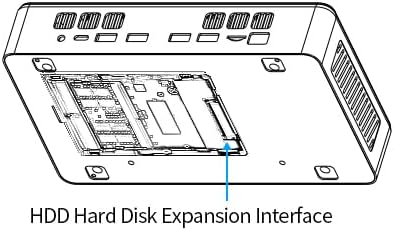
Figure 5.1.2: HDD Hard Disk Expansion Interface. This diagram illustrates the location of the HDD Hard Disk Expansion Interface on the underside of the EVRAIN T8 PRO Mini PC, indicating where additional storage can be installed.
- 2.5" SATA SSD/HDD: You can add a 2.5-inch SATA SSD or HDD (not included) up to 2TB for additional storage.
- M.2 2280 NVMe PCIe/SATA SSD: The device supports adding an M.2 2280 NVMe PCIe or SATA SSD (not included) up to 2TB.
For detailed instructions on installing additional storage, please refer to the technical support section on the EVRAIN website or consult a qualified technician.
6. Specifikace
Below are the key technical specifications for the EVRAIN T8 PRO Mini PC:
| Funkce | Specifikace |
|---|---|
| Model | T8 PRO |
| Procesor | Intel N95 (4 Cores, 4 Threads, 6MB L3 Cache, 15W TDP, up to 3.40 GHz Burst Frequency) |
| BERAN | 8 GB DDR4 |
| Interní úložiště | 128 GB SSD (M.2) |
| Zobrazit | 8palcová dotyková obrazovka, rozlišení 1280x800 |
| Grafický koprocesor | Integrovaná grafika |
| Operační systém | Windows 11 Pro |
| Bezdrátové připojení | Wi-Fi 6 (802.11a/b/g/n/ac), Bluetooth 5.2 |
| LAN porty | Dual Gigabit RJ45 |
| USB porty | 4x USB 3.0, 2x USB 2.0 |
| Video výstup | HDMI, DisplayPort (DP), Type-C |
| Zvuk | Zvukový konektor 3.5mm |
| Čtečka karet | Slot pro kartu TF |
| Rozměry (DxŠxV) | 8.31 x 51.18 x 1.61 palce |
| Hmotnost | 2.86 libry |

Figure 6.1.1: Alder Lake-N95 Processor. This image highlights the specifications of the Intel N95 processor, including its 4 cores, 4 threads, 6MB L3 cache, 15W TDP, and 3.40 GHz burst frequency, which powers the EVRAIN T8 PRO Mini PC.
Video 6.1.1: T8 PRO Introduction of Specification. This video provides a visual overview of the EVRAIN T8 PRO Mini PC's key specifications and features, including its various ports and internal components.
7. Řešení problémů
7.1. Běžné problémy a jejich řešení
- Bez napájení:
- Ujistěte se, že je napájecí adaptér bezpečně připojen k Mini PC i k funkční zásuvce.
- Ověřte funkčnost elektrické zásuvky zapojením jiného zařízení.
- Bez displeje:
- If using an external monitor, ensure the HDMI/DP cable is securely connected and the monitor is powered on and set to the correct input source.
- Check the integrated 8-inch touch screen for any signs of power or activity.
- Try restarting the Mini PC.
- Žádné internetové připojení:
- Kabelové: Check Ethernet cable connections and router status.
- Bezdrátový: Verify WiFi is enabled in Windows settings, ensure you are connected to the correct network, and check router functionality.
- Dotyková obrazovka nereaguje:
- Restartujte minipočítač.
- Check for updated display or touch screen drivers in Windows Device Manager.
- Pomalý výkon:
- Zavřete nepotřebné aplikace běžící na pozadí.
- Ujistěte se, že je systém Windows aktuální.
- Check disk space and consider adding more storage if needed (refer to Section 5).
8. Údržba
- Čištění: Use a soft, dry cloth to clean the exterior of the Mini PC. For the screen, use a microfiber cloth specifically designed for electronics. Avoid abrasive cleaners or solvents.
- Větrání: Ensure the ventilation openings are clear of dust and obstructions to prevent overheating. Do not block the air vents.
- Aktualizace softwaru: Pravidelně aktualizujte ovladače systému Windows 11 Pro a zařízení, abyste zajistili optimální výkon, zabezpečení a kompatibilitu.
- Záloha dat: Pravidelně zálohujte důležitá data na externí disk nebo cloudové úložiště, abyste předešli jejich ztrátě.
9. Záruka a podpora
For warranty information, technical support, or service inquiries, please refer to the official EVRAIN webnebo se obraťte přímo na jejich zákaznický servis. Uschovejte si účtenku jako doklad o koupi pro případ reklamace.
Online zdroje: Visit the EVRAIN support page for FAQs, driver downloads, and additional troubleshooting guides.