
Zavedení
The SINGMOOD S-68 Portable Karaoke Machine is an all-in-one entertainment system designed for immersive karaoke experiences. Featuring a 16-inch touchscreen display, two wireless UHF microphones, and powerful audio output, this system provides a comprehensive solution for home, outdoor, and party use. Its integrated tablet functionality allows for seamless access to various applications and content, ensuring a versatile and enjoyable user experience.

Figure 1: The SINGMOOD S-68 Portable Karaoke Machine, showcasing its main unit with integrated touchscreen and two wireless microphones.
Co je zahrnuto
Zkontrolujte prosím obsah balení, abyste se ujistili, že jsou všechny položky přítomny a v dobrém stavu:
- S-68 Karaoke Machine (Main Unit with 16" Touchscreen)
- 2 x bezdrátový UHF mikrofon
- Dálkové ovládání
- Napájecí adaptér
- Uživatelská příručka

Obrázek 2: Ilustrace položek obsažených v balení produktu.
Průvodce nastavením
- Rozbalení a umístění: Carefully remove all components from the packaging. Place the karaoke machine on a stable, flat surface. Ensure adequate ventilation around the unit.
- Charging the Main Unit: Connect the provided Power Adapter to the DC 12V input port on the back of the karaoke machine. Plug the adapter into a standard electrical outlet. The unit will begin charging. A full charge is recommended before first use.
- Charging Microphones: The wireless microphones are rechargeable via Type-C ports. Connect the microphones to a suitable Type-C charging cable (not included, but commonly available) and power source.
- Zapnutí: Locate the Power button on the control panel. Press and hold it for a few seconds until the screen illuminates and the unit powers on.
- Initial Network Setup (Wi-Fi): Upon first power-on, the system may prompt you to connect to a Wi-Fi network. Follow the on-screen instructions to select your network and enter the password. This is essential for accessing online content like YouTube and other streaming services.
- Párování mikrofonu: The wireless UHF microphones are typically pre-paired with the main unit. If they do not connect automatically, ensure the microphones are powered on and within range. Refer to the microphone section for manual pairing instructions if needed.
Návod k obsluze
1. Navigace na dotykové obrazovce
The 16-inch full touchscreen display serves as the primary interface for the karaoke machine. Navigate through menus, select songs, adjust settings, and access applications by tapping on the screen icons. The interface is designed to be intuitive, similar to a standard tablet.

Figure 3: The 16-inch touchscreen display, providing easy access to various applications and settings.
2. Použití mikrofonu
The system includes two true UHF wireless microphones for clear and stable audio transmission. Ensure microphones are charged and powered on. Hold the microphone approximately 2-6 inches from your mouth for optimal sound pickup. Adjust microphone volume using the dedicated controls on the main unit's control panel.

Figure 4: The two wireless UHF microphones, designed for high-fidelity audio.
3. Sound Adjustments and Control Panel
The top control panel features various knobs and buttons for fine-tuning your audio experience:
- MIC.BASS+ / MIC.TREBLE+: Adjust the bass and treble levels for the microphones.
- ECHO+ / MIC.DELAY+: Control the echo and delay effects for vocal enhancement.
- BASS+ / TREBLE+: Adjust the overall bass and treble of the speaker output.
- VOLUME+: Master volume control for the entire system.
- KARAOKE MODE Button: Press this button to reduce or remove vocals from songs, converting them into instrumental tracks for karaoke.
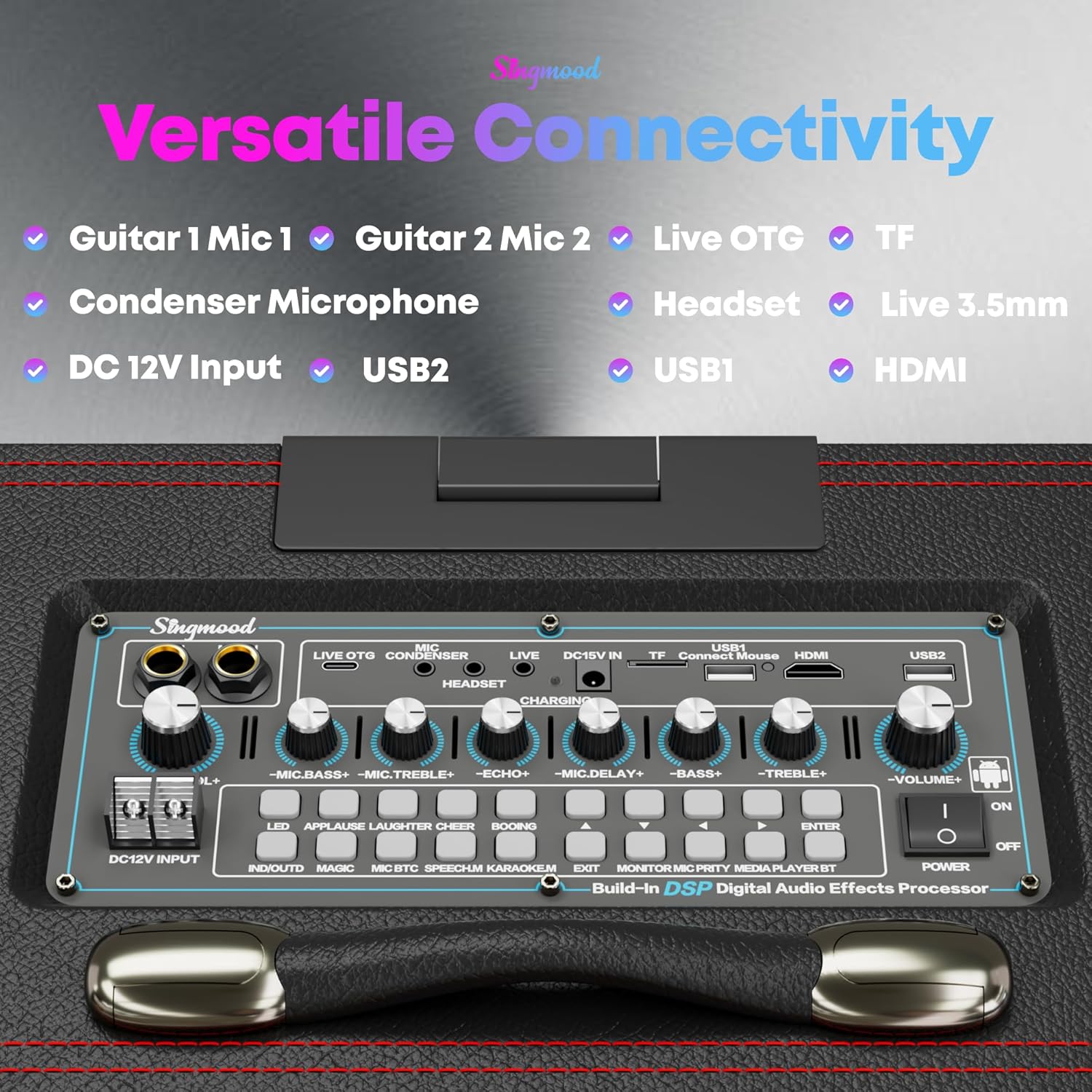
Obrázek 5: Detailní view of the control panel with various audio adjustment knobs and input ports.
4. Všestranná konektivita
The S-68 offers multiple connectivity options:
- Bluetooth: Connect your smartphone or other Bluetooth-enabled devices wirelessly to stream music.
- HDMI výstup: Connect the karaoke machine to an external display (TV, projector) to mirror the screen content for a larger viewzkušenosti.
- USB porty (USB1, USB2): Přehrát média filepřímo z USB disků.
- Slot na kartu TF: Insert a TF (microSD) card to play media files.
- Guitar/Mic Inputs (Guitar 1 Mic 1, Guitar 2 Mic 2): Connect additional wired microphones or guitars.
- Headset / Live 3.5mm: For audio monitoring or connecting external audio sources.

Figure 6: Screen projection feature, allowing the display to be mirrored on an external TV via HDMI.
5. Karaoke Mode and App Usage
The dedicated "KARAOKE MODE" button on the control panel allows you to instantly lower or remove the original vocals from most songs, making them suitable for singing along. The integrated Android tablet system provides access to the Google Play Store, enabling you to download and use various apps like YouTube, Spotify, and other karaoke applications for an endless selection of songs and content.

Figure 7: The Karaoke Mode button, simplifying vocal removal for sing-alongs.
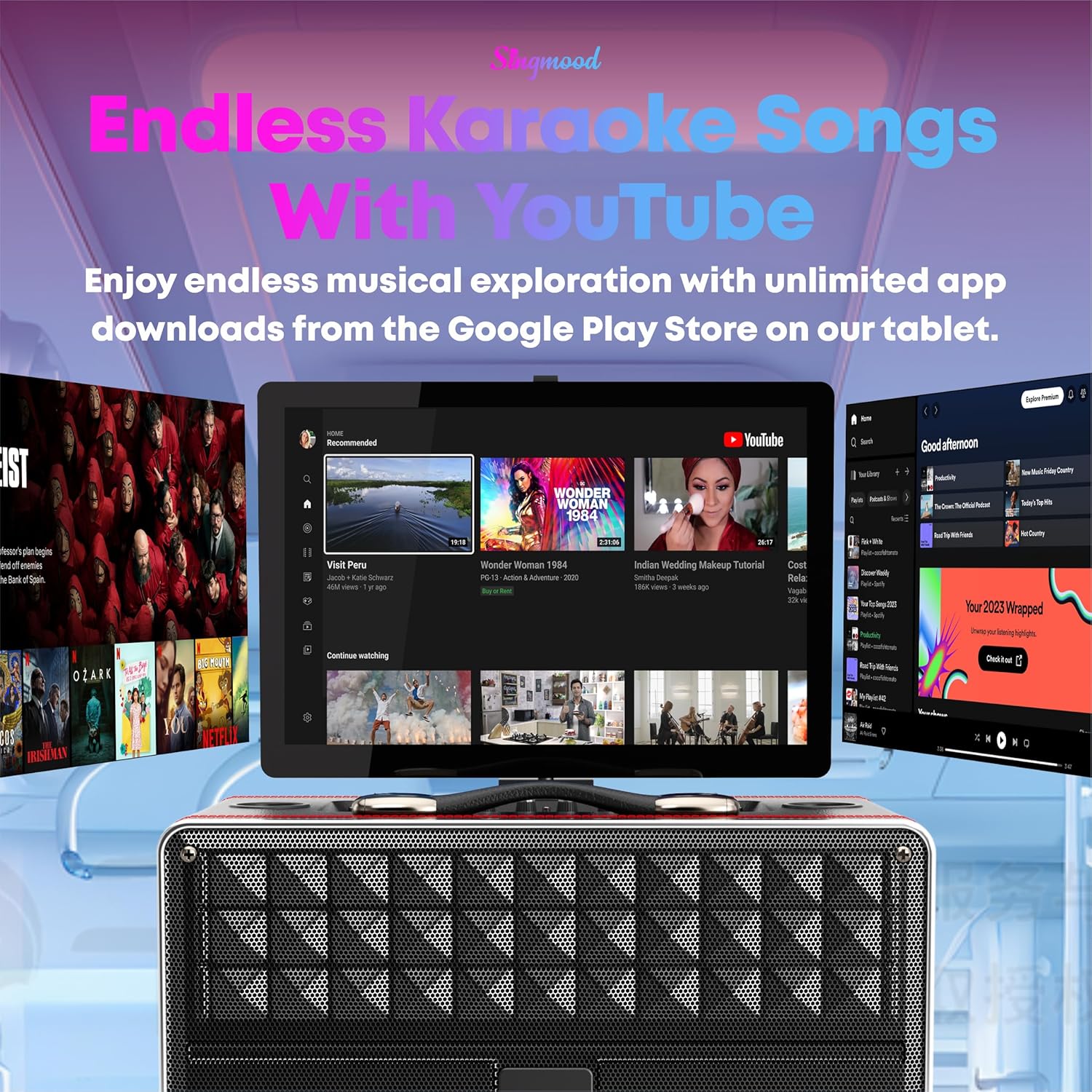
Figure 8: Access to YouTube and other streaming apps for a vast library of content.
Údržba
- Čištění: Use a soft, dry cloth to wipe down the exterior of the unit and microphones. For the touchscreen, use a screen-specific cleaning solution and a microfiber cloth. Avoid abrasive cleaners or excessive moisture.
- Skladování: Pokud karaoke zařízení nepoužíváte, skladujte ho na chladném a suchém místě mimo dosah přímého slunečního záření a extrémních teplot.
- Péče o baterie: To prolong battery life, avoid fully discharging the unit and microphones frequently. If storing for an extended period, charge the batteries to approximately 50-70% before storage and recharge every few months.
Odstraňování problémů
| Problém | Možná příčina | Řešení |
|---|---|---|
| Jednotka se nezapne. | Low battery; Power adapter not connected or faulty. | Připojte napájecí adaptér a nechte zařízení nabít. Ujistěte se, že je zásuvka funkční. |
| Z reproduktoru není slyšet žádný zvuk. | Příliš nízká hlasitost; Aktivováno ztlumení; Vybrán nesprávný zdroj zvuku. | Increase the master volume. Check if the unit is muted. Verify the correct input source is selected on the touchscreen. |
| Mikrofony nefungují. | Microphones not powered on; Low microphone battery; Microphones not paired. | Ensure microphones are charged and powered on. If issues persist, try re-pairing them according to the manual's specific instructions (if available, otherwise assume automatic pairing). |
| Lyrics/video not syncing or lagging. | Poor Wi-Fi connection; High network traffic; App performance issue. | Ensure a strong Wi-Fi signal. Try restarting the app or the karaoke machine. Close other background applications. |
| Obrazovka nereaguje nebo zamrzá. | Softwarová závada; Přetížení systému. | Perform a soft reset by holding the power button until the unit shuts down, then restart. If the issue persists, a factory reset might be necessary (consult full manual for steps). |
Specifikace
| Funkce | Detail |
|---|---|
| Číslo modelu | S-68 |
| Typ montáže | Stolní deska |
| Zdroj napájení | Napájení z baterie |
| Typ konektoru | HDMI |
| Výstupní Wattage | 800 XNUMX wattů (špička) |
| Počet kanálů | 2 |
| Zvukový vstup | Wireless Microphones, Bluetooth |
| Doporučená použití | Pro hudební přehrávače |
| Rozměry produktu (D x Š x V) | 17 x 13 x 15 palce |
| Hmotnost položky | 33.8 libry |
| Baterie | 1 lithium-iontová baterie (součástí balení) |
| Technologie připojení | Bluetooth, WiFi |
| Barva | Černý |
| Kompatibilní zařízení | Notebook, Smartphone |
| Zobrazit | 16palcový dotykový displej |
| Procesor | RK3566 Chip |
| BERAN | 4 GB |
| ROM | 64 GB |
| Mikrofony | 2 x bezdrátové UHF mikrofony |
| Audio Decoder Chip | 32-bit Digital Audio Decoder |
Záruka a podpora
For warranty information, technical support, or service inquiries, please contact SINGMOOD customer support. Details can typically be found on the product packaging or the official SINGMOOD webmísto.
E-mail zákaznické podpory: Singmood.official@gmail.com
Please have your product model number (S-68) and purchase details ready when contacting support.