
Zavedení
This manual provides essential information for setting up, operating, maintaining, and troubleshooting your HP Envy 17-DA000 Laptop. Please read this guide thoroughly to ensure proper use and to maximize the performance and longevity of your device.

Image: The HP Envy 17-DA000 Laptop with its 17.3-inch display open, showing the Windows 11 operating system desktop.
Nastavení
1. Rozbalení a počáteční kontrola
Carefully remove the laptop and all accessories from the packaging. Inspect the laptop for any physical damage. The manufacturer box may have been opened for professional customization and testing.
2. Připojování k napájení
- Připojte síťový adaptér k napájecímu konektoru na notebooku.
- Zapojte napájecí kabel do elektrické zásuvky.
- Před prvním použitím nechte baterii nabíjet alespoň 30 minut nebo dokud indikátor baterie neukáže dostatečné nabití.
3. Počáteční zapnutí a nastavení systému Windows 11
- Stisknutím tlačítka napájení zapněte notebook.
- Postupujte podle pokynů na obrazovce a dokončete proces nastavení systému Windows 11 Home. To zahrnuje výběr regionu, jazyka, připojení k síti Wi-Fi a vytvoření uživatelského účtu.
4. Připojení periferií
Connect external devices such as a mouse, external keyboard, or monitor to the available ports on your laptop. Refer to the 'Ports and Connectors' section for port identification.
Návod k obsluze
1. Keyboard and Touchscreen
- Podsvícená klávesnice: The keyboard features backlighting for use in low-light conditions. Adjust brightness settings through the function keys or Windows settings.
- Numerická klávesnice: Pro efektivní zadávání dat je integrována samostatná numerická klávesnice.
- Dotyková obrazovka: The 17.3-inch FHD display supports touch input. Use gestures for navigation and interaction within Windows 11.
2. Porty a konektory
Your HP Envy 17-DA000 laptop is equipped with various ports for connectivity:
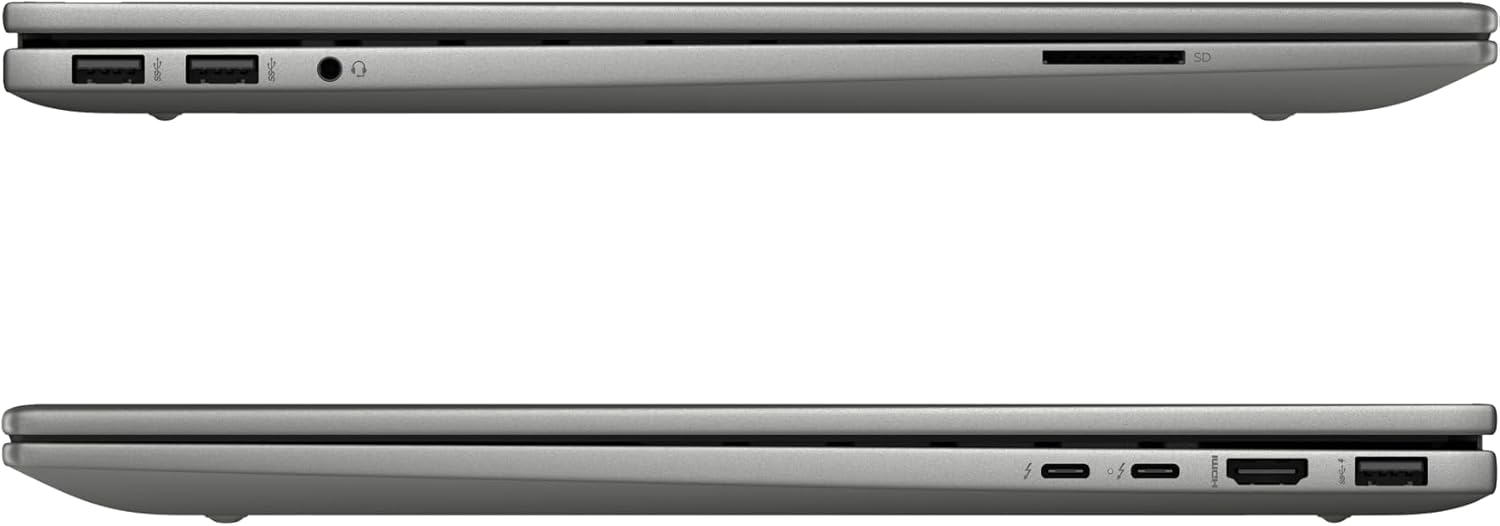
Image: Left side of the laptop, featuring two USB 3.2 Gen 2 ports, a headphone/microphone combo jack, and an SD card reader.
- Levá strana:
- 2x USB 3.2 Gen 2 (10Gbps)
- 1x kombinovaný konektor pro sluchátka/mikrofon
- 1x čtečka SD karet

Image: Right side of the laptop, featuring two USB-C Thunderbolt 4 ports, an HDMI 2.1 port, and one USB 3.2 Gen 2 port.
- Pravá strana:
- 2x USB-C Thunderbolt 4 / USB4 40Gbps (with Power Delivery and DisplayPort 1.4, Power-off Charging)
- 1x USB 3.2 Gen 2 (10Gbps, with Power-off Charging)
- 1x HDMI v2.1
3. Bezdrátové připojení
- Wi-Fi 6E AX211 (2x2): Připojte se k bezdrátovým sítím pro přístup k internetu.
- Bluetooth 5.3: Pair with compatible Bluetooth devices such as headphones, speakers, or mice.
4. Webvačka
The HP Wide Vision 5MP IR camera includes a privacy shutter. Slide the shutter to cover the camera lens when not in use to ensure privacy.
Údržba
1. Čištění notebooku
- Použijte měkký hadřík, který nepouští vlákna dampDisplej opláchněte vodou nebo čističem obrazovek.
- Na klávesnici a šasi používejte měkký, suchý hadřík. Nepoužívejte agresivní chemikálie ani abrazivní materiály.
- Pravidelně používejte stlačený vzduch k odstranění prachu z větracích otvorů a portů.
2. Aktualizace softwaru
Regularly check for and install updates for Windows 11 and HP drivers to ensure optimal performance and security. Access Windows Update through the Settings menu.
3. Péče o baterie
- Vyhněte se častému úplnému vybíjení baterie.
- Pokud notebook delší dobu nepoužíváte, skladujte jej na chladném a suchém místě.
- K nabíjení používejte pouze dodaný 100W AC adaptér.
4. Správa úložiště
The 1TB NVMe M.2 SSD provides fast storage. Regularly back up important data and manage files to maintain sufficient free space for system performance.
Odstraňování problémů
Běžné problémy a řešení
- Notebook se nezapne: Ensure the AC adapter is securely connected and the battery has sufficient charge. Try a different power outlet.
- Problémy se zobrazením: If the screen is blank, try connecting an external monitor to check if the issue is with the laptop's display. Adjust display settings in Windows.
- Žádné Wi-Fi připojení: Check if Wi-Fi is enabled in Windows settings. Restart the laptop and your wireless router. Ensure drivers are up to date.
- Pomalý výkon: Zavřete nepotřebné aplikace, zkontrolujte, zda se neobjevuje malware, zajistěte dostatek volného místa v úložišti a aktualizujte ovladače.
V případě složitějších problémů se obraťte na podporu HP webwebu nebo kontaktujte zákaznickou podporu.
Specifikace
| Funkce | Detail |
|---|---|
| Model | HP Envy 17-DA000 |
| Procesor | Intel Core Ultra 7 155U (Up to 4.8 GHz, 12 Cores, 14 Threads) |
| Zobrazit | 17.3-inch FHD (1920 x 1080) LED-backlit Touchscreen, 60Hz, 300 nits, 45% NTSC |
| Grafika | NVIDIA GeForce RTX 3050 4GB GDDR6 |
| Paměť | 32GB DDR5 SDRAM 5600 MHz |
| Skladování | 1TB SSD NVMe M.2 |
| Operační systém | Windows 11 Home |
| Klávesnice | Podsvícená klávesnice s numerickou klávesnicí |
| Bezdrátové připojení | Intel Wi-Fi 6E AX211 (2x2), Bluetooth 5.3 |
| Porty | 2x USB-C Thunderbolt 4, 3x USB 3.2 Gen 2, 1x HDMI v2.1, 1x Headphone/microphone combo, 1x SD Card Reader |
| Webvačka | HP Wide Vision 5MP IR camera with Privacy Shutter |
| Baterie | 55Wh lithium-iontová baterie |
| Rozměry (DxŠxV) | 15.59 x 10.18 x 0.77 palce |
| Hmotnost | 5.55 liber |
| Barva | Platinum Stříbro |
Informace o záruce
Tento produkt je dodáván s a Záruka 12 měsíců. This warranty covers manufacturing defects and issues arising from normal use. Please retain your proof of purchase for warranty claims. The warranty does not cover damage caused by misuse, accidents, or unauthorized modifications.
Podpora
If you require technical assistance, have questions about your laptop, or need to make a warranty claim, please contact our support team. You can find contact information on the official HP support webwebu nebo prostřednictvím dokumentace dodané s vaším produktem.
Online zdroje naleznete na Podpora HP Webmísto.