
BT4
Uživatelská příručka k bezdrátovým sluchátkům Pro 4 TWS
Model: BT4 | Značka: Generic
Konec produktuview
The Pro 4 TWS Wireless Headphones are designed to provide a high-quality audio experience with the convenience of wireless technology. These earbuds feature Bluetooth 5.0 for stable connectivity, an IPX7 waterproof rating for durability, and a built-in microphone for clear calls. The ergonomic design ensures a comfortable and secure fit for extended use.

Image: The black protective storage case included with the Pro 4 TWS Wireless Headphones. This compact case helps protect your earbuds when not in use.

Image: The Pro 4 TWS Wireless Earbuds resting inside their open charging case. The earbuds are white with black tips, and the case is also white.
Co je zahrnuto
- Pro 4 TWS Wireless Earbuds (Left and Right)
- Nabíjecí pouzdro
- Protective Case (Black, as shown in product images)
- Uživatelská příručka (tento dokument)
- Charging Cable (not explicitly mentioned but standard for earbuds)
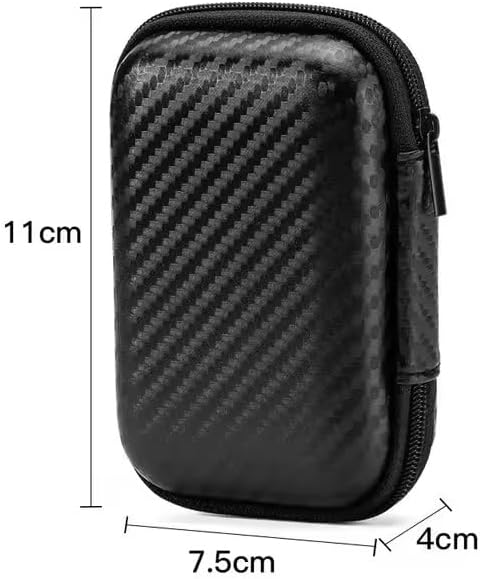
Image: A visual representation of the protective storage case with its dimensions: approximately 11cm in height, 7.5cm in width, and 4cm in depth. This illustrates the compact size of the included accessory.
Průvodce nastavením
1. Počáteční nabíjení
Before first use, ensure both the earbuds and the charging case are fully charged. Place the earbuds into the charging case and connect the charging case to a power source using the provided charging cable. The indicator light on the case will show charging status.
2. Spárování se zařízením
- Otevřete nabíjecí pouzdro. Sluchátka se automaticky přepnou do režimu párování.
- Na svém zařízení (chytrý telefon, tablet, notebook) přejděte do nastavení Bluetooth.
- Hledat available devices and select "Pro 4 TWS" (or similar name) from the list.
- Po připojení hlasový pokyn potvrdí úspěšné spárování.
Note: If pairing fails, ensure the earbuds are charged and within range of your device. You may need to "forget" previous pairings on your device and try again.

Image: The Pro 4 TWS earbuds shown with a smartphone, illustrating the touch control feature for connection. A blue light effect indicates active connection or touch interaction.
Návod k obsluze
Dotykové ovládání
The Pro 4 TWS headphones feature intuitive touch controls on each earbud. Specific functions may vary slightly, but common controls include:
- Jedno klepnutí: Přehrát/Pozastavit hudbu, Přijmout/Ukončit hovor.
- Dvojité klepnutí (levé sluchátko): Předchozí skladba.
- Dvojité klepnutí (pravé sluchátko): Další skladba.
- Trojité klepnutí: Aktivujte hlasového asistenta (Siri, Google Assistant).
- Dlouhé stisknutí: Odmítnout hovor.
Nošení sluchátek
Gently insert each earbud into your ear canal. Rotate slightly until you achieve a comfortable and secure fit. The ergonomic design is intended to keep them stable during various activities.

Image: A woman wearing the Pro 4 TWS earbuds, highlighting their ergonomic design and comfortable fit within the ear. The image emphasizes that the earbuds are designed to stay securely in place.
Údržba a péče
- Čištění: K čištění sluchátek a nabíjecího pouzdra používejte měkký, suchý hadřík, který nepouští vlákna. Nepoužívejte agresivní chemikálie ani abrazivní materiály.
- Voděodolnost: The earbuds have an IPX7 waterproof rating, meaning they are resistant to sweat and rain. Do not submerge them in water or expose them to strong jets of water. Ensure they are dry before placing them back in the charging case.
- Skladování: When not in use, store the earbuds in their charging case, preferably within the included protective case, to prevent damage and keep them clean.
- Péče o baterie: Chcete-li prodloužit životnost baterie, vyvarujte se častého úplného vybíjení sluchátek a nabíjecího pouzdra. Pravidelně je nabíjejte, i když je nepoužíváte neustále.
Odstraňování problémů
| Problém | Možné řešení |
|---|---|
| Sluchátka se nespárují |
|
| Žádný zvuk z jednoho sluchátka |
|
| Špatná kvalita zvuku |
|
| Problémy s nabíjením |
|
Specifikace
| Funkce | Detail |
|---|---|
| Číslo modelu | BT4 |
| Technologie připojení | Bezdrátové, Bluetooth |
| Verze Bluetooth | 5.0 |
| Bezdrátové Dosah | Až 33 stop (přibližně 10 metrů) |
| Voděodolnost | IPX7 (Resistant to sweat and rain) |
| Mikrofon | Built-in, High-Quality |
| Kontrolní metoda | Dálkové ovládání (dotykové ovládání) |
| Umístění uší | V uchu |
| Materiál | Silikon, plast |
| Zahrnuté komponenty | Ochranné pouzdro |
| Kompatibilní zařízení | Smartphones, Tablets, Laptops, Desktops, Smart Speakers, Cars (with Bluetooth capabilities) |

Image: A diagram highlighting the upgraded Bluetooth 5.0 chip, emphasizing features like HD Voice, Quick Connect, and Stable Reception, which contribute to high-fidelity sound quality and anti-interference.

Obrázek: Explodoval view of the earbud's internal components, specifically showcasing the high-quality dynamic unit and balanced adjustment technology designed to deliver rich sound effects.
Záruka a podpora
For warranty information and customer support, please refer to the documentation provided at the time of purchase or contact the seller directly. The product is manufactured by "wireless earphone".
For further assistance, you may also visit the product page on Amazon: Pro 4 TWS Wireless Headphones on Amazon.
Ask a question about this manual
Ask about setup, troubleshooting, compatibility, parts, safety, or missing instructions. Manuals+ will review the question and use this page’s manual context to help answer it.