
1. Úvod
This manual provides essential information for the proper use and maintenance of your EBTOOLS 8-Inch 2-in-1 Pocket PC Computer. Please read this guide thoroughly before operating the device to ensure optimal performance and longevity. This compact and versatile device features an 8-inch touchscreen, a 360-degree rotating design, and runs on Windows 11 Pro.

Image: The EBTOOLS 8-Inch 2-in-1 Pocket PC shown in its tablet configuration, with a scenic road displayed on the screen.
2. Obsah balení
Ověřte, zda jsou v balení produktu obsaženy všechny níže uvedené položky:
- 1 x EBTOOLS 8-Inch 2-in-1 Laptop
- 1 x napájecí kabel
- 1 x napájecí adaptér (US zástrčka)
- 2 x User Manuals (this document is one of them)

Image: The EBTOOLS 8-Inch 2-in-1 Pocket PC, its power supply cord, and the US plug adapter, laid out as they would appear in the package.
3. Konec produktuview
The EBTOOLS 8-Inch 2-in-1 Pocket PC is designed for portability and versatility. It features a compact form factor and a 360-degree rotating display, allowing it to function as both a laptop and a tablet.
Klíčové vlastnosti:
- Procesor: N100 CPU, capable of up to 3.4GHz frequency.
- Paměť: 12 GB RAM LPDDR5.
- Skladování: 512GB M.2 SSD, expandable up to 2TB.
- Zobrazit: 8-inch touchscreen with 360-degree rotation.
- Konektivita: WiFi6 (2.4G/5G band) and Bluetooth 5.2.
- Fotoaparát: 2MP 30 Frame HD built-in front camera for video calls.
- Klávesnice: Edge-less full-size QWERTY keyboard with integrated touchpad.
- Baterie: Built-in 5000mAh polymer lithium battery, providing 4-6 hours of use.
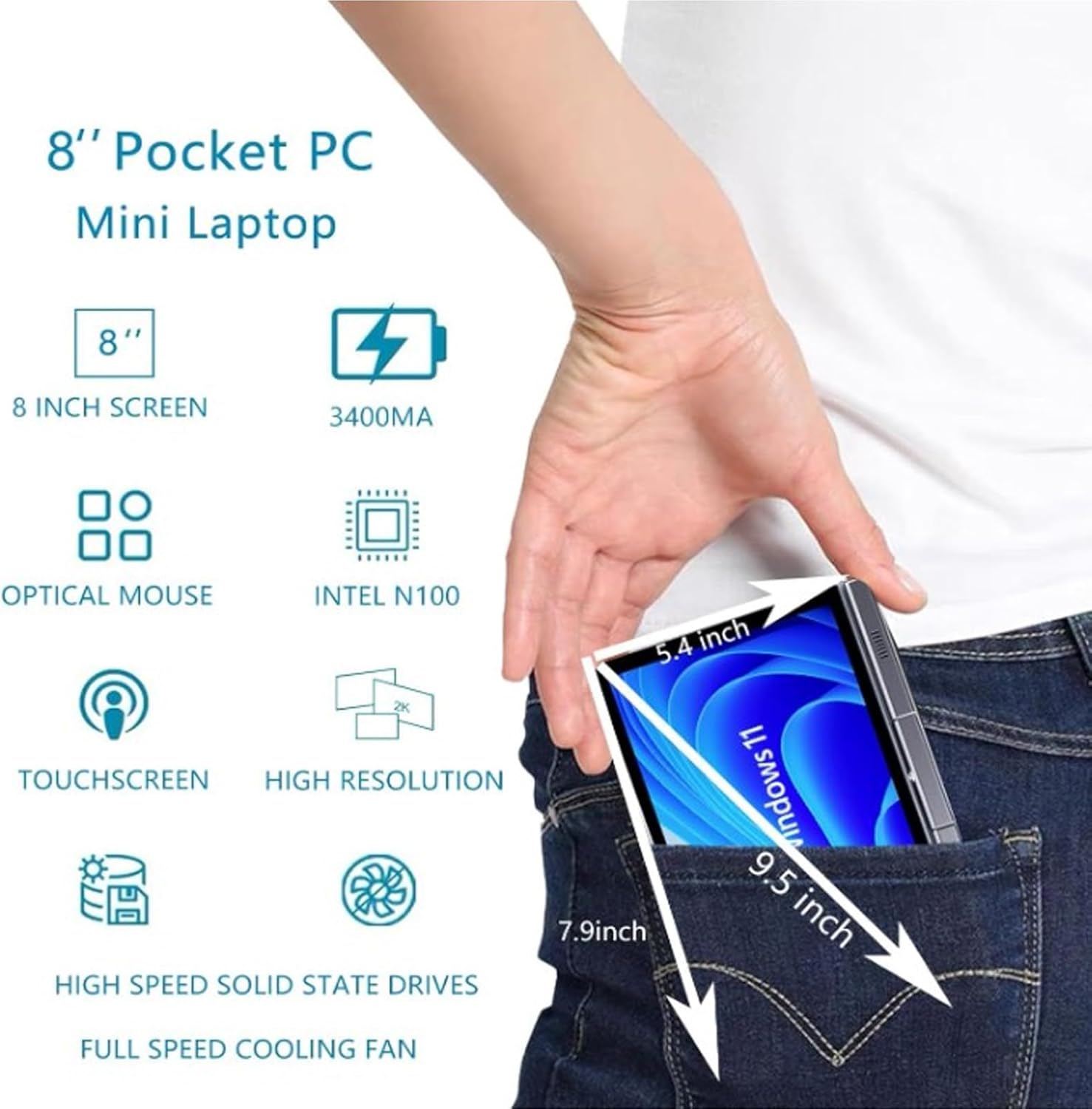
Image: A visual representation of the 8-inch Pocket PC's compact dimensions, demonstrating its portability by showing it fitting into a standard pocket.

Image: A labeled diagram highlighting the various ports (USB 3.0, Type-C, Audio, RJ45) and keyboard components (Front Camera, Speaker, Power Light, Power Button, Left/Right/Middle Mouse Buttons) of the EBTOOLS 8-Inch 2-in-1 Pocket PC.
4. Nastavení
4.1 První zapnutí a nabíjení
- Nabijte zařízení: Before first use, connect the power adapter to the Type-C port on the device and plug it into a power outlet. Allow the device to charge fully. The power light indicator will show charging status.
- Zapnutí: Press and hold the Power Button located on the keyboard deck until the screen illuminates.
- Počáteční nastavení: Postupujte podle pokynů na obrazovce a dokončete proces instalace systému Windows 11 Pro, včetně výběru jazyka, síťového připojení a vytvoření uživatelského účtu.
The device is designed for immediate use upon completion of the initial Windows setup.
5. Návod k obsluze
5.1 Klávesnice a touchpad
- The device features an edge-less full-size QWERTY keyboard for typing.
- The integrated touchpad supports standard mouse functions, including moving the pointer, scrolling, and left/right clicks. The left, right, and middle mouse buttons are clearly indicated on the diagram.
5.2 Ovládání dotykové obrazovky
- The 8-inch display is a multi-touch screen. Use gestures such as tap, swipe, pinch-to-zoom, and rotate for navigation and interaction with applications.
5.3 Rotace o 360 stupňů
- The display can be rotated 360 degrees to switch between laptop mode (traditional clamshell) and tablet mode (screen folded back against the base).
- When in tablet mode, the keyboard is automatically disabled to prevent accidental input.
5.4 Připojení periferních zařízení
- USB 3.0: Connect external devices such as USB drives, mice, or keyboards to the USB 3.0 port.
- Typ C: Používá se pro nabíjení a přenos dat.
- High Definition Multimedia Interface (HDMI): Connect an external monitor or projector using an HDMI cable for extended display.
- 3.5mm Standard Headphone Jack: Připojte sluchátka nebo externí reproduktory.
- Síťový port RJ45: Připojte ethernetový kabel pro kabelové připojení k internetu.
5.5 Bezdrátové připojení
- WiFi6: Access wireless networks (2.4G and 5G bands) for internet connectivity. Enable Wi-Fi through Windows settings.
- Bluetooth 5.2: Pair with Bluetooth-enabled devices such as headphones, speakers, or other peripherals. Enable Bluetooth through Windows settings.
6. Údržba
6.1 Čištění
- K čištění obrazovky a vnějších povrchů používejte měkký hadřík, který nepouští vlákna. V případě odolných skvrn lehceamphadřík vodou nebo roztokem na čištění obrazovky.
- Nepoužívejte agresivní chemikálie, abrazivní čisticí prostředky ani aerosolové spreje přímo na zařízení.
- Před čištěním se ujistěte, že je zařízení vypnuté a odpojené ze zásuvky.
6.2 Skladování
- Přístroj skladujte na chladném a suchém místě mimo dosah přímého slunečního záření a extrémních teplot.
- If storing for an extended period, ensure the battery is charged to approximately 50% to preserve battery health.
7. Řešení problémů
This section addresses common issues you might encounter with your EBTOOLS 8-Inch 2-in-1 Pocket PC.
7.1 Zařízení se nezapne
- Ensure the device is fully charged. Connect the power adapter and wait a few minutes before attempting to power on again.
- Verify the power adapter and cable are securely connected and the power outlet is functional.
- Zkuste podržet tlačítko napájení po dobu 10-15 sekund, abyste provedli tvrdý reset.
7.2 Problémy s připojením k Wi-Fi nebo Bluetooth
- Zkontrolujte, zda je v nastavení systému Windows povoleno Wi-Fi nebo Bluetooth.
- Restart the device and your wireless router/Bluetooth device.
- Ujistěte se, že jste v dosahu sítě Wi-Fi nebo zařízení Bluetooth.
- Update wireless drivers if available.
7.3 Touchscreen Not Responding
- Restartujte zařízení.
- Ujistěte se, že je obrazovka čistá a bez nečistot.
- Check for any system updates that might include touchscreen driver fixes.
7.4 Krátká výdrž baterie
- Adjust power settings in Windows to optimize battery usage.
- Zavřete nepotřebné aplikace běžící na pozadí.
- Snižte jas obrazovky.
- Ensure the device is not running resource-intensive tasks continuously.
8. Specifikace
| Funkce | Specifikace |
|---|---|
| Operační systém | Windows 11 Pro |
| Velikost displeje | 8 palců |
| Procesor | N100 CPU (up to 3.4GHz) |
| BERAN | 12GB LPDDR5 |
| Skladování | 512GB M.2 SSD (supports up to 2TB) |
| Přední kamera | 2MP 30 Frame HD Built-In Camera |
| Bluetooth | BT 5.2 |
| Wireless Fidelity Type | 2.4G / 5G Band (WiFi6) |
| Rozhraní | 1 x USB3.0, 1 x 3.5mm Standard Headphone Jack, 1 x High Definition Multimedia Interface Port, 1 x Type-C, 1 x RJ45 Network Port |
| Typ baterie | Vestavěná 5000mAh polymerová lithiová baterie |
| Životnost baterie | 4–6 hodin (typické použití) |
| Hmotnost položky | 2.68 libry (přibližně 1.22 kg) |
| Rozměry balení | 9.45 x 7.09 x 2.36 palce |
9. Záruka a podpora
9.1 Záruka na produkt
Specific warranty details for your EBTOOLS 8-Inch 2-in-1 Pocket PC are typically provided with your purchase documentation or on the manufacturer's official website. Please refer to these resources for information regarding warranty coverage, duration, and terms.
9.2 Zákaznická podpora
For technical assistance, troubleshooting beyond this manual, or warranty claims, please contact EBTOOLS customer support. Contact information can usually be found on the product packaging, the manufacturer's webwebu nebo prostřednictvím svého prodejce.
When contacting support, please have your product model number (EBTOOLS9pxf4058ch-12) and purchase information readily available.