
1. Úvod
Thank you for choosing the GOWENIC Bluetooth 5.3 Rechargeable Earpiece Headset. This manual provides essential information for setting up, operating, and maintaining your new earpiece. Please read it carefully before use to ensure optimal performance and longevity of the product.
2. Obsah balení
Zkontrolujte prosím balení, zda neobsahuje následující položky:
- 1 x GOWENIC Earpiece
- 1 x USB nabíjecí kabel
3. Konec produktuview
Familiarize yourself with the components and controls of your GOWENIC Earpiece.
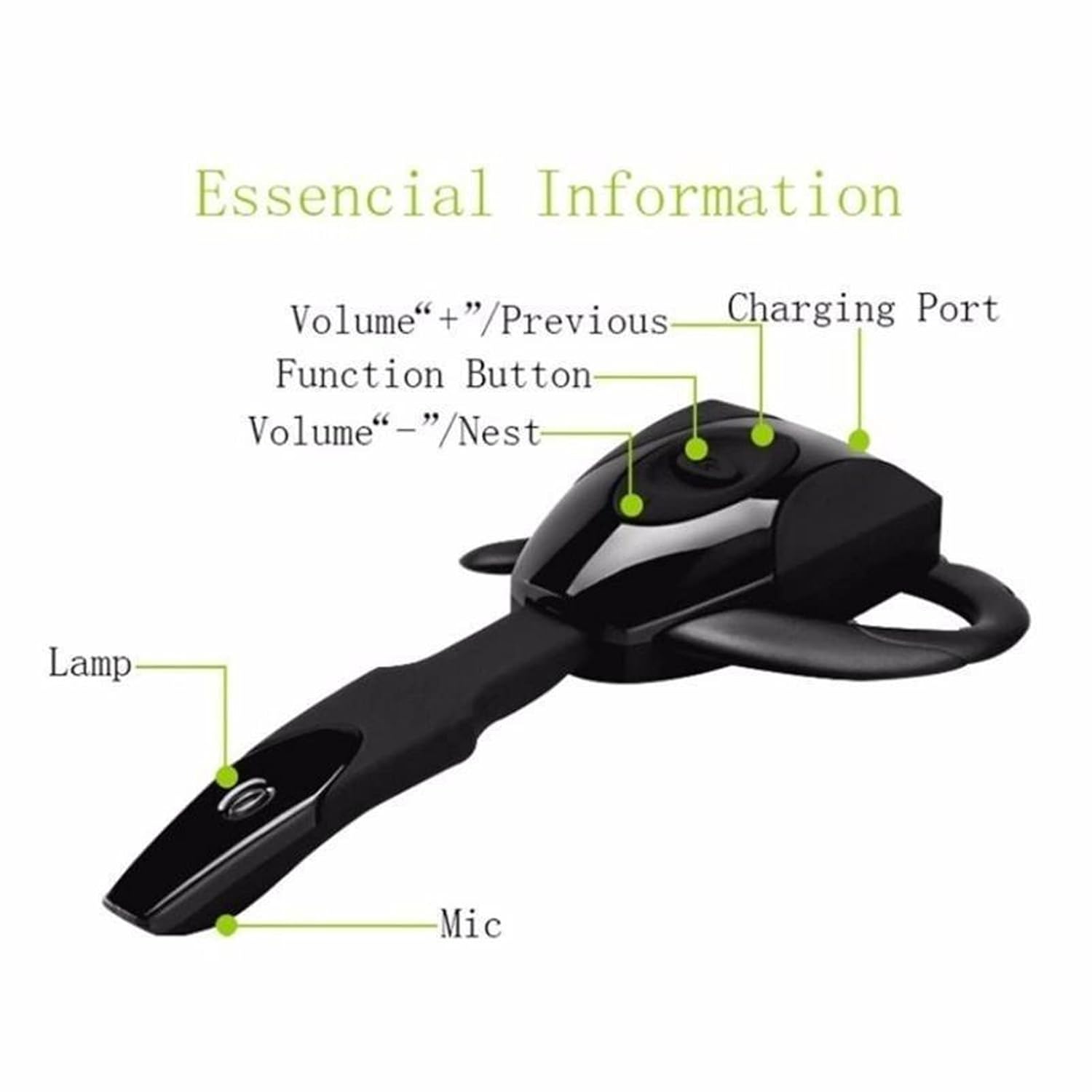
Obrázek 3.1: Earpiece Components. This image displays the earpiece with labels pointing to its key features: the Charging Port, Function Button, Volume +/Previous button, Volume -/Next button, Indicator Lamp, and Microphone.

Obrázek 3.2: Detailed Earpiece Diagram. This diagram provides a comprehensive view of the earpiece, highlighting the Multi-function button, Volume +/Next Song, Volume -/Previous Song, Indicator light, Charging port, Ear hang, Hi-Fi receiver, and Microphone.
- Multifunkční tlačítko: Používá se pro zapnutí/vypnutí, přehrávání/pozastavení, přijímání/ukončování hovorů.
- Volume + / Previous Song: Krátké stisknutí pro zvýšení hlasitosti, dlouhé stisknutí pro předchozí skladbu.
- Volume - / Next Song: Krátké stisknutí pro snížení hlasitosti, dlouhé stisknutí pro další skladbu.
- Nabíjecí port: Zde připojte nabíjecí kabel USB.
- Kontrolka: Displays status (e.g., charging, pairing, connected).
- Mikrofon: Pro hlasovou komunikaci.
- Háček na ucho: Provides secure and comfortable fit.
4. Nastavení
4.1. Charging the Earpiece
Before first use, fully charge the earpiece.
- Connect the small end of the USB charging cable to the charging port on the earpiece.
- Připojte větší konec nabíjecího kabelu USB ke zdroji napájení USB (např. k portu USB počítače, k adaptéru USB do zásuvky).
- The indicator light will typically show a solid color (e.g., red) during charging and change or turn off when fully charged.
- Doba nabíjení je přibližně 1-2 hodiny.
4.2. Wearing the Earpiece
The earpiece is designed for comfortable, long-term wear. You may need to adjust the ear hook for the best fit.

Obrázek 4.1: Earpiece Worn on Ear. This image demonstrates the earpiece comfortably positioned on a user's ear, highlighting its ergonomic design.

Obrázek 4.2: Ear Hook Installation and Charging Port Access. This series of images illustrates the steps for attaching and removing the ear hook, as well as locating the charging port on the earpiece.
- Identify the transparent cover and the ear hang/hook.
- Gently remove the transparent cover if present.
- Attach the ear hook to the earpiece, ensuring it clicks into place securely.
- Place the earpiece over your ear, adjusting the ear hook for a snug and comfortable fit.
4.3. Párování Bluetooth
To connect your earpiece to a device:
- Zapnutí: Press and hold the Multi-function Button until the indicator light flashes (often blue and red alternately), indicating it is in pairing mode.
- Aktivujte Bluetooth: Na svém zařízení (chytrý telefon, tablet, počítač) povolte Bluetooth.
- Hledat Zařízení: V nastavení Bluetooth vašeho zařízení vyhledejte dostupná zařízení.
- Select Earpiece: Select "GOWENIC Earpiece" or a similar name from the list of found devices.
- Potvrdit připojení: Once paired, the indicator light on the earpiece will typically flash blue slowly or turn off, and your device will confirm the connection.
The earpiece supports connection to two devices simultaneously.

Obrázek 4.3: Multi-Device Connection. This image illustrates the earpiece's capability to connect to two devices, such as smartphones and tablets, at the same time.
5. Návod k obsluze
5.1. Zapnutí/vypnutí
- Zapnutí: Press and hold the Multi-function Button for approximately 3-5 seconds until the indicator light flashes.
- Vypnout: Press and hold the Multi-function Button for approximately 3-5 seconds until the indicator light turns off.
5.2. Správa hovorů
- Přijmout hovor: Short press the Multi-function Button when an incoming call rings.
- Ukončit hovor: Během hovoru krátce stiskněte multifunkční tlačítko.
- Odmítnout hovor: Press and hold the Multi-function Button for 2 seconds when an incoming call rings.
- Znovu vytočit poslední číslo: Dvojitým stisknutím multifunkčního tlačítka neprobíhá hovor.
5.3. Přehrávání hudby
- Přehrát/pozastavit: Krátce stiskněte multifunkční tlačítko.
- Další skladba: Dlouze stiskněte tlačítko pro zvýšení hlasitosti.
- Předchozí skladba: Dlouze stiskněte tlačítko pro zvýšení hlasitosti.
5.4. Ovládání hlasitosti
- Zvýšit hlasitost: Krátce stiskněte tlačítko Hlasitost +.
- Snížit hlasitost: Krátce stiskněte tlačítko Hlasitost -.
6. Údržba
To ensure the longevity and optimal performance of your earpiece:
- Keep the earpiece dry. Do not expose it to moisture or extreme temperatures.
- Clean the earpiece regularly with a soft, dry cloth. Avoid using harsh chemicals or abrasive materials.
- Store the earpiece in a cool, dry place when not in use.
- Avoid dropping or subjecting the earpiece to strong impacts.
7. Řešení problémů
If you encounter issues with your earpiece, refer to the following common solutions:
| Problém | Možné řešení |
|---|---|
| Earpiece does not power on | Ensure the earpiece is fully charged. Press and hold the Multi-function Button for a longer duration. |
| Nelze spárovat se zařízením | Ensure the earpiece is in pairing mode (indicator light flashing). Turn off and on Bluetooth on your device. Move the earpiece closer to your device. Clear previous Bluetooth connections on your device. |
| Žádný zvuk nebo nízká hlasitost | Increase the volume on both the earpiece and your connected device. Ensure the earpiece is properly connected. Check if the audio output is set to the earpiece on your device. |
| Problém s nabíjením | Ensure the USB cable is securely connected to both the earpiece and the power source. Try a different USB cable or power source. |
| Přerušované připojení | Ensure there are no obstructions between the earpiece and your device. Move away from sources of strong electromagnetic interference. |
8. Specifikace
Detailed technical specifications for the GOWENIC Earpiece:
- Typ položky: Sluchátko
- Materiál: ABS
- Velikost: Přibližně 10.5 x 6 x 2 cm (4.1 x 2.4 x 0.8 palce)
- Verze Bluetooth: 5.3
- Typ baterie: Vestavěná dobíjecí lithiová baterie
- Model baterie: Lithiová baterie 381423
- Kapacita baterie: 135 XNUMX mAh
- Barva: Černý
- Hmotnost položky: 2.08 unce
9. Záruka a podpora
GOWENIC products are designed for reliability and performance. For warranty information or technical support, please refer to the retailer's return policy or contact the seller directly through your purchase platform.
Uschovejte si prosím doklad o koupi pro případné reklamace.