
Zavedení
Thank you for choosing the Yoidesu Cordless Phone System. This system combines a corded base unit with a cordless handset, offering advanced features such as a digital answering machine, photo dialing, smart call blocking, and an expandable design. This manual will guide you through the setup, operation, and maintenance of your new phone system to ensure optimal performance.
Obsah balení
Zkontrolujte prosím, zda jsou všechny níže uvedené položky součástí balení. Pokud některé položky chybí nebo jsou poškozené, kontaktujte prosím zákaznickou podporu.
- Kabelová základnová jednotka s ručním ovladačem
- Bezdrátové sluchátko
- Cordless Handset Charging Base
- AC Power Adapters (2)
- Kabel telefonní linky
- Dobíjecí baterie pro bezdrátové sluchátko
- Uživatelská příručka (tento dokument)
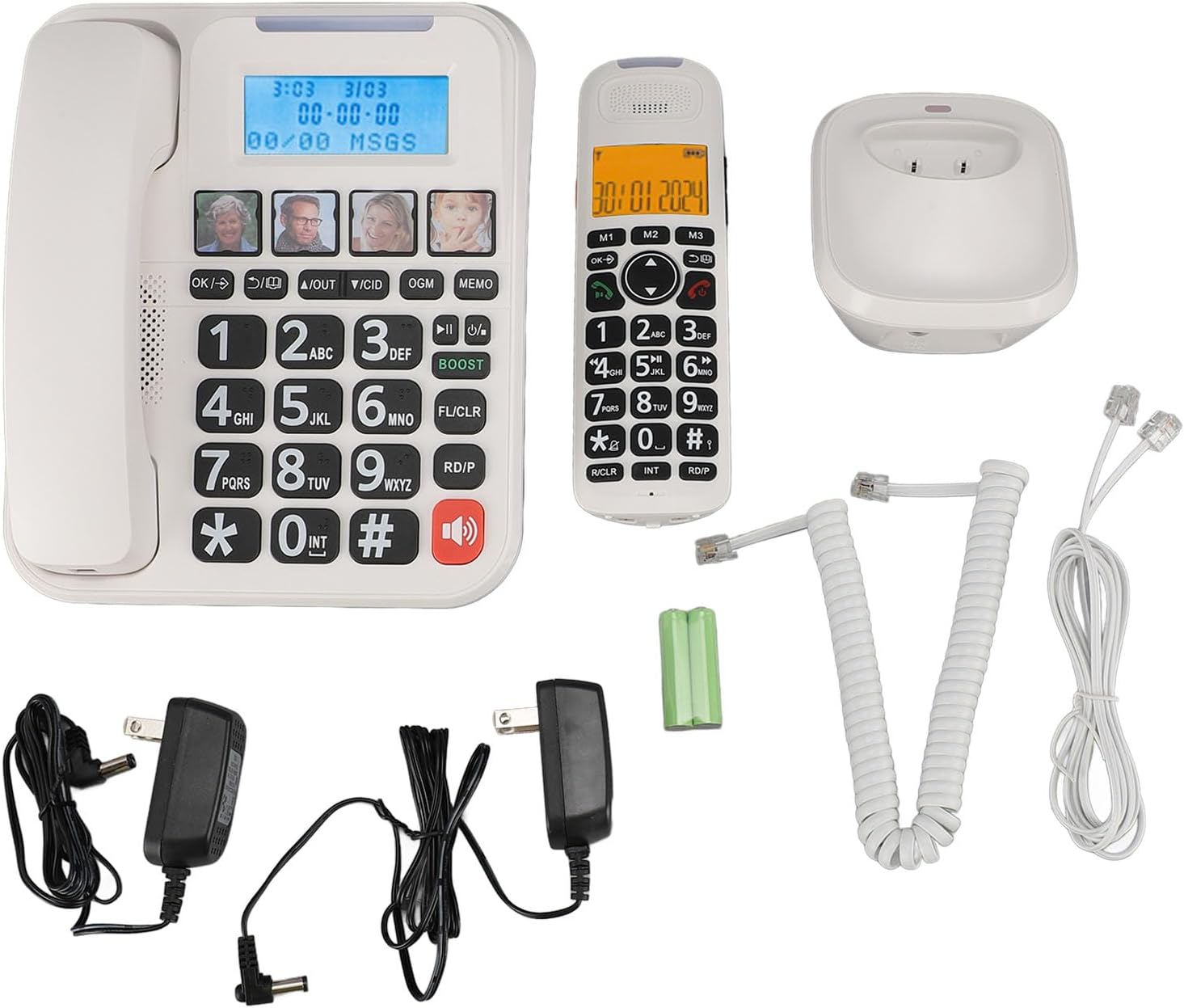
Obrázek 1: Complete package contents of the Yoidesu Cordless Phone System.
Konec produktuview
Corded Base Unit
The base unit serves as the central hub for your phone system, featuring a large display, keypad, and dedicated buttons for answering machine functions and photo dialing.
- Velký 2palcový displej: Displays caller ID, call history, and answering machine status with high-contrast text.
- Velká klávesnice: Oversized buttons for easy dialing, especially in low-light conditions.
- Photo Dialing Buttons: Four customizable buttons for quick access to frequently dialed numbers with associated photos.
- AMP Tlačítko: Enhances call volume by up to 28dB for improved clarity.
- Ovládací prvky záznamníku: Play/Stop, Skip, Record, and Memo functions.

Obrázek 2: Přední view of the Corded Base Unit.
Bezdrátové sluchátko
The cordless handset provides mobility and convenience, allowing you to make and receive calls away from the base unit.
- Displej: Shows caller information, menu options, and battery status.
- Navigační tlačítka: For menu navigation and volume adjustment.
- Talk/End Buttons: Pro zahájení a ukončení hovorů.
- Intercom (INT) Button: For internal calls between handsets or base unit.

Obrázek 3: Přední view of the Cordless Handset.
Nastavení
1. Připojení základní jednotky
- Připojte jeden konec telefonního kabelu do zdířky TEL LINE na zadní straně základní jednotky.
- Druhý konec telefonního kabelu připojte do telefonní zásuvky ve zdi.
- Plug one AC power adapter into the DC IN 6V jack on the back of the base unit.
- Zapojte druhý konec napájecího adaptéru do standardní elektrické zásuvky.

Obrázek 4: Rear connections of the Base Unit.
2. Installing the Handset Battery
- Otevřete kryt přihrádky na baterie na zadní straně bezdrátového sluchátka.
- Insert the supplied rechargeable battery, ensuring correct polarity (+/-).
- Zavřete kryt prostoru pro baterie.
3. Nabíjení sluchátka
- Plug the second AC power adapter into the DC IN 6V jack on the cordless handset charging base.
- Zapojte druhý konec napájecího adaptéru do standardní elektrické zásuvky.
- Place the cordless handset onto its charging base. The charging indicator on the handset should illuminate.
- Před prvním použitím nechte sluchátko nabíjet alespoň 12 hodin, aby byla zajištěna plná kapacita baterie.

Obrázek 5: Cordless Handset on Charging Base.
4. Registering Additional Handsets (Optional)
The system supports up to five handsets. Refer to the specific instructions provided with additional handsets for registration procedures. Typically, this involves placing the base unit in registration mode and then initiating registration from the new handset.
Návod k obsluze
Uskutečňování a přijímání hovorů
- Chcete-li zavolat: Zvedněte kabelový sluchátko nebo stiskněte MLUVIT button on the cordless handset, then dial the number.
- Chcete-li přijmout hovor: Zvedněte kabelový sluchátko nebo stiskněte MLUVIT button on the cordless handset when the phone rings.
- Ukončení hovoru: Place the corded handset back on the base or press the KONEC button on the cordless handset.
Nastavení hlasitosti hovoru
Během hovoru stiskněte AMP button on the base unit to increase the volume by 28dB. On the cordless handset, use the navigation buttons to adjust the earpiece volume.
Using the Digital Answering Machine
The integrated answering machine can record up to 60 minutes of messages, outgoing announcements, and memos.
- Přehrát zprávy: Stiskněte tlačítko PLAY/STOP tlačítko na základní jednotce.
- Nahrát odchozí zprávu (OGM): Stiskněte tlačítko OGM button and follow the voice prompts.
- Record Memo: Stiskněte tlačítko MEMO button and speak after the tone.
Photo Dialing
Set up four frequently dialed numbers with associated photos for quick access.
- Programovat: Select an empty photo slot on the base unit. Follow the on-screen prompts to enter the contact's name and phone number. You can then insert a printed photo into the designated slot.
- Vytočit: Simply press the desired photo button on the base unit.

Obrázek 6: Using the Photo Dialing feature.
Smart Call Blocker and Caller ID
The system can store up to 30 incoming call numbers on handsets and 29 on the base unit. The call block function helps prevent unwanted calls.
- ID volajícího: Incoming call numbers are displayed on both the base unit and handset screens.
- Blokování hovorů: Access the call block menu to add numbers manually or block numbers from the caller ID history. You can set it to manual or automatic mode, allowing only calls from saved contacts.
Phonebook and Call History
Store up to 50 phonebook entries. Review 10 outgoing call numbers and incoming call numbers (30 on handset, 29 on base).
- Přidat kontakt: Navigate to the phonebook menu and enter the name and number.
- Review Dějiny: Use the navigation buttons to scroll through incoming and outgoing call lists.
Intercom and 3-Way Calling
The expandable system allows for internal communication and conference calls.
- Interkom: Stiskněte tlačítko INT button on a handset or base unit to call another registered handset or the base unit.
- 3-pásmové volání: Supports conference calls between a landline, a sub-phone (handset), and a third-party phone. Refer to the system menu for initiating this feature.
Údržba
Čištění
Otřete telefonní systém měkkým hadříkemamp hadříkem. Nepoužívejte agresivní chemikálie ani abrazivní čisticí prostředky. Před čištěním se ujistěte, že je jednotka odpojena od sítě.
Péče o baterie
To prolong battery life, always return the cordless handset to its charging base when not in use. If the phone will be unused for an extended period, remove the battery from the handset.
Odstraňování problémů
| Problém | Možná příčina | Řešení |
|---|---|---|
| Žádný oznamovací tón | Telefonní kabel je odpojený nebo vadný. | Ensure the telephone line cord is securely connected to both the base unit and the wall jack. Test with another phone if possible. |
| Sluchátko se nenabíjí | Handset not properly seated on charging base; charging base not powered; faulty battery. | Ensure the handset is correctly placed on the charging base. Check that the charging base's power adapter is plugged in. Replace battery if necessary. |
| Záznamník nenahrává | Answering machine is off; memory is full. | Ensure the answering machine is turned on. Delete old messages to free up memory. |
| Špatná kvalita hovoru/statický šum | Rušení od jiných elektronických zařízení; sluchátko je příliš daleko od základnové jednotky. | Přemístěte základnu dále od ostatní elektroniky. Ujistěte se, že je sluchátko v dosahu základny. |
Specifikace
- Číslo modelu: Yoidesuav12iq6wt4-14
- Doba nahrávání záznamníku: Až 60 minut
- Handset Expansion: Up to 5 handsets per base unit
- Hlasitost vyzvánění: Až 90 dB (nastavitelné)
- Call Volume Boost: +28dB via AMP tlačítko
- Velikost obrazovky: 2 inches (handset and base unit)
- Caller ID Storage: 30 incoming calls (handset), 29 incoming calls (base unit)
- Phonebook Entries: 50
- Úložiště odchozích hovorů: 10
- Rozměry balení: 12.99 x 9.06 x 3.94 palce
- Hmotnost položky: 2.84 libry
Záruka a podpora
For warranty information or technical assistance, please contact Yoidesu customer support. Keep your purchase receipt as proof of purchase for any warranty claims.
Výrobce: Yoidesu
Datum první dostupnosti: 5. září 2024