
Zavedení
This manual provides essential information for setting up, operating, maintaining, and troubleshooting your HP 17 Laptop PC. Please read this manual thoroughly to ensure proper use and to maximize the lifespan of your device.
Co je v krabici
Upon unboxing your HP 17 Laptop PC, verify that all the following items are present:
- HP 17 Laptop PC
- Napájecí adaptér
- Napájecí kabel
- 8-in-1 Docking Station (SD card reader, SuperSpeed USB-C & USB-A, PD, 4K HDMI, RJ-45)
- Nabíjecí kabel 3 v 1
- Ethernetový kabel

Image: Included accessory suite, featuring an 8-in-1 docking station, a 3-in-1 charging cable, and an Ethernet cable.
Nastavení
- Připojte napájení: Plug the power adapter into the laptop's AC smart pin port and then into a wall outlet. Allow the battery to charge fully before first use.
- Počáteční zapnutí: Open the laptop lid and press the power button, usually located on the keyboard deck. The laptop will boot up.
- Nastavení systému Windows: Postupujte podle pokynů na obrazovce a dokončete proces nastavení systému Windows 11 Home. To zahrnuje výběr regionu, připojení k síti Wi-Fi a vytvoření uživatelského účtu.
- Připojení periferií:
- Zařízení USB: Connect USB devices (e.g., mouse, external drive) to the available USB Type-A or USB Type-C ports.
- Externí displej: Use an HDMI cable to connect an external monitor to the HDMI 1.4b port.
- Síť: For a wired connection, use the provided Ethernet cable with the 8-in-1 docking station, then connect the docking station to a USB-C port on the laptop.
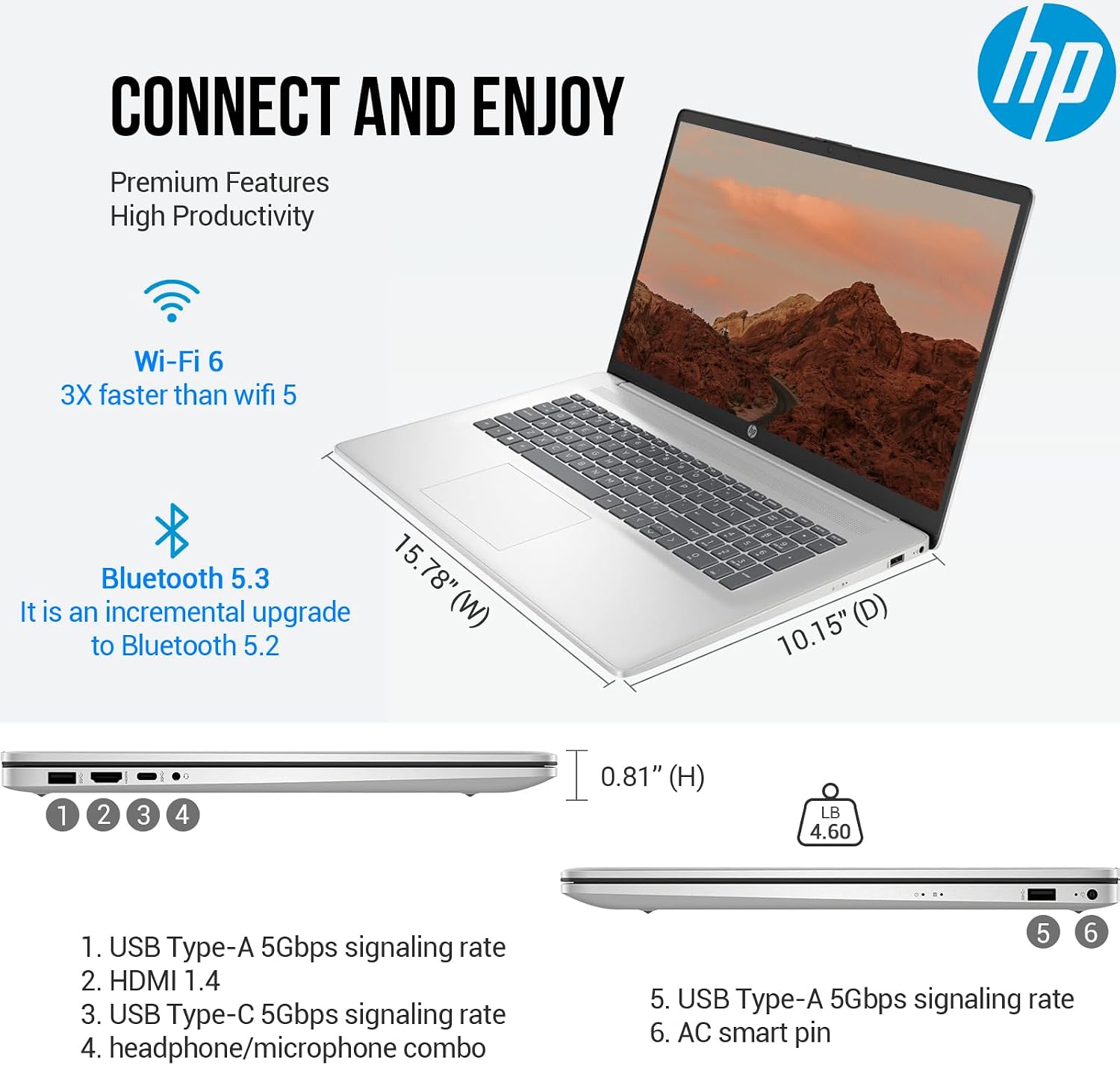
Obrázek: Boční view of the HP 17 laptop, illustrating the various ports including USB Type-A, HDMI, USB Type-C, headphone/microphone combo jack, and the AC smart pin for power.
Ovládání notebooku
Klávesnice a touchpad
The HP 17 features a full-size, backlit keyboard with a 10-key numeric keypad for comfortable typing and data entry. The integrated touchpad provides precise cursor control. Refer to the laptop's function keys for adjusting backlight brightness, volume, and other settings.

Image: The HP 17 laptop, highlighting its full-size backlit keyboard with a numeric keypad, the HP True Vision 720p HD camera, dual array digital microphones, and B&O-tuned stereo speakers.
Zobrazit
Your laptop is equipped with a 17.3-inch Full HD (1920 x 1080) IPS anti-glare display. This screen provides wide viewing angles and vibrant colors, suitable for various tasks from productivity to entertainment.
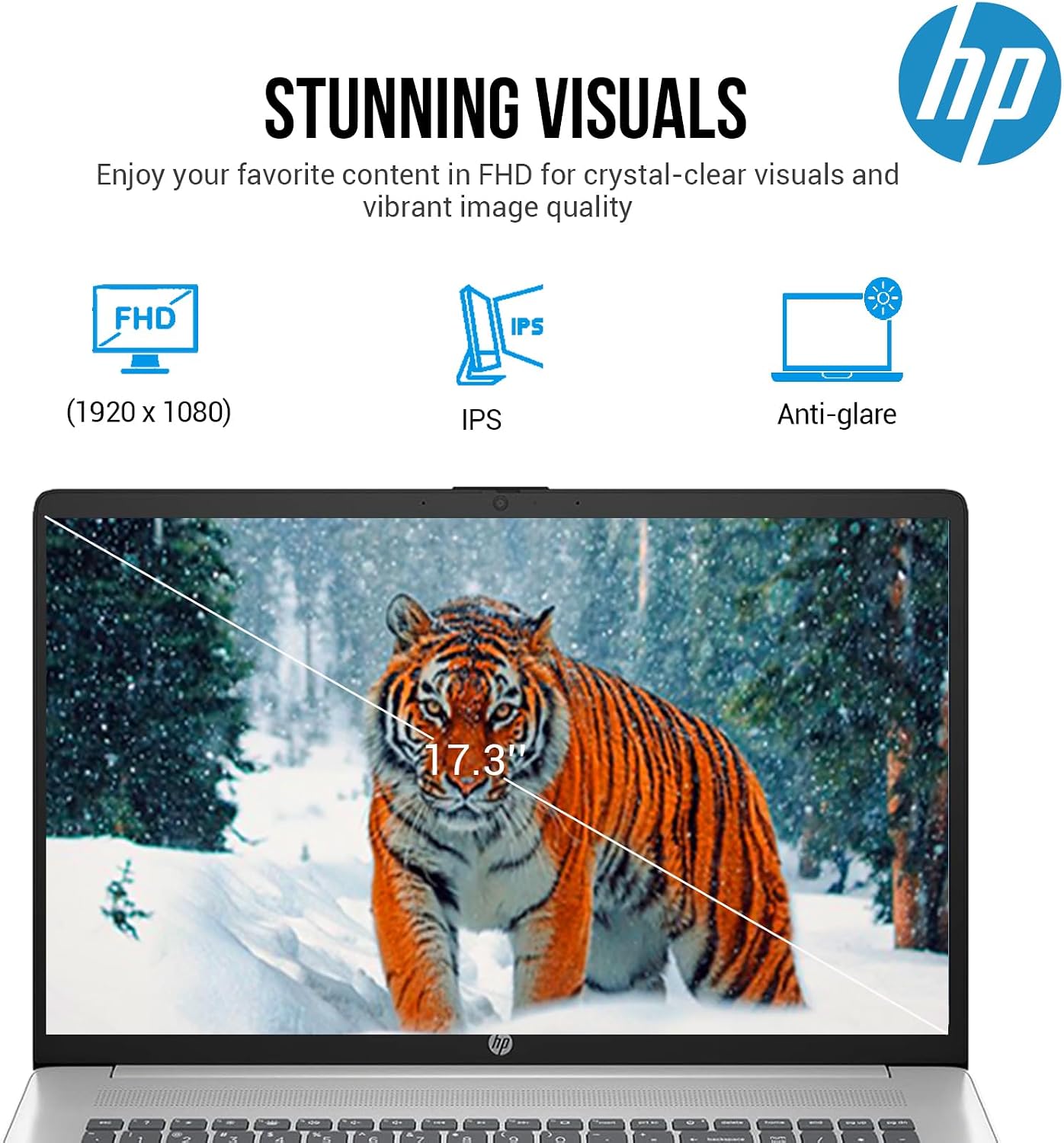
Image: The HP 17 laptop's display, emphasizing its Full HD (1920x1080) resolution, IPS technology for wide viewing angles, and anti-glare coating.
Fotoaparát a zvuk
The integrated HP True Vision 720p HD camera and dual array digital microphones facilitate clear video calls and online meetings. Audio is enhanced by B&O-tuned stereo speakers, providing a quality listening experience.
Konektivita
- Wi-Fi 6: Připojte se k bezdrátovým sítím pro vysokorychlostní přístup k internetu.
- Bluetooth 5.3: Pair with compatible wireless devices such as headphones, speakers, or mice.
- USB porty: Utilize the USB Type-A and USB Type-C ports for connecting various peripherals and data transfer.
- HDMI: Připojení k externím displejům nebo projektorům.
Accessory Suite Usage
The included 8-in-1 docking station expands your laptop's connectivity, offering additional USB ports, an SD card reader, HDMI output, and an Ethernet port. Connect the docking station to a USB-C port on your laptop. The 3-in-1 charging cable provides versatile charging options for various mobile devices.
Údržba
- Čištění: Použijte měkký hadřík, který nepouští vlákna dampDisplej opláchněte vodou nebo čističem obrazovek. Na klávesnici a šasi použijte suchý, měkký hadřík. Nepoužívejte agresivní chemikálie.
- Větrání: Ensure the laptop's ventilation openings are clear and unobstructed to prevent overheating. Do not operate the laptop on soft surfaces like beds or couches that can block airflow.
- Péče o baterie: For optimal battery life, avoid frequently discharging the battery completely. Store the laptop in a cool, dry place when not in use for extended periods.
- Aktualizace softwaru: Regularly update your operating system and drivers to ensure system stability and security.
Odstraňování problémů
| Problém | Možné řešení |
|---|---|
| Notebook se nezapne | Ensure the power adapter is securely connected to both the laptop and a working power outlet. Check if the power outlet is functional. Try a different outlet. |
| Displej je prázdný | Press the power button to ensure the laptop is on. Check display brightness settings (function keys). If an external monitor is connected, ensure it is powered on and correctly configured. |
| Problémy s připojením Wi-Fi | Verify Wi-Fi is enabled in Windows settings. Restart your router and modem. Ensure you are within range of the Wi-Fi network. Check for updated Wi-Fi drivers. |
| Keyboard or touchpad unresponsive | Restartujte notebook. Ujistěte se, že žádná externí zařízení neruší. Zkontrolujte aktualizace ovladačů ve Správci zařízení. |
| Pomalý výkon | Close unnecessary applications. Check for background processes consuming resources. Ensure sufficient free storage space on the SSD. Run a system scan for malware. |
Specifikace
The following table details the technical specifications of your HP 17 Laptop PC:
| Funkce | Detail |
|---|---|
| Značka | HP |
| Název modelu | Nezbytné 17 |
| Velikost obrazovky | 17.3 palce |
| Rozlišení displeje | 1920 x 1080 pixelů (FHD) |
| Typ zobrazení | LED IPS, Anti-glare |
| Procesor | Intel Core i5-1335U (10 Cores, 12 Threads, up to 4.6 GHz) |
| Grafika | Grafická karta Intel Iris Xe (integrovaná) |
| BERAN | 32 GB DDR4 SDRAM |
| Skladování | 1TB PCIe NVMe M.2 SSD |
| Operační systém | Windows 11 Home |
| Bezdrátové připojení | Wi-Fi 6 (802.11ax), Bluetooth 5.3 |
| Porty | USB Type-C (5Gbps signaling rate), 2x USB Type-A (5Gbps signaling rate), HDMI 1.4b, Headphone/Microphone Combo |
| Fotoaparát | Kamera HP True Vision 720p HD |
| Zvuk | B&O-tuned stereo speakers |
| Klávesnice | Podsvícená klávesnice plné velikosti s numerickou klávesnicí |
| Životnost baterie | Up to 8.5 Hours (41 Watt Hours Lithium Ion) |
| Rozměry (D x Š x V) | 15.78 cm x 10.15 cm x 0.81 cm |
| Hmotnost | 13.14 libry |
| Barva | Stříbro |
| UPC | 195122685362 |

Obrázek: Overview of the HP 17 laptop, highlighting key features such as Windows 11 Home operating system, Intel Core i5-1335U processor, and Intel Iris Xe Graphics.

Obrázek: Podrobný view of the Intel Core i5-1335U processor, showing its specifications including 10 cores, 12 threads, 12 MB cache, and a maximum turbo frequency of 4.60 GHz.

Image: Key features of the HP 17 laptop, including 32GB DDR4 RAM for faster speeds, a 1TB PCIe SSD for rapid storage, and a long battery life of up to 8 hours and 30 minutes.
Záruka a podpora
Your HP 17 Laptop PC comes with a limited warranty. For specific warranty terms and conditions, please refer to the documentation included with your product or visit the official HP support website. For technical assistance, driver downloads, or service requests, please contact HP customer support.
Podpora HP Webmísto: support.hp.com