
1. Úvod
Děkuji za nákupasing the LONPOO Mini Hi-Fi Ampdoživotní AMP-615B. This 2-channel stereo amplifier je navržen tak, aby poskytoval vysoce kvalitní zvuk amplification for your passive speakers, offering versatile connectivity options including Bluetooth 5.3, Optical, Coaxial, USB, and AUX inputs. This manual provides detailed instructions for setup, operation, and maintenance to ensure optimal performance and longevity of your device.
2. Bezpečnostní pokyny
- Zdroj napájení: Zajistěte amplifier is connected to a power supply within the specified voltage range (AC 100-240V ~ 50/60Hz).
- Větrání: Neblokujte větrací otvory. Zajistěte dostatečné proudění vzduchu kolem jednotky, abyste zabránili přehřátí.
- vlhkost: Udržujte amplifier away from water, moisture, and high humidity environments. Do not operate with wet hands.
- Teplo: Neumísťujte jednotku do blízkosti zdrojů tepla, jako jsou radiátory, topná tělesa, kamna nebo jiná zařízení produkující teplo.
- Čištění: Před čištěním odpojte napájecí kabel. Použijte suchý, měkký hadřík. Nepoužívejte tekuté ani aerosolové čisticí prostředky.
- Servis: Nepokoušejte se tento výrobek opravit sami. Veškerý servis svěřte kvalifikovanému servisnímu personálu.
- Umístění: Umístěte jednotku na stabilní, rovný povrch, aby nedošlo k jejímu pádu.
3. Obsah balení
Carefully unpack the box and ensure all items listed below are present and in good condition. If any item is missing or damaged, please contact your retailer.

The package includes the LONPOO Mini Hi-Fi Amplifier, a remote control for convenient operation, an AC power cord, an optical cable for digital audio, and a quick start guide.
- 1x LONPOO Mini Hi-Fi Ampživější (AMP-615B)
- 1x Dálkové ovládání
- 1x napájecí kabel
- 1x optický kabel
- 1x User Manual (Quick Start Guide)
4. Konec produktuview
4.1 Přední panel

The front panel features Treble and Bass controls, a multi-function knob for volume and input selection, AUX IN, USB input, IR receiver, and an indicator light.
- Ovládání TREBLE: Adjusts high-frequency audio levels.
- Ovládání BASS: Adjusts low-frequency audio levels.
- Multi-Function Knob (VOLUME +/- / MODE / POWER ON/OFF):
- Rotate: Adjusts volume.
- Short Press: Cycles through input modes (Bluetooth, AUX, USB, Coaxial, Optical).
- Long Press: Powers the unit On/Off.
- AUX IN (3.5 mm): Audio input for devices with a 3.5mm audio jack.
- Vstup USB: Pro přehrávání zvuku files from a USB flash drive (supports MP3, WAV formats).
- IR (Infrared) Receiver: Přijímá signály z dálkového ovladače.
- Kontrolka: Displays the current status/input mode:
- Red: Standby (Power Off)
- Blue: Bluetooth Input
- Green: AUX Input
- Yellow: Coaxial Input
- Light Blue: Optical Input
4.2 Zadní panel
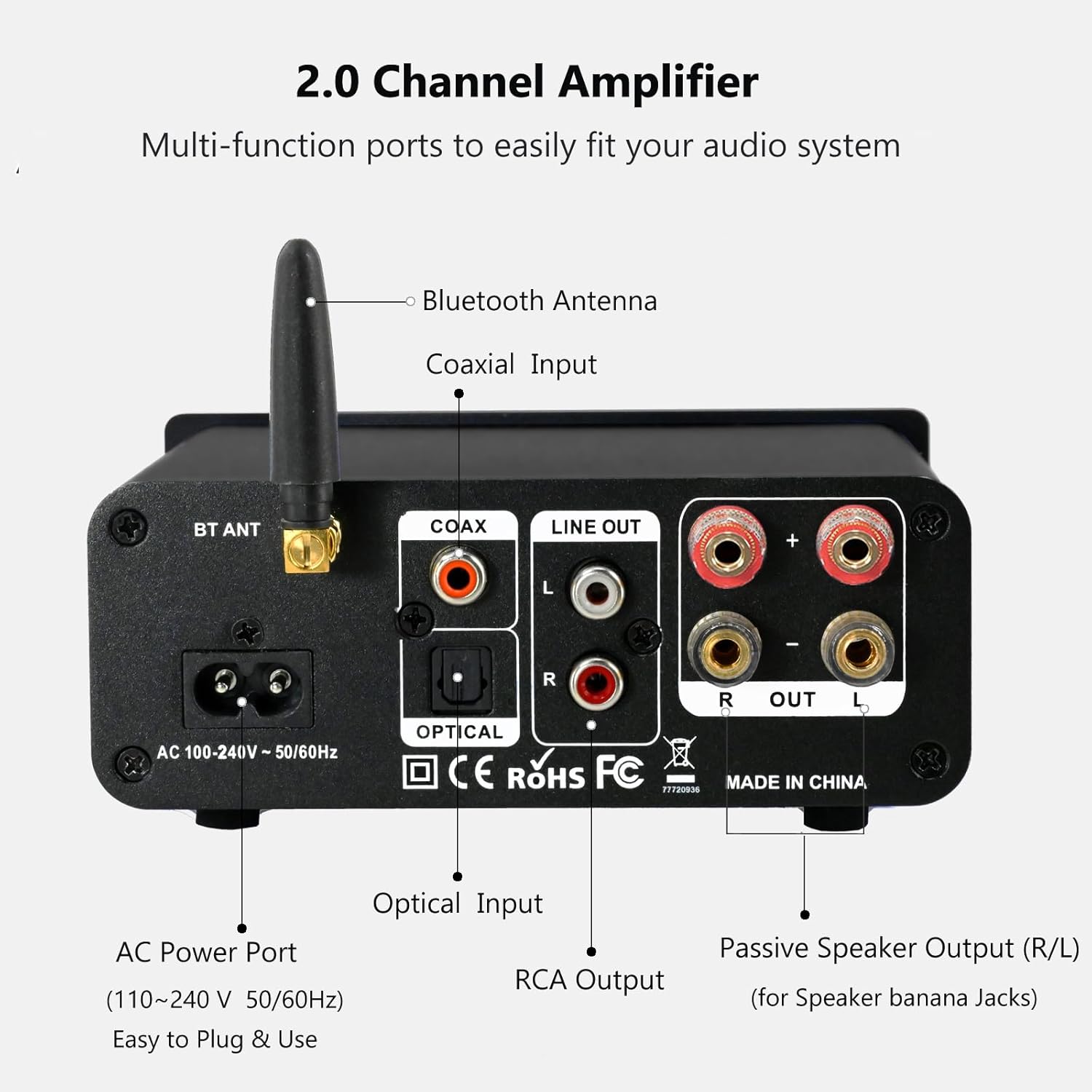
The rear panel provides connections for the Bluetooth antenna, Coaxial and Optical inputs, RCA Line Out, passive speaker outputs, and the AC power port.
- BT ANT (Bluetooth Antenna): Connect the included Bluetooth antenna for optimal wireless range and stability.
- COAX (Coaxial Input): Digital audio input for devices with a coaxial output.
- OPTICAL (Optical Input): Digital audio input for devices with an optical (Toslink) output.
- LINE OUT (RCA L/R): Analog audio output for connecting to powered speakers or a subwoofer.
- PASSIVE SPEAKER OUTPUT (R/L): Connect passive speakers using banana plugs or bare speaker wire.
- AC POWER PORT: Connect the supplied AC power cord (100-240V ~ 50/60Hz).
5. Nastavení
5.1 Připojení reproduktorů

The LONPOO Mini Hi-Fi Amplifier seamlessly integrates with your home audio setup, providing clear sound to passive bookshelf speakers.
- Pasivní reproduktory: Connect your passive bookshelf speakers to the PASSIVE SPEAKER OUTPUT (R/L) terminals on the rear panel. Ensure correct polarity (+ to + and - to -) for each speaker. You can use banana plugs or strip the speaker wire ends and insert them into the terminals.
- Powered Speakers/Subwoofer: If you wish to connect powered speakers or a subwoofer, use an RCA cable to connect them to the LINE OUT (RCA L/R) porty na zadním panelu.
5.2 Připojení zdrojů zvuku
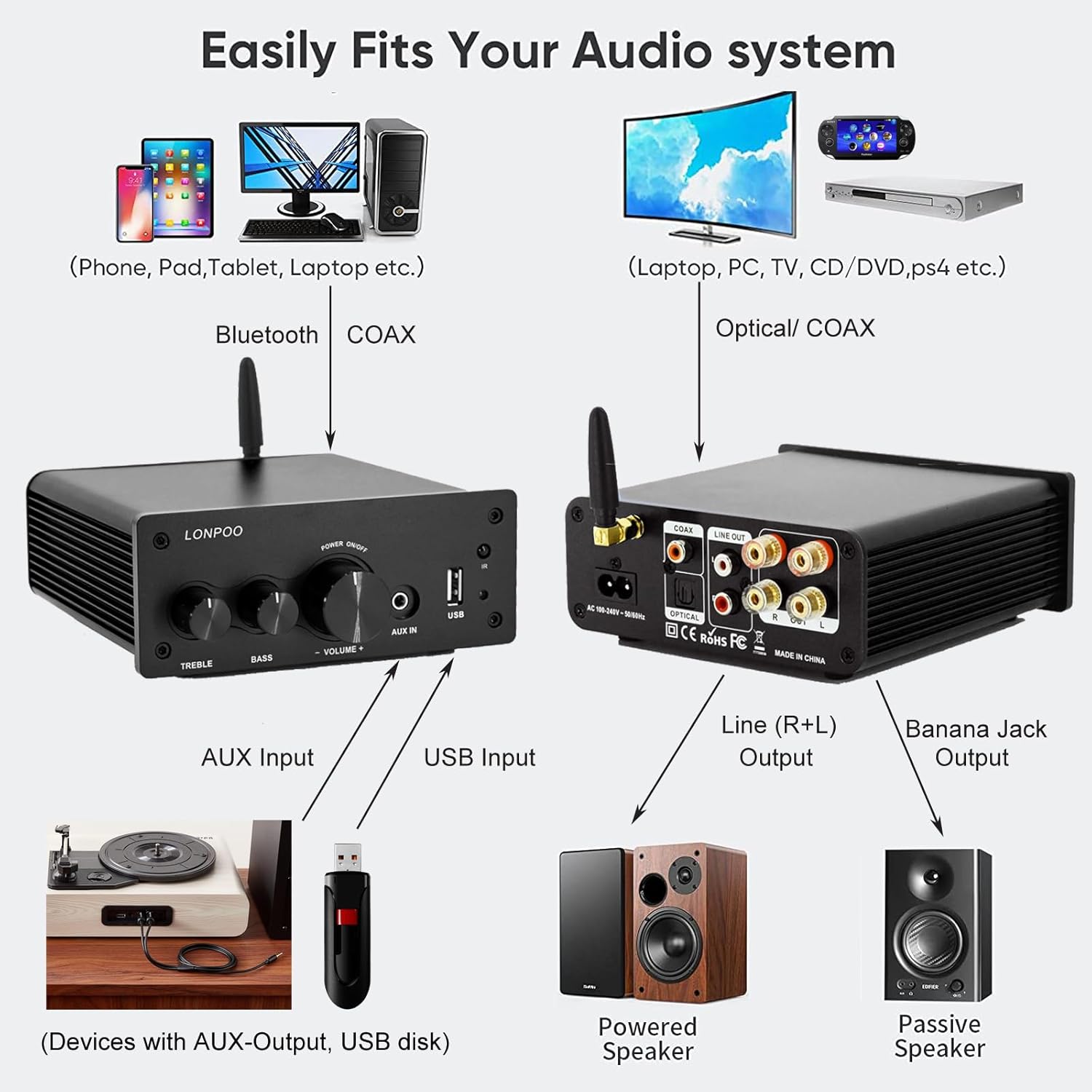
This diagram illustrates how the amplifier connects to a wide range of audio sources and output devices, including phones, PCs, TVs, CD players, powered speakers, and passive speakers.
- Bluetooth: Ensure the Bluetooth antenna is connected to the BT ANT přístav.
- Vstup AUX: Connect your smartphone, tablet, or other audio device using a 3.5mm audio cable to the AUX IN port na předním panelu.
- Vstup USB: Vložte USB flash disk s audio souborem MP3 nebo WAV fileje do Vstup USB port na předním panelu.
- Optický vstup: Connect your TV, CD player, or game console with an optical output to the OPTICKÝ port on the rear panel using the provided optical cable.
- Koaxiální vstup: Connect your TV, DVD player, or other audio source with a coaxial output to the PŘEMLUVIT port na zadním panelu.
5.3 Připojení napájení
Připojte dodaný napájecí kabel k PŘÍVOD AC na zadním panelu amplifier, then plug the other end into a wall outlet.
6. Návod k obsluze
6.1 Zapnutí/vypnutí
Chcete-li zapnout ampzvlhčovač, dlouhý stisk a Multifunkční knoflík on the front panel. The indicator light will illuminate. To power off, dlouhý stisk the knob again.
6.2 Výběr vstupu
To select an audio input source, krátký stisk a Multifunkční knoflík. Each short press will cycle through the available inputs: Bluetooth, AUX, USB, Coaxial, and Optical. The Kontrolka will change color to reflect the active input mode (refer to Section 4.1 for color codes).
6.3 Nastavení hlasitosti
Otočte Multifunkční knoflík ve směru hodinových ručiček pro zvýšení hlasitosti a proti směru hodinových ručiček pro její snížení.
Ovládání 6.4 tónů
Použijte ZTROJNÁSOBIT a BASS knobs on the front panel to adjust the high and low frequencies of the audio output according to your preference.
6.5 Párování Bluetooth

Connect your smartphone or other Bluetooth-enabled devices wirelessly to the amplifier for convenient audio streaming.
- Ensure the Bluetooth antenna is securely connected.
- Zapněte amplifier and select the Bluetooth input mode (the indicator light will turn blue).
- Na zařízení s podporou Bluetooth (např. chytrý telefon, tablet) vyhledejte dostupná zařízení Bluetooth.
- Select "LONPOO AMP-615" from the list to pair.
- Po spárování bude amplifier will play a confirmation sound, and you can stream audio wirelessly.
6.6 Přehrávání z USB

The amplifier supports direct audio input via 3.5mm AUX and USB, allowing for plug-and-play functionality with various devices.
Vložte USB flash disk do Vstup USB přístav. Ten amplifier will automatically detect and begin playing supported audio files (MP3, WAV). Use the remote control for playback functions like play/pause, next/previous track.
6.7 Dálkové ovládání
Součástí dodávky je dálkové ovládání, které umožňuje pohodlné ovládání amplifier from a distance. Functions include:
- Zapnutí/vypnutí
- Zvýšení/snížení hlasitosti
- Ztlumit
- Input Source Selection (BT, AUX, USB, COAX, OPT)
- USB Playback Controls (Play/Pause, Next/Previous Track)
7. Řešení problémů
If you encounter any issues with your LONPOO Mini Hi-Fi Amplifier, please refer to the following troubleshooting guide:
| Problém | Možná příčina | Řešení |
|---|---|---|
| Žádný zvukový výstup |
|
|
| Špatná kvalita zvuku (zkreslení, nízká hlasitost) |
|
|
| Problémy s připojením Bluetooth |
|
|
| Optical/Coaxial audio dropouts or no sound |
|
|
| Hučení nebo bzučení |
|
|
8. Specifikace
| Číslo modelu | AMP-615 |
| Výstupní výkon | 100W + 100W (200W total) |
| Kanály | 2.0 Stereo |
| Verze Bluetooth | 5.3 |
| Vstupy | Bluetooth, Optical, Coaxial, USB, 3.5mm AUX |
| Výstupy | RCA Line Out (L/R), Passive Speaker Output (Banana Jack compatible) |
| Napájení | AC 100-240V ~ 50 / 60Hz |
| Rozměry (Š x V x H) | 132 mm x 55 mm x 140 mm (přibližně 5.19 x 2.16 x 5.51 palce) |
| Hmotnost | 1.09 kg (cca 2.4 lb) |
| Zahrnuté komponenty | Hifi Amplifier, AC Cable, Remote Control, Optical Cable |
9. Údržba
- Čištění: Před čištěním odpojte napájení. K otření vnějšího povrchu použijte měkký, suchý hadřík. ampNepoužívejte abrazivní čisticí prostředky ani rozpouštědla.
- Skladování: Pokud uchováváte amplifier for an extended period, disconnect it from the power supply and store it in a cool, dry place.
- Správa kabelů: Ujistěte se, že všechny kabely jsou úhledně uspořádány a nejsou pod napětím, aby nedošlo k jejich poškození.
10. Záruka a podpora
This product comes with a standard manufacturer's warranty. For specific warranty details, please refer to the documentation provided with your purchase or contact your retailer. For technical support, troubleshooting assistance, or inquiries regarding spare parts, please contact LONPOO customer service or your authorized dealer. Information regarding spare parts availability is currently unavailable.