
1. Úvod
This user manual provides comprehensive instructions for the Brondi Amico Speciale 4G Senior Dual SIM Mobile Phone. It covers essential information regarding the device's features, setup, operation, and maintenance to ensure optimal use. The Amico Speciale 4G is designed with ease of use in mind, featuring large keys, an active flip design, and dedicated emergency functions.
Mezi klíčové vlastnosti patří:
- Dálkové ovládání: Allows family members to manage certain phone functions remotely.
- Active Flip: Answer and end calls by simply opening and closing the flip.
- Large Backlit Keys: Enhanced visibility and tactile feedback for easy dialing and navigation.
- SOS tlačítko: Sends emergency SMS messages and automatically calls pre-stored numbers.
- Quick Dial Memories: 11 direct memories for rapid calling of frequently used contacts.
- 3 Quick Keys: Dedicated buttons for Camera, Messages, and Torch.
- Duální SIM karta 4G: Podporuje dvě Nano SIM karty pro flexibilní využití sítě.
- Multimédia: Includes a 2 MP camera with LED flash, FM radio, and MicroSD slot for expandable memory up to 64 GB.
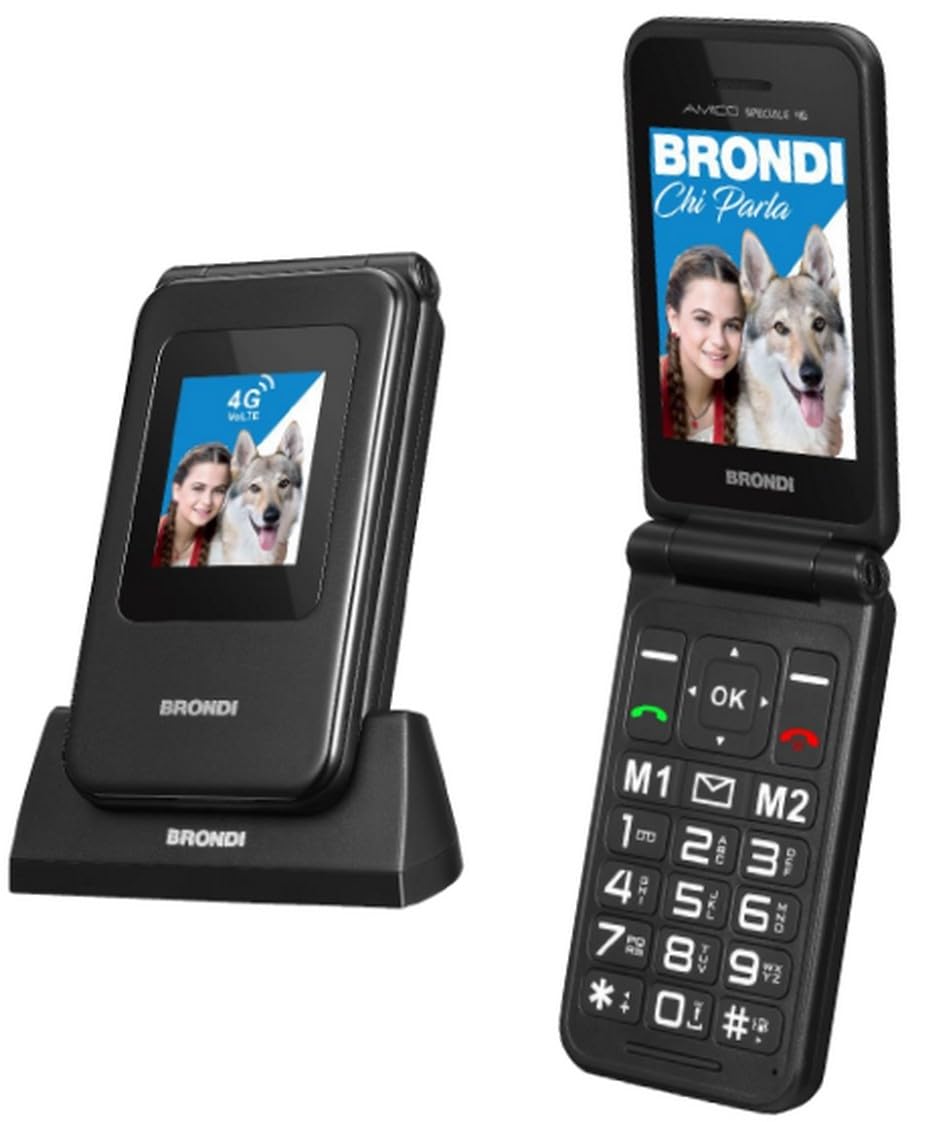
Figure 1: Brondi Amico Speciale 4G Senior Dual SIM Mobile Phone (Black Metal). This image shows the phone in its closed flip state, highlighting its compact design.
2. Obsah balení
Po vybalení zkontrolujte obsah balení. Pokud některé položky chybí nebo jsou poškozené, kontaktujte svého prodejce.
- Brondi Amico Speciale 4G Mobile Phone
- Nabíjecí kolébka
- USB kabel
- Li-ion BL-5C 1000 mAh Battery
- Uživatelská příručka (tento dokument)
3. Zařízení skončiloview
Familiarize yourself with the main components of your Brondi Amico Speciale 4G phone.
3.1 Přední View (ZAVŘENO)
- Externí displej: 1.77'' TN 128 x 160 pixels, shows time, date, and incoming call information.
- LED indikátory: For notifications (e.g., new message, missed call, charging).
3.2 Interní View (OTEVŘENO)
- Interní displej: 2.8'' QVGA 240 x 320 pixels, main screen for navigation and content.
- Navigační klávesy: Up, Down, Left, Right, and OK/Confirm button.
- Tlačítka pro volání/ukončení: Zelené tlačítko pro příjem/uskutečňování hovorů, červené tlačítko pro ukončení hovorů/vypnutí.
- Numerická klávesnice: Large, backlit keys for dialing and text input.
- Rychlé klávesy: Dedicated buttons for Camera, Messages, and Torch.
- Klávesy přímé paměti: Programmable keys for quick dialing.
3.3 Boční a zadní část View
- SOS tlačítko: Located on the rear for emergency calls and SMS.
- Fotoaparát: 2 MP camera with LED Flash on the rear.
- Tlačítka hlasitosti: Na boku pro nastavení hlasitosti hovorů a médií.
- Nabíjecí port: Konektor USB-C.
- Kontakty pro nabíjení: On the bottom for use with the charging cradle.
4. Nastavení
4.1 Installing the SIM Card(s) and MicroSD Card
- Ujistěte se, že je telefon vypnutý.
- Odstraňte zadní kryt telefonu.
- Carefully insert your Nano SIM card(s) into the designated SIM slots. The phone supports Dual SIM functionality.
- If desired, insert a MicroSD card (up to 64 GB) into the MicroSD slot for additional storage.
- Bezpečně nasaďte zadní kryt.
4.2 Instalace baterie
- With the back cover removed, align the contacts of the Li-ion BL-5C 1000 mAh battery with the contacts in the battery compartment.
- Jemně zatlačte baterii na místo, dokud nebude bezpečně uchycena.
- Nasaďte zadní kryt.
4.3 Nabíjení telefonu
Před prvním použitím plně nabijte baterii telefonu.
- Používání nabíjecí kolébky: Place the phone into the charging cradle, ensuring the charging contacts align. The charging indicator will illuminate.
- Použití kabelu USB: Connect the USB-C cable to the phone's charging port and the other end to a compatible USB power adapter or computer.
A full charge typically takes a few hours. The battery icon on the screen will indicate charging status.
5. Návod k obsluze
5.1 Zapnutí/vypnutí
- Zapnutí: Press and hold the Red End Call/Power button until the screen lights up.
- Vypnutí: Press and hold the Red End Call/Power button until the power off options appear, then confirm.
5.2 Uskutečňování a přijímání hovorů
- Uskutečnění hovoru:
- Dial the number using the numeric keypad. The phone announces the number being dialed.
- Stiskněte zelené tlačítko pro zahájení hovoru.
- Answering a Call (Active Flip): Simply open the phone's flip to answer an incoming call.
- Ending a Call (Active Flip): Close the phone's flip to end an active call. Alternatively, press the Red End Call button.
- Rychlá volba: Press and hold one of the 11 direct memory keys (e.g., 2-9, *, #) to call a pre-assigned contact.
5.3 Funkce SOS
The SOS button is designed for emergencies.
- Nastavení: Before using, program emergency contact numbers in the SOS settings menu.
- Aktivace: In an emergency, press and hold the SOS button on the rear of the phone.
- The phone will automatically send an emergency SMS to the programmed numbers and then sequentially call them until one answers.
5.4 Zasílání zpráv
Access the messaging function via the dedicated Quick Key or through the main menu to send and receive SMS.
5.5 Fotoaparát
The phone features a 2 MP camera with LED flash.
- Press the dedicated Camera Quick Key to open the camera application.
- Use the navigation keys to adjust settings if available.
- Stiskněte tlačítko OK/Potvrdit pro pořízení fotografie.
5.6 FM rádio
To use the FM Radio, access it from the multimedia menu. Headphones may be required to act as an antenna (not included).
5.7 Bluetooth
The phone supports Bluetooth 5.1 for connecting to wireless headsets or other compatible devices.
- Go to the Settings menu and select Bluetooth.
- Zapněte Bluetooth a vyhledejte dostupná zařízení.
- Select your desired device and pair it following the on-screen prompts.
Pochodeň 5.8
Activate the built-in torch using the dedicated Torch Quick Key.
6. Údržba
6.1 Obecná péče
- Udržujte telefon suchý. Vlhkost může poškodit elektronické obvody.
- Vyhněte se extrémním teplotám. Vysoké teploty mohou zkrátit životnost elektronických zařízení a deformovat nebo roztavit některé plasty.
- K čištění telefonu nepoužívejte agresivní chemikálie, čisticí rozpouštědla ani silné čisticí prostředky. Otřete jej měkkým,amp tkanina.
- S telefonem zacházejte opatrně. Nenechávejte ho upadnout, neklepejte s ním ani s ním netřeste. Hrubé zacházení může poškodit vnitřní desky plošných spojů a jemnou mechaniku.
6.2 Péče o baterii
- Use only Brondi-approved batteries and charging accessories.
- Nezkratujte baterii.
- Nevhazujte baterie do ohně.
- Použité baterie recyklujte v souladu s místními předpisy.
7. Řešení problémů
If you encounter issues with your phone, refer to the following common problems and solutions before contacting support.
| Problém | Možná příčina | Řešení |
|---|---|---|
| Telefon se nezapne. | Baterie je vybitá nebo není správně nainstalována. | Nabijte baterii. Ujistěte se, že je baterie správně vložena. |
| Nelze uskutečňovat ani přijímat hovory. | Chybí SIM karta, SIM karta není správně vložena nebo není signál sítě. | Zkontrolujte instalaci SIM karty. Přesuňte se do oblasti s lepším pokrytím sítě. Kontaktujte svého poskytovatele služeb. |
| Poor call quality or low volume. | Weak signal, speaker/microphone obstruction, or volume setting too low. | Adjust call volume. Ensure speaker/microphone are clear. Move to an area with better signal. |
| Funkce SOS nefunguje. | Emergency numbers not programmed or no credit/signal for SMS/calls. | Program emergency numbers in settings. Ensure sufficient credit and network signal. |
| Telefon se nenabíjí. | Charger or cable faulty, or charging port/cradle contacts are dirty. | Check charger and cable. Clean charging contacts gently. Try charging via both USB cable and cradle. |
8. Specifikace
| Funkce | Detail |
|---|---|
| Značka | Brondi |
| Název modelu | Amico Speciale 4G |
| Operační systém | Proprietary (not Android) |
| Interní displej | 2.8 inches QVGA (240 x 320) LCD |
| Externí displej | 1.77 inches TN (128 x 160) |
| Procesor | Mediatek Dimensity 900, 2 GHz |
| BERAN | 4 GB (Note: This value appears unusually high for a feature phone with a proprietary OS, typically these devices have significantly less RAM.) |
| Interní úložiště | 1 GB |
| Rozšiřitelná paměť | MicroSD slot, up to 64 GB |
| Typ SIM karty | Duální Nano SIM karta |
| Připojení k síti | 2G (Quadri band), 3G (900/2100), 4G (B1/B3/B7/B8/B20), VoLTE support |
| Bluetooth | 5.1 |
| Fotoaparát | 2 MP with LED Flash (Rear) |
| Baterie | Li-ion BL-5C 1000 mAh |
| Doba hovoru | Až 240 minut |
| Pohotovostní doba | Až 170 hodin |
| Nabíjecí port | USB-C |
| Speciální funkce | Active Flip, Large Backlit Keys, SOS Button, Quick Dial, FM Radio, Torch, Remote Control |
| Barva | Black Metal |
| Hmotnost | 106 g (s baterií) |
| Voděodolnost | Není odolný proti vodě |
Poznámka: Specifikace se mohou změnit bez předchozího upozornění.
9. Záruka a podpora
9.1 Záruka na produkt
The Brondi Amico Speciale 4G Mobile Phone comes with a 2letá záruka na produkt od data nákupu. Tato záruka se vztahuje na výrobní vady a poruchy při běžném používání. Uschovejte si prosím doklad o koupi pro případ uplatnění záruky.
Záruka se nevztahuje na poškození způsobené:
- Nehody, zneužití nebo zneužití.
- Neoprávněné opravy nebo úpravy.
- Exposure to liquids, extreme temperatures, or environmental conditions.
- Běžné opotřebení.
9.2 Zákaznická podpora
For technical assistance, troubleshooting beyond this manual, or warranty inquiries, please contact Brondi customer support or visit the official Brondi webmísto.
Více informací a podpůrných zdrojů naleznete na Brondi Store on Amazon.